Retail integration

Casey's EDI requirements for suppliers

What Casey's publishes for suppliers about EDI, including its X12 4010 specifications for the 850, 810 and 856, the ASN rules for stores and distribution centers, GS1-128 labels and food traceability data.

Overview

Understanding Casey's integration

Who this is for: Suppliers shipping to Casey's distribution centers or direct to Casey's stores, especially food and beverage suppliers, and the EDI, logistics and accounting teams that support them.

Casey's publishes its supplier rules in a Supplier Handbook, last modified in March 2025, and posts its own X12 version 4010 specifications for three EDI documents: the 850 purchase order (dated January 21, 2025), the 810 invoice (January 2, 2025) and the 856 ship notice (updated May 30, 2025). Suppliers with EDI capability start by emailing Casey's EDI support team; most other suppliers transact through Casey's Coupa procure-to-pay platform.

The ship notice carries the most rules. Casey's prefers the EDI 856, also accepts cXML, and will not receive merchandise at its stores without a successful ASN transmission. Suppliers must review the 997 that comes back, respond to ASN errors within two hours of notice, and resend the complete transmission when an ASN needs an update. The 856 is built in shipment, order, tare and item levels, with SSCC-18 marks, and ships either to a Casey's distribution center or to a store.

Food traceability raises the stakes. Under FSMA 204, Casey's requires ASNs carrying key data elements for food deliveries, with GS1-128 labels on food pallets and cases, starting with suppliers of foods on the FDA's Food Traceability List. This guide records what Casey's publishes and when we checked, and lists what we could not confirm.


Requirements at a glance

What Casey's publishes for suppliers

Casey's publishes its own X12 version 4010 specifications for the 850 purchase order (January 21, 2025), the 810 invoice (January 2, 2025) and the 856 ship notice (updated May 30, 2025), alongside a Supplier Handbook modified in March 2025. We read all four on October 31, 2026.

Coupa Supplier Portal

Casey's procure-to-pay platform for most suppliers: purchase orders, invoices and receipts for suppliers enabled by Casey's procurement team.

Official site

Graphite Connect

Supplier profile, facility documents and food safety assessments for Casey's suppliers.

Official site

Business units and channels

Casey's business units suppliers trade with

Large retailers often handle each business unit or channel as a separate EDI relationship, with its own documents, guides and setup. Confirm with Casey's which of these you supply before mapping.

Stores and distribution centers

Distribution centers

Deliveries to Casey's Ankeny, Joplin and Terre Haute distribution centers, named as ship-to locations in the 856 specification.

Documents: 850,856,810

Confirmed on a public Casey's page

Stores and distribution centers

Direct store delivery (DSD)

Suppliers delivering to Casey's stores, identified by store number in the 856; GS1-128 labels are required.

Documents: 856,810

Confirmed on a public Casey's page

Other channel

Prepared Foods and Dispensed Beverage

Casey's category for food and food packaging used in its kitchens and beverage programs, with extra supplier requirements.

Confirmed on a public Casey's page

Other channel

Indirect procurement

Goods and services not for resale, paid on net 60 terms, usually through Coupa.

Confirmed on a public Casey's page

Workflows

Typical Casey's business workflows

The steps summarize the documents below. Where a step is not in Casey's published documents, it reflects common practice.

Distribution center and store deliveries

  1. 1Receive 850 purchase order
  2. 2Ship with GS1-128 labels
  3. 3Send 856 before delivery
  4. 4Review the 997
  5. 5Fix ASN errors within 2 hours
  6. 6Send 810 by store location

Documents and APIs

Casey's documents by program

Every document this guide names, with the program it applies to and its status. Required, optional and conditional come from Casey's published documents cited below; documents marked general guidance are common in this industry but not confirmed for Casey's.

DocumentNameDirectionProgramStatusPurpose
850 Purchase Order You receive from Casey's Distribution centers Named; level not stated Casey's purchase order, specified at X12 4010; not used for changes or acknowledgments.
856 Advance Ship Notice You send to Casey's Food deliveries ConditionalRequired with FSMA 204 key data elements Casey's preferred ASN format, in shipment, order, tare and item levels; required for merchandise received at stores.
810 Invoice You send to Casey's Distribution centers, Direct store delivery (DSD) Named; level not stated Casey's invoice specification at X12 4010; invoices are consolidated at the PO and item level and billed by store location.
997 Functional Acknowledgment You receive from Casey's Not stated Named; level not stated Casey's handbook asks suppliers to review the 997 as part of ASN data validation.
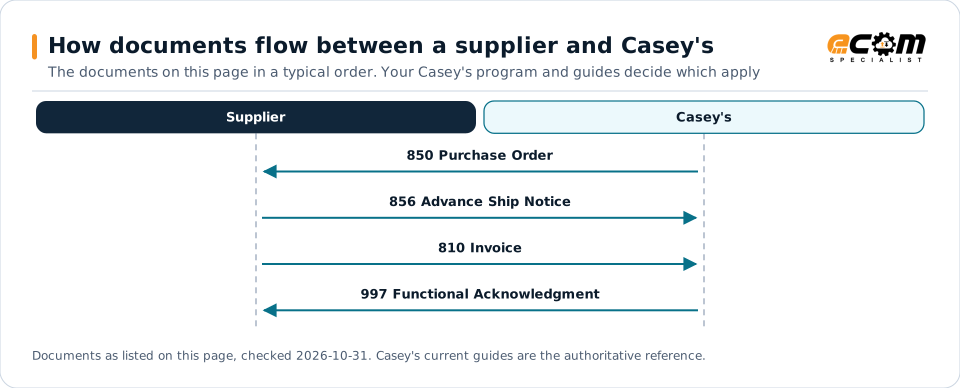
How documents flow between a supplier and Casey'sSequence diagram of EDI documents between a supplier and Casey's: 850 Purchase Order from Casey's, 856 Advance Ship Notice to Casey's, 810 Invoice to Casey's and 997 Functional Acknowledgment from Casey's.How documents flow between a supplier and Casey'sThe documents on this page in a typical order. Your Casey's program and guides decide which applySupplierCasey's850 Purchase Order856 Advance Ship Notice810 Invoice997 Functional AcknowledgmentDocuments as listed on this page, checked 2026-10-31. Casey's current guides are the authoritative reference.
How documents flow between a supplier and Casey'sSequence diagram of EDI documents between a supplier and Casey's: 850 Purchase Order from Casey's, 856 Advance Ship Notice to Casey's, 810 Invoice to Casey's and 997 Functional Acknowledgment from Casey's.How documents flow between asupplier and Casey'sThe documents on this page in a typical order.Your Casey's program and guides decide whichapplySupplierCasey's850 Purchase Order856 Advance Ship Notice810 Invoice997 FunctionalAcknowledgmentDocuments as listed on this page, checked2026-10-31. Casey's current guides are theauthoritative reference.

Read from top to bottom. Solid arrows are documents Casey's names in its own public documentation; the dashed arrow is the acknowledgment. The order is typical, not a Casey's rule: programs such as vendor direct to consumer use their own documents and timing.

Expand diagram Download SVG

Document by document

What each Casey's document needs

For each document: what it does for you as the supplier, what Casey's own documents say about it (with the source and its date), and general EDI practice that helps, labelled as such. Your Casey's mapping guide for your version is the final word on fields and codes.

850

Purchase Order

You receive

Casey's purchase order, specified at X12 4010, with item, packaging and pack-size detail.

What Casey's states

General EDI practice

  • Load the pack and size from each line so ship notice and invoice quantities use the same units.

How the 850 works in X12

856

Advance Ship Notice

You send · Distribution centers and direct store delivery

Casey's preferred ASN. It is built in shipment, order, tare and item levels and ships to a distribution center or a store.

What Casey's states

General EDI practice

  • Generate the 856 and GS1-128 labels from the same pallet build, and alert the team on any ASN error notice at once.

How the 856 works in X12

Onboarding

Getting set up with Casey's, step by step

Steps with a source come from Casey's own onboarding material; the others are general practice that keeps the project on track.

  1. Set up your supplier profile

    Complete your Graphite Connect profile, and food safety assessments if you supply food.

    Source: Casey's, Supplier Handbook, Mar 2025
  2. Contact EDI support

    Suppliers able to transact by EDI email Casey's EDI support team.

    Source: Casey's, Supplier Handbook, Mar 2025
  3. Validate GTINs

    Make sure item data is current and synchronized between your system and Casey's item file.

    Source: Casey's, Supplier Handbook, Mar 2025
  4. Map from Casey's specifications

    Map the 850, 810 and 856 from Casey's X12 4010 specifications.

    Source: Casey's General Stores 856 Ship Notice, X12 4010, May 30, 2025
  5. Begin ASN onboarding

    Email Casey's EDI support team to begin ASN onboarding activities; you are responsible for reviewing and correcting errors.

    Source: Casey's, Supplier Handbook, Mar 2025
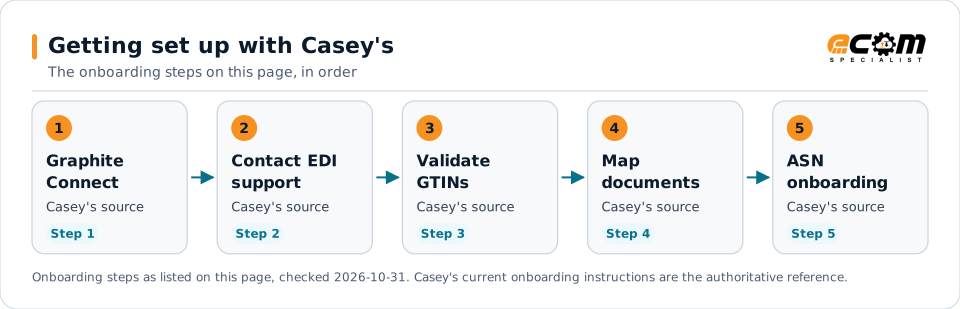
Getting set up with Casey'sFlow diagram of 5 onboarding steps with Casey's: Set up your supplier profile, Contact EDI support, Validate GTINs, Map from Casey's specifications and Begin ASN onboarding.Getting set up with Casey'sThe onboarding steps on this page, in order1GraphiteConnectCasey's sourceStep 12Contact EDIsupportCasey's sourceStep 23ValidateGTINsCasey's sourceStep 34MapdocumentsCasey's sourceStep 45ASNonboardingCasey's sourceStep 5Onboarding steps as listed on this page, checked 2026-10-31. Casey's current onboarding instructions are the authoritative reference.
Getting set up with Casey'sFlow diagram of 5 onboarding steps with Casey's: Set up your supplier profile, Contact EDI support, Validate GTINs, Map from Casey's specifications and Begin ASN onboarding.Getting set up with Casey'sThe onboarding steps on this page, in order1Graphite ConnectCasey's sourceStep 12Contact EDI supportCasey's sourceStep 23Validate GTINsCasey's sourceStep 34Map documentsCasey's sourceStep 45ASN onboardingCasey's sourceStep 5Onboarding steps as listed on this page, checked2026-10-31. Casey's current onboarding instructionsare the authoritative reference.

Read left to right, or top to bottom on a phone. 5 of the 5 steps come from Casey's own published material and are marked "Casey's source"; the rest are general practice. Week numbers are given only where Casey's states them.

Expand diagram Download SVG

Verification

What we checked, and where

Each statement below shows its source and the date we checked it. Statements we could not confirm from an official Casey's source are labelled as such.

TopicStatementEvidenceChecked
StandardsCasey's publishes X12 4010 specifications for the 850 (January 21, 2025), the 810 (January 2, 2025) and the 856 (updated May 30, 2025).Confirmed on a public Casey's pageOct 31, 2026
Shipping and labelsMerchandise will not be received at Casey's store locations without a successful ASN transmission.Confirmed on a public Casey's pageOct 31, 2026
Shipping and labelsSuppliers must respond to EDI 856 errors within two hours of receiving notice, and resend the complete transmission to update an ASN.Confirmed on a public Casey's pageOct 31, 2026
Shipping and labelsSuppliers of foods on the FDA Food Traceability List were expected to provide ASNs with traceability key data elements and GS1-128 pallet and case labels by October 1, 2025.Confirmed on a public Casey's pageOct 31, 2026
PaymentsCasey's standard terms are net 30 for direct procurement (goods for resale) and net 60 for indirect procurement, unless a contract says otherwise.Confirmed on a public Casey's pageOct 31, 2026
Recent changeIf an existing EDI or cXML connection cannot be transferred after a supplier change, establishing a new one may take 4 to 6 weeks.Confirmed on a public Casey's pageOct 31, 2026

Available only after supplier login

Casey's keeps these behind its supplier portal. This guide does not reproduce them; use your own Casey's access or ask your Casey's contact.

  • Purchase orders, invoices and receipts in the Coupa Supplier Portal
  • Supplier profiles and food safety assessments in Graphite Connect

Not confirmed

We could not confirm these from an official public source, so we do not state them as Casey's requirements.

  • The connection methods and networks Casey's supports for EDI
  • Whether Casey's uses EDI documents beyond the 850, 810, 856 and 997
  • Casey's charges for ASN or invoice errors; the handbook says failures may lead to rejections and payment delays but lists no amounts
  • How long EDI testing takes for a new supplier

Checklist

Casey's EDI readiness checklist

  1. Email Casey's EDI support team to begin EDI and ASN onboarding.
  2. Validate your GTINs against Casey's item file before mapping.
  3. Map the 850, 810 and 856 from Casey's X12 4010 specifications.
  4. Send an 856 for every delivery; stores will not receive without one.
  5. Review every 997 and fix ASN errors within two hours of notice.
  6. Consolidate invoices at the PO and item level, billed by store location.
  7. Label food pallets with GS1-128 SSCC-18 barcodes and food cases with GS1-128 barcodes.
  8. Send quantities in single selling units and in master pack or case units.

Connectivity and contacts

How Casey's connects with suppliers

What Casey's public documents say about networks and setup, and the department contacts it publishes for suppliers. Connection credentials and trading-partner IDs are exchanged with Casey's during setup and are never shown on this page.

What Casey's states about connecting

Department contacts Casey's publishes

Listed as Casey's published them. These are Casey's contacts, not ECOM's; check the source for the current details.

Avoid these

Common mistakes with Casey's EDI

Arriving at a store without an ASN

Casey's stores will not receive merchandise without a successful ASN transmission.

Source: Casey's, Supplier Handbook, Mar 2025, p. 19

Sending only the changed part of an ASN

An update to an 856 requires resending the complete transmission.

Source: Casey's, Supplier Handbook, Mar 2025, p. 19

Slow response to ASN errors

Casey's expects a response to 856 errors within two hours of notice.

Source: Casey's, Supplier Handbook, Mar 2025, p. 19

Connectivity

Your options for connecting to Casey's

  • EDI, onboarded through Casey's EDI support

    Suppliers able to transact by EDI email Casey's EDI support team to begin onboarding and ASN enablement.

    From Casey's published documents

  • Coupa procure-to-pay platform

    Casey's uses Coupa for most suppliers; qualifying suppliers are contacted by Casey's procurement team to enable it.

    From Casey's published documents

  • cXML

    Casey's also accepts cXML ship notices, under its own cXML specifications.

    From Casey's published documents

Challenges

Common integration challenges

  • No ASN, no receipt at stores

    Casey's stores will not receive merchandise without a successful ASN, so the 856 must be right before the truck arrives.

  • Two-hour error response

    Suppliers must respond to 856 errors within two hours of notice and resend the complete transmission for any update.

  • Traceability data on food

    Food deliveries need ASNs with traceability key data elements and GS1-128 labels on pallets and cases.

Automation options for Casey's suppliers

Four ways to automate. One foundation.

Casey's requirements on this page cover the 850, 856, 810 and 997. ECOM helps you automate them, meet Casey's labeling and ship notice requirements, and see what needs action. Casey's sets its program's rules; ECOM confirms which options fit yours.

PRISM Supply Chain Automation Foundation

One platform beneath every option. Use one, or combine them for different partners and documents.

Compliance and actionable visibility

Connect order processing, shipping documentation, trading partner requirements, and performance monitoring through one coordinated workflow. These capabilities help teams improve shipment accuracy, reduce manual work, address compliance risks, and respond to exceptions before they affect customers.

Discuss Your Trading Partner Requirements

Connect Casey's documents to your ERP

ECOM integrates Casey's purchase orders, ship notices and invoices with your ERP and warehouse systems, to Casey's published X12 4010 specifications.

Industry

Food and Beverage

See how ECOM supports food and beverage suppliers with retailer EDI and traceability data.

Next step

Get help with your Casey's program

Each request goes to an ECOM EDI specialist with Casey's name attached, so the reply starts from your program.

  • Review Casey's requirements

    Send us Casey's guide or your program details; we explain the documents, rules and options for meeting them.

    Request a requirements review
  • Connect Casey's to your ERP

    Orders in, ship notices and invoices out, from the ERP and warehouse systems you already run.

    Discuss ERP integration
  • Testing and certification

    Build, test and certify each Casey's document, then go live with monitoring from the first file.

    Plan testing and certification
  • Shipping labels and ASNs

    Labels and ship notices that match Casey's rules, to help avoid receiving problems and compliance deductions.

    Review shipping compliance

Casey's integration FAQs

Which X12 version does Casey's use?

Casey's publishes X12 version 4010 specifications for the 850 purchase order, the 810 invoice and the 856 ship notice.

Does Casey's require an ASN?

Casey's Supplier Handbook says merchandise will not be received at Casey's store locations without a successful ASN transmission. The EDI 856 is preferred, and cXML is also accepted.

How fast must I fix a Casey's ASN error?

Within two hours of receiving notice of the errors, according to the handbook's ASN data validation rules. Updates require resending the complete transmission.

How do I start EDI with Casey's?

Suppliers able to transact by EDI email Casey's EDI support team. For ASNs, validate GTINs against Casey's item file and map from Casey's ASN specification first.

Is ECOM a Casey's-approved provider?

This page is an integration guide and does not indicate an approval or partnership with Casey's. ECOM builds integrations to the requirements Casey's publishes.

Sources and accuracy

This guide summarizes publicly available information as of October 2026. Casey's sets its own requirements and can change them at any time; your Casey's implementation guide, supplier portal or account contact is the authoritative source for your program.

Casey's documents cited on this page

Learn the general practice

Request Casey's integration assistance

Tell us about your Casey's program, documents and ERP. We will outline the connection, mapping and testing plan.