Retail integration

Burlington Stores EDI requirements for vendors

What Burlington Stores publishes for vendors about EDI, including its X12 4010 specifications for merchandise, direct-to-consumer and freight, the free Gateway web portal, ASN timing, UCC-128 labels and invoicing.

Overview

Understanding Burlington Stores integration

Who this is for: Apparel, home and accessory vendors shipping to Burlington distribution centers and stores, and the EDI, logistics and accounts receivable teams that support them.

Burlington Stores publishes its EDI specifications on its vendor EDI page. They are grouped into merchandise, direct-to-consumer, freight and non-merchandise programs, all at ANSI X12 version 4010. Merchandise vendors receive the 850 purchase order and 860 change, and send the 856 ship notice and 810 invoice. The page also lists the 824 application advice, 852 product activity and 997 acknowledgment, plus a bar code label specification. Burlington updates its specifications each year, with changes taking effect around the start of its fiscal year on February 1.

Vendors without their own EDI system can use Gateway, Burlington's free web portal. It lets them view and acknowledge purchase orders, build shipments, print UCC-128 labels, and submit ASNs and invoices. Its help guide, updated January 2020, says Burlington requires invoices by EDI and does not accept mailed or emailed ones.

The guide also sets timing. For the most common case, a live appointment at a DC, the ASN is due 24 hours before the goods arrive, excluding weekends. Every purchase order must be acknowledged. This guide records what Burlington's public pages and documents say and lists what we could not confirm.

Requirements at a glance

What Burlington Stores publishes for suppliers

Burlington Stores publishes its EDI specifications at ANSI X12 version 4010, grouped by program: merchandise, direct to consumer, freight and non-merchandise. Specifications are updated each year, with changes effective around February 1. The newest document we read is the 856 specification of August 8, 2022. We read the page and documents on October 31, 2026.

Burlington vendor EDI page

Burlington's X12 4010 specifications, the Gateway manual, the EDI agreement and EDI contacts.

Public Official site

Burlington Gateway

Burlington's free web portal for acknowledging POs, printing UCC-128 labels and submitting ASNs and invoices.

Official site

Business units and channels

Burlington Stores business units suppliers trade with

Large retailers often handle each business unit or channel as a separate EDI relationship, with its own documents, guides and setup. Confirm with Burlington Stores which of these you supply before mapping.

Stores and distribution centers

Distribution center orders (bulk and pre-pack)

Pack-by-style bulk orders (one SKU per carton) and pre-pack orders shipped to Burlington distribution centers, including Edgewater Park and San Bernardino.

Documents: 850,860,856,810

Confirmed on a public Burlington Stores page

Stores and distribution centers

Pack by store

Orders packed and labeled by store, one carton per store, agreed with the buyer before the order is written.

Documents: 850,856,810

Confirmed on a public Burlington Stores page

Stores and distribution centers

Direct to store

Listed among the purchase order types Burlington supports.

Confirmed on a public Burlington Stores page

Drop-ship

Direct to consumer

Burlington publishes separate direct-to-consumer specifications (832, 846, 850, 856, 810, 997) and a branded packing slip; these orders do not ship through Gateway.

Documents: 832,846,850,856,810,997

Confirmed on a public Burlington Stores page

International

Import orders

Import purchase orders carry delivery dates, freight forwarder and customs broker; vendors paid by letter of credit do not submit invoices.

Documents: 850

Confirmed on a public Burlington Stores page

Other channel

Non-merchandise

Separate non-merchandise specifications for the 850, 855, 856, 810 and 997.

Documents: 850,855,856,810,997

Confirmed on a public Burlington Stores page

Workflows

Typical Burlington Stores business workflows

The steps summarize the documents below. Where a step is not in Burlington Stores's published documents, it reflects common practice.

Distribution center orders

  1. 1Receive 850 purchase order
  2. 2Acknowledge every PO
  3. 3Pack as ordered
  4. 4Label each carton UCC-128
  5. 5Send 856 24 hours ahead
  6. 6Send 810 after the ASN

Documents and APIs

Burlington Stores documents by program

Every document this guide names, with the program it applies to and its status. Required, optional and conditional come from Burlington Stores's published documents cited below; documents marked general guidance are common in this industry but not confirmed for Burlington Stores.

DocumentNameDirectionProgramStatusPurpose
850 Purchase Order You receive from Burlington Stores Distribution center orders (bulk and pre-pack), Pack by store, Direct to consumer, Import orders, Non-merchandise Named; level not stated Merchandise purchase orders for bulk, pre-pack, pack-by-store, direct-to-store and GOH orders, with vendor style, color and size.
860 Purchase Order Change You receive from Burlington Stores Distribution center orders (bulk and pre-pack) Named; level not stated Changes retransmitted by the buyer; quantity changes must be retransmitted even within the fill-rate allowance.
856 Advance Ship Notice You send to Burlington Stores Distribution center orders (bulk and pre-pack), Pack by store, Direct to consumer, Non-merchandise Named; level not stated Shipment contents, carrier and cartons, due 24 hours before arrival for live DC appointments.
810 Invoice You send to Burlington Stores All vendors RequiredMailed or emailed invoices are not accepted Required by EDI or Gateway; mailed and emailed invoices are not accepted, and invoice numbers must not repeat.
824 Application Advice You receive from Burlington Stores Not stated Named; level not stated Listed among Burlington's merchandise EDI specifications.
852 Product Activity Data You receive from Burlington Stores Not stated Named; level not stated Listed among Burlington's merchandise EDI specifications.
997 Functional Acknowledgment Both directions Direct to consumer, Non-merchandise Named; level not stated Listed for the merchandise, direct-to-consumer, freight and non-merchandise programs.
846 Inventory Inquiry/Advice You send to Burlington Stores Direct to consumer Named; level not stated Listed among Burlington's direct-to-consumer specifications.
832 Price/Sales Catalog You send to Burlington Stores Direct to consumer Named; level not stated Listed among Burlington's direct-to-consumer specifications.
855 Purchase Order Acknowledgment Not stated Non-merchandise Named; level not stated
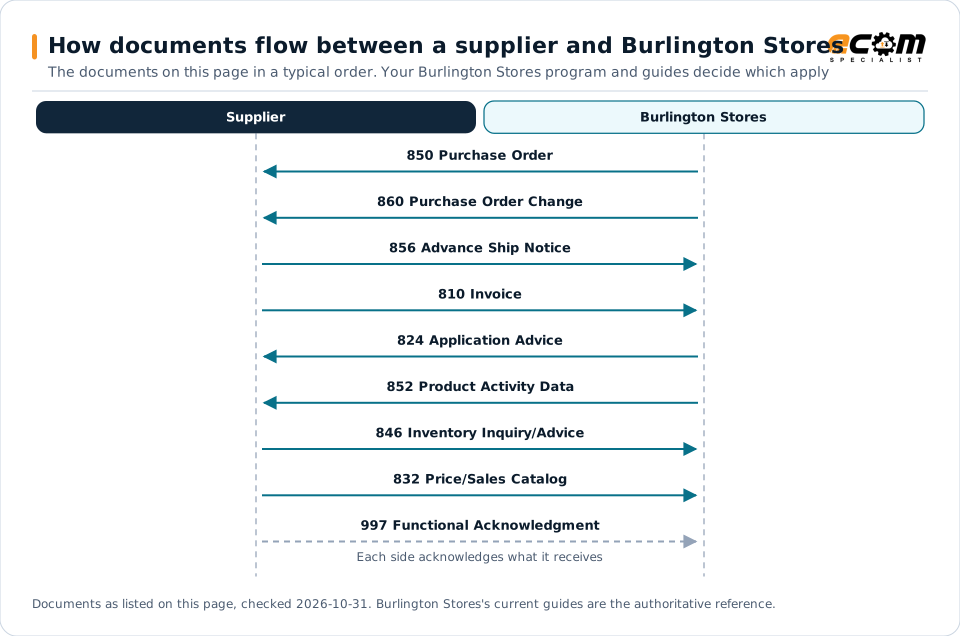
How documents flow between a supplier and Burlington StoresSequence diagram of EDI documents between a supplier and Burlington Stores: 850 Purchase Order from Burlington Stores, 860 Purchase Order Change from Burlington Stores, 856 Advance Ship Notice to Burlington Stores, 810 Invoice to Burlington Stores, 824 Application Advice from Burlington Stores, 852 Product Activity Data from Burlington Stores, 846 Inventory Inquiry/Advice to Burlington Stores, 832 Price/Sales Catalog to Burlington Stores and 997 Functional Acknowledgment to Burlington Stores.How documents flow between a supplier and Burlington StoresThe documents on this page in a typical order. Your Burlington Stores program and guides decide which applySupplierBurlington Stores850 Purchase Order860 Purchase Order Change856 Advance Ship Notice810 Invoice824 Application Advice852 Product Activity Data846 Inventory Inquiry/Advice832 Price/Sales Catalog997 Functional AcknowledgmentEach side acknowledges what it receivesDocuments as listed on this page, checked 2026-10-31. Burlington Stores's current guides are the authoritative reference.
How documents flow between a supplier and Burlington StoresSequence diagram of EDI documents between a supplier and Burlington Stores: 850 Purchase Order from Burlington Stores, 860 Purchase Order Change from Burlington Stores, 856 Advance Ship Notice to Burlington Stores, 810 Invoice to Burlington Stores, 824 Application Advice from Burlington Stores, 852 Product Activity Data from Burlington Stores, 846 Inventory Inquiry/Advice to Burlington Stores, 832 Price/Sales Catalog to Burlington Stores and 997 Functional Acknowledgment to Burlington Stores.How documents flow between asupplier and Burlington StoresThe documents on this page in a typical order.Your Burlington Stores program and guidesdecide which applySupplierBurlington Stores850 Purchase Order860 Purchase OrderChange856 Advance Ship Notice810 Invoice824 Application Advice852 Product Activity Data846 InventoryInquiry/Advice832 Price/Sales Catalog997 FunctionalAcknowledgmentEach side acknowledges whatit receivesDocuments as listed on this page, checked2026-10-31. Burlington Stores's current guides are theauthoritative reference.

Read from top to bottom. Solid arrows are documents Burlington Stores names in its own public documentation; the dashed arrow is the acknowledgment. The order is typical, not a Burlington Stores rule: programs such as vendor direct to consumer use their own documents and timing.

Expand diagram Download SVG

Document by document

What each Burlington Stores document needs

For each document: what it does for you as the supplier, what Burlington Stores's own documents say about it (with the source and its date), and general EDI practice that helps, labelled as such. Your Burlington Stores mapping guide for your version is the final word on fields and codes.

850

Purchase Order

You receive

Burlington's order type, ship window, destination and ticketing are on the 850. Pack exactly as ordered.

What Burlington Stores states

How the 850 works in X12

856

Advance Ship Notice

You send

The ASN describes the shipment and its cartons. It is due 24 hours before a live DC appointment and is final once sent.

What Burlington Stores states

How the 856 works in X12

810

Invoice

You send

Invoices go by EDI after the ASN, with a unique invoice number.

What Burlington Stores states

How the 810 works in X12

Onboarding

Getting set up with Burlington Stores, step by step

Steps with a source come from Burlington Stores's own onboarding material; the others are general practice that keeps the project on track.

  1. Choose Gateway or EDI

    Request Gateway access from Burlington, or map Burlington's X12 4010 specifications into your own EDI system.

    Source: Burlington Stores, Vendor EDI page, Oct 31, 2026
  2. Apply the control segment rules

    Follow the 001 control segment specification and Burlington's production delimiters on every transmission.

    Source: Burlington Stores, 856 Ship Notice/Manifest specification (X12 4010), Aug 8, 2022
  3. Test with your EDI provider

    Agree mapping and testing for each document with Burlington's EDI team before going live; the public page does not describe the certification steps.

    General EDI practice, not a stated requirement
  4. Track the annual update

    Review each year's specification release notes before the changes take effect around February 1.

    Source: Burlington Stores, EDI change letter for the 850 and 860, Feb 1, 2015
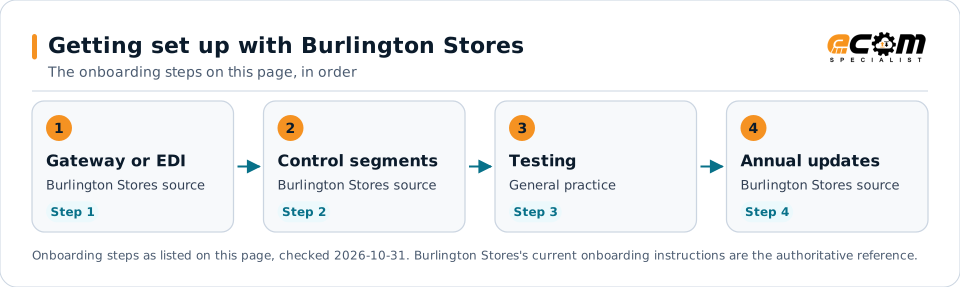
Getting set up with Burlington StoresFlow diagram of 4 onboarding steps with Burlington Stores: Choose Gateway or EDI, Apply the control segment rules, Test with your EDI provider and Track the annual update.Getting set up with Burlington StoresThe onboarding steps on this page, in order1Gateway or EDIBurlington Stores sourceStep 12Control segmentsBurlington Stores sourceStep 23TestingGeneral practiceStep 34Annual updatesBurlington Stores sourceStep 4Onboarding steps as listed on this page, checked 2026-10-31. Burlington Stores's current onboarding instructions are the authoritative reference.
Getting set up with Burlington StoresFlow diagram of 4 onboarding steps with Burlington Stores: Choose Gateway or EDI, Apply the control segment rules, Test with your EDI provider and Track the annual update.Getting set up with BurlingtonStoresThe onboarding steps on this page, in order1Gateway or EDIBurlington Stores sourceStep 12Control segmentsBurlington Stores sourceStep 23TestingGeneral practiceStep 34Annual updatesBurlington Stores sourceStep 4Onboarding steps as listed on this page, checked2026-10-31. Burlington Stores's current onboardinginstructions are the authoritative reference.

Read left to right, or top to bottom on a phone. 3 of the 4 steps come from Burlington Stores's own published material and are marked "Burlington Stores source"; the rest are general practice. Week numbers are given only where Burlington Stores states them.

Expand diagram Download SVG

Verification

What we checked, and where

Each statement below shows its source and the date we checked it. Statements we could not confirm from an official Burlington Stores source are labelled as such.

TopicStatementEvidenceChecked
StandardsBurlington's merchandise, direct-to-consumer, freight and non-merchandise EDI specifications are published at X12 version 4010.Confirmed on a public Burlington Stores pageOct 31, 2026
Recent changeBurlington updates its EDI specifications annually, with release notes, and changes take effect around the start of the fiscal year (February 1).Confirmed on a public Burlington Stores pageOct 31, 2026
Supplier portalGateway is a free, web-based portal for viewing and acknowledging POs, submitting ASNs, generating labels and submitting invoices.Confirmed on a public Burlington Stores pageOct 31, 2026
Shipping and labelsFor a live appointment at a DC, the ASN is due 24 hours before the goods arrive, excluding weekends.Confirmed on a public Burlington Stores pageOct 31, 2026
DocumentsMailed or emailed invoices are not accepted; Burlington requires invoices by EDI.Confirmed on a public Burlington Stores pageOct 31, 2026

Available only after supplier login

Burlington Stores keeps these behind its supplier portal. This guide does not reproduce them; use your own Burlington Stores access or ask your Burlington Stores contact.

  • Purchase orders, labels, ASNs and invoices in the Gateway portal, which needs a user ID from Burlington
  • Routing in Burlington's TMS system for collect vendors

Not confirmed

We could not confirm these from an official public source, so we do not state them as Burlington Stores requirements.

  • Burlington's vendor compliance manual and chargeback amounts, which we could not locate on its current site
  • ASN deadlines for shipment types other than a live DC appointment
  • The certification steps for vendors trading EDI through their own system or provider

Checklist

Burlington Stores EDI readiness checklist

  1. Request Gateway access from Burlington, or build to its X12 4010 specifications with your own EDI system.
  2. Use Burlington's production delimiters and control segment specification on every transmission.
  3. Acknowledge every purchase order, including resubmitted ones.
  4. Ask your buyer to retransmit the PO for any quantity or date change before you ship.
  5. Pack exactly as ordered: one SKU per carton for bulk orders, and one carton per store for pack-by-store orders.
  6. Put a UCC-128 label on every carton, including each carton on a pallet.
  7. Submit the 856 24 hours before a live DC appointment, once nothing on the order will change.
  8. Send each 810 by EDI with a new, never-reused invoice number.

Connectivity and contacts

How Burlington Stores connects with suppliers

What Burlington Stores's public documents say about networks and setup, and the department contacts it publishes for suppliers. Connection credentials and trading-partner IDs are exchanged with Burlington Stores during setup and are never shown on this page.

What Burlington Stores states about connecting

Department contacts Burlington Stores publishes

Listed as Burlington Stores published them. These are Burlington Stores's contacts, not ECOM's; check the source for the current details.

Avoid these

Common mistakes with Burlington Stores EDI

Shipping a changed quantity without a new PO

Even within the 10% allowance, shipping a different quantity without a retransmitted PO can bring a compliance chargeback and a wrong invoice.

Source: Burlington Stores, Gateway Help Guide, Jan 28, 2020, p. 22

Submitting the ASN too early

Nothing can be changed after an ASN is submitted, so a later change to the order cannot be reflected.

Source: Burlington Stores, Gateway Help Guide, Jan 28, 2020, p. 50

Reusing invoice numbers

A repeated invoice number and date rejects as a duplicate in Burlington's accounts payable system.

Source: Burlington Stores, Gateway Help Guide, Jan 28, 2020, p. 43

Mixing SKUs in bulk cartons

Bulk cartons may hold only one style, color and size, and purchase orders must not be mixed in a carton.

Source: Burlington Stores, Gateway Help Guide, Jan 28, 2020, p. 10

Connectivity

Your options for connecting to Burlington Stores

  • Gateway web portal

    Burlington's free, web-based Gateway lets vendors view and acknowledge POs, build shipments, print UCC-128 labels and submit ASNs and invoices. Access is requested from Burlington.

    From Burlington Stores's published documents

  • Your own EDI system or provider

    Vendors trading EDI directly use Burlington's published X12 4010 specifications, control segment specification and production delimiters.

    From Burlington Stores's published documents

  • TMS routing for collect vendors

    Gateway is not used for routing; collect vendors route orders in Burlington's TMS system, and prepaid vendors submit a routing request to the scheduling team.

    From Burlington Stores's published documents

Challenges

Common integration challenges

  • Acknowledge every PO

    Every purchase order, including each resubmitted one, must be acknowledged so Burlington knows you accepted it.

  • Retransmitted quantities

    Any quantity change, even within Burlington's 10% over or under allowance, must be updated and retransmitted by the buyer, or compliance chargebacks may follow.

  • ASN 24 hours ahead

    For live DC appointments the ASN is due 24 hours before arrival, excluding weekends, and cannot be changed once submitted.

Automation options for Burlington Stores suppliers

Four ways to automate. One foundation.

Burlington Stores's requirements on this page cover the 850, 860, 856, 810, 824, 852, 997, 846 and 832. ECOM helps you automate them, meet Burlington Stores's labeling and ship notice requirements, and see what needs action. Burlington Stores sets its program's rules; ECOM confirms which options fit yours.

PRISM Supply Chain Automation Foundation

One platform beneath every option. Use one, or combine them for different partners and documents.

Compliance and actionable visibility

Connect order processing, shipping documentation, trading partner requirements, and performance monitoring through one coordinated workflow. These capabilities help teams improve shipment accuracy, reduce manual work, address compliance risks, and respond to exceptions before they affect customers.

Discuss Your Trading Partner Requirements

Connect Burlington Stores documents to your ERP

ECOM integrates Burlington Stores' X12 4010 purchase orders, changes, ship notices and invoices with your ERP and warehouse systems, built to Burlington's published specifications.

Next step

Get help with your Burlington Stores program

Each request goes to an ECOM EDI specialist with Burlington Stores's name attached, so the reply starts from your program.

  • Review Burlington Stores's requirements

    Send us Burlington Stores's guide or your program details; we explain the documents, rules and options for meeting them.

    Request a requirements review
  • Connect Burlington Stores to your ERP

    Orders in, ship notices and invoices out, from the ERP and warehouse systems you already run.

    Discuss ERP integration
  • Testing and certification

    Build, test and certify each Burlington Stores document, then go live with monitoring from the first file.

    Plan testing and certification
  • Shipping labels and ASNs

    Labels and ship notices that match Burlington Stores's rules, to help avoid receiving problems and compliance deductions.

    Review shipping compliance

Burlington Stores integration FAQs

Which EDI documents does Burlington use with merchandise vendors?

Burlington's vendor EDI page lists merchandise specifications for the 810, 824, 850, 852, 856, 860 and 997, all at X12 version 4010, plus a bar code label specification.

Can I trade with Burlington without EDI software?

Yes. Burlington's Gateway is a free web portal for viewing and acknowledging POs, printing UCC-128 labels and submitting ASNs and invoices. Access is requested from Burlington.

When is the Burlington ASN due?

Burlington's Gateway guide says the most common case, a live appointment for pre-pack, bulk or GOH shipments to a DC, needs the ASN 24 hours before the goods arrive, excluding weekends.

Does Burlington accept paper invoices?

No. The Gateway guide says mailing or emailing invoices is not acceptable; Burlington requires invoices by EDI, submitted through Gateway or your EDI system.

Is ECOM a Burlington-approved provider?

This page is an integration guide and does not indicate an approval or partnership with Burlington Stores. ECOM builds integrations to the requirements Burlington publishes.

Sources and accuracy

This guide summarizes publicly available information as of October 2026. Burlington Stores sets its own requirements and can change them at any time; your Burlington Stores implementation guide, supplier portal or account contact is the authoritative source for your program.

Burlington Stores documents cited on this page

Learn the general practice

Request Burlington Stores integration assistance

Tell us about your Burlington Stores program, documents and ERP. We will outline the connection, mapping and testing plan.