Retail integration

Academy Sports + Outdoors EDI requirements for vendors

What Academy Sports + Outdoors publishes in its SMART Guide about EDI, including the six X12 5010 documents, acknowledgment deadlines, ship notice and label rules, on-time-in-full chargebacks and onboarding through Academy's designated EDI program provider.

At a glance

Academy Sports + Outdoors integration, in three pictures

The industry, the document flow and the outcome for your team. Illustrations only: they show typical practice, not a specific Academy Sports + Outdoors program or a customer relationship.

Illustration of a retail storefront with an awning and a shopping bag, representing the retail industry that Academy Sports + Outdoors operates in.
Industry. Retail: where Academy Sports + Outdoors operates.
Workflow diagram: your ERP and warehouse systems exchange documents with Academy Sports + Outdoors through ECOM. You send 855, 856, 810; you receive 850, 860, 997. Your systems ERP · warehouse · finance ECOM integration map · validate · connect · monitor Academy Sports + Outdoors 855 856 810 855 856 810 850 860 997 850 860 997
Workflow. Documents in each direction. Orange: you send. Blue: you receive. Typical, not confirmed.
Comparison diagram: without integration, documents are re-keyed, files are emailed and rejections are found late; with ECOM, documents are mapped to your ERP, validated and monitored, and exceptions are visible early. Without integration Orders re-keyed by hand Files emailed or uploaded Rejections found late With ECOM Documents mapped to your ERP Every file validated and monitored Exceptions visible early
Outcome. From manual handling to a monitored flow. No figures: results depend on your setup.

Talk to an EDI/API Expert about Academy Sports + Outdoors

Tell us which documents you exchange with Academy Sports + Outdoors, which ERP you run and when you need to be live. A specialist will outline the connection, mapping and testing plan. This page is a guide based on typical practice; it does not mean ECOM works with Academy Sports + Outdoors.

  • Review of Academy Sports + Outdoors' requirements with you, once you have them
  • EDI and API integration with your ERP and warehouse systems
  • Monitoring and managed service after go-live, if you want it

Prefer to call? Sales 972-836-7750 or email sales@ecom-specialist.com.

Takes about 30 seconds. Phone and note are optional.

Your request is about

Trading partner
Academy Sports + Outdoors

When should we talk?

Times are in your time zone. We use this to schedule the conversation.

We use your details only to respond to your request. See our privacy notice. Prefer to talk? Call Sales at 972-836-7750.

Integration and onboarding

How Academy Sports + Outdoors integration fits your systems

Your systemsERP, WMS and accounting
ECOMMapping, validation, connectivity and monitoringAcademy's designated EDI program provider · Provider fulfillment portal · OTM transportation system
Academy Sports + OutdoorsIts program, documents and requirements
  1. ConfirmConfirm your Academy Sports + Outdoors program, role and the documents it requires.
  2. MapMap each document to your ERP fields and business rules.
  3. ConnectConfigure the connection and security the program needs.
  4. TestTest against the applicable specifications and acknowledgments.
  5. Go liveGo live with monitoring, alerts and exception handling.
Typical implementation path. Exact requirements are confirmed against the applicable specifications during onboarding.

Overview

Understanding Academy Sports + Outdoors integration

Who this is for: Sporting goods, outdoor, apparel and footwear vendors shipping to Academy distribution centers and stores, and the EDI, logistics and compliance teams that support them.

Academy Sports + Outdoors publishes its vendor requirements in the SMART Guide (Strategic Merchandising and Routing / Transportation), with the current US edition effective May 3, 2026. Its EDI section is specific: Academy requires all vendors to have EDI capability for six documents, all at ASC X12 version 5010. Those are the 850 purchase order, 855 acknowledgment, 856 ship notice, 860 purchase order change, 810 invoice and 997 functional acknowledgment, with GS1-128 carton labels.

Academy's EDI program is managed by a designated third-party EDI provider. New vendors are referred to Academy's designated EDI program provider as soon as they receive a vendor number, and they are expected to send ASNs and invoices with their first shipment. Vendors without an integrated system can use the provider's fulfillment portal.

The guide sets firm timings. An 855 is due within one business day for domestic replenishment orders and five for import and bulk orders, the ASN goes out as soon as the carrier leaves, and the invoice follows within 10 days of the ASN. On-time-in-full performance on domestic collect orders below 80% brings a chargeback. This guide records what the SMART Guide says and when we checked, and lists what we could not confirm.

Program summary

What Academy Sports + Outdoors asks of suppliers

A summary in ECOM's own words. Requirements vary by program and change over time, so confirm the details with Academy Sports + Outdoors during setup.

Standard
X12 5010
Order types
Ship to DC · Cross-dock · Prepack

Orders and acknowledgments

  • Separate order and change flows apply to freight forwarders, so confirm which flow your orders follow.

Labels and pallets

  • Shipping labels are checked as part of testing, alongside the ship notice and the invoice.

Testing

  • Testing includes cross-dock prepack orders at both the prepack level and the component level.

Requirements at a glance

What Academy Sports + Outdoors publishes for suppliers

Academy Sports + Outdoors publishes its EDI rules in the SMART Guide for U.S. vendors, effective May 3, 2026. All six traded documents (810, 850, 855, 856, 860 and 997) are ASC X12 version 5010, and a designated third-party provider manages the EDI program. We read the guide on October 31, 2026.

Academy vendor site

The SMART Guide, import guide, chargeback schedule and vendor FAQ.

Public Official site

Business units and channels

Academy Sports + Outdoors business units suppliers trade with

Large companies often handle each business unit or channel as a separate EDI relationship, with its own documents, guides and setup. Confirm with Academy Sports + Outdoors which of these applies to you before mapping.

Stores and distribution centers

Distribution centers (bulk orders)

Bulk orders shipped to the Katy (Texas), Jeffersonville (Georgia) or Cookeville (Tennessee) distribution centers, one SKU per carton.

Documents: 850,855,856,860,810

Confirmed on a public Academy Sports + Outdoors page

Stores and distribution centers

Pack-by-store (cross-dock)

Pre-marked orders shipped to a distribution center and cross-docked to stores, with store quantities in the 850.

Documents: 850,856,810

Confirmed on a public Academy Sports + Outdoors page

Stores and distribution centers

Direct to store

Orders shipped straight to an Academy store, identified by store number in the 850.

Documents: 850,856,810

Confirmed on a public Academy Sports + Outdoors page

Drop-ship

Drop ship (direct to customer)

Orders shipped to Academy customers or stores by the vendor; invoices reference the store number for drop ships to a store.

Confirmed on a public Academy Sports + Outdoors page

International

Import

Import purchase orders, with a 5 business day 855 deadline and a separate Import SMART Guide.

Documents: 855

Confirmed on a public Academy Sports + Outdoors page

Workflows

Typical Academy Sports + Outdoors business workflows

The steps summarize the documents below. Where a step is not in Academy Sports + Outdoors' published documents, it reflects common practice.

Distribution center and store orders

  1. 1Receive 850 purchase order
  2. 2Return 855 on time
  3. 3Process 860 changes
  4. 4Ship with GS1-128 labels
  5. 5Send 856 at departure
  6. 6Send 810 within 10 days

Documents and APIs

Academy Sports + Outdoors documents by program

Every document this guide names, with the program it applies to and its status. Required, optional and conditional come from Academy Sports + Outdoors' published documents cited below; documents marked general guidance are common in this industry but not confirmed for Academy Sports + Outdoors.

DocumentNameDirectionProgramStatusPurpose
850 Purchase Order You receive from Academy Sports + Outdoors Distribution centers (bulk orders), Pack-by-store (cross-dock), Direct to store Named; level not stated Sent once a PO is approved in Academy's ERP, with PO type, ship-to, freight terms, ship or delivery window and item detail.
855 Purchase Order Acknowledgment You send to Academy Sports + Outdoors All vendors RequiredFor every 850 and 860 Returned for every 850 or 860, within 1 business day for domestic replenishment and 5 for import and bulk orders.
860 Purchase Order Change You receive from Academy Sports + Outdoors Distribution centers (bulk orders) Named; level not stated Academy's changes and cancellations, and merchant-approved vendor change requests made on the 855.
856 Advance Ship Notice You send to Academy Sports + Outdoors Distribution centers (bulk orders), Pack-by-store (cross-dock), Direct to store Named; level not stated Sent as soon as the carrier departs, matching the GS1-128 labels, with a unique ASN for each trailer or container.
810 Invoice You send to Academy Sports + Outdoors Distribution centers (bulk orders), Pack-by-store (cross-dock), Direct to store Named; level not stated Sent right after the ASN and no later than 10 days from the ASN date.
997 Functional Acknowledgment You receive from Academy Sports + Outdoors Not stated Named; level not stated Returned by Academy for each 810, 855 and 856; confirms format and syntax only.
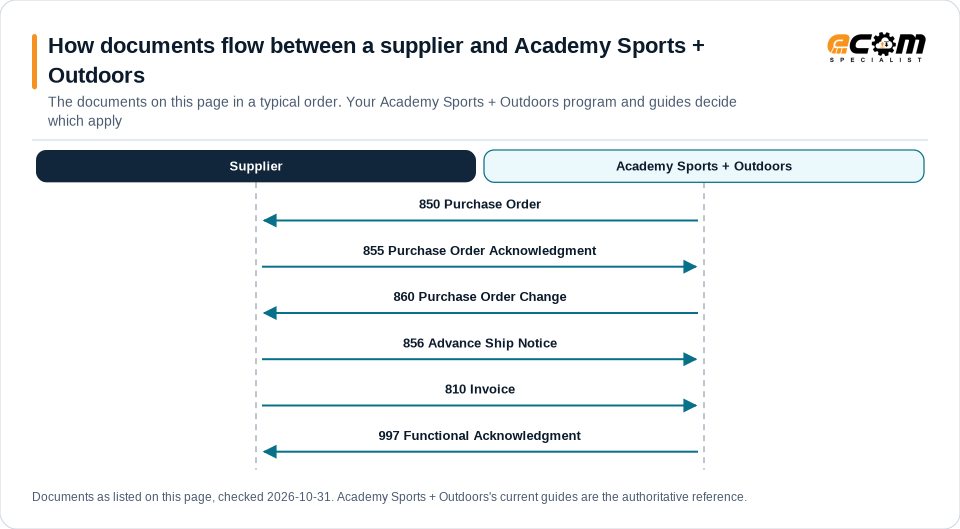
How documents flow between a supplier and Academy Sports + OutdoorsSequence diagram of documents between a supplier and Academy Sports + Outdoors: 850 Purchase Order from Academy Sports + Outdoors, 855 Purchase Order Acknowledgment to Academy Sports + Outdoors, 860 Purchase Order Change from Academy Sports + Outdoors, 856 Advance Ship Notice to Academy Sports + Outdoors, 810 Invoice to Academy Sports + Outdoors and 997 Functional Acknowledgment from Academy Sports + Outdoors.How documents flow between a supplier and Academy Sports +OutdoorsThe documents on this page in a typical order. Your Academy Sports + Outdoors program and guides decidewhich applySupplierAcademy Sports + Outdoors850 Purchase Order855 Purchase Order Acknowledgment860 Purchase Order Change856 Advance Ship Notice810 Invoice997 Functional AcknowledgmentDocuments as listed on this page, checked 2026-10-31. Academy Sports + Outdoors' current guides are the authoritative reference.
How documents flow between a supplier and Academy Sports + OutdoorsSequence diagram of documents between a supplier and Academy Sports + Outdoors: 850 Purchase Order from Academy Sports + Outdoors, 855 Purchase Order Acknowledgment to Academy Sports + Outdoors, 860 Purchase Order Change from Academy Sports + Outdoors, 856 Advance Ship Notice to Academy Sports + Outdoors, 810 Invoice to Academy Sports + Outdoors and 997 Functional Acknowledgment from Academy Sports + Outdoors.How documents flow between asupplier and Academy Sports +OutdoorsThe documents on this page in a typical order.Your Academy Sports + Outdoors program andguides decide which applySupplierAcademy Sports +Outdoors850 Purchase Order855 Purchase OrderAcknowledgment860 Purchase OrderChange856 Advance Ship Notice810 Invoice997 FunctionalAcknowledgmentDocuments as listed on this page, checked2026-10-31. Academy Sports + Outdoors' currentguides are the authoritative reference.

Read from top to bottom. Solid arrows are documents Academy Sports + Outdoors names in its own public documentation; the dashed arrow is the acknowledgment. The order is typical, not a Academy Sports + Outdoors rule: programs such as vendor direct to consumer use their own documents and timing.

Expand diagram Download SVG

Document by document

What each Academy Sports + Outdoors document needs

For each document: what it does for you as the supplier, what Academy Sports + Outdoors' own documents say about it (with the source and its date), and general EDI practice that helps, labelled as such. Your Academy Sports + Outdoors mapping guide for your version is the final word on fields and codes.

850

Purchase Order

You receive

Academy sends the 850 once a PO is approved in its ERP. The PO type and ship-to tell you how to pack.

What Academy Sports + Outdoors states

How the 850 works in X12

855

Purchase Order Acknowledgment

You send

An 855 is required for every 850 and 860, and its deadline depends on the order type.

What Academy Sports + Outdoors states

How the 855 works in X12

856

Advance Ship Notice

You send

The ASN goes out as soon as the carrier leaves, matches the GS1-128 labels, and is one per trailer or container.

What Academy Sports + Outdoors states

General EDI practice

  • Keep a register of ASN and carton serial numbers already sent, and block any reuse before transmission.

How the 856 works in X12

810

Invoice

You send

The invoice follows the ASN and must reach Academy within 10 days of it.

What Academy Sports + Outdoors states

How the 810 works in X12

Deductions

What Academy Sports + Outdoors charges for EDI problems

The SMART Guide states the OTIF chargeback below. Other chargebacks are in a separate chargeback schedule on Academy's vendor site, which we did not review.

ProblemCharge stated by Academy Sports + OutdoorsSource
Vendor-controllable OTIF score below 80% on domestic collect orders1% of average merchandise cost on all OTIF chargeable units in the periodSource: Academy Sports + Outdoors, SMART Guide for U.S. Vendors, May 3, 2026, p. 13
Shipments outside the ship or delivery windowSubject to vendor chargeback or refusalSource: Academy Sports + Outdoors, SMART Guide for U.S. Vendors, May 3, 2026, p. 8

Penalty assessed for non-compliance (reduction or reimbursement may be possible, except freight)Send a corrective action plan to Vendor Compliance within 30 days of assessmentSource: Academy Sports + Outdoors, SMART Guide for U.S. Vendors, May 3, 2026, p. 1

General practice for handling deductions

  • Route every chargeback notice to a shared compliance mailbox, so disputes start well inside the window.

Scorecard and audits

How Academy Sports + Outdoors measures supplier performance

Academy measures on-time-in-full (OTIF) on domestic collect purchase orders each fiscal month, from the units on ASNs that Academy's designated EDI program provider receives within each order's ship window.

MeasureTarget stated by Academy Sports + OutdoorsSource
Vendor-controllable OTIF score (units shipped on time divided by units ordered)80% minimumSource: Academy Sports + Outdoors, SMART Guide for U.S. Vendors, May 3, 2026, p. 13
  • Send each ASN on the actual departure date; units on ASNs sent after the not-after date count against the score.

Onboarding

Getting set up with Academy Sports + Outdoors, step by step

Steps with a source come from Academy Sports + Outdoors' own onboarding material; the others are general practice that keeps the project on track.

  1. Receive your vendor number

    Academy refers new vendors to Academy's designated EDI program provider immediately after assigning a vendor number.

    Source: Academy Sports + Outdoors, Vendor FAQ, Oct 31, 2026
  2. Onboard with the program provider

    Complete onboarding-partner testing with your existing EDI solution or provider, or use the provider's fulfillment portal.

    Source: Academy Sports + Outdoors, SMART Guide for U.S. Vendors, May 3, 2026
  3. Send item dimensions

    Send item dimensions to Academy's designated EDI program provider before items arrive at Academy's distribution centers.

    Source: Academy Sports + Outdoors, SMART Guide for U.S. Vendors, May 3, 2026
  4. Approve your GS1-128 label

    Submit a sample GS1-128 label to Academy Vendor Compliance for approval.

    Source: Academy Sports + Outdoors, Vendor FAQ, Oct 31, 2026
  5. Ship with ASN and invoice

    Send ASNs and invoices from your first shipment.

    Source: Academy Sports + Outdoors, SMART Guide for U.S. Vendors, May 3, 2026
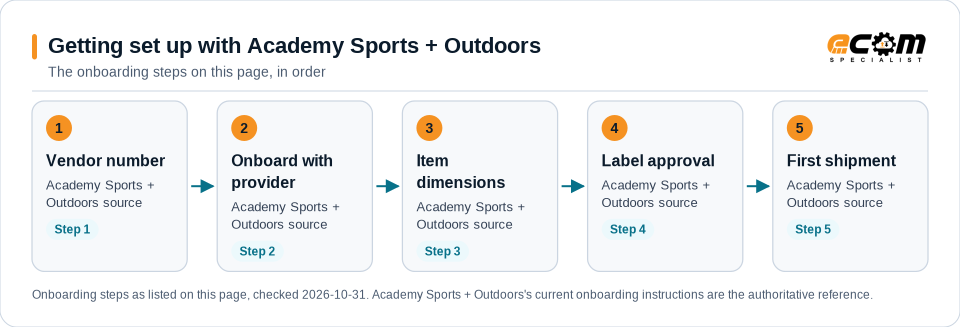
Getting set up with Academy Sports + OutdoorsFlow diagram of 5 onboarding steps with Academy Sports + Outdoors: Receive your vendor number, Onboard with the program provider, Send item dimensions, Approve your GS1-128 label and Ship with ASN and invoice.Getting set up with Academy Sports + OutdoorsThe onboarding steps on this page, in order1Vendor numberAcademy Sports +Outdoors sourceStep 12Onboard withproviderAcademy Sports +Outdoors sourceStep 23ItemdimensionsAcademy Sports +Outdoors sourceStep 34Label approvalAcademy Sports +Outdoors sourceStep 45First shipmentAcademy Sports +Outdoors sourceStep 5Onboarding steps as listed on this page, checked 2026-10-31. Academy Sports + Outdoors' current onboarding instructions are the authoritative reference.
Getting set up with Academy Sports + OutdoorsFlow diagram of 5 onboarding steps with Academy Sports + Outdoors: Receive your vendor number, Onboard with the program provider, Send item dimensions, Approve your GS1-128 label and Ship with ASN and invoice.Getting set up with AcademySports + OutdoorsThe onboarding steps on this page, in order1Vendor numberAcademy Sports + Outdoors sourceStep 12Onboard with providerAcademy Sports + Outdoors sourceStep 23Item dimensionsAcademy Sports + Outdoors sourceStep 34Label approvalAcademy Sports + Outdoors sourceStep 45First shipmentAcademy Sports + Outdoors sourceStep 5Onboarding steps as listed on this page, checked2026-10-31. Academy Sports + Outdoors' currentonboarding instructions are the authoritativereference.

Read left to right, or top to bottom on a phone. 5 of the 5 steps come from Academy Sports + Outdoors' own published material and are marked "Academy Sports + Outdoors source"; the rest are general practice. Week numbers are given only where Academy Sports + Outdoors states them.

Expand diagram Download SVG

Verification

What we checked, and where

Each statement below shows its source and the date we checked it. Statements we could not confirm from an official Academy Sports + Outdoors source are labelled as such.

TopicStatementEvidenceChecked
StandardsAcademy trades the 810, 850, 855, 856, 860 and 997, all at ASC X12 version 5010.Confirmed on a public Academy Sports + Outdoors pageOct 31, 2026
OnboardingAcademy's EDI program is managed by a designated third-party EDI provider; new vendors are referred to Academy's designated EDI program provider immediately after receiving their vendor number.Confirmed on a public Academy Sports + Outdoors pageOct 31, 2026
OnboardingNew vendors are expected to send ASNs and invoices with their first shipment.Confirmed on a public Academy Sports + Outdoors pageOct 31, 2026
DocumentsAn 855 is due within 1 business day for domestic replenishment orders and within 5 for import and domestic bulk orders; without one, the order is deemed accepted.Confirmed on a public Academy Sports + Outdoors pageOct 31, 2026
Shipping and labelsOrders filling multiple trailers or containers need a unique ASN for each trailer or container, for every PO type and freight term.Confirmed on a public Academy Sports + Outdoors pageOct 31, 2026
PaymentsDomestic collect orders with a vendor-controllable OTIF score below 80% are charged 1% of average merchandise cost on chargeable units.Confirmed on a public Academy Sports + Outdoors pageOct 31, 2026
PaymentsVendors have 30 days to dispute a chargeback.Confirmed on a public Academy Sports + Outdoors pageOct 31, 2026

Available only after supplier login

Academy Sports + Outdoors keeps these behind its supplier portal. This guide does not reproduce them; use your own Academy Sports + Outdoors access or ask your Academy Sports + Outdoors contact.

  • Academy's EDI mapping specifications and testing, provided through Academy's designated EDI program provider
  • Routing and appointments in Academy's OTM transportation system

Not confirmed

We could not confirm these from an official public source, so we do not state them as Academy Sports + Outdoors requirements.

  • The amounts in Academy's separate chargeback schedule, which we did not review
  • The EDI documents used for drop ship orders
  • Whether vendors can connect without going through onboarding-partner testing

Checklist

Academy Sports + Outdoors EDI readiness checklist

  1. Contact Academy's designated EDI program provider as soon as Academy assigns your vendor number.
  2. Be ready to send ASNs and invoices with your first shipment.
  3. Return an 855 for every 850 and 860 within 1 business day (replenishment) or 5 (import and bulk).
  4. Send the 856 when the carrier departs, with the ship date matching the departure.
  5. Send a separate ASN for each trailer or container and never reuse an ASN or carton number.
  6. Submit your GS1-128 sample label to Academy Vendor Compliance for approval.
  7. Send the 810 right after the ASN, no later than 10 days, invoicing pack-by-store orders to the DC.
  8. Track your monthly OTIF score and keep it at 80% or above.

Connectivity and contacts

How Academy Sports + Outdoors connects with suppliers

What Academy Sports + Outdoors' public documents say about networks and setup, and the department contacts it publishes for suppliers. Connection credentials and trading-partner IDs are exchanged with Academy Sports + Outdoors during setup and are never shown on this page.

What Academy Sports + Outdoors states about connecting

Department contacts Academy Sports + Outdoors publishes

Listed as Academy Sports + Outdoors published them. These are Academy Sports + Outdoors' contacts, not ECOM's; check the source for the current details.

Avoid these

Common mistakes with Academy Sports + Outdoors EDI

One ASN for several trailers

Each trailer or container on a large order needs its own unique ASN.

Source: Academy Sports + Outdoors, SMART Guide for U.S. Vendors, May 3, 2026, p. 6

Reusing ASN or carton numbers

ASN numbers can be sent only once, and carton serial numbers already in Academy's history fail validation.

Source: Academy Sports + Outdoors, SMART Guide for U.S. Vendors, May 3, 2026, p. 6

Skipping the 855

Without an 855, Academy treats the order as accepted as sent, to ship complete and on time.

Source: Academy Sports + Outdoors, SMART Guide for U.S. Vendors, May 3, 2026, p. 5

Invoicing stores on pack-by-store orders

Pack-by-store orders are invoiced to the distribution center, not the individual stores.

Source: Academy Sports + Outdoors, SMART Guide for U.S. Vendors, May 3, 2026, p. 6

Connectivity

Your options for connecting to Academy Sports + Outdoors

  • Academy's designated EDI program provider

    New vendors are referred to Academy's designated EDI program provider after receiving a vendor number. The provider's testing service lets vendors use their existing EDI solution or provider.

    From Academy Sports + Outdoors' published documents

  • Provider fulfillment portal

    Vendors can receive POs and send ASNs and invoices in the provider's portal without integrating their own systems.

    From Academy Sports + Outdoors' published documents

  • OTM transportation system

    Collect shipments are routed and delivery appointments approved through Academy's OTM transportation system.

    From Academy Sports + Outdoors' published documents

Challenges

Common integration challenges

  • Acknowledgment deadlines

    An 855 is due within one business day for replenishment orders, and an unacknowledged order is deemed accepted as sent.

  • One ASN per trailer

    Large orders across several trailers or containers need a unique ASN for each, and ASN and carton numbers can never be reused.

  • On-time-in-full scoring

    Domestic collect orders below an 80% on-time-in-full score bring a chargeback of 1% of average merchandise cost on chargeable units.

Automation options for Academy Sports + Outdoors suppliers

Four ways to automate. One foundation.

Academy Sports + Outdoors' requirements on this page cover the 850, 855, 860, 856, 810 and 997. ECOM helps you automate them, meet Academy Sports + Outdoors' labeling and ship notice requirements, and see what needs action. Academy Sports + Outdoors sets its program's rules; ECOM confirms which options fit yours.

PRISM Supply Chain Automation Foundation

One platform beneath every option. Use one, or combine them for different partners and documents.

Compliance and actionable visibility

Connect order processing, shipping documentation, trading partner requirements, and performance monitoring through one coordinated workflow. These capabilities help teams improve shipment accuracy, reduce manual work, address compliance risks, and respond to exceptions before they affect customers.

Discuss Your Trading Partner Requirements

Connect Academy Sports + Outdoors documents to your ERP

ECOM integrates Academy's X12 5010 purchase orders, changes, acknowledgments, ship notices and invoices with your ERP and warehouse systems, connected through the EDI program provider Academy uses.

Zero Trust for supplier data exchange

Zero Trust EDI and MFT for your Academy Sports + Outdoors connection

Supplier exchanges with Academy Sports + Outdoors carry orders, ship notices, invoices and item data. A Zero Trust design assumes no connection, file or user is safe by default.

ECOM has implemented Zero Trust EDI and Zero Trust MFT in retail.

For supplier exchanges this means each supplier and vendor connection has its own scope, orders, ship notices and invoices are verified on arrival, late or altered files are noticed early, and the transfer log helps answer deduction and security-review questions.

  • Authentication

    Every connection proves who it is: partner-specific accounts with SSH keys or certificates over SFTP, FTPS, HTTPS or AS2, never a shared login.

    Business outcome: A lost or reused credential affects one partner, not all of them.

  • Least privilege

    Each partner and user reaches only its own folders, file types and actions. Internal user permissions are managed centrally and reviewed with you.

    Business outcome: A mistake or compromise in one account stays limited to what that account could reach.

  • Isolation

    Partners are kept apart by account and file area. Where your design calls for it, a proxy or DMZ keeps outside connections away from internal systems. The design follows your architecture.

    Business outcome: Outside connections do not land directly on your internal systems.

  • Encryption

    Encrypted protocols in transit and PGP for files at rest. Encryption protects the data. It is one control, and not Zero Trust on its own.

    Business outcome: Less exposure if a file is intercepted or a file store is reached.

  • Certificate and key management

    Partner keys and certificates are managed centrally. Renewal and rotation are planned with you, so an expiring certificate does not stop a flow.

    Business outcome: Fewer outages caused by an expired certificate or key.

  • Monitoring and access controls

    Real-time transfer status and alerts for late, missing or failed files, so unexpected access or a broken flow is seen quickly.

    Business outcome: Late, missing or failed files are noticed early, before they hold up late shipments or deductions.

  • Audit trail

    Every transfer is logged with sender, receiver, time and outcome, which supports your own review and audit work.

    Business outcome: You can answer who sent what and when, for your own audits and partner reviews.

What this means for your data

Supplier and vendor access

Each supplier, 3PL and vendor connection has its own account and limited scope, so one compromised credential cannot reach other partners' data.

Orders, ship notices and invoices

Documents are verified when they arrive and every transfer is logged, so a missing or altered file shows up quickly.

Portals and file drops

Replace shared logins and open folders with named accounts, reviewed on a schedule you set.

Zero Trust is an approach, not a product or a certification. ECOM covers the EDI and file-transfer side. Your identity, network and endpoint controls stay yours, and so does the assessment of your own compliance obligations. ECOM does not guarantee compliance or any security outcome. Academy Sports + Outdoors may set its own security requirements, which come first.

Next step

Get help with your Academy Sports + Outdoors program

Each request goes to an ECOM EDI specialist with Academy Sports + Outdoors' name attached, so the reply starts from your program.

  • Review Academy Sports + Outdoors' requirements

    Send us Academy Sports + Outdoors' guide or your program details; we explain the documents, rules and options for meeting them.

    Request a requirements review
  • Connect Academy Sports + Outdoors to your ERP

    Orders in, ship notices and invoices out, from the ERP and warehouse systems you already run.

    Discuss ERP integration
  • Testing and certification

    Build, test and certify each Academy Sports + Outdoors document, then go live with monitoring from the first file.

    Plan testing and certification
  • Shipping labels and ASNs

    Labels and ship notices that match Academy Sports + Outdoors' rules, to help avoid receiving problems and compliance deductions.

    Review shipping compliance

Academy Sports + Outdoors integration FAQs

Which EDI documents does Academy Sports + Outdoors require?

Academy's SMART Guide lists the 810, 850, 855, 856, 860 and 997, all at ASC X12 version 5010, along with GS1-128 carton labels.

How do I start EDI with Academy?

Academy's EDI program is managed by a designated third-party EDI provider. New vendors are referred to Academy's designated EDI program provider immediately after receiving their vendor number to begin EDI onboarding.

When is the Academy 855 due?

Within 1 business day for domestic replenishment orders, and within 5 business days for import orders and domestic bulk orders. Without an 855, the order is deemed accepted as sent.

What is Academy's OTIF chargeback?

For domestic collect orders, a vendor-controllable OTIF score below 80% brings a chargeback of 1% of average merchandise cost on all chargeable units in the measurement period.

Is ECOM an Academy-approved provider?

This page is an integration guide and does not indicate an approval or partnership with Academy Sports + Outdoors. ECOM builds integrations to the requirements Academy publishes.

Sources and accuracy

This guide summarizes publicly available information as of October 2026. Academy Sports + Outdoors sets its own requirements and can change them at any time; your Academy Sports + Outdoors implementation guide, supplier portal or account contact is the authoritative source for your program.

Academy Sports + Outdoors documents cited on this page

Learn the general practice

Request Academy Sports + Outdoors integration assistance

Tell us about your Academy Sports + Outdoors program, documents and ERP. We will outline the connection, mapping and testing plan.