
Resources · UK retail EDI
TRADACOMS messages for UK retail EDI
TRADACOMS is the original UK retail EDI standard. It was introduced in 1982, maintained by the Article Numbering Association (now GS1 UK), and is still used by some British retailers and their suppliers for orders, delivery notes, invoices and statements. This page lists the file types and messages and shows how a TRADACOMS file is put together.
- Introduced
- 1982, UK retail
- Maintained by
- ANA, now GS1 UK
- Successor
- EANCOM (EDIFACT subset)
- Entries listed
- 37
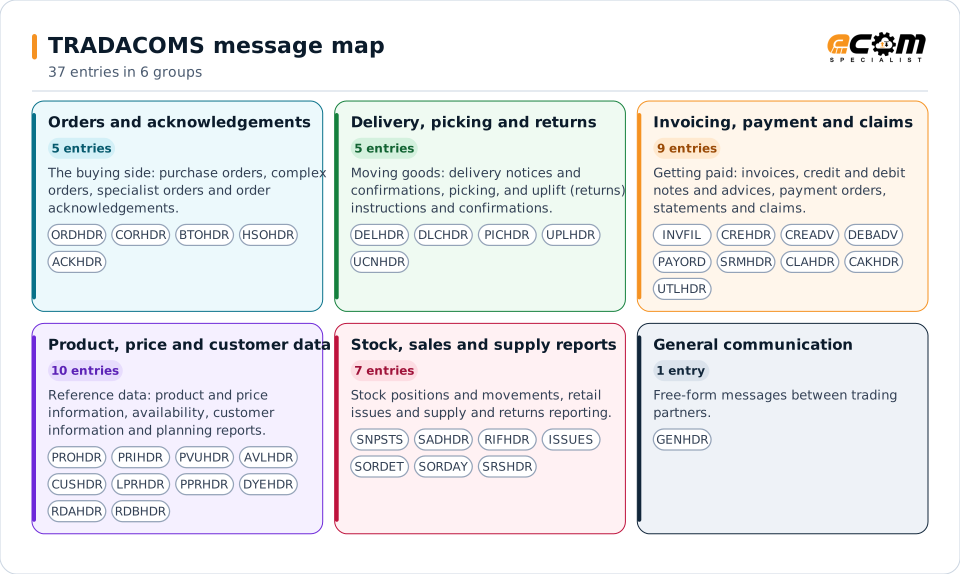
Each colored card is one group of TRADACOMS files. The codes are the header codes of the files; the tables below give each file's name, purpose and detail message.
Overview
What TRADACOMS is
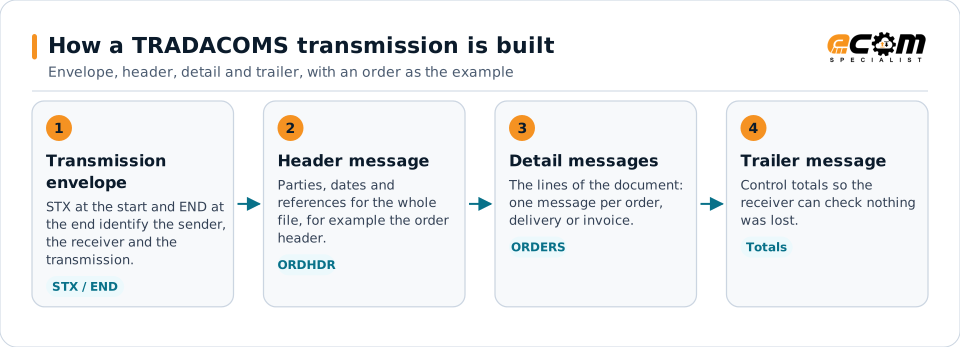
TRADACOMS exchanges business documents as "files". Each file has a header message named after its type (for example ORDHDR for orders), one or more detail messages that carry the lines (for example ORDERS), and a trailer message with the totals. A single transmission can hold several files, wrapped in an envelope that starts with the STX segment and ends with END.
The standard grew to cover far more than orders and invoices: product and price information for the book trade, stock snapshots and sales reports, claims, uplift (returns) instructions and even utility bills. Development effectively ceased in the mid-1990s in favor of EDIFACT EANCOM subsets, but the existing TRADACOMS links keep running because replacing a working retailer interface is costly.
ECOM's B2B gateway reads and writes TRADACOMS and maps each file to the same internal document your ERP uses for X12 or EDIFACT, so a UK retailer can be added without a separate tool.
Suppliers to UK retailers
Receive orders and send delivery notes and invoices to retailers that still run TRADACOMS.
Book trade and specialist sectors
Use the book trade, home shopping, textile dye and utility variants built on the same structure.
Companies moving to EANCOM
Run TRADACOMS and EANCOM side by side while a retailer migrates, with one mapping to the ERP.
Orders and acknowledgements
The buying side: purchase orders, complex orders, specialist orders and order acknowledgements.
| File code | Message | What it is for | Detail message |
|---|---|---|---|
| ORDHDR | Purchase order | A retailer orders goods from a supplier. | ORDERS |
| CORHDR | Complex order | Orders with multiple delivery points or complex conditions. | CORDER |
| BTOHDR | Book trade orders | Orders in the book trade variant. | BTOERS |
| HSOHDR | Home shopping orders | Orders in the home shopping variant. | HSODET |
| ACKHDR | Acknowledgement | The supplier acknowledges an order. | ACKMNT |
Delivery, picking and returns
Moving goods: delivery notices and confirmations, picking, and uplift (returns) instructions and confirmations.
| File code | Message | What it is for | Detail message |
|---|---|---|---|
| DELHDR | Delivery notice | The supplier tells the retailer what is on its way. | DELIVR |
| DLCHDR | Delivery confirmation | The receiver confirms what was delivered. | DLCDET |
| PICHDR | Picking instruction | Instructs a distribution point which goods to pick. | PICKER |
| UPLHDR | Uplift instruction | Instructs collection (uplift) of goods, such as returns. | UPLIFT |
| UCNHDR | Uplift confirmation | Confirms that goods were collected. | UCNDET |
Invoicing, payment and claims
Getting paid: invoices, credit and debit notes and advices, payment orders, statements and claims.
| File code | Message | What it is for | Detail message |
|---|---|---|---|
| INVFIL | Invoice | Invoices for goods and services. | INVOIC |
| CREHDR | Credit note | Credit note against an invoice. | CREDIT |
| CREADV | Credit advice | Advice that a credit is due. | CRAINF |
| DEBADV | Debit advice | Advice that a debit is raised. | DRAINF |
| PAYORD | Payment order | An instruction to pay. | PAYINF |
| SRMHDR | Statement and remittance details | Account statement and remittance information. | SRMINF |
| CLAHDR | Claims message | A claim, for example for short delivery or damage. | |
| CAKHDR | Claims acknowledgement | Acknowledges a claim. | |
| UTLHDR | Utility bill | Utility billing variant. | UTLBIL |
Product, price and customer data
Reference data: product and price information, availability, customer information and planning reports.
| File code | Message | What it is for | Detail message |
|---|---|---|---|
| PROHDR | Product information | Product master data. | PROINF |
| PRIHDR | Price information | Prices and price changes. | PRIINF |
| PVUHDR | Book trade price and availability update | Price and availability for the book trade. | |
| AVLHDR | Availability report | What is available to order. | AVLDET |
| CUSHDR | Customer information | Customer details. | CUSINF |
| LPRHDR | Location planning report | Planning information by location. | LPRDET |
| PPRHDR | Product planning report | Product planning information. | PPRDET |
| DYEHDR | Dye instruction | Textile dye instruction variant. | DYEINS |
| RDAHDR | Retailer database | Retailer database information. | |
| RDBHDR | Retail B 1–4 retailer database | Retailer database, further variant. |
Stock, sales and supply reports
Stock positions and movements, retail issues and supply and returns reporting.
| File code | Message | What it is for | Detail message |
|---|---|---|---|
| SNPSTS | Stock snapshot | Stock position at a point in time. | SNPSTS |
| SADHDR | Stock adjustment | Stock adjustments. | SADDET |
| RIFHDR | Retail issues file | Retail issues reporting. | |
| ISSUES | Issues | Issues reporting. | |
| SORDET | Supply and returns details | Detail of supply and returns. | |
| SORDAY | Supply and returns summary | Summary of supply and returns. | |
| SRSHDR | Supply and returns summary | Supply and returns summary file. |
General communication
Free-form messages between trading partners.
| File code | Message | What it is for | Detail message |
|---|---|---|---|
| GENHDR | General communication | A general message between trading partners. | GENRAL |
Structure
How a TRADACOMS file is built
A transmission starts with STX and ends with END. Inside it, a file is a header message (for example ORDHDR), one or more detail messages (for example ORDERS) and a trailer message. Each message is wrapped in MHD and MTR segments. Some files also carry VAT summary messages, and repeating segment groups are held in a reference message (RSGRSG).
Because the structure is fixed by the standard, trading partners agree which messages and fields they use. Some retailers and suppliers extend the standard with their own versions, which is why a translator needs its message table to be configurable.
The outer envelope starts with STX and ends with END. Inside it, a file has a header message such as ORDHDR, detail messages such as ORDERS that carry the lines, and a trailer message with the totals.
Versions
Releases
TRADACOMS evolved through numbered releases; translators commonly carry separate message versions for releases 8 and 9. The public sources do not list which messages exist in which release, so the release a retailer uses is confirmed against its own guide.
| Item | Detail |
|---|---|
| Introduced | 1982, as an implementation of the UN/GTDI guidelines |
| Maintenance | UK Article Numbering Association, now GS1 UK |
| Development | Effectively ceased in 1995 in favor of EDIFACT EANCOM subsets |
| Releases commonly carried | Release 8 and Release 9 message versions |
ECOM B2B Gateway
How ECOM handles TRADACOMS
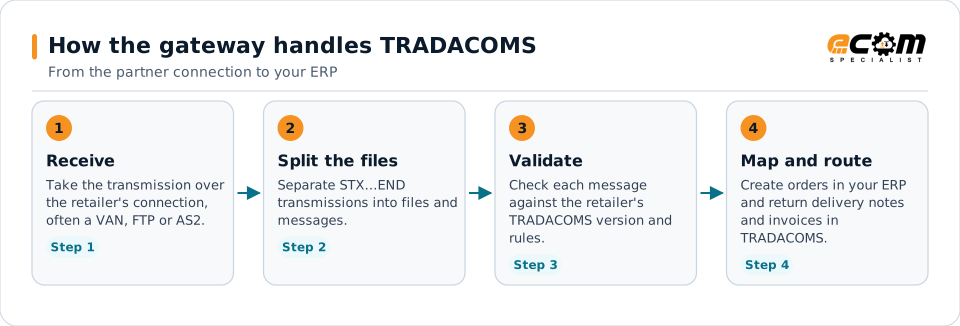
Each TRADACOMS file is parsed into the gateway's internal document, so the ERP sees the same purchase order, delivery or invoice whatever the retailer's standard.
- 1
Receive
Take the transmission over the retailer's connection, often a VAN, FTP or AS2.
- 2
Split the files
Separate STX…END transmissions into files and messages.
- 3
Validate
Check each message against the retailer's TRADACOMS version and rules.
- 4
Map and route
Create orders in your ERP and return delivery notes and invoices in TRADACOMS.
Each TRADACOMS file is parsed into the gateway's internal document, so the ERP sees the same purchase order, delivery or invoice whatever the retailer's standard.
Good to know
What this page does and does not cover
- The file codes and names come from a public index of TRADACOMS application references. The index does not give a description for every file type, so rows without a detail message are listed by name only.
- GS1 UK's own TRADACOMS manual was not readable when this page was prepared, so the standard's segment-level detail is confirmed against the retailer's guide during scoping.
- Several variants (book trade, home shopping, dye, utility, insurance and others) exist for specific industries. Your retailer states which ones it uses.
Sources, read November 3, 2026
Frequently asked questions
Is TRADACOMS still used?
Yes, by some UK retailers and their suppliers. Development of the standard effectively stopped in the mid-1990s and most new programs use EDIFACT EANCOM or X12, but existing TRADACOMS links keep running until the retailer migrates.
What is the difference between ORDHDR and ORDERS?
ORDHDR is the file type, the header message that opens an orders file. ORDERS is the detail message that carries the order lines inside it.
Can ECOM connect us to a UK retailer that only accepts TRADACOMS?
Yes. ECOM's B2B gateway reads and writes TRADACOMS and maps it to your ERP. The retailer's own guide decides which files, release and connection are used, and ECOM confirms them during scoping.
Connect a TRADACOMS partner
Tell us which TRADACOMS messages and versions your partner requires. An ECOM specialist confirms the connection, the map and the test plan.