
Resources · High-tech supply chain
RosettaNet PIPs by cluster and segment
RosettaNet defines the XML business processes used in electronics, semiconductors and other high-tech supply chains. Each Partner Interface Process (PIP) is a numbered, ready-made exchange, such as 3A4 for a purchase order or 3B2 for an advance shipment notice. This page lists the PIPs by cluster and segment and shows how a PIP message is packaged.
- Format
- XML, RNIF packaging
- Organized in
- 8 clusters, 26 segments
- Governed by
- GS1 US
- Used in
- Electronics and high tech
- Entries listed
- 131
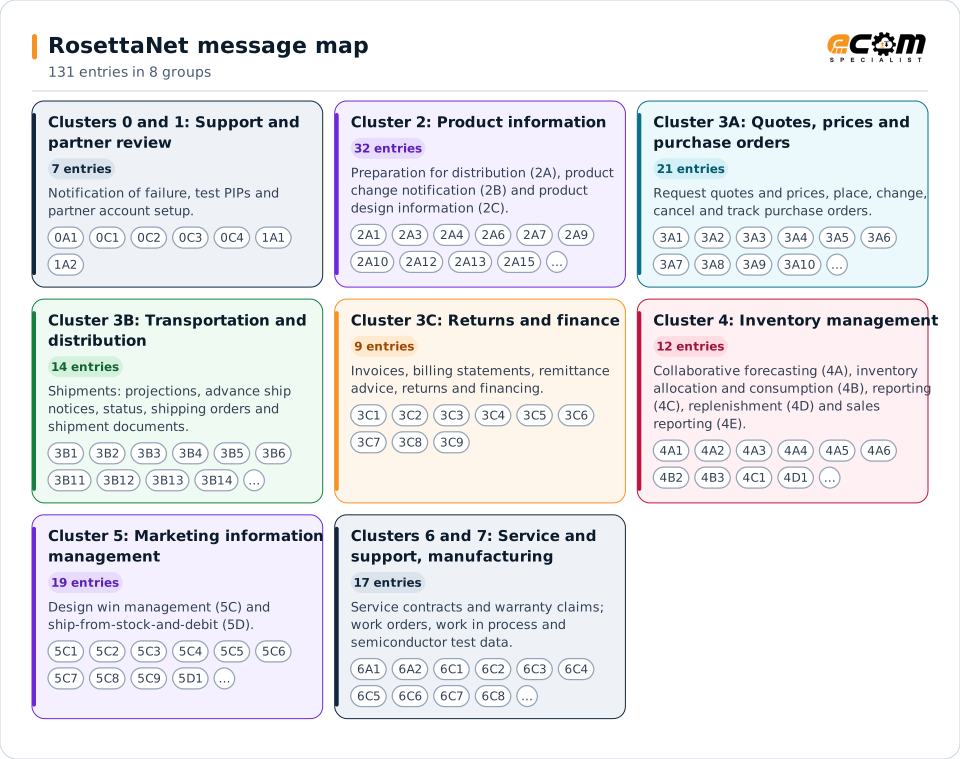
Each colored card is one cluster or group of clusters. The codes on a card are its PIPs; the tables below give each PIP's full name.
Overview
What RosettaNet is
A PIP is more than a document. It specifies who sends what to whom, in what order, within what time, and which acknowledgments are required. PIPs are grouped in clusters (the business function) and segments (the sub-function): for example Cluster 3 Order Management has segment 3A for quotes and order entry, 3B for transportation and distribution, 3C for returns and finance, and 3D for product configuration.
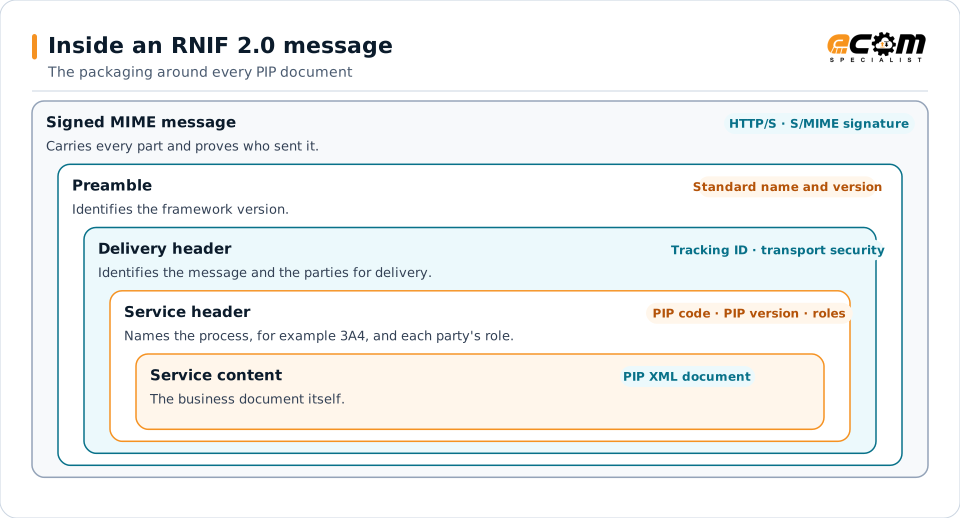
Each PIP specification has three views: the business operational view (the process), the functional service view (the network components and messages) and the implementation framework view (how messages are packaged). Messages are XML and are wrapped by the RosettaNet Implementation Framework (RNIF), which carries the preamble, delivery header, service header and service content.
ECOM's B2B gateway handles the PIP payloads and the RNIF packaging, so a supplier can exchange PIP 3A4 orders or PIP 3B2 ship notices with a high-tech customer and map them to the same ERP documents used for EDI.
Electronics and semiconductor suppliers
Receive purchase orders, forecasts and inventory requests and send confirmations, ship notices and invoices.
Distributors and contract manufacturers
Exchange product information, inventory reports, sales reports and work orders.
Service and warranty teams
Handle service entitlement queries and warranty claims between manufacturers and service partners.
Clusters 0 and 1: Support and partner review
Notification of failure, test PIPs and partner account setup.
| PIP | Name |
|---|---|
| 0A1 | Notification of Failure |
| 0C1 | Asynchronous Test Notification |
| 0C2 | Asynchronous Test Request / Confirmation |
| 0C3 | Synchronous Test Notification |
| 0C4 | Synchronous Test Query / Response |
| 1A1 | Request Account Setup |
| 1A2 | Maintain Account |
Cluster 2: Product information
Preparation for distribution (2A), product change notification (2B) and product design information (2C).
| PIP | Name |
|---|---|
| 2A1 | Distribute New Product Information |
| 2A3 | Query Marketing Information |
| 2A4 | Query Sales Promotion & Rebate Information |
| 2A6 | Query Product Lifecycle Information |
| 2A7 | Query Product Discontinuation Information |
| 2A9 | Query Technical Product Information |
| 2A10 | Distribute Design Engineering Information |
| 2A12 | Distribute Product Master |
| 2A13 | Distribute Material Composition Information |
| 2A15 | Request Material Composition Information |
| 2A16 | Distribute Engineering Information Inquiry |
| 2A17 | Notify of Certificate of Analysis |
| 2A18 | Notify of Certificate of Analysis Response |
| 2B1 | Change Basic Product Information |
| 2B2 | Change Marketing Information |
| 2B3 | Change Sales Promotion & Rebate Information |
| 2B5 | Change Product Lifecycle Information |
| 2B7 | Notify of Product Change |
| 2B8 | Notify of Product Change Query |
| 2B9 | Notify of Product Change Acceptance |
| 2C1 | Distribute Engineering Change Status |
| 2C2 | Request Engineering Change |
| 2C3 | Distribute Engineering Change Response |
| 2C4 | Request Engineering Change Approval |
| 2C5 | Notify of Engineering Change Order |
| 2C6 | Notify of Engineering Change Implementation Plan |
| 2C7 | Request Bill Of Material |
| 2C8 | Notify of Bill Of Material |
| 2C9 | Request Approved Manufacturer List |
| 2C10 | Notify of Approved Manufacturer List |
| 2C11 | Notify of Approved Manufacturer List Request |
| 2C12 | Notify of Approved Manufacturer List Confirmation |
Cluster 3A: Quotes, prices and purchase orders
Request quotes and prices, place, change, cancel and track purchase orders.
| PIP | Name |
|---|---|
| 3A1 | Request Quote |
| 3A2 | Request Price and Availability |
| 3A3 | Request Shopping Cart Transfer |
| 3A4 | Request Purchase Order |
| 3A5 | Query Order Status |
| 3A6 | Distribute Order Status |
| 3A7 | Notify of Purchase Order Update |
| 3A8 | Request Purchase Order Change |
| 3A9 | Request Purchase Order Cancellation |
| 3A10 | Notify of Quote Acknowledgment |
| 3A13 | Notify of Purchase Order Information |
| 3A14 | Distribute Planned Order |
| 3A15 | Notify of Quote Request |
| 3A16 | Notify of Quote Confirmation |
| 3A17 | Distribute Price And Availability Request |
| 3A18 | Distribute Price And Availability Response |
| 3A19 | Notify of Purchase Order Request |
| 3A20 | Notify of Purchase Order Confirmation |
| 3A21 | Notify of Purchase Order Change Request |
| 3A22 | Notify of Purchase Order Change Confirmation |
| 3A24 | Notify of Purchase Order Cancellation Confirmation |
Cluster 3B: Transportation and distribution
Shipments: projections, advance ship notices, status, shipping orders and shipment documents.
| PIP | Name |
|---|---|
| 3B1 | Distribute Transportation Projection |
| 3B2 | Notify of Advance Shipment |
| 3B3 | Distribute Shipment Status |
| 3B4 | Query Shipment Status |
| 3B5 | Request Shipment Change |
| 3B6 | Notify of Shipments Tendered |
| 3B11 | Notify of Shipping Order |
| 3B12 | Request Shipping Order |
| 3B13 | Notify of Shipping Order Confirmation |
| 3B14 | Request Shipping Order Cancellation |
| 3B18 | Notify of Shipment Documentation |
| 3B19 | Notify of Shipping Order Request |
| 3B21 | Notify of Shipping Order Cancellation Request |
| 3B22 | Notify of Shipping Order Cancellation Confirmation |
Cluster 3C: Returns and finance
Invoices, billing statements, remittance advice, returns and financing.
| PIP | Name |
|---|---|
| 3C1 | Return Product |
| 3C2 | Request Financing Approval |
| 3C3 | Notify of Invoice |
| 3C4 | Notify of Invoice Reject |
| 3C5 | Notify of Billing Statement |
| 3C6 | Notify of Remittance Advice |
| 3C7 | Notify of Self-Billing Invoice |
| 3C8 | Notify of Return Product Request |
| 3C9 | Notify of Return Product Confirmation |
Cluster 4: Inventory management
Collaborative forecasting (4A), inventory allocation and consumption (4B), reporting (4C), replenishment (4D) and sales reporting (4E).
| PIP | Name |
|---|---|
| 4A1 | Notify of Strategic Forecast |
| 4A2 | Notify of Embedded Release Forecast |
| 4A3 | Notify of Threshold Release Forecast |
| 4A4 | Notify of Planning Release Forecast |
| 4A5 | Notify of Forecast Reply |
| 4A6 | Notify of Forecasting Exception |
| 4B2 | Notify of Shipment Receipt |
| 4B3 | Notify of Consumption |
| 4C1 | Distribute Inventory Report |
| 4D1 | Notify of Material Release |
| 4E1 | Notify of Sales Report |
| 4E2 | Notify of Sales Report Acknowledgement |
Cluster 5: Marketing information management
Design win management (5C) and ship-from-stock-and-debit (5D).
| PIP | Name |
|---|---|
| 5C1 | Distribute Product List |
| 5C2 | Request Design Registration |
| 5C3 | Create Design Win |
| 5C4 | Distribute Registration Status |
| 5C5 | Query Registration Status |
| 5C6 | Notify of Design Registration Request |
| 5C7 | Notify of Design Registration Confirmation |
| 5C8 | Notify of Win Claim Request |
| 5C9 | Notify of Win Claim Confirmation |
| 5D1 | Request Ship from Stock and Debit Authorization |
| 5D2 | Notify of Blanket Ship from Stock and Debit Authorization |
| 5D3 | Distribute Open Ship from Stock and Debit Authorization Status |
| 5D4 | Query Ship from Stock and Debit Authorization Status |
| 5D5 | Create Ship from Stock and Debit Claim Status |
| 5D6 | Notify of Ship from Stock and Debit Claim Status |
| 5D7 | Notify of Ship From Stock And Debit Authorization Request |
| 5D8 | Notify of Ship From Stock And Debit Authorization Confirmation |
| 5D9 | Notify of Ship From Stock And Debit Claim Request |
| 5D10 | Notify of Ship From Stock And Debit Claim Confirmation |
Clusters 6 and 7: Service and support, manufacturing
Service contracts and warranty claims; work orders, work in process and semiconductor test data.
| PIP | Name |
|---|---|
| 6A1 | Notify of Service Contract Request |
| 6A2 | Notify of Service Contract Reply |
| 6C1 | Query Service Entitlement |
| 6C2 | Request Warranty Claim |
| 6C3 | Notify of Case Request |
| 6C4 | Notify of Case Confirmation |
| 6C5 | Distribute Service Entitlement Query |
| 6C6 | Distribute Service Entitlement Status Response |
| 6C7 | Notify of Warranty Claim Request |
| 6C8 | Notify of Warranty Claim Confirmation |
| 7B1 | Distribute Work in Process |
| 7B2 | Query Work in Process |
| 7B5 | Notify of Manufacturing Work Order |
| 7B6 | Notify of Manufacturing Work Order Reply |
| 7C6 | Distribute Product Quality Event Data |
| 7C7 | Notify of Semiconductor Test Data |
| 7C8 | Notify of Semiconductor Process Data |
Structure
How a PIP message is packaged (RNIF)
The RosettaNet Implementation Framework (RNIF) defines the outer packaging. An RNIF 2.0 message is a MIME message carrying a preamble, a delivery header, a service header and the service content, which is the PIP's XML document. It is exchanged over HTTP/S, signed for authentication and non-repudiation, and answered by an acknowledgment signal.
The service header names the PIP and its version, and the partner roles (for example buyer and seller). The earlier RNIF 1.1 attached the signature directly to the payload; RNIF 2.0 adds the explicit preamble and delivery header parts and standardizes synchronous and asynchronous acknowledgments.
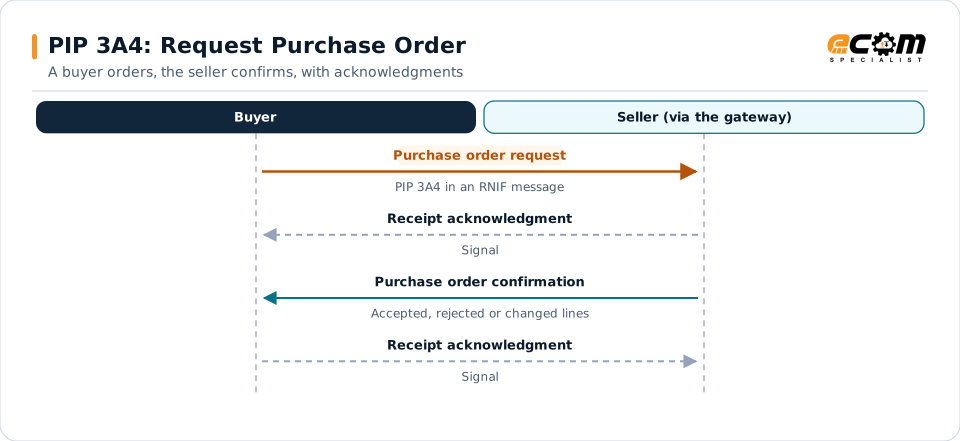
The buyer sends the purchase order request. The seller's system answers at once with a receipt acknowledgment, later sends the purchase order confirmation, and the buyer acknowledges that in turn.
The PIP document is the innermost layer. The headers around it say who sent it, where it goes and which PIP and version it belongs to, and the whole message is signed.
Versions
Versions
Every PIP specification carries its own version identifier, which appears in the service header of each message (for example V02.02 in a published 3A4 header example). The version a partner uses is stated in that partner's PIP specification.
| Item | Detail |
|---|---|
| RNIF 1.1 | Signature attached to the PIP payload |
| RNIF 2.0 | Adds the preamble and delivery header parts; synchronous and asynchronous acknowledgments |
| PIP versions | Identified in the service header; confirmed per partner |
ECOM B2B Gateway
How ECOM handles RosettaNet
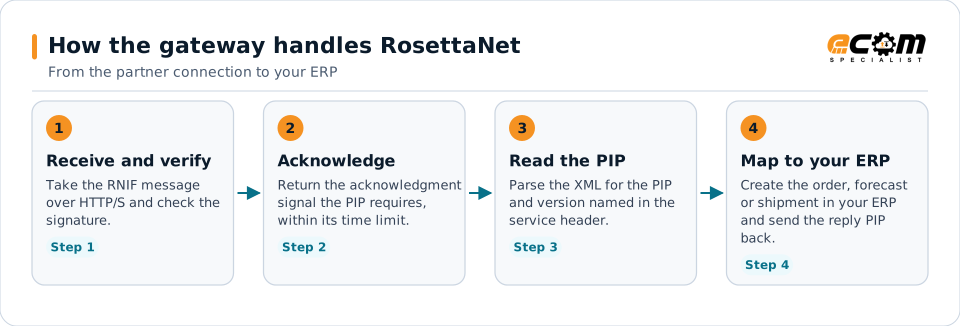
The gateway receives the RNIF message, verifies it, answers with the acknowledgment signal and turns the PIP document into an ERP transaction, then does the reverse for outbound PIPs.
- 1
Receive and verify
Take the RNIF message over HTTP/S and check the signature.
- 2
Acknowledge
Return the acknowledgment signal the PIP requires, within its time limit.
- 3
Read the PIP
Parse the XML for the PIP and version named in the service header.
- 4
Map to your ERP
Create the order, forecast or shipment in your ERP and send the reply PIP back.
The gateway receives the RNIF message, verifies it, answers with the acknowledgment signal and turns the PIP document into an ERP transaction, then does the reverse for outbound PIPs.
Good to know
What this page does and does not cover
- PIP codes and names come from the GS1 US directory titles as reproduced in a public list. Codes whose names sources disagree on, or do not give, are left out instead of guessed: 2B4, 3A23 and 3B20, and a few codes found in one secondary source only.
- PIP versions, the message guideline and the XML schema for each PIP are in the official PIP specification, which is the authority for a partner exchange. The GS1 US RosettaNet site was not reachable when this page was prepared.
- The same code can be described by different names in unofficial lists. Where they differ, the name here follows the GS1 US directory titles.
Sources, read November 3, 2026
Frequently asked questions
What is the difference between a PIP and an EDI transaction set?
An EDI transaction set defines one document. A PIP defines a whole exchange: the documents, the order they are sent in, the roles, the acknowledgments and the time limits. PIP 3A4 for a purchase order includes both the request and the confirmation.
Which RosettaNet PIPs are most common?
In practice the order management PIPs: 3A4 purchase order, 3A7 order update, 3A8 order change, 3B2 advance shipment notice, 3C3 invoice and 3C6 remittance advice, together with 4A forecasts and 4B2 and 4C1 inventory PIPs.
Does ECOM support RosettaNet RNIF?
Yes. RosettaNet RNIF is among the communication options of ECOM's B2B gateway, and the PIP payloads are mapped like any other XML document. ECOM confirms the PIPs and versions each partner requires during scoping.
Where do I find the exact schema for a PIP?
In the PIP specification package published through GS1 US: a message guideline in HTML and the XML schema. Your trading partner tells you which version it uses.
Connect a RosettaNet partner
Tell us which RosettaNet messages and versions your partner requires. An ECOM specialist confirms the connection, the map and the test plan.