
PRISM SmartConnect
Messaging and Collaboration
Bring important business events into the channels your people already use. A delayed shipment, an order exception, a customer request or an approval should reach the team that can act on it. SmartConnect integration workflows can connect application data with collaboration and messaging channels, so a notification becomes a useful next step.
Channels
Connect conversations with business action
Messaging coverage can span employee collaboration, customer communications, email, mobile notifications and the queues that move events between applications. ECOM scopes the appropriate channel and integration method around your users, operating process and platform permissions.
Team chat and collaboration (7)
Route order exceptions, fulfillment alerts, service updates and approval requests to the responsible team.
-
 Slack . Discuss this integration with an ECOM expert.
-
 Microsoft Teams . Discuss this integration with an ECOM expert.
-
 Google Chat . Discuss this integration with an ECOM expert.
-
 Cisco Webex . Discuss this integration with an ECOM expert.
-
 Zoom Team Chat . Discuss this integration with an ECOM expert.
-
 Mattermost . Discuss this integration with an ECOM expert.
-
 Rocket.Chat . Discuss this integration with an ECOM expert.
Mobile and customer messaging (8)
Order updates, appointment reminders, delivery notifications and service conversations through supported business channels.
-
 WhatsApp Business Platform . Discuss this integration with an ECOM expert.
- SMS . Discuss this integration with an ECOM expert.
- MMS . Discuss this integration with an ECOM expert.
- RCS . Discuss this integration with an ECOM expert.
-
 Facebook Messenger . Discuss this integration with an ECOM expert.
-
 Telegram . Discuss this integration with an ECOM expert.
-
 LINE . Discuss this integration with an ECOM expert.
-
 Viber . Discuss this integration with an ECOM expert.
Email and shared mailboxes (9)
Route inbound requests, send operational notifications and connect mailbox activity with business workflows.
-
 Microsoft 365 Outlook . Discuss this integration with an ECOM expert.
-
 Exchange Online . Discuss this integration with an ECOM expert.
-
 Gmail . Discuss this integration with an ECOM expert.
- SMTP . Discuss this integration with an ECOM expert.
- IMAP . Discuss this integration with an ECOM expert.
-
 Amazon SES . Discuss this integration with an ECOM expert.
-
 SendGrid . Discuss this integration with an ECOM expert.
-
 Mailgun . Discuss this integration with an ECOM expert.
-
 Postmark . Discuss this integration with an ECOM expert.
Communications platforms (5)
Multi-channel messaging, provider callbacks and delivery-status updates through a communications provider.





Mobile and browser notifications (3)
Alerts for mobile workers, warehouse users, field teams and customer applications.


Named services are candidate integration targets. Availability, supported actions, channel eligibility and development requirements are confirmed by ECOM. Customer messaging also depends on consent, provider terms, templates and destination requirements.
From alert to action
A notification should be a useful next step
Put context into every notification
Design messages with the order, shipment, customer or ticket reference; the reason attention is needed; the responsible owner; and a link to the relevant business record. Route by customer, location, department, severity or working hours instead of sending every alert to everyone.
Connect responses to the next step
Where a platform supports the required interaction, an acknowledgment or approval can trigger a controlled workflow update. Role checks, approved actions and the destination application’s rules determine what a user can change. Interactive approvals, bots and two-way messaging require explicit implementation scope.
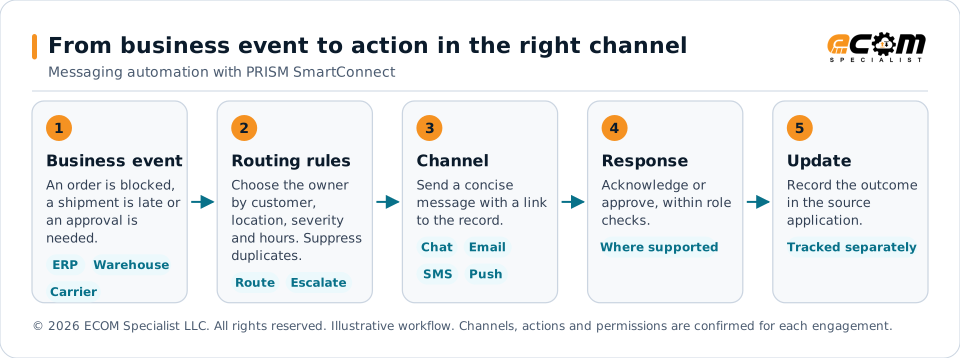
A business event, such as an order exception or a delayed shipment, passes through routing rules to the channel the responsible team uses. Where the platform supports it, an acknowledgment or approval can update the workflow. Message delivery and the completed business action are tracked as separate outcomes.
Example workflows
Make messaging useful across departments
The value of messaging is what happens after the alert. Design each workflow around a business outcome, with a clear owner and a defined path to completion. These examples illustrate how connected conversations can support day-to-day operations.
| Team or situation | Example connected workflow | Business outcome |
|---|---|---|
| Sales and customer service | An order is blocked in the ERP. Send context to the account team in Teams or Slack and link to the record requiring review. | Help the right person address the order before the customer asks. |
| Warehouse and fulfillment | A fulfillment request fails validation. Notify the site team, create a service task and update the originating workflow after correction. | Keep incomplete information from becoming an unattended exception. |
| Transportation and delivery | A carrier reports a delay. Update the service record and prepare a customer notification using the approved channel. | Coordinate internal action and customer communication. |
| Finance and accounting | An invoice does not match a purchase order. Route it for review and record the approved disposition in the finance workflow. | Give reviewers transaction context and a clear next step. |
| Purchasing and suppliers | A supplier acknowledgment is overdue. Notify the buyer and escalate according to agreed timing rules. | Make missing responses visible before they affect operations. |
| HR and employee services | An onboarding event creates follow-up tasks and sends approved reminders to the employee and responsible teams. | Coordinate cross-department handoffs. |
| IT and integration operations | A transaction fails after configured retries. Create an incident, notify the support channel and send a resolution update after recovery. | Connect exception detection with ownership and recovery. |
| Management and operations | Deliver a scheduled summary of open exceptions, aging items, shipment issues or approval backlogs. | Focus attention on work that requires a decision. |
Build a workflow that respects attention
Define which events deserve a message, how duplicate alerts are suppressed, when escalation occurs and how resolution is communicated. Use concise summaries with record links, and keep sensitive details in the authorized source system. Channel delivery status and a completed business action should be tracked as separate outcomes.
Keep people in control
Agree on recipients, permissions, acknowledgment rules, approval authority and exception ownership. Where supported, use delivery callbacks and correlated transaction references to distinguish a sent notification from an acknowledged request or a completed workflow.
Queues, events and streaming
Connect message queues and business events
People need readable notifications. Applications need dependable event exchange. SmartConnect can be scoped to connect your business workflows with enterprise messaging, queueing and event infrastructure, allowing applications to exchange work without requiring every system to process it at the same moment.
Enterprise messaging (4)
Exchange application messages and hand work between business systems.


Cloud queues and notifications (5)
Buffer work, route messages or distribute notifications to downstream applications.
-
 Amazon SQS . Discuss this integration with an ECOM expert.
-
 Amazon SNS . Discuss this integration with an ECOM expert.
-
 Azure Service Bus . Discuss this integration with an ECOM expert.
-
 Azure Queue Storage . Discuss this integration with an ECOM expert.
-
 Google Cloud Pub/Sub . Discuss this integration with an ECOM expert.
Event routing (3)
Route order, inventory, shipment and service events to the appropriate workflow.


Event streaming (6)
Explore continuous operational feeds and multiple consumers of business events.
-
 Apache Kafka . Discuss this integration with an ECOM expert.
-
 Confluent . Discuss this integration with an ECOM expert.
-
 Amazon MSK . Discuss this integration with an ECOM expert.
-
 Azure Event Hubs . Discuss this integration with an ECOM expert.
-
 Apache Pulsar . Discuss this integration with an ECOM expert.
-
 Redpanda . Discuss this integration with an ECOM expert.
Lightweight and device messaging (5)
Explore events from field devices, equipment, connected assets and distributed applications.




Connection patterns (5)
Select the integration method that fits the broker, application and deployment environment.
Design for recovery as well as delivery
A queue or event connection needs agreed rules for acknowledgment, retry timing, failed-message handling, replay, duplicate detection and transaction correlation. Message ordering, retention and delivery guarantees vary by technology and configuration; ECOM confirms these requirements during design.
Use events to coordinate the business
An order-created event can initiate fulfillment. An inventory change can trigger channel updates. A shipment milestone can update customer service and prepare a notification. A failed invoice posting can open an exception for finance. The same event can serve different workflows when routing and access are explicitly configured.
Queue, broker, streaming and device integrations are solution design options, not a statement that every adapter is prebuilt or that SmartConnect includes a hosted messaging service. Required adapters, infrastructure, licensing and operational responsibilities are established in the agreed scope.
Webhooks, REST and the connector SDK on the Universal Connectivity page
Frequently asked questions
Which messaging and collaboration tools can SmartConnect work with?
ECOM discusses team chat and collaboration (such as Slack and Microsoft Teams), mobile and customer messaging, email, communications platforms, and mobile and browser notifications. These are candidate integration targets; availability, supported actions and channel eligibility are confirmed during scoping.
Can people approve something from a chat message?
Where a platform supports the required interaction, an acknowledgment or approval can trigger a controlled workflow update, subject to role checks and the destination application’s rules. Interactive approvals, bots and two-way messaging require explicit implementation scope.
Does customer messaging need anything special?
Yes. Customer messaging depends on consent, provider terms, templates and destination requirements, which ECOM reviews with you during scoping.
Does SmartConnect include a hosted message queue or broker?
No. Queue, broker, streaming and device integrations are solution design options. Required adapters, infrastructure, licensing and operating responsibilities are set in the agreed scope.
How are duplicate or failed messages handled?
A queue or event connection is designed with agreed rules for acknowledgment, retry timing, failed-message handling, replay, duplicate detection and transaction correlation. Delivery guarantees vary by technology and configuration, so ECOM confirms them during design.
Talk to an EDI/API Expert
Tell us which events should reach which teams, and through which channels. ECOM scopes the channel and integration method around your users, process and platform permissions.
Implementation scope determines connector availability and enabled capabilities. Third-party names identify integration targets; all trademarks belong to their respective owners.