
PRISM SmartConnect
PRISM SmartConnect: Connect Apps and Data
Connect the applications that run your business so orders, inventory, shipments and financial data can move where they are needed. PRISM SmartConnect brings application connections, data mapping and transaction controls together to help reduce manual work and improve coordination across your teams.
Why connect your applications
Make your applications work together
When systems operate separately, employees spend time copying data, checking spreadsheets and chasing updates. SmartConnect helps turn those disconnected handoffs into repeatable integration workflows, giving your business a practical foundation for automation.
Reduce repetitive data entry
Move business information between connected applications and reduce the need to rekey the same order, customer or shipment details in multiple systems.
Keep teams aligned
Synchronize the information that sales, operations, finance and customer service need to act on the same business transaction.
Expand as your business changes
Start with a priority workflow, then extend connectivity to additional applications and partners using reusable connection patterns and customer-specific integrations.
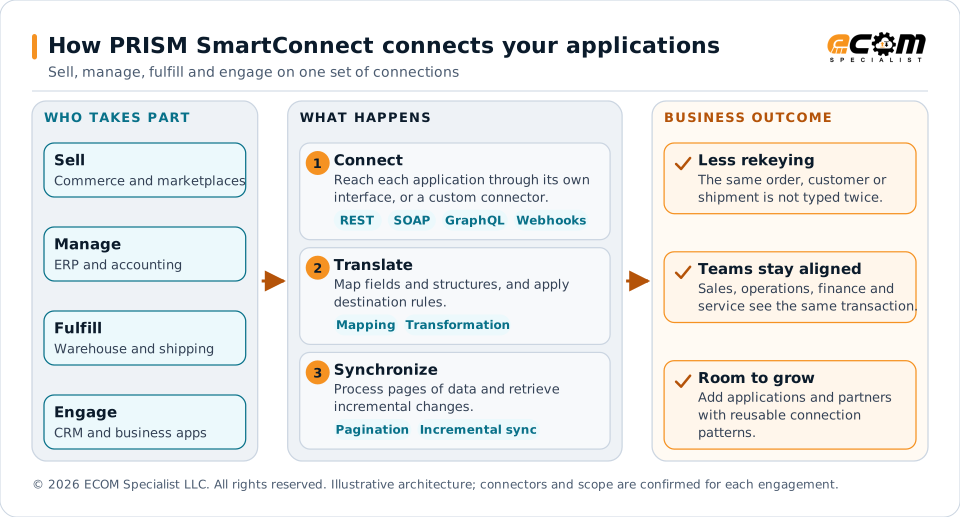
Applications on the left are the ones that sell, manage, fulfill and engage. SmartConnect connects to each through the interface it offers, translates fields and structures into what the destination expects, and keeps the data synchronized. The result is less rekeying and teams working from the same transaction.
Example workflows
Connect the complete business workflow
A customer order touches more than a storefront. SmartConnect helps coordinate the application handoffs behind order processing, fulfillment and customer updates. Each implementation defines the systems, data ownership, timing and business rules needed for your process.
| Business workflow | What can move between systems | Customer value |
|---|---|---|
| Commerce to ERP | Customers, products, pricing, orders and inventory availability | Reduce order reentry and support consistent selling information. |
| ERP to fulfillment | Fulfillment requests, inventory updates, receipts and shipment status | Coordinate warehouse activity with order operations. |
| Shipping to customer service | Rates, labels, tracking and delivery updates where supported | Give teams access to shipment information with fewer manual checks. |
| Operations to finance | Invoices, credits, payments and transaction status | Reduce administrative handoffs and help reconcile transactions. |
| Business apps to analytics | Operational records and transaction feeds | Provide connected data for reporting and analysis. |
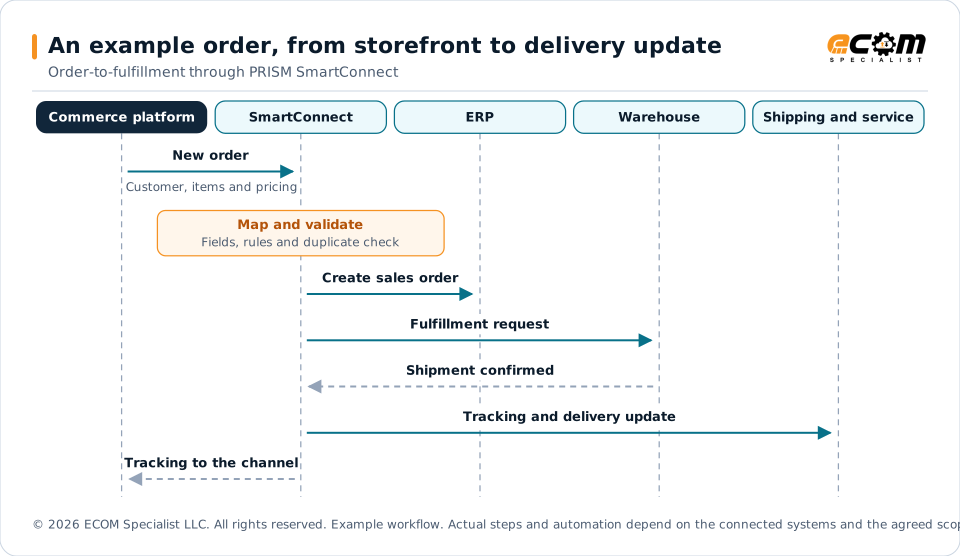
Example order workflow. Actual steps and automation depend on the connected systems and the agreed implementation scope.
One example of a customer order moving through connected applications. The order is validated once, the ERP and the warehouse each receive what they need, and the shipment status flows back to customer service and to the selling channel. Actual steps depend on the connected systems and the agreed implementation scope.
Built around your operating priorities
- Retailers and brands. Connect selling channels with inventory and fulfillment.
- Manufacturers. Coordinate orders, procurement and financial transactions.
- Logistics providers. Exchange fulfillment requests and shipment updates with customer systems.
Your workflow determines the integration design.
Application landscape
Reach across your application landscape
SmartConnect combines application-specific connections with universal API and webhook capabilities. This approach supports a broad integration strategy, including business applications that require a tailored connection.
ERP and accounting
Systems of record for orders, inventory, pricing and finance.
-
 SAP . Read more on this site.
-
 Microsoft Dynamics 365 Business Central . Read more on this site.
-
 Oracle . Read more on this site.
-
 NetSuite . Read more on this site.
-
 Infor . Read more on this site.
-
 Sage . Read more on this site.
-
 Acumatica . Read more on this site.
-
 Epicor . Read more on this site.
-
 QAD . Read more on this site.
-
 QuickBooks . Read more on this site.
-
 Xero . Discuss this integration with an ECOM expert.
-
 Zoho Books . Read more on this site.
Commerce and marketplaces
Selling channels that create orders and need inventory and shipment updates.





Warehouse and shipping
Fulfillment, parcel and transportation applications.



Customer and enterprise apps
Application families discussed during scoping. No single product is implied.
- CRM . See these applications in the connector directory.
- Procurement . See these applications in the connector directory.
- Payments . See these applications in the connector directory.
- Customer service . See these applications in the connector directory.
- Product information . See these applications in the connector directory.
- HR . See these applications in the connector directory.
- Collaboration . See these applications in the connector directory.
- Documents . See these applications in the connector directory.
- Analytics . See these applications in the connector directory.
Application examples show integration opportunities, not a guarantee of prebuilt connector availability. ECOM confirms the exact product, version, API access, supported operations and connector readiness during scoping. Some connections may require custom development or additional testing.
Universal connectivity
A connection approach that fits your systems
REST connectivity supports endpoint, method, header, parameter and payload configuration. SOAP connectivity reaches applications with web services, while GraphQL supports API-based queries and updates. Incoming and outgoing webhooks enable event-driven exchanges. A custom connector SDK provides a path for reusable connections to customer-specific applications.
-
REST API connector
Configure endpoints, methods, headers, parameters and payloads.
-
SOAP connector
Integrate applications exposing SOAP web services.
-
GraphQL connector
Query and update applications through GraphQL APIs.
-
Incoming and outgoing webhooks
Receive events and notify connected applications.
-
Custom connector SDK
Build reusable connectors for customer-specific applications.
-
Authentication profiles
API keys, OAuth 2.0, basic authentication and certificate authentication where required.
-
Pagination and incremental synchronization
Process large datasets and retrieve changes efficiently.
-
Mapping and transformation
Convert source fields and structures into destination requirements.
-
Reliability controls
Handle rate limits, retries, duplicate events and failed transactions.
-
Monitoring and replay
Show transaction status and support controlled reprocessing.
Messaging and collaboration
Connect conversations with business action
Bring important business events into the channels your people already use. A delayed shipment, an order exception, a customer request or an approval should reach the team that can act on it.
Team chat and collaboration
Route order exceptions, fulfillment alerts, service updates and approval requests to the responsible team.
-
 Slack . Discuss this integration with an ECOM expert.
-
 Microsoft Teams . Discuss this integration with an ECOM expert.
-
 Google Chat . Discuss this integration with an ECOM expert.
-
 Cisco Webex . Discuss this integration with an ECOM expert.
-
 Zoom Team Chat . Discuss this integration with an ECOM expert.
-
 Mattermost . Discuss this integration with an ECOM expert.
-
 Rocket.Chat . Discuss this integration with an ECOM expert.
Operations
Operate integrations with visibility and control
Connecting an application is only the beginning. Reliable operations require a way to manage access, process changing data, handle interruptions and understand transaction outcomes.
Authenticate each connection appropriately
Authentication profiles accommodate API keys, OAuth 2.0, basic authentication and certificate authentication where required by the connected service. The chosen method follows the application’s requirements and your implementation scope.
Move the right data in the right structure
Mapping and transformation align source fields and structures with destination requirements. Pagination processes datasets returned across multiple API responses. Incremental synchronization retrieves changes efficiently where the source application supports it.
Handle interruptions and transaction exceptions
Reliability controls address API rate limits, retries, duplicate events and failed transactions. Transaction monitoring and controlled replay help authorized teams review outcomes and reprocess transactions according to the configured workflow.
Get started
Start with a focused integration assessment
Bring ECOM your application list and one business process you want to improve. Together, we identify the data that must move, confirm interface access and connector fit, define exception handling and agree on acceptance criteria before expanding the workflow.
- Name the source system of record and the destination
- Agree the trigger, the expected volume and who owns exceptions
- Confirm interface access and connector fit
- Define the business result and acceptance criteria
Frequently asked questions
What is PRISM SmartConnect?
PRISM SmartConnect brings application connections, data mapping and transaction controls together, so orders, inventory, shipments and financial data can move between the applications that run your business.
Which applications can SmartConnect connect?
The connector directory lists the applications ECOM discusses with customers, from ERP and commerce to warehouse, messaging and enterprise apps. They are integration targets. ECOM confirms the exact product, version, API access, supported operations and connector readiness during scoping, and some connections need custom development or additional testing.
Is every application in the directory a prebuilt connector?
No. The directory shows integration opportunities, not a guarantee of prebuilt connector availability. A tile is labeled Available only after ECOM has confirmed a prebuilt connector for the product and version.
What if my application is not listed?
Universal connectivity (REST, SOAP, GraphQL, webhooks and a custom connector SDK) is how SmartConnect reaches applications that have no branded connector. Whether it fits depends on the application’s interface and your scope.
Does SmartConnect replace EDI?
No. EDI exchanges documents with trading partners. SmartConnect connects the business applications behind those exchanges, and the two can share the same operating practices.
How do we get started?
Bring your application list and one business process you want to improve. ECOM helps define a practical SmartConnect scope for your business.
Talk to an EDI/API Expert
Tell us which applications you need to connect, where manual work slows your team and what a successful result looks like. ECOM will help define a practical SmartConnect integration scope for your business.
Implementation scope determines connector availability and enabled capabilities. Third-party names identify integration targets; all trademarks belong to their respective owners.