
Resources · Procurement networks
cXML documents and versions
cXML is the XML standard behind procurement networks such as SAP Ariba. Buyers and suppliers use it for catalogs, PunchOut shopping, purchase orders, confirmations, ship notices, invoices and payments. This page lists the document types from the cXML Reference Guide, with version milestones up to the current 1.2.071.
- Current version
- 1.2.071 (August 2026)
- Format
- XML (DTD)
- Model
- Request and response
- Maintained at
- cxml.org
- Entries listed
- 53
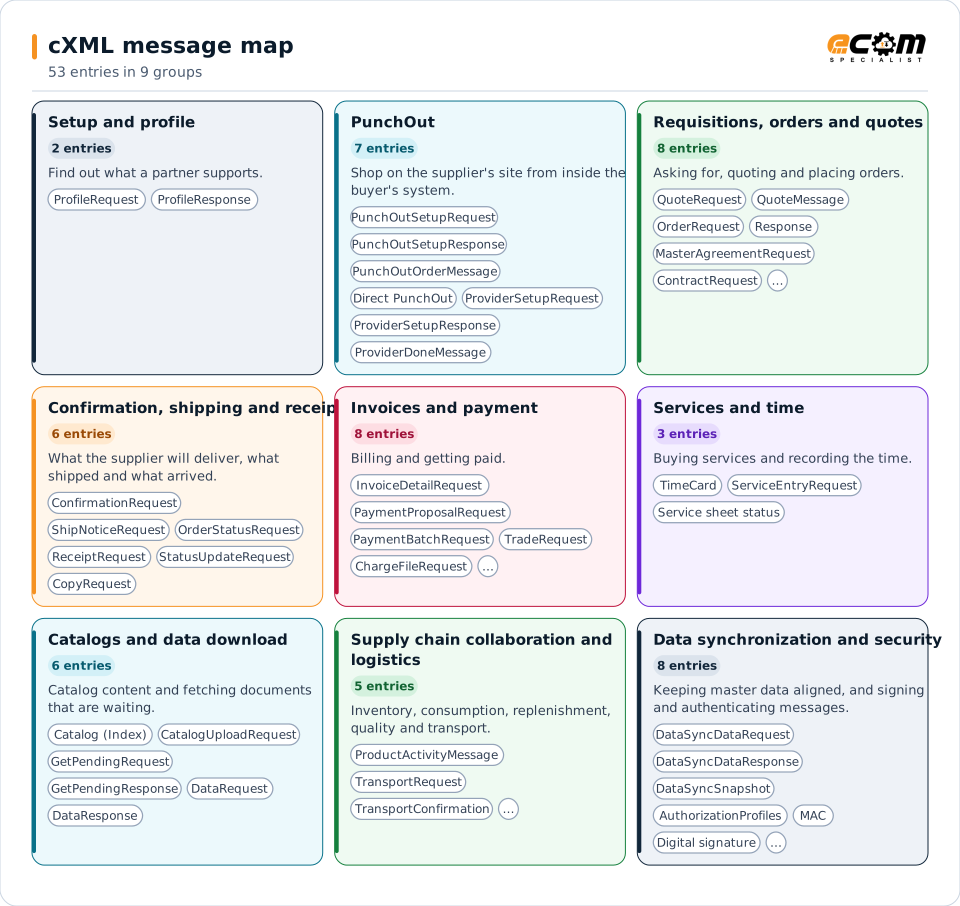
Each colored card is a cXML process. The names on a card are its document types; the tables give each document's purpose, chapter and version notes.
Overview
What cXML is
cXML wraps every document in the same envelope: a header (who is sending, to whom, with which credentials) and either a request, a response or a one-way message. The request names the document, for example OrderRequest, ConfirmationRequest, ShipNoticeRequest or InvoiceDetailRequest, and the response says whether it was accepted.
The standard covers the whole buying cycle. PunchOut lets a buyer shop on a supplier's website from inside the buyer's procurement system. Orders, confirmations, ship notices and invoices are the cXML counterparts of EDI 850, 855, 856 and 810. Further chapters cover quotes, payment, time cards, contracts, service sheets, catalogs, supply chain collaboration, logistics and data synchronization.
ECOM's B2B gateway exchanges cXML with the procurement networks and maps it to the formats your ERP uses, in either direction, so a customer's cXML order can become an ERP sales order and your invoice can go back as an InvoiceDetailRequest.
Suppliers on procurement networks
Receive cXML purchase orders and send confirmations, ship notices and invoices through SAP Ariba and similar networks.
Suppliers with online catalogs
Support PunchOut so buyers shop on your site and return the cart to their system.
Buyers
Send cXML orders and receive invoices and payment documents from suppliers.
Setup and profile
Find out what a partner supports.
| Document | Name | What it is for | Version and notes |
|---|---|---|---|
| ProfileRequest | Profile request | Asks a cXML server which transactions and options it supports. | Chapter 4 |
| ProfileResponse | Profile response | Lists the transactions and options the server supports. | Chapter 4 |
PunchOut
Shop on the supplier's site from inside the buyer's system.
| Document | Name | What it is for | Version and notes |
|---|---|---|---|
| PunchOutSetupRequest | PunchOut setup request | Starts a PunchOut session. | Chapter 5 |
| PunchOutSetupResponse | PunchOut setup response | Returns the start page URL for the session. | Chapter 5 |
| PunchOutOrderMessage | PunchOut order message | Returns the shopping cart to the buyer's system. | Chapter 5 |
| Direct PunchOut | Direct PunchOut | PunchOut without a network hub in between, with authentication options. | Chapter 5 |
| ProviderSetupRequest | Provider setup request | Starts a provider PunchOut. | Chapter 19 |
| ProviderSetupResponse | Provider setup response | Returns the start page of the provider. | Chapter 19 |
| ProviderDoneMessage | Provider done message | Tells the buyer's system the provider session is complete. | Chapter 19 |
Requisitions, orders and quotes
Asking for, quoting and placing orders.
| Document | Name | What it is for | Version and notes |
|---|---|---|---|
| PurchaseRequisitionRequest | Purchase requisition | Sends a requisition. | Chapter 6 |
| QuoteRequest | Request for quotation | Asks a supplier for a quote. | Chapter 10 |
| QuoteMessage | Quote message | The supplier's quote. | Chapter 10 |
| OrderRequest | Purchase order | New, change and delete purchase orders (EDI 850 and 860). | Chapter 7 |
| Response | Response to an OrderRequest | Accepts or rejects the order document. | Chapter 7 |
| MasterAgreementRequest | Master agreement | Sends a master agreement. | Chapter 13 |
| ContractRequest | Contract | Sends a contract. | Chapter 13 |
| ContractStatusUpdateRequest | Contract status update | Updates the status of a contract. | Chapter 13 |
Confirmation, shipping and receipt
What the supplier will deliver, what shipped and what arrived.
| Document | Name | What it is for | Version and notes |
|---|---|---|---|
| ConfirmationRequest | Order confirmation | Accepts, rejects or updates an order (EDI 855). | Introduced in 1.2.001 · Chapter 14 |
| ShipNoticeRequest | Ship notice | Advance ship notice (EDI 856). | Introduced in 1.2.001 · Chapter 14 |
| OrderStatusRequest | Order status request | Asks for the status of an order. | Chapter 14 |
| ReceiptRequest | Receipt | Tells the supplier what the buyer received. | Chapter 14 |
| StatusUpdateRequest | Status update | Later status changes for documents, payments, invoices and integration. | Chapter 14 |
| CopyRequest | Copy request | Copies a document to another party. | Changed in 1.2.011 · Chapter 9 |
Invoices and payment
Billing and getting paid.
| Document | Name | What it is for | Version and notes |
|---|---|---|---|
| InvoiceDetailRequest | Invoice | Invoice with header, order and summary detail (EDI 810). | Introduced in 1.2.006 · Chapter 15 |
| PaymentProposalRequest | Payment proposal | Proposes a payment to a supplier. | Elements deprecated in 1.2.042 · Chapter 11 |
| PaymentRemittanceRequest | Payment remittance | Remittance advice for a payment. | Chapter 11 |
| PaymentBatchRequest | Payment batch | A batch of remittances. | Chapter 11 |
| PaymentRemittanceStatusUpdateRequest | Payment remittance status update | Updates the status of a remittance. | Chapter 11 |
| PaymentReceiptConfirmationRequest | Payment receipt confirmation | Confirms receipt of a payment. | Chapter 11 |
| TradeRequest | Trade request | Trade and payment financing request. | Chapter 11 |
| ChargeFileRequest | Charge file | File of charges. | Chapter 11 |
Services and time
Buying services and recording the time.
| Document | Name | What it is for | Version and notes |
|---|---|---|---|
| TimeCard | Time card | Contractor time reporting, supplier to buyer and buyer to supplier. | Chapter 12 |
| ServiceEntryRequest | Service entry (service sheet) | Records the services delivered against an order. | Chapter 16 |
| Service sheet status | Service sheet status updates | Status of a service sheet. | Chapter 16 |
Catalogs and data download
Catalog content and fetching documents that are waiting.
| Document | Name | What it is for | Version and notes |
|---|---|---|---|
| Catalog (Index) | Catalog definitions | Supplier catalog content: supplier, index, types and subscriptions. | Catalog.dtd added in 1.2.008 · Chapter 17 |
| CatalogUploadRequest | Catalog upload | Uploads a catalog. | Chapter 17 |
| GetPendingRequest | Get pending request | Asks which documents are waiting. | Chapter 18 |
| GetPendingResponse | Get pending response | Lists documents waiting, or none. | Chapter 18 |
| DataRequest | Data request | Downloads waiting data. | Chapter 18 |
| DataResponse | Data response | Returns the data. | Chapter 18 |
Supply chain collaboration and logistics
Inventory, consumption, replenishment, quality and transport.
| Document | Name | What it is for | Version and notes |
|---|---|---|---|
| ProductActivityMessage | Product activity message | Inventory, sales report and consumption details. | Chapter 20 |
| ProductReplenishmentMessage | Product replenishment message | Replenishment header and details. | Chapter 20 |
| QualityNotificationRequest | Quality notification | Quality issues. | Chapter 20 |
| TransportRequest | Transport request | Request for transport. | Chapter 21 |
| TransportConfirmation | Transport confirmation | Confirms the transport. | Chapter 21 |
Data synchronization and security
Keeping master data aligned, and signing and authenticating messages.
| Document | Name | What it is for | Version and notes |
|---|---|---|---|
| DataSyncChangeListRequest | Change list request | Asks for the list of changed data. | Chapter 24 |
| DataSyncChangeListResponse | Change list response | Returns the list. | Chapter 24 |
| DataSyncDataRequest | Data sync data request | Asks for the changed data. | Chapter 24 |
| DataSyncDataResponse | Data sync data response | Returns the data. | Chapter 24 |
| DataSyncSnapshot | Data sync snapshot | Snapshot of the data. | Chapter 24 |
| AuthorizationProfiles | Authorization profiles | Access profiles. | Chapter 24 |
| MAC | Message authentication code | Authenticates a message. | Chapter 22 |
| Digital signature | cXML digital signatures | Signs a cXML document. | Chapter 23 |
Structure
The cXML envelope
Every cXML document is an XML document with a root cXML element. Inside it a Header names the sender, the receiver and any intermediary, with credentials. A Request carries the business document; a Response carries the result and a status code; a Message is a one-way document with no response. Attachments travel in a MIME wrapper around the XML.
cXML is defined by DTDs. The documents are grouped in files such as Fulfill.dtd for confirmations and ship notices, InvoiceDetail.dtd for invoices and Catalog.dtd for catalogs, and a document names the DTD version it follows in its DOCTYPE.
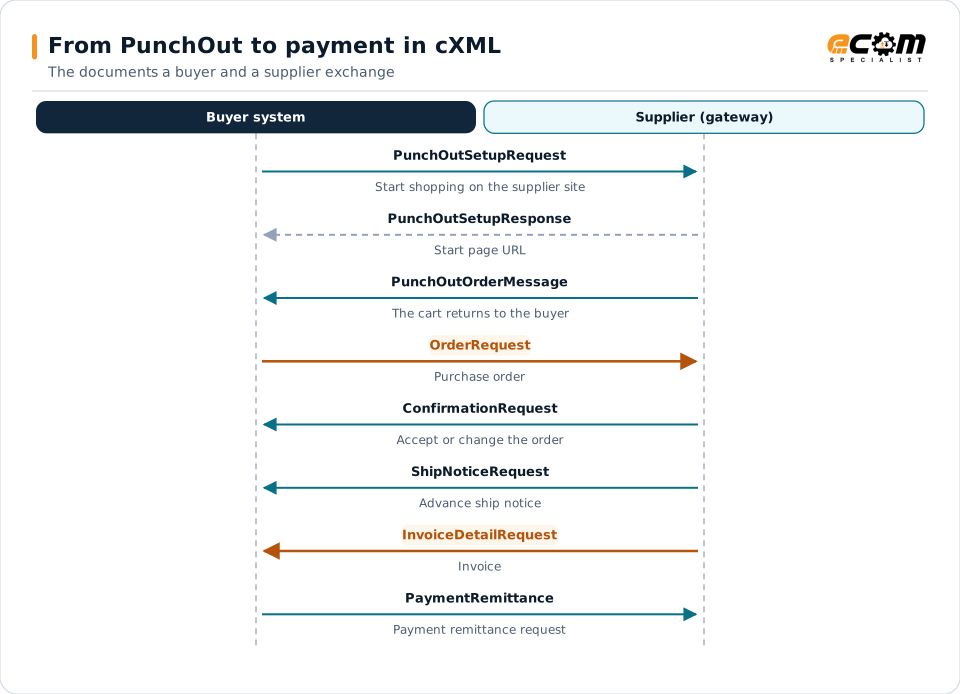
The buyer opens the supplier's catalog through PunchOut and returns the cart. The buyer then sends the order, the supplier confirms and ships, invoices, and the buyer sends the payment remittance.
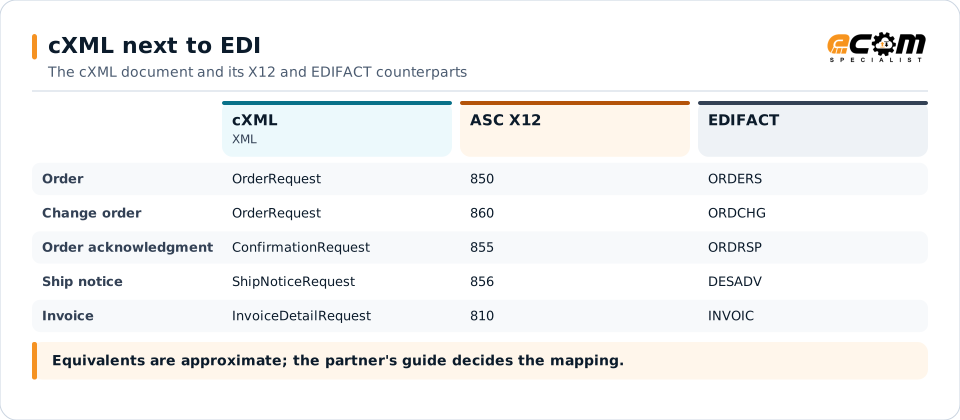
The core purchasing documents have direct EDI equivalents, so the gateway can convert a customer's cXML order to the EDI format your ERP already uses, and back.
Versions
Versions and milestones
The current version is 1.2.071 (cxml.org, August 14, 2026). The 1.2 line adds documents and elements release by release. These are the milestones the cXML sources state.
| Item | Detail |
|---|---|
| 1.0 and 1.1 | The early releases; cxml.org's release notes list what changed since 1.1 |
| 1.2.001 | Fulfill.dtd: ConfirmationRequest and ShipNoticeRequest |
| 1.2.006 | InvoiceDetail.dtd: InvoiceDetailRequest |
| 1.2.007 | The version attribute is deprecated; do not use it in new documents |
| 1.2.008 | Catalog.dtd |
| 1.2.011 | CopyRequest changed |
| 1.2.042 | Some PaymentProposalRequest elements deprecated |
| 1.2.071 | Current version, with the Reference Guide dated August 14, 2026 |
ECOM B2B Gateway
How ECOM handles cXML
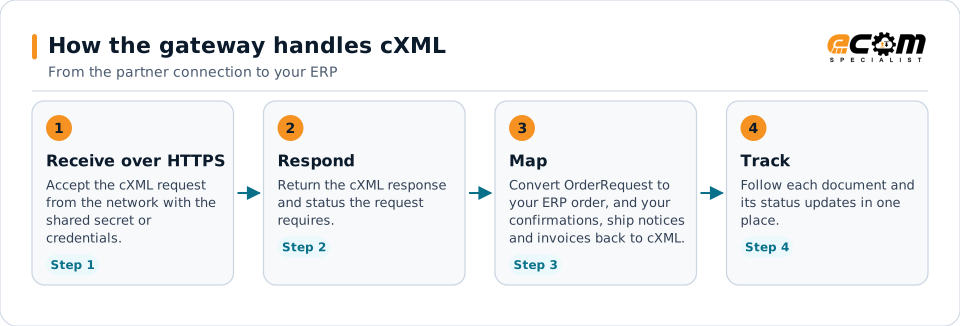
The gateway acts as the supplier's (or buyer's) cXML endpoint: it signs in to the network, receives the documents and returns the responses the standard requires.
- 1
Receive over HTTPS
Accept the cXML request from the network with the shared secret or credentials.
- 2
Respond
Return the cXML response and status the request requires.
- 3
Map
Convert OrderRequest to your ERP order, and your confirmations, ship notices and invoices back to cXML.
- 4
Track
Follow each document and its status updates in one place.
The gateway acts as the supplier's (or buyer's) cXML endpoint: it signs in to the network, receives the documents and returns the responses the standard requires.
Good to know
What this page does and does not cover
- The document list follows the chapters of the cXML Reference Guide 1.2.071. Elements inside each document are in the Guide; this page lists the documents.
- The Guide dates its revision history by month, not by cXML version, and cxml.org's release notes page was not readable. Only version milestones the sources state are shown; the Guide and the DTDs of the version your partner uses are authoritative.
- Procurement networks add their own rules and extensions on top of cXML. Your network's guide, not the standard, decides which documents and fields it requires.
Sources, read November 3, 2026
Frequently asked questions
What is the difference between cXML and EDI?
cXML is XML with a request and response model, mostly used through procurement networks such as SAP Ariba. EDI standards such as X12 and EDIFACT are segment-based. The core documents match: OrderRequest to 850, ConfirmationRequest to 855, ShipNoticeRequest to 856 and InvoiceDetailRequest to 810.
What is PunchOut?
A cXML feature that lets a buyer shop on a supplier's website from inside the buyer's procurement system. The cart comes back to the buyer's system as a PunchOutOrderMessage.
Which cXML version should I use?
The one your network or customer requires. The current version is 1.2.071, and documents name the DTD version they follow. ECOM confirms the version and documents with your partner during scoping.
Can ECOM connect us to SAP Ariba using cXML?
The B2B gateway exchanges cXML with procurement networks and maps it to your ERP. The network's own supplier guide decides which documents, fields and connection settings are used.
Connect a cXML partner
Tell us which cXML messages and versions your partner requires. An ECOM specialist confirms the connection, the map and the test plan.