
PRISM SmartConnect
Universal Connectivity
SmartConnect combines application-specific connections with REST, SOAP, GraphQL and webhook integration. Mapping, reliability controls and monitoring are configured for each application and use case.
What universal connectivity gives you
Ten capabilities, explained by what they do for you
Universal connectivity translates application interfaces into reusable business data flows. Each capability below is described by what it lets your team do.
-
REST API connector
What it doesConfigure endpoints, methods, headers, parameters and payloads.
What it means for youReach an application that has a documented REST API, even when no branded connector exists.
Set the address, the operation, the headers and parameters it needs, and the data to send or receive. The same pattern then serves each workflow that uses that application.
-
SOAP connector
What it doesIntegrate applications exposing SOAP web services.
What it means for youKeep established systems in the workflow instead of replacing them to connect them.
Many ERP, finance and logistics systems still publish SOAP web services. A SOAP connector reaches those services so their data joins the same workflows as newer applications.
-
GraphQL connector
What it doesQuery and update applications through GraphQL APIs.
What it means for youAsk an application for the specific data a workflow needs, and update records through the same interface.
Where an application offers a GraphQL API, a workflow can query exactly the fields it needs and send updates back, without a separate integration for each screen or report.
-
Incoming and outgoing webhooks
What it doesReceive events and notify connected applications.
What it means for youAct when something happens, such as a new order or a shipment update, instead of waiting for the next scheduled check.
Incoming webhooks start a workflow when an application announces an event. Outgoing webhooks tell another application that the workflow has reached a point it should know about.
-
Custom connector SDK
What it doesBuild reusable connectors for customer-specific applications.
What it means for youA path to connect an in-house or specialist application, and reuse that connection across workflows.
When an application is specific to your business, a connector can be built once on the SDK and then reused, rather than rebuilt for every workflow that touches the application.
-
Authentication profiles
What it doesAPI keys, OAuth 2.0, basic authentication and certificate authentication where required.
What it means for youEach connection uses the access method its application requires, set up once and applied wherever the connection is used.
The chosen method follows the application’s requirements and your implementation scope.
-
Pagination and incremental synchronization
What it doesProcess large datasets and retrieve changes efficiently.
What it means for youLarge catalogs and order histories load in manageable pieces, and later runs retrieve only what changed.
Pagination processes datasets that an application returns across multiple responses. Incremental synchronization retrieves changes efficiently where the source application supports it.
-
Mapping and transformation
What it doesConvert source fields and structures into destination requirements.
What it means for youData arrives in the structure the destination expects, so teams stop reformatting it by hand.
Mapping aligns source fields and structures with destination requirements, so an order, customer or shipment from one application is usable in the next.
-
Reliability controls
What it doesHandle rate limits, retries, duplicate events and failed transactions.
What it means for youInterruptions are handled by rule instead of by someone noticing late.
Controls address API rate limits, retries, duplicate events and failed transactions, according to the workflow that is configured for your process.
-
Monitoring and replay
What it doesShow transaction status and support controlled reprocessing.
What it means for youAuthorized teams can see what happened to a transaction and reprocess it deliberately after a fix.
Transaction monitoring shows outcomes. Controlled replay lets authorized teams reprocess transactions according to the configured workflow.
Operations
Operate integrations with visibility and control
Connecting an application is only the beginning. Reliable operations require a way to manage access, process changing data, handle interruptions and understand transaction outcomes. SmartConnect’s capability framework addresses these needs throughout the integration lifecycle.
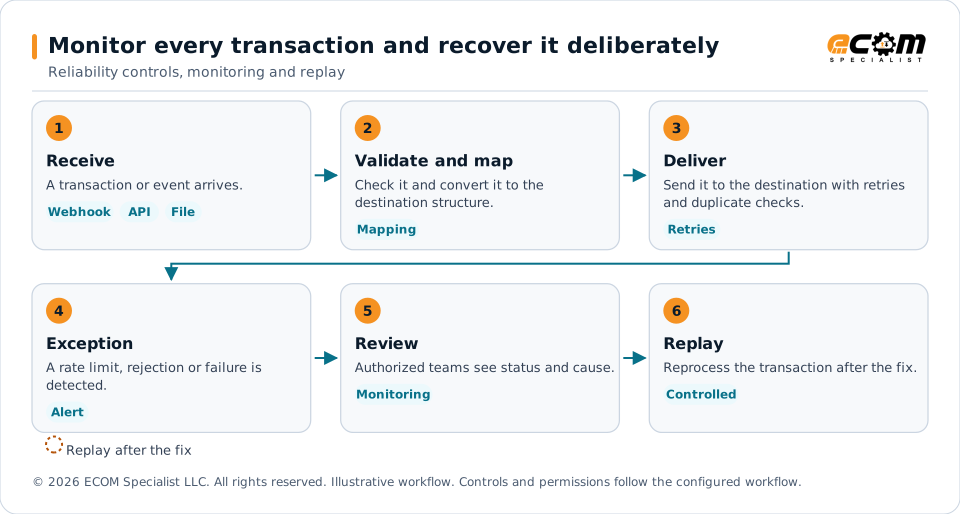
Every transaction has a visible status. Reliability controls handle rate limits, retries and duplicate events. When a transaction still fails, an authorized team reviews it, fixes the cause and replays it under the configured workflow.
Fit
When universal connectivity fits
Universal connectivity suits applications that offer an interface to connect to and no branded connector exists, or where a customer-specific application needs a tailored connection. ECOM assesses interface access, data scope, provider permissions and any custom work before committing to a connection, and some connections may require custom development or additional testing.
The application has an interface
A REST, SOAP or GraphQL API, or webhooks, gives SmartConnect something to connect to.
It is specific to your business
A custom connector built on the SDK can be reused across workflows.
Scope confirms the rest
Interface access, supported operations, permissions and acceptance criteria are agreed before the workflow expands.
Browse the connector directory Messaging and collaboration PRISM SmartConnect overview
Frequently asked questions
What does universal connectivity mean?
It means SmartConnect can connect through the interfaces applications publish (REST, SOAP, GraphQL and webhooks) as well as through application-specific connections, so it is not limited to a list of branded connectors.
Can SmartConnect connect an application that has no connector?
Often it can, when the application offers an API or webhooks, or when a custom connector is built on the SDK. ECOM assesses interface access, data scope, permissions and any custom work first.
Which authentication methods are supported?
Authentication profiles accommodate API keys, OAuth 2.0, basic authentication and certificate authentication where required by the connected service. The chosen method follows the application’s requirements and your implementation scope.
How does SmartConnect handle large amounts of data?
Pagination processes datasets returned across multiple API responses, and incremental synchronization retrieves changes efficiently where the source application supports it.
What happens when a transaction fails?
Reliability controls address API rate limits, retries, duplicate events and failed transactions. Transaction monitoring and controlled replay help authorized teams review outcomes and reprocess transactions according to the configured workflow.
Talk to an EDI/API Expert
Tell us which application you need to reach and what interface it offers. ECOM assesses interface access, data scope, permissions and any custom work before committing to a connection.
Implementation scope determines connector availability and enabled capabilities. Third-party names identify integration targets; all trademarks belong to their respective owners.