
PRISM Reconcile360
Stop matching spreadsheets. Start automating cash application.
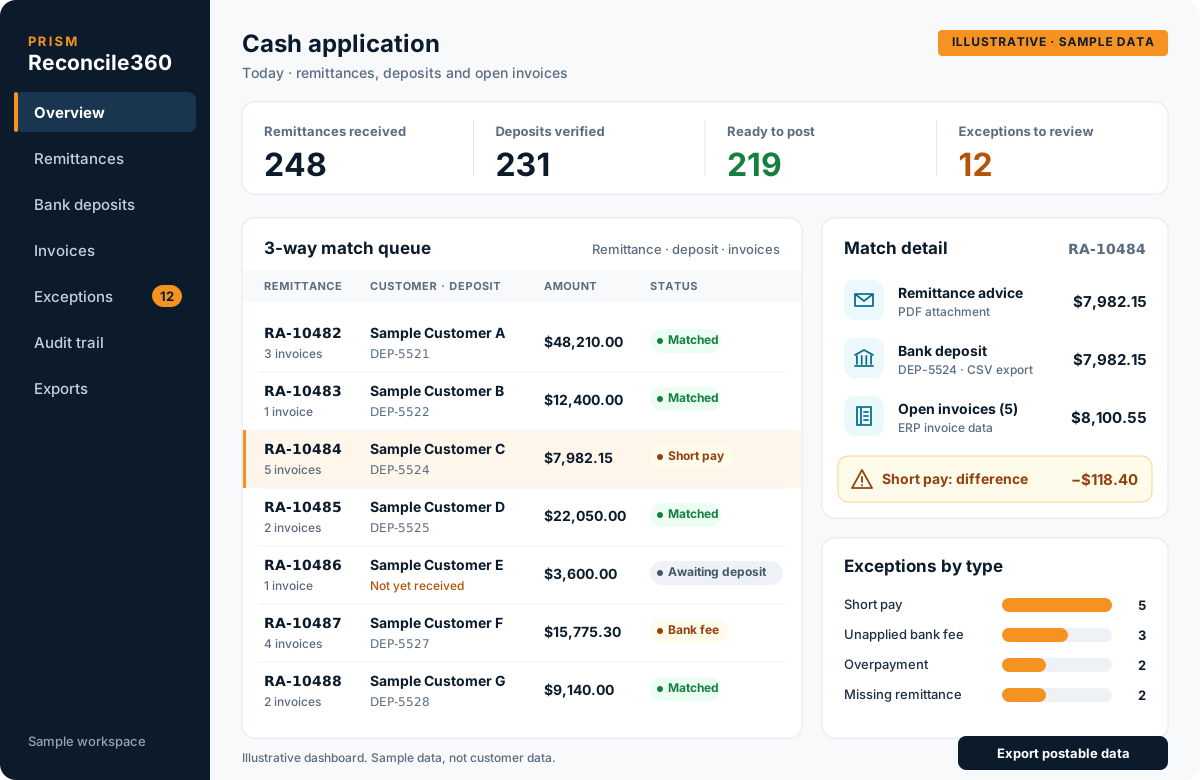
PRISM Reconcile360 connects your remittances, bank deposits and invoices for 3-way matching. It reads remittance advice from emails and PDFs, verifies it against bank deposit data, matches it to open invoices and delivers postable data, so payments can be posted against invoices without manual spreadsheet work.
- 01Remittance ingestion
- 02Bank deposit verification
- 03Invoice matching
Value
What changes when matching is automated
| Operational metric | Manual process | With Reconcile360 |
|---|---|---|
| Match speed | 5–15 mins per remittance | Less than 3 seconds |
| Data accuracy | ~92–95% accuracy | 99.9% automated precision |
| Resource efficiency | High manual data-entry overhead | 80% reduction in manual matching time |
| Cash visibility | Days behind real-time bank deposits | Same-day automated cash application |
Figures from ECOM’s PRISM Reconcile360 product information.
What is 3-way cash reconciliation?
3-way cash reconciliation checks three records against each other before a payment is posted. The remittance advice says what the customer is paying for, the bank deposit shows what actually arrived, and the invoice records show what is open. When all three agree, the payment can be applied with confidence; when they do not, the difference is an exception to review.
The 3-way match
Three records, one decision before anything posts
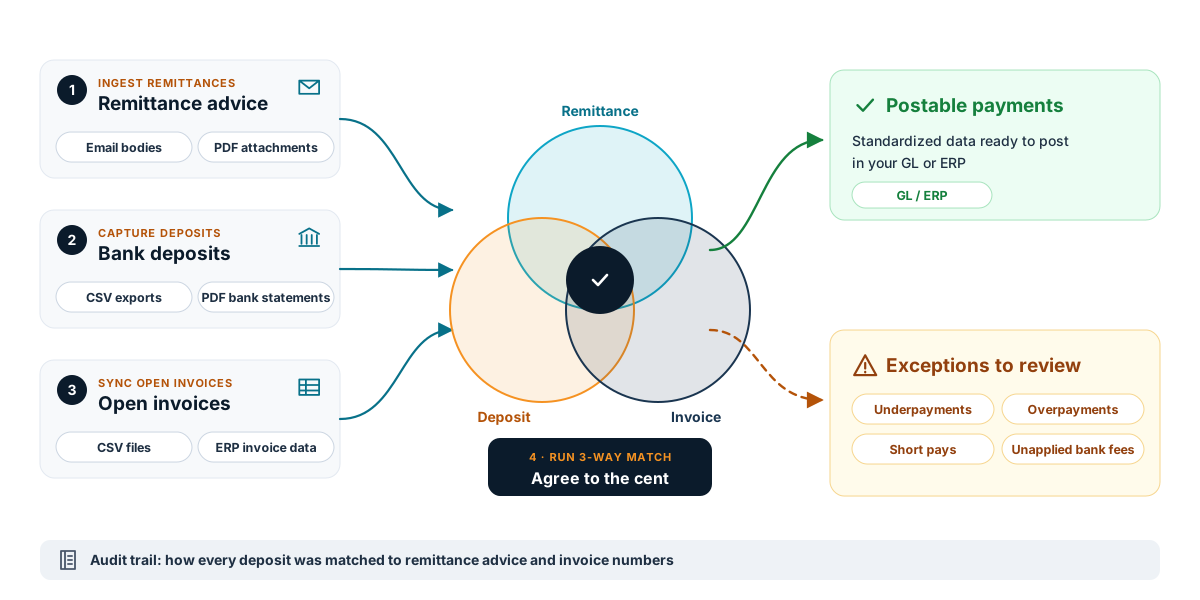
Remittance advice, bank deposits and open invoices are brought into one pipeline. When all three agree to the cent, the payment becomes postable data. When they do not, the difference goes to review.
- 1
Remittance ingestion
Extract payment details, discounts and line-item breakdowns from email bodies and attached PDF remittances.
- 2
Bank deposit verification
Read bank deposit logs from standard CSV exports or PDF bank statements and verify them against the remittance.
- 3
Invoice matching
Connect to customer billing data and open invoice records in CSV or ERP format, and match each payment to the invoices it covers.
- 4
3-way match before posting
Confirm that the remittance advice, the bank deposit and the customer invoice agree to the cent before data goes to your GL or ERP.
Capabilities
After the match: review, record and post
Every payment that does not agree is held for review, and every match is recorded, so posting is fast and explainable.
- 05
Exception handling
Flag underpayments, overpayments, short pays and unapplied bank fees for quick review by your team.
- 06
Audit trail and postable exports
Show how every deposit was matched to remittance advice and invoice numbers, and export standardized data ready to post in your accounting system.
Business benefits
What finance teams gain
- 01
Less manual matching
Remittance emails, bank PDFs and customer CSV files are processed without retyping, so AR teams stop sifting through disjointed documents.
- 02
Fewer posting errors
Every payment is checked against the deposit and the open invoice before posting, which catches typos, missed line items and unapplied credits before they become customer disputes.
- 03
Current cash visibility
Payments are applied as deposits and remittances arrive, so finance sees cash flow sooner.
- 04
Growth without more data entry
Higher payment volumes are handled by the matching pipeline rather than by adding data-entry staff.
Where it fits
Who it is for, and where teams use it
- CFOs and finance directors
- Faster, more reliable cash application and a current view of cash.
- AR managers and controller teams
- Fewer hours spent matching remittances, deposits and invoices by hand, with a clear record of every match.
- Operations leaders with high payment volumes
- Daily payment volumes that grow without adding data-entry work.
Multi-invoice customer payments
Apply one deposit across many invoices using the line items in the customer's remittance advice.
Short pays and deductions
Separate payments that do not match the invoice so they can be researched instead of posted incorrectly.
Remittances in mixed formats
Handle remittance emails, PDF attachments and customer CSV files in the same process.
Frequently asked questions
What are the three parts of the match?
The remittance advice, the bank deposit and the customer invoice. Reconcile360 checks that all three agree before the payment is posted.
Which file formats does Reconcile360 read?
Remittance details from email bodies and PDF attachments, bank deposits from CSV exports and PDF bank statements, and invoice records in CSV or ERP format. Specific bank and customer formats are confirmed during scoping.
Does Reconcile360 post to our ERP?
It delivers standardized, postable data for your GL or ERP. How that data is loaded is agreed during implementation.
What happens when a payment does not match?
Underpayments, overpayments, short pays and unapplied bank fees are flagged as exceptions for your team to review.
Was Reconcile360 previously called CashMatch AI?
Yes. PRISM CashMatch AI has been renamed PRISM Reconcile360.
Talk to an EDI/API Expert about PRISM Reconcile360
Tell us about your partners, systems and goals. We will show you how PRISM and our team can help.