
Resources
Industry standards, message by message
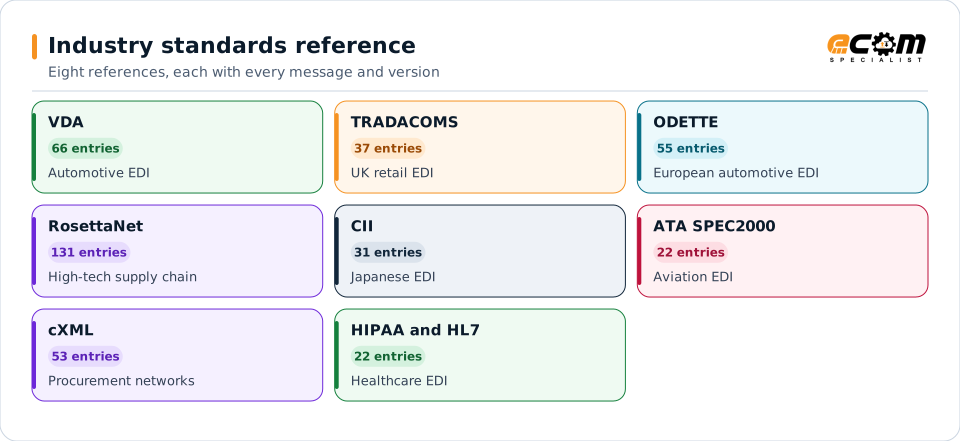
Eight reference pages for the automotive, retail, high-tech, Japanese, aviation, procurement and healthcare standards that trading partners ask for. Each lists every message and version, shows how it is built, and explains how ECOM's B2B gateway handles it.
Each card is one reference page. The colors group them by region and industry: European automotive in cyan and green, UK retail in orange, high tech and procurement in violet and rose, Japan and aviation in navy, and healthcare in green.
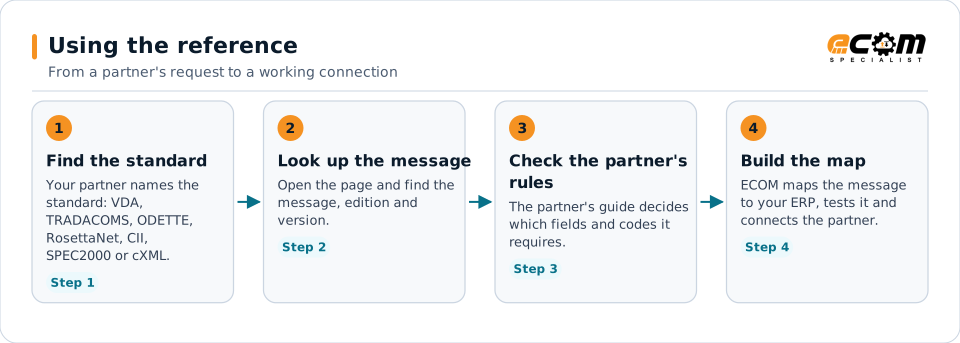
Start from what the partner asked for. The reference shows the message and edition; the partner's own guide has the final word on which parts it uses.
-
Automotive EDI
VDA
Every VDA EDI recommendation by business area, from flat-file 4905 and 4913 to EDIFACT 4984 and 4987, with editions, replacements and how ECOM handles them.
66 entries in 8 groups
Open the VDA reference -
UK retail EDI
TRADACOMS
Every TRADACOMS file and message type for UK retail EDI, from ORDHDR orders and DLCHDR delivery confirmations to INVFIL invoices, and how ECOM handles them.
37 entries in 6 groups
Open the TRADACOMS reference -
European automotive EDI
ODETTE
Every Odette automotive message and recommendation by business area, with EDIFACT base, version and date, plus OFTP2 secure file transfer and how ECOM handles them.
55 entries in 8 groups
Open the ODETTE reference -
High-tech supply chain
RosettaNet
RosettaNet Partner Interface Processes by cluster and segment, from quotes and purchase orders to shipments, invoices, forecasts and manufacturing, and RNIF.
131 entries in 8 groups
Open the RosettaNet reference -
Japanese EDI
CII
The Japanese CII EDI standard: syntax rule versions 1.10 to 3.00, JIS X 7012, the 19 industry message sets (BPIDs), XML/EDI mapping and how ECOM handles them.
31 entries in 4 groups
Open the CII reference -
Aviation EDI
ATA SPEC2000
ATA Spec 2000 for aviation parts and maintenance, chapter by chapter: provisioning, procurement, repair, reliability, warranty and records, and how ECOM handles it.
22 entries in 6 groups
Open the ATA SPEC2000 reference -
Procurement networks
cXML
Every cXML document type by process, from PunchOut and OrderRequest to ShipNotice, InvoiceDetail, payment and catalogs, with version milestones up to 1.2.071.
53 entries in 9 groups
Open the cXML reference -
Healthcare EDI
HIPAA and HL7
What ECOM's B2B gateway covers for healthcare: HL7 2.9 validation, HL7 v2 and FHIR mapping, FHIR prior authorization, MLLP, and X12 HIPAA transactions.
22 entries in 4 groups
Open the HIPAA and HL7 reference -
Coverage
B2B gateway coverage
Every data format, standard, catalog entry and communication protocol the gateway covers, on one page.
See the full coverage
Which standard does your partner need?
Tell us the standard and the partner. An ECOM specialist confirms the messages, versions and connection.