
IBM Sterling Secure Proxy
Keep partners out of your trusted zone with IBM Sterling Secure Proxy
IBM Sterling Secure Proxy sits in the DMZ between external partners and your B2B and file transfer servers. It authenticates partners at the perimeter and opens a separate session inward. ECOM designs the DMZ setup, configures adapters and policies, manages certificates and moves partners over without disruption.
At a glance
- DMZ architecture
- Adapters and policies
- Authentication
- Certificates and keys
- Partner cutover
- Upgrades
The challenge
The perimeter that every partner connection passes through
Every external file transfer passes the DMZ, so a Secure Proxy outage stops every partner at once. Configurations grow over years with one adapter per protocol and per target, policies copied between partners and certificates managed by hand. Upgrades are postponed because the impact on hundreds of partners is hard to judge, and when a partner cannot connect, it is not always clear whether the proxy, the firewall or the internal server is at fault.
- One outage affects every external partner
- Adapters and policies copied without a standard
- Certificates and keys managed by hand
- Hard to tell where a failed connection stopped
Business uses
Where businesses use Secure Proxy
Secure Proxy is used wherever external partners connect to internal B2B or file transfer servers.
Protecting B2B Integrator and File Gateway
Partners connect to the proxy in the DMZ instead of the B2B servers, which stay in the trusted zone.
Connect:Direct with external partners
Banks and partners using Connect:Direct reach internal nodes through the proxy, which checks the node before connecting inward.
Central authentication at the edge
Partner logins can be checked in the DMZ, with IBM's External Authentication Server, before any session reaches internal systems.
Scope
What ECOM's specialists do for Secure Proxy
-
DMZ architecture
Design where the proxy engines, configuration manager and internal servers sit, with ports and firewall rules agreed with your network team.
-
Adapters and policies
Configure adapters for each protocol and target, and netmaps and policies for each partner, to an agreed standard.
-
Authentication
Set up partner authentication, including certificate and key checks and External Authentication Server where it is used.
-
Certificates and keys
Manage certificates, SSH keys and trust stores, and plan renewals before they expire.
-
Partner cutover
Move partners to the proxy in planned waves, with tests for each partner before its connection changes.
-
Upgrades
Plan and run Secure Proxy upgrades, including engines, configuration manager and the internal products they connect to.
-
Troubleshooting and support
Trace failed partner connections across the proxy, firewall and internal server, as a project or an ongoing service.
Integration architecture
How Secure Proxy fits between partners and your servers
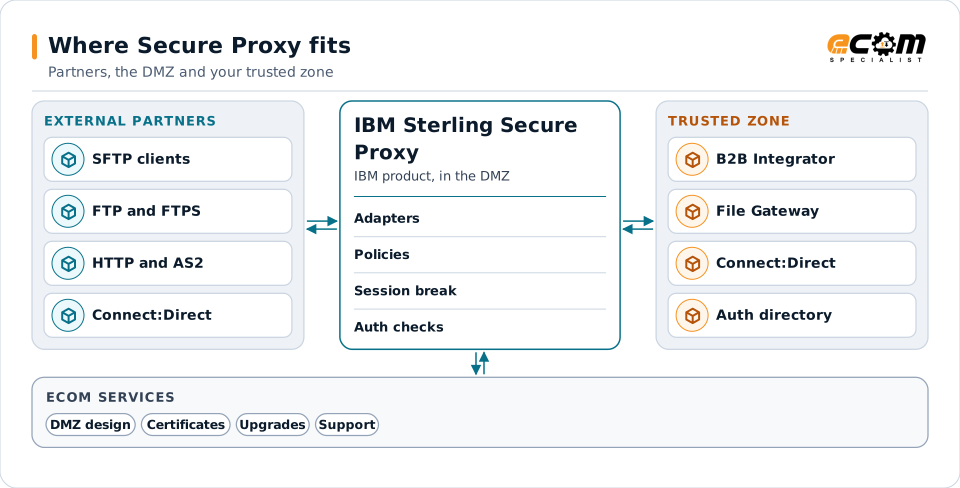
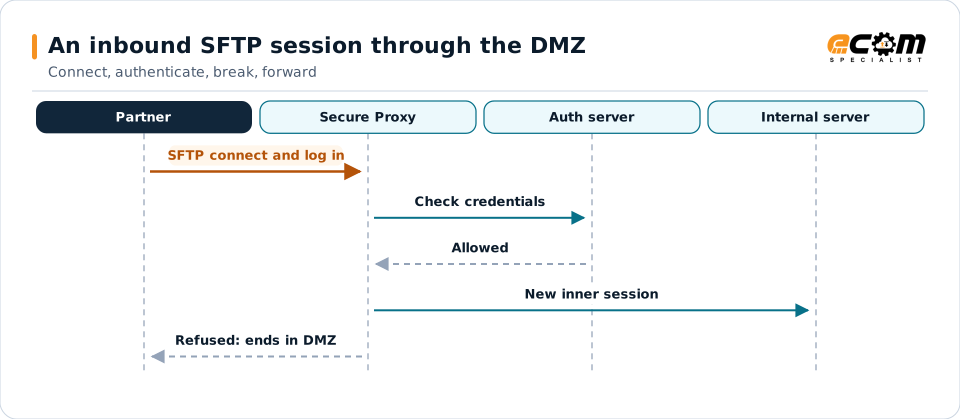
Secure Proxy splits each connection in two. The partner session ends in the DMZ; a new session starts from the proxy to the internal server.
Partners never connect directly to the trusted zone. Secure Proxy authenticates them in the DMZ, then opens its own session inward.
Engines in the DMZ
Proxy engines in the DMZ accept partner connections on the ports and protocols you allow, through adapters configured per protocol.
Configuration manager in the trusted zone
Adapters, netmaps and policies are maintained in the configuration manager inside the trusted zone and pushed to the engines.
Session break
After the partner is checked, the proxy opens its own session to the internal server, so partners never connect inward directly.
Protocols
IBM lists Connect:Direct, SFTP, HTTP and FTP or FTPS among the protocols, with differences between product editions.
External Authentication Server
IBM's External Authentication Server is installed separately and can check certificates and credentials against directories.
Approach
How an engagement runs
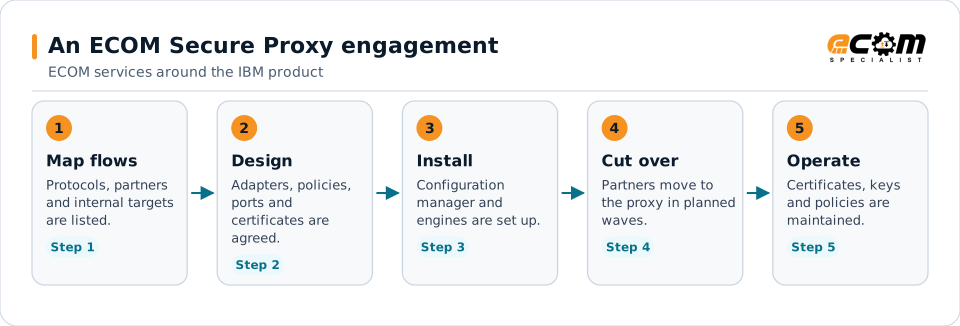
Cutover in waves keeps partners connected: each partner moves to the proxy address only once its adapter, policy and certificates are tested.
- 01
Map the flows
List protocols, partners, internal targets, ports and certificates, and agree which flows are most critical.
- 02
Design
Agree adapter and policy standards, authentication, certificate handling and the cutover plan with your security team.
- 03
Implement and cut over
Configure engines, adapters and policies, then move partners in waves with a test for each partner.
- 04
Hand over or operate
Hand over with documentation, or continue with ECOM administration of certificates, partners and upgrades.
Technical considerations
Technical considerations for Secure Proxy
-
Editions and protocols
IBM documents different editions for inbound and outbound use, and the protocols available differ between them.
-
Firewall changes
Every new protocol or partner range needs firewall rules on both sides of the DMZ, planned with your network team.
-
High availability
Several engines behind a load balancer keep partners connected during maintenance, but add configuration to keep consistent.
-
Internal products
Releases of B2B Integrator, File Gateway and Connect:Direct behind the proxy must stay compatible through upgrades.
Migration and upgrades
Upgrades and moves for Secure Proxy
Because every partner depends on the proxy, upgrades and moves are planned to keep connections running.
Release and edition planning
Check the target release and edition against IBM's support dates, the protocols you use and the internal products behind the proxy.
Parallel engines
Where possible, new engines run beside the old ones and partners move in groups, so a problem affects only a few partners.
From perimeter servers or other proxies
Partners moving from B2B Integrator perimeter servers or another proxy are mapped to adapters and policies and tested one by one.
Support and troubleshooting
Common Secure Proxy issues and where specialists look
A failed partner connection can stop at the firewall, the proxy or the internal server; logs at each point show which.
The session break is the point of the product: the partner session ends at the proxy, and only an authenticated request becomes a new session inside.
| What you see | What specialists check |
|---|---|
| A partner cannot connect at all | Check the firewall rule, the adapter's listening port and whether the engine is running and connected to the configuration manager. |
| The partner connects but login fails | Check the partner's credentials, certificate or SSH key, the policy that applies and the External Authentication Server log if it is used. |
| Login works but the transfer fails | Check the outbound session from the proxy to the internal server, its credentials and the internal server's own logs. |
| Connections fail after a certificate change | Compare the certificates and trust stores on the proxy, the partner and the internal server, including the full chain. |
Why it matters
What you gain
No direct partner access inward
Partners stop at the DMZ, and only authenticated requests reach internal servers.
Consistent partner setup
Standard adapters and policies make partners easier to add, change and support.
Fewer certificate outages
Planned renewals avoid connections failing when a certificate expires.
Fit
When teams call us
Partners connect directly to internal servers
External partners reach B2B or file transfer servers without a proxy, and security wants that closed.
An aging proxy setup
Secure Proxy runs an old release with years of copied adapters and policies.
Recurring partner connection failures
Partners regularly cannot connect and it takes too long to find out why.
Product background
About IBM Sterling Secure Proxy
Highlights from IBM's product page and documentation for Secure Proxy. Editions, protocols and features differ by release; confirm them for your version.
IBM sources, checked November 7, 2026:
- IBM Sterling Secure Proxy product page (opens in a new tab)
- IBM Sterling Connect:Direct Overview, version 6.1 (IBM Documentation) (opens in a new tab)
IBM publishes lifecycle and compatibility information that changes over time. Always confirm current details with IBM for your versions and entitlements. IBM and related product names are trademarks of IBM.
- IBM describes Secure Proxy as a DMZ-based layer that keeps external partners from connecting directly to internal servers
- IBM describes a session break, where a separate session into the trusted zone opens only after the partner is validated
- IBM's product page lists Connect:Direct, SFTP, HTTP and FTP/S among the supported protocols, with differences between editions
- IBM's Connect:Direct documentation describes Secure Proxy checking that the node is authorized before connecting to the internal node
- IBM documents External Authentication Server as a separately installed component used for authentication checks
Why ECOM
Sterling expertise, plus everything around it
Most Sterling problems are not only platform problems. They involve maps, partners, infrastructure and people. ECOM brings these together:
-
IBM Sterling technical expertise
Specialists who install, upgrade, administer and develop on B2B Integrator, File Gateway and Connect:Direct.
-
EDI mapping and partner integration
Maps, business processes and trading partner onboarding, not only platform administration.
-
Managed infrastructure and operations
Hosting, monitoring and day-to-day operations when you want ECOM to run the environment.
-
PRISM integration and visibility
Add ECOM PRISM for visibility, partner connectivity or a future platform path alongside Sterling.
-
EDI Team as a Service
Sterling and EDI specialists who extend your team on an ongoing basis.
-
Automotive integration
Deep automotive integration experience: schedules, ship notices and plant routing on Sterling or PRISM.
Ways to work with ECOM
A defined project
An upgrade, migration, implementation or fix with an agreed scope, plan and hand-over to your team.
Ongoing administration
ECOM specialists share administration and development work with your team through EDI Team as a Service.
Managed service
ECOM operates the environment within an agreed scope and service levels defined in the service agreement.
Each engagement is scoped individually. Not every engagement includes every service listed on this site.
Frequently asked questions
Is ECOM an IBM partner for IBM Sterling Secure Proxy?
Yes. ECOM is an IBM Gold Business Partner with certified delivery for IBM Sterling Secure Proxy.
Why use Secure Proxy instead of opening the firewall to our B2B servers?
Secure Proxy keeps partners in the DMZ. It checks them there and opens its own session inward, so no external partner connects directly to internal servers.
Which protocols does Secure Proxy support?
IBM lists Connect:Direct, SFTP, HTTP and FTP or FTPS, with differences between editions. Check IBM's documentation for your release and edition.
Can partners move to Secure Proxy without disruption?
Yes, with planning. ECOM moves partners in groups, tests each one before its connection changes and keeps the previous path available until the move is confirmed.
Can ECOM manage our proxy certificates and keys?
Yes. ECOM can track certificates and keys with their expiry dates, plan renewals with partners and update the proxy, as a project or an ongoing service.
Talk to an EDI/API Expert about Secure Proxy
Tell us about your partners, protocols and DMZ setup. An ECOM specialist will review them with you and suggest a practical next step.