
X12 transaction guide · Planning
EDI 852 Product Activity Data
The X12 document a retailer sends to share point-of-sale and inventory data with suppliers by item and location.
- Sent by
- Retailer or distributor
- Received by
- Supplier or brand
- Standard
- ANSI ASC X12
- EDIFACT equivalent
- SLSRPT
What is an EDI 852?
The EDI 852 Product Activity Data is the ANSI X12 transaction set retailers and distributors use to share sales and inventory activity with suppliers. It reports quantities sold, on hand, on order and received for each item, often by store or distribution center and for a defined reporting period.
Suppliers use 852 data to understand sell-through, plan replenishment and production, manage promotions and support vendor-managed inventory programs. Because 852 files can be large and detailed, the value comes from loading them into analytics or planning systems rather than reading them manually.
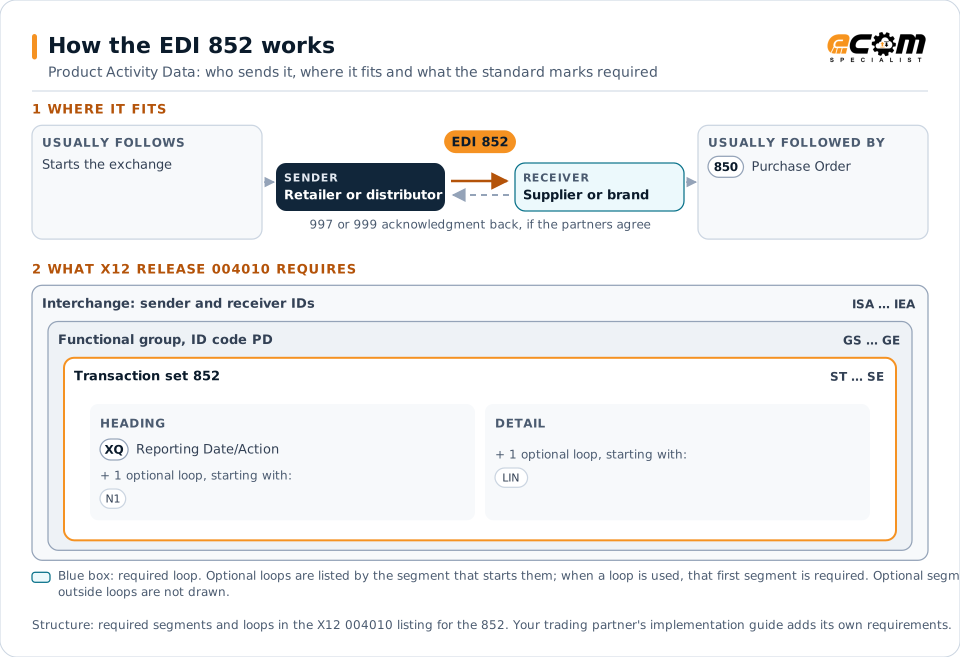
How to read this diagram: the top row shows who sends the 852, to whom, and which documents usually come before and after it. The lower part shows what X12 release 004010 itself requires: the envelopes around the 852 and the segments and loops the standard marks as required, area by area. Optional loops are listed by the segment that starts them rather than drawn in full. This is the standard's minimum, not a trading partner's requirement: each partner's implementation guide usually makes some optional loops mandatory, restricts the codes and may use a different release.
When it is used
- Weekly sales and inventory reporting by store
- Vendor-managed inventory and replenishment planning
- Measuring promotion performance and sell-through
Where it fits in the document flow
Structure
Key segments in the 852
The segments most implementations use, described in plain language. The last column shows what X12 release 004010 itself requires: "Required" marks a segment the standard requires in every 852; "Optional, common" marks a segment the standard leaves optional, or that sits in an optional loop, but that implementations often use. This is the standard's requirement, not your trading partner's: each partner's implementation guide names the release it uses, makes some optional segments mandatory and restricts the values, and requirements can differ between releases. The requirement status comes from one published X12 reference listing and has not been checked against a second source.
| Segment | Name | What it carries | In X12 004010 |
|---|---|---|---|
| XQ | Reporting Date/Action | Report type and the start and end dates of the reporting period. | Required |
| N9 | Reference Identification | References such as the supplier's vendor number. | Optional, common |
| LIN | Item Identification | Product identifiers such as UPC. Each LIN starts the detail for one item. | Optional, common |
| ZA | Product Activity Reporting | Activity type, such as quantity sold or on hand, with quantity and unit of measure. | Optional, common |
| SDQ | Destination Quantity | Quantities by store or location. | Optional, common |
Example
Sample EDI 852
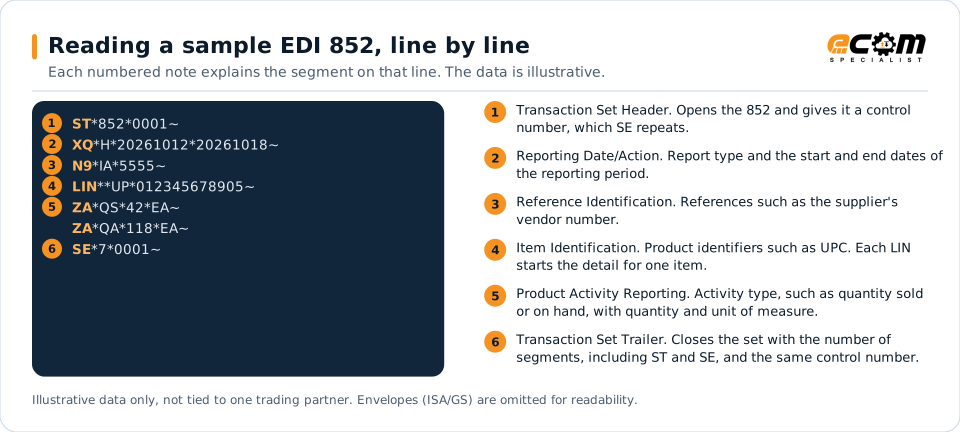
A weekly report for vendor 5555 showing 42 units of one item sold (QS) and 118 units available for shipment or sale (QA) for the reporting period.
Illustrative data only, not tied to one X12 release or trading partner. The interchange (ISA/IEA) and functional group (GS/GE) envelopes are omitted for readability.
ST*852*0001~
XQ*H*20261012*20261018~
N9*IA*5555~
LIN**UP*012345678905~
ZA*QS*42*EA~
ZA*QA*118*EA~
SE*7*0001~The sample is the same one shown above, with a note beside each segment the first time it appears. Segment IDs are highlighted at the start of each line; the fields after them are separated by asterisks, and each segment ends with a tilde.
Avoid problems
Common 852 errors and how to prevent them
Data never used
Many suppliers receive 852s without loading them anywhere. Route them into planning or analytics.
Mixing reporting periods
Each report covers a defined period. Overlapping or missing periods distort sell-through calculations.
Ignoring location detail
Store-level quantities reveal regional differences that totals hide.
Trading partners
Integration guides that include the 852





How ECOM helps
Automate the 852 with ECOM
Industry
Consumer Goods
Retail, distributor, marketplace and direct-channel integration for consumer brands.
Industry
Retail
Retail and eCommerce EDI for suppliers and retailers, from purchase order to payment, with compliance built in.
Solution
Supply Chain Visibility
Track orders, shipments and invoices across partners and catch exceptions early.
EDI 852 FAQs
What is the 852 used for?
Retailers use it to share sales and inventory activity with suppliers, who use it for replenishment, forecasting and promotion analysis.
Is the 852 required by retailers?
It is usually provided by the retailer rather than required from the supplier. Availability varies by retailer and program.
What is the EDIFACT equivalent of the 852?
The closest UN/EDIFACT equivalent is the SLSRPT sales data report message.
More general questions about EDI are answered in the EDI FAQ.
Related transactions
Related planning documents
Need help with the EDI 852?
ECOM maps, tests and monitors X12 documents for your trading partners and integrates them with your ERP.