Retail integration

The Save Mart Companies EDI requirements for suppliers

What The Save Mart Companies publish on their supplier portal about EDI, covering warehouse, vendor-managed inventory, direct store delivery and scan-based trading documents, testing, invoicing and delivery fines.

Overview

Understanding The Save Mart Companies integration

Who this is for: Grocery and consumer goods suppliers shipping to Save Mart, Lucky, FoodMaxx and the company's other banners in Northern and Central California and Northern Nevada.

The Save Mart Companies run a public supplier portal with separate pages for technology and EDI, vendor-managed inventory, direct store delivery, invoice requirements, distribution centers and deduction contacts. A downloadable EDI communications document sets out the transaction list, connection options and testing steps, and specifications for each document are linked from the portal.

The company states that its documents are ANSI X12 version 4010, except the pharmacy 835 at 5010. Warehouse suppliers receive purchase orders and send invoices, and EDI invoices are required. Vendor-managed inventory works the other way round from a normal order: Save Mart sends daily inventory activity on an 852, and the supplier sends an 855 when stock is needed, which acts as an inbound purchase order for the buyer to approve. Direct store delivery suppliers use the 894 through NEX or DEX, and scan-based trading suppliers receive point-of-sale activity.

Setup starts with the buyer's approval and an EDI connection request form. Testing follows a set sequence, and Save Mart warns against resending vendor-managed inventory orders without approval. This guide records what the portal says and when we checked, and lists what we could not confirm.


Requirements at a glance

What The Save Mart Companies publishes for suppliers

The Save Mart Companies publish their EDI rules on a public supplier portal and in a downloadable EDI communications document. Transactions are ANSI X12 version 4010, except the pharmacy 835 at version 5010. Separate specifications are linked for the 850, 810, 820, 852 (VMI and scan-based trading), 855, 835 and 894. We checked the portal on October 31, 2026.

The Save Mart Companies supplier portal

EDI, VMI, DSD, invoice, distribution center and deduction pages, with document specifications and setup forms to download.

Public Official site

Business units and channels

The Save Mart Companies business units suppliers trade with

Large retailers often handle each business unit or channel as a separate EDI relationship, with its own documents, guides and setup. Confirm with The Save Mart Companies which of these you supply before mapping.

Stores and distribution centers

Save Mart

Full-service grocery stores in Northern and Central California and Northern Nevada.

Confirmed on a public The Save Mart Companies page

Stores and distribution centers

S-Mart Foods

Full-service grocery stores in Stockton and Lodi, California.

Confirmed on a public The Save Mart Companies page

Stores and distribution centers

Lucky

Full-service grocery stores in the San Francisco and East Bay area.

Confirmed on a public The Save Mart Companies page

Stores and distribution centers

FoodMaxx

One of the company's two price-impact divisions, in a no-frills format.

Confirmed on a public The Save Mart Companies page

Stores and distribution centers

Maxx Value Foods

Limited-selection stores with aggressive pricing.

Confirmed on a public The Save Mart Companies page

Stores and distribution centers

Warehouse (distribution centers)

Deliveries to the Roseville, Vacaville and Yosemite Wholesale (Merced) distribution centers, with EDI 810 invoices required.

Documents: 850,810,820,997

Confirmed on a public The Save Mart Companies page

Stores and distribution centers

Vendor-managed inventory

Suppliers who manage warehouse stock to agreed levels, reading daily 852 activity and sending 855 orders.

Documents: 852,855,850

Confirmed on a public The Save Mart Companies page

Stores and distribution centers

Direct store delivery

Store deliveries checked in through NEX or receiver scan; all product, even free product, goes through the DSD system.

Documents: 894

Confirmed on a public The Save Mart Companies page

Other channel

Scan-based trading

Consignment suppliers who receive point-of-sale activity on an 852.

Documents: 852

Confirmed on a public The Save Mart Companies page

Other channel

Pharmacy claims

Health care claim payment and advice on the 835, at X12 version 5010.

Documents: 835

Confirmed on a public The Save Mart Companies page

Workflows

Typical The Save Mart Companies business workflows

The steps summarize the documents below. Where a step is not in The Save Mart Companies's published documents, it reflects common practice.

Warehouse order-to-cash

  1. 1Receive 850 purchase order
  2. 2Return 997 within 24 hours
  3. 3Ship to the distribution center
  4. 4Send 810 invoice
  5. 5Receive 820 or ACH payment

Vendor-managed inventory

  1. 1Receive daily 852 activity
  2. 2Send 855 inbound order
  3. 3Buyer approves or adjusts
  4. 4Ship to the distribution center
  5. 5Send 810 invoice

Documents and APIs

The Save Mart Companies documents by program

Every document this guide names, with the program it applies to and its status. Required, optional and conditional come from The Save Mart Companies's published documents cited below; documents marked general guidance are common in this industry but not confirmed for The Save Mart Companies.

DocumentNameDirectionProgramStatusPurpose
850 Purchase Order You receive from The Save Mart Companies Warehouse (distribution centers), Vendor-managed inventory Named; level not stated Warehouse purchase orders, and an optional echo after a VMI order is approved.
810 Invoice You send to The Save Mart Companies Warehouse deliveries Required Required for warehouse deliveries. Any other method may delay payment.
852 Product Activity Data You receive from The Save Mart Companies Vendor-managed inventory, Scan-based trading Named; level not stated Daily warehouse inventory for VMI suppliers, and point-of-sale activity for scan-based trading.
855 VMI Inbound Purchase Order You send to The Save Mart Companies Vendor-managed inventory Named; level not stated The VMI supplier's order, based on agreed inventory levels, for the buyer to approve.
894 Delivery/Return Base Record You send to The Save Mart Companies Direct store delivery Named; level not stated Direct store delivery invoicing through NEX or DEX.
820 Remittance Advice You receive from The Save Mart Companies Warehouse OptionalMarked optional on the supplier portal Optional payment detail; ACH with spreadsheet detail is the alternative.
997 Functional Acknowledgment Both directions Warehouse (distribution centers) Named; level not stated Save Mart sends acknowledgments and expects to receive 997s.
835 Health Care Claim Payment/Advice Not stated Pharmacy claims Named; level not stated
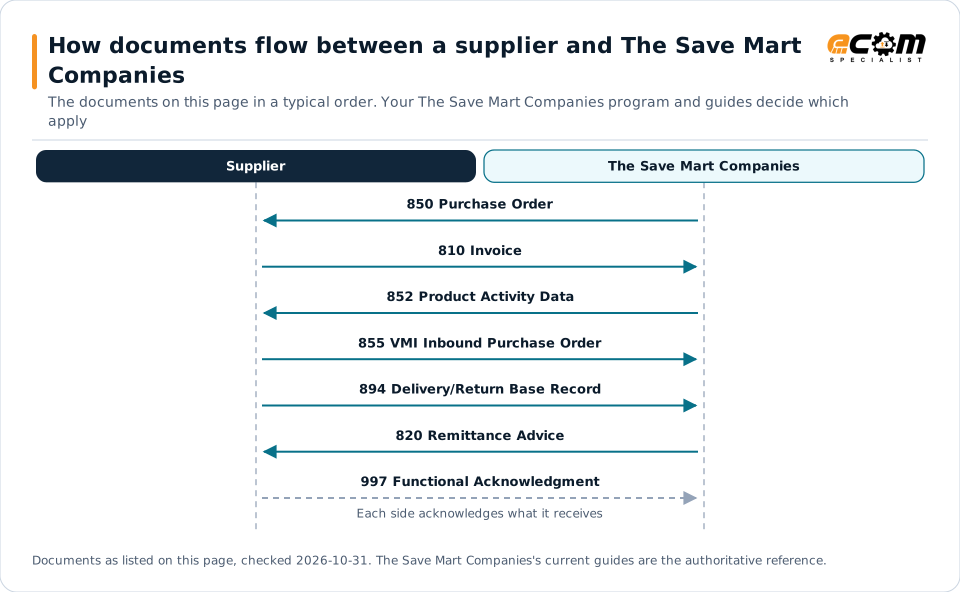
How documents flow between a supplier and The Save Mart CompaniesSequence diagram of EDI documents between a supplier and The Save Mart Companies: 850 Purchase Order from The Save Mart Companies, 810 Invoice to The Save Mart Companies, 852 Product Activity Data from The Save Mart Companies, 855 VMI Inbound Purchase Order to The Save Mart Companies, 894 Delivery/Return Base Record to The Save Mart Companies, 820 Remittance Advice from The Save Mart Companies and 997 Functional Acknowledgment to The Save Mart Companies.How documents flow between a supplier and The Save MartCompaniesThe documents on this page in a typical order. Your The Save Mart Companies program and guides decide whichapplySupplierThe Save Mart Companies850 Purchase Order810 Invoice852 Product Activity Data855 VMI Inbound Purchase Order894 Delivery/Return Base Record820 Remittance Advice997 Functional AcknowledgmentEach side acknowledges what it receivesDocuments as listed on this page, checked 2026-10-31. The Save Mart Companies's current guides are the authoritative reference.
How documents flow between a supplier and The Save Mart CompaniesSequence diagram of EDI documents between a supplier and The Save Mart Companies: 850 Purchase Order from The Save Mart Companies, 810 Invoice to The Save Mart Companies, 852 Product Activity Data from The Save Mart Companies, 855 VMI Inbound Purchase Order to The Save Mart Companies, 894 Delivery/Return Base Record to The Save Mart Companies, 820 Remittance Advice from The Save Mart Companies and 997 Functional Acknowledgment to The Save Mart Companies.How documents flow between asupplier and The Save MartCompaniesThe documents on this page in a typical order.Your The Save Mart Companies program andguides decide which applySupplierThe Save MartCompanies850 Purchase Order810 Invoice852 Product Activity Data855 VMI InboundPurchase Order894 Delivery/Return BaseRecord820 Remittance Advice997 FunctionalAcknowledgmentEach side acknowledges whatit receivesDocuments as listed on this page, checked2026-10-31. The Save Mart Companies's currentguides are the authoritative reference.

Read from top to bottom. Solid arrows are documents The Save Mart Companies names in its own public documentation; the dashed arrow is the acknowledgment. The order is typical, not a The Save Mart Companies rule: programs such as vendor direct to consumer use their own documents and timing.

Expand diagram Download SVG

Document by document

What each The Save Mart Companies document needs

For each document: what it does for you as the supplier, what The Save Mart Companies's own documents say about it (with the source and its date), and general EDI practice that helps, labelled as such. Your The Save Mart Companies mapping guide for your version is the final word on fields and codes.

850

Purchase Order

You receive · Warehouse; optional echo for approved VMI orders

Warehouse orders arrive as an X12 4010 850. During testing, Save Mart sends test orders of one case of every item.

What The Save Mart Companies states

How the 850 works in X12

852

Product Activity Data

You receive · Vendor-managed inventory and scan-based trading

VMI suppliers receive warehouse inventory levels daily; scan-based trading suppliers receive point-of-sale activity.

What The Save Mart Companies states

General EDI practice

  • Load each 852 automatically and alert when one is missing, since VMI orders depend on it.

How the 852 works in X12

855

VMI Inbound Purchase Order

You send · Vendor-managed inventory

In VMI the supplier sends the order. The 855 is based on inventory levels agreed with the buyer, who approves it or suggests changes.

What The Save Mart Companies states

General EDI practice

  • Give every 855 a unique reference and block automatic resends in your EDI software.

How the 855 works in X12

810

Invoice

You send · Warehouse

EDI invoices are required for warehouse deliveries, with strict rules on what can share an invoice.

What The Save Mart Companies states

How the 810 works in X12

894

Delivery/Return Base Record

You send · Direct store delivery

Direct store delivery is checked in through NEX or receiver scan at the store's back door.

What The Save Mart Companies states

How the 894 works in X12

997

Functional Acknowledgment

Both directions

Save Mart sends acknowledgments and expects 997s back.

What The Save Mart Companies states

How the 997 works in X12

Deductions

What The Save Mart Companies charges for EDI problems

The fines Save Mart publishes are for distribution center deliveries; the portal lists no charge specifically for EDI errors. Deductions are identified by a prefix or suffix that tells you which team or audit firm to contact.

ProblemCharge stated by The Save Mart CompaniesSource
Late delivery to a distribution centerFines beginning at $300 for each late loadSource: The Save Mart Companies, Distribution Centers, Appointments and Receiving Times, Oct 31, 2026
Late delivery without prior notification$100Source: The Save Mart Companies, Distribution Centers, Appointments and Receiving Times, Oct 31, 2026
Missed scheduled delivery appointment$300Source: The Save Mart Companies, Distribution Centers, Appointments and Receiving Times, Oct 31, 2026
Rescheduled delivery arriving more than 48 hours after the original time$300Source: The Save Mart Companies, Distribution Centers, Appointments and Receiving Times, Oct 31, 2026
Truck received after the scheduled timeMay cover distribution center overtime labor costsSource: The Save Mart Companies, Distribution Centers, Appointments and Receiving Times, Oct 31, 2026

General practice for handling deductions

  • Use the deduction prefix (DEAL, PRC, CPN, OTH, PRGAUDIT, PAG) or suffix (APAUDIT, VRAUDIT) to route each dispute to the right contact.

Onboarding

Getting set up with The Save Mart Companies, step by step

Steps with a source come from The Save Mart Companies's own onboarding material; the others are general practice that keeps the project on track.

  1. Get your buyer's approval

    Suppliers interested in EDI contact their Save Mart buyer for approval.

    Source: The Save Mart Companies, Vendor Managed Inventory (VMI), Oct 31, 2026
  2. Submit the EDI Connection Request Form

    Send it to EDI support with your warehouse vendor account, accounts payable vendor and receiving facilities, or a recent purchase order number; the supplier name alone is not accepted.

    Source: The Save Mart Companies, EDI Communications at The Save Mart Companies, Oct 31, 2026
  3. Test the purchase order

    Save Mart sends a test 850; return a 997 and verify the UPCs.

    Source: The Save Mart Companies, EDI Communications at The Save Mart Companies, Oct 31, 2026
  4. Test the invoice

    Self-test the 810 on the web testing portal and return the test invoice in the same month as the test order.

    Source: The Save Mart Companies, EDI Communications at The Save Mart Companies, Oct 31, 2026
  5. Full production

    Accounts payable approves full production once the invoice test passes.

    Source: The Save Mart Companies, EDI Communications at The Save Mart Companies, Oct 31, 2026
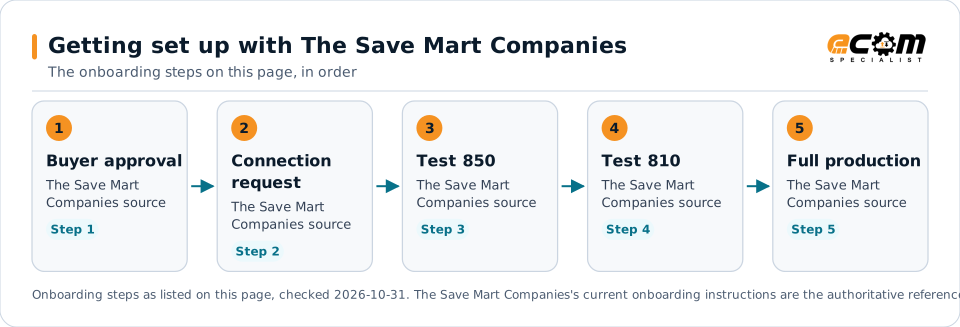
Getting set up with The Save Mart CompaniesFlow diagram of 5 onboarding steps with The Save Mart Companies: Get your buyer's approval, Submit the EDI Connection Request Form, Test the purchase order, Test the invoice and Full production.Getting set up with The Save Mart CompaniesThe onboarding steps on this page, in order1Buyer approvalThe Save MartCompanies sourceStep 12ConnectionrequestThe Save MartCompanies sourceStep 23Test 850The Save MartCompanies sourceStep 34Test 810The Save MartCompanies sourceStep 45Full productionThe Save MartCompanies sourceStep 5Onboarding steps as listed on this page, checked 2026-10-31. The Save Mart Companies's current onboarding instructions are the authoritative reference.
Getting set up with The Save Mart CompaniesFlow diagram of 5 onboarding steps with The Save Mart Companies: Get your buyer's approval, Submit the EDI Connection Request Form, Test the purchase order, Test the invoice and Full production.Getting set up with The SaveMart CompaniesThe onboarding steps on this page, in order1Buyer approvalThe Save Mart Companies sourceStep 12Connection requestThe Save Mart Companies sourceStep 23Test 850The Save Mart Companies sourceStep 34Test 810The Save Mart Companies sourceStep 45Full productionThe Save Mart Companies sourceStep 5Onboarding steps as listed on this page, checked2026-10-31. The Save Mart Companies's currentonboarding instructions are the authoritativereference.

Read left to right, or top to bottom on a phone. 5 of the 5 steps come from The Save Mart Companies's own published material and are marked "The Save Mart Companies source"; the rest are general practice. Week numbers are given only where The Save Mart Companies states them.

Expand diagram Download SVG

Verification

What we checked, and where

Each statement below shows its source and the date we checked it. Statements we could not confirm from an official The Save Mart Companies source are labelled as such.

TopicStatementEvidenceChecked
StandardsSave Mart's transactions are ANSI X12 version 4010, except the 835, which is version 5010.Confirmed on a public The Save Mart Companies pageOct 31, 2026
PaymentsEDI 810 invoices are required; any other method may delay payment processing.Confirmed on a public The Save Mart Companies pageOct 31, 2026
DocumentsSuppliers must not resend an 855 without prior approval from Save Mart's EDI support, because duplicate 855s may crash the warehouse system.Confirmed on a public The Save Mart Companies pageOct 31, 2026
OnboardingSuppliers interested in EDI must contact their Save Mart buyer for approval before setup.Confirmed on a public The Save Mart Companies pageOct 31, 2026
ConnectivityConnections are by VAN through Save Mart's VAN partner, direct through three named EDI service providers, AS2 hosted by the VAN partner, or secure FTP as the final option.Confirmed on a public The Save Mart Companies pageOct 31, 2026
Shipping and labelsLate distribution center deliveries may be fined from $300 per late load.Confirmed on a public The Save Mart Companies pageOct 31, 2026

Available only after supplier login

The Save Mart Companies keeps these behind its supplier portal. This guide does not reproduce them; use your own The Save Mart Companies access or ask your The Save Mart Companies contact.

  • None of the EDI pages we read needed a login; supplier-specific setup details come from Save Mart's EDI support during testing

Not confirmed

We could not confirm these from an official public source, so we do not state them as The Save Mart Companies requirements.

  • Whether every warehouse supplier must use the 820, which the portal marks optional
  • Any charge specifically for EDI non-compliance; the portal lists none
  • How long testing takes from the connection request to full production
  • The contents of the supplier onboarding checklist, which we could not read

Checklist

The Save Mart Companies EDI readiness checklist

  1. Get your Save Mart buyer's approval for EDI setup.
  2. Submit the EDI Connection Request Form with your vendor account and a recent purchase order number.
  3. Name any third-party EDI provider or broker on the form.
  4. Return a 997 for every Save Mart document within 24 hours.
  5. Return the test invoice in the same month as the test purchase order.
  6. Never resend an 855 without written approval from EDI support.
  7. Send one invoice per distribution center and purchase order, with valid UPCs.
  8. Book and keep distribution center appointments to avoid delivery fines.

Connectivity and contacts

How The Save Mart Companies connects with suppliers

What The Save Mart Companies's public documents say about networks and setup, and the department contacts it publishes for suppliers. Connection credentials and trading-partner IDs are exchanged with The Save Mart Companies during setup and are never shown on this page.

What The Save Mart Companies states about connecting

Department contacts The Save Mart Companies publishes

Listed as The Save Mart Companies published them. These are The Save Mart Companies's contacts, not ECOM's; check the source for the current details.

Avoid these

Common mistakes with The Save Mart Companies EDI

Resending a VMI order

A duplicate 855 may crash Save Mart's warehouse system; resend only with written approval from EDI support.

Source: The Save Mart Companies, Vendor Managed Inventory (VMI), Oct 31, 2026

Identifying yourself by name only

The connection request needs a vendor account or a recent purchase order number; the supplier name alone is not accepted.

Source: The Save Mart Companies, EDI Communications at The Save Mart Companies, Oct 31, 2026

Combining distribution centers on one invoice

Each distribution center and purchase order needs its own invoice.

Source: The Save Mart Companies, Invoice Requirements, Oct 31, 2026

Missing the test invoice window

The test invoice must come back in the same month as the test purchase order, and test orders are removed at the start of each month.

Source: The Save Mart Companies, EDI Communications at The Save Mart Companies, Oct 31, 2026

Connectivity

Your options for connecting to The Save Mart Companies

  • Value-added network

    The EDI communications document names Save Mart's VAN partner.

    From The Save Mart Companies's published documents

  • Direct connections, AS2 and secure FTP

    Direct connections are listed through three named EDI service providers; Save Mart's VAN partner hosts AS2, and secure FTP is the final option.

    From The Save Mart Companies's published documents

  • Save Mart supplier portal

    Public pages for EDI, VMI, DSD, invoicing, distribution centers and deductions, with document specifications to download.

    From The Save Mart Companies's published documents

Challenges

Common integration challenges

  • VMI orders flow from the supplier

    The supplier reads the daily 852 and sends 855 orders, so inventory logic and approvals must run reliably every day.

  • No duplicate 855s

    Save Mart says duplicate 855s may crash its warehouse system and forbids resending one without approval.

  • Delivery timing fines

    Late, missed or rescheduled distribution center deliveries carry fines of $100 to $300, so ship and appointment data must line up.

Automation options for The Save Mart Companies suppliers

Four ways to automate. One foundation.

The Save Mart Companies's requirements on this page cover the 850, 810, 852, 855, 894, 820 and 997. ECOM helps you automate them, meet The Save Mart Companies's labeling and ship notice requirements, and see what needs action. The Save Mart Companies sets its program's rules; ECOM confirms which options fit yours.

PRISM Supply Chain Automation Foundation

One platform beneath every option. Use one, or combine them for different partners and documents.

Compliance and actionable visibility

Connect order processing, shipping documentation, trading partner requirements, and performance monitoring through one coordinated workflow. These capabilities help teams improve shipment accuracy, reduce manual work, address compliance risks, and respond to exceptions before they affect customers.

Discuss Your Trading Partner Requirements

Next step

Get help with your The Save Mart Companies program

Each request goes to an ECOM EDI specialist with The Save Mart Companies's name attached, so the reply starts from your program.

  • Review The Save Mart Companies's requirements

    Send us The Save Mart Companies's guide or your program details; we explain the documents, rules and options for meeting them.

    Request a requirements review
  • Connect The Save Mart Companies to your ERP

    Orders in, ship notices and invoices out, from the ERP and warehouse systems you already run.

    Discuss ERP integration
  • Testing and certification

    Build, test and certify each The Save Mart Companies document, then go live with monitoring from the first file.

    Plan testing and certification
  • Shipping labels and ASNs

    Labels and ship notices that match The Save Mart Companies's rules, to help avoid receiving problems and compliance deductions.

    Review shipping compliance

The Save Mart Companies integration FAQs

Which X12 version does Save Mart use?

Save Mart's EDI communications document says its transactions are ANSI X12 version 4010, except the 835 health care claim payment, which is version 5010.

How does Save Mart vendor-managed inventory work?

Save Mart sends warehouse inventory levels daily on an 852. When stock is needed, the supplier sends an 855 based on agreed levels, which acts as an inbound purchase order that the buyer approves or adjusts.

Does Save Mart require EDI invoices?

Yes. Save Mart's invoice requirements page says EDI 810 invoices are required and that any other method may delay payment processing.

How do I start EDI with Save Mart?

Ask your Save Mart buyer for approval, then submit the EDI Connection Request Form to the EDI support mailbox with your vendor account and a recent purchase order number.

Is ECOM a Save Mart-approved provider?

This page is an integration guide and does not indicate an approval or partnership with The Save Mart Companies. ECOM builds integrations to the requirements they publish.

Sources and accuracy

This guide summarizes publicly available information as of October 2026. The Save Mart Companies sets its own requirements and can change them at any time; your The Save Mart Companies implementation guide, supplier portal or account contact is the authoritative source for your program.

The Save Mart Companies documents cited on this page

Learn the general practice

Request The Save Mart Companies integration assistance

Tell us about your The Save Mart Companies program, documents and ERP. We will outline the connection, mapping and testing plan.