Retail integration

Publix EDI requirements for suppliers

What Publix publishes about EDI in its Supplier Policies and Guidelines, which documents it supports, how warehouse and direct store delivery suppliers invoice, and what to prepare before setup.

Overview

Understanding Publix integration

Who this is for: Product suppliers selling to Publix warehouses and stores, including direct store delivery (DSD) and pharmacy suppliers, and the EDI and accounting teams that support them.

Publix sets out its supplier rules in one public document, the Supplier Policies and Guidelines, published on the Publix Business Connection. Its Electronic Data Interchange section is short but firm: Publix requires all product suppliers to be EDI trading partners, mainly so it can send purchase orders and receive invoices electronically. Suppliers to Publix manufacturing facilities are the stated exception.

The document lists the transactions Publix supports. Purchase orders arrive as a grocery 875 or an X12 850, and invoices go back as an 880 or an 810. The list also includes the 856 ship notice, the 824 application advice and the 820 for electronic funds transfer. Direct store delivery has its own set: delivery and return records for network (NEX) invoicing, adjustments sent back to the supplier, polled orders and text messages. Pharmacy suppliers exchange product activity and transfer reports.

Setup starts before you become a vendor. Publix asks for your EDI contact as a prerequisite, and its EDI department then contacts you to review your capabilities and schedule testing. This guide records what the published document says, separates it from what sits behind the Business Connection sign-in, and states what we could not confirm.

Requirements at a glance

What Publix publishes for suppliers

Publix publishes its EDI rules in the Supplier Policies and Guidelines (publication date July 24, 2026). It supports X12 and grocery (UCS) documents side by side: 875 or 850 purchase orders and 880 or 810 invoices, with direct store delivery and pharmacy documents listed separately. The document does not state version numbers; those come with Publix's specifications during setup. We read the document on October 31, 2026.

Publix Business Connection

Public supplier policies, forms, contact lists and category review schedules, with scorecards and resources behind a sign-in.

Public landing page; some documents need a login Official site

Publix Taulia accounting portal

Invoice status, payment information, credits and a messaging board with Publix, for enrolled suppliers.

Official site

Business units and channels

Publix business units suppliers trade with

Large retailers often handle each business unit or channel as a separate EDI relationship, with its own documents, guides and setup. Confirm with Publix which of these you supply before mapping.

Stores and distribution centers

Warehouse suppliers

Suppliers delivering to Publix distribution centers, who receive EDI purchase orders and invoice by EDI or mail.

Documents: 875,850,880,810,856,824,820

Confirmed on a public Publix page

Stores and distribution centers

Direct store delivery (DSD)

Suppliers delivering straight to Publix stores, invoicing through network (NEX) or direct exchange (DEX) receiving.

Documents: 875,894,895,864

Confirmed on a public Publix page

Other channel

Pharmacy suppliers

Pharmacy suppliers, for whom Publix lists product activity data and product transfer and resale reports.

Documents: 852,867

Confirmed on a public Publix page

Other channel

Manufacturing facility suppliers

Suppliers of ingredients and supplies to Publix manufacturing facilities; the EDI section does not currently apply to them.

Confirmed on a public Publix page

Other channel

Transportation (traffic)

Load tender, shipment status and load tender response documents, listed by Publix as traffic information only.

Documents: 204,214,990

Confirmed on a public Publix page

Workflows

Typical Publix business workflows

The steps summarize the documents below. Where a step is not in Publix's published documents, it reflects common practice.

Warehouse order-to-cash

  1. 1Receive 875 or 850 order
  2. 2Ship complete and on time
  3. 3Send 856 where required
  4. 4Send 880 or 810 invoice
  5. 5Read 824 application advice
  6. 6Receive 820 payment detail

Direct store delivery

  1. 1Receive 875 polled order
  2. 2Send 894 delivery record (NEX)
  3. 3Deliver and check in at store
  4. 4Receive 895 adjustment
  5. 5Reconcile payment

Documents and APIs

Publix documents by program

Every document this guide names, with the program it applies to and its status. Required, optional and conditional come from Publix's published documents cited below; documents marked general guidance are common in this industry but not confirmed for Publix.

DocumentNameDirectionProgramStatusPurpose
875 / 850 Purchase Order (grocery or X12) You receive from Publix Not stated Named; level not stated Publix's purchase order. Most Publix orders reach suppliers by EDI.
880 / 810 Invoice (grocery or X12) You send to Publix Not stated Named; level not stated Invoices for product delivered to Publix distribution centers or manufacturing facilities, sent by EDI or mail; faxed invoices are not accepted.
856 Advance Ship Notice You send to Publix Warehouse suppliers ConditionalOnly for suppliers Publix requires to send it Listed among the transactions Publix supports. The published document does not say which suppliers must send it.
824 Application Advice You receive from Publix Warehouse suppliers Named; level not stated Listed among the transactions Publix supports; reports on documents the supplier sent.
820 Electronic Funds Transfer You receive from Publix Warehouse suppliers Named; level not stated Payment detail. Publix lists the 820 for electronic funds transfer and prefers ACH payments.
894 / 895 Delivery/Return Record and Adjustment Both directions Direct store delivery Named; level not stated Direct store delivery invoicing: the supplier sends an 894 NEX invoice and Publix returns an 895 acknowledgment or adjustment.
852 / 867 Product Activity and Transfer Reports Both directions Pharmacy suppliers Named; level not stated Listed for pharmacy suppliers: product activity data and product transfer and resale reports.
875 Purchase Order (875 grocery or 850 X12) You receive from Publix Warehouse; the 875 is also used for DSD polled orders Named; level not stated Most Publix orders reach suppliers by EDI, as a grocery 875 or an X12 850. DSD suppliers can also receive polled orders on an 875.
810 Invoice (880 grocery or 810 X12) You send to Publix Warehouse and manufacturing facility deliveries Named; level not stated Warehouse invoices go back as an 880 or an 810. Publix pays against the cost offer you submitted and the quantity received.
894 Delivery/Return Base Record (NEX invoice) You send to Publix Direct store delivery Named; level not stated DSD suppliers invoice through network exchange (NEX), where the 894 travels from the supplier's office to the store ahead of delivery, or direct exchange (DEX) at the store.
850 Purchase Order Not stated Warehouse suppliers Named; level not stated
880 Grocery Products Invoice Not stated Warehouse suppliers Named; level not stated
895 Delivery/Return Acknowledgment or Adjustment Not stated Direct store delivery (DSD) Named; level not stated
864 Text Message Not stated Direct store delivery (DSD) Named; level not stated
852 Product Activity Data Not stated Pharmacy suppliers Named; level not stated
867 Product Transfer and Resale Report Not stated Pharmacy suppliers Named; level not stated
204 Motor Carrier Load Tender Not stated Transportation (traffic) Named; level not stated
214 Transportation Carrier Shipment Status Message Not stated Transportation (traffic) Named; level not stated
990 Response to a Load Tender Not stated Transportation (traffic) Named; level not stated
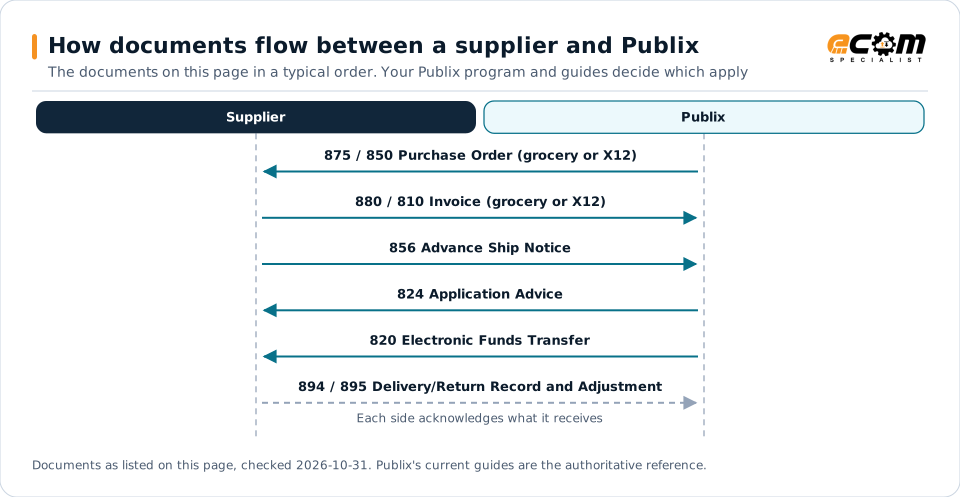
How documents flow between a supplier and PublixSequence diagram of EDI documents between a supplier and Publix: 875 / 850 Purchase Order (grocery or X12) from Publix, 880 / 810 Invoice (grocery or X12) to Publix, 856 Advance Ship Notice to Publix, 824 Application Advice from Publix, 820 Electronic Funds Transfer from Publix and 894 / 895 Delivery/Return Record and Adjustment to Publix.How documents flow between a supplier and PublixThe documents on this page in a typical order. Your Publix program and guides decide which applySupplierPublix875 / 850 Purchase Order (grocery or X12)880 / 810 Invoice (grocery or X12)856 Advance Ship Notice824 Application Advice820 Electronic Funds Transfer894 / 895 Delivery/Return Record and AdjustmentEach side acknowledges what it receivesDocuments as listed on this page, checked 2026-10-31. Publix's current guides are the authoritative reference.
How documents flow between a supplier and PublixSequence diagram of EDI documents between a supplier and Publix: 875 / 850 Purchase Order (grocery or X12) from Publix, 880 / 810 Invoice (grocery or X12) to Publix, 856 Advance Ship Notice to Publix, 824 Application Advice from Publix, 820 Electronic Funds Transfer from Publix and 894 / 895 Delivery/Return Record and Adjustment to Publix.How documents flow between asupplier and PublixThe documents on this page in a typical order.Your Publix program and guides decide whichapplySupplierPublix875 / 850 Purchase Order(grocery or X12)880 / 810 Invoice(grocery or X12)856 Advance Ship Notice824 Application Advice820 Electronic FundsTransfer894 / 895 Delivery/ReturnRecord and AdjustmentEach side acknowledges whatit receivesDocuments as listed on this page, checked2026-10-31. Publix's current guides are theauthoritative reference.

Read from top to bottom. Solid arrows are documents Publix names in its own public documentation; the dashed arrow is the acknowledgment. The order is typical, not a Publix rule: programs such as vendor direct to consumer use their own documents and timing.

Expand diagram Download SVG

Document by document

What each Publix document needs

For each document: what it does for you as the supplier, what Publix's own documents say about it (with the source and its date), and general EDI practice that helps, labelled as such. Your Publix mapping guide for your version is the final word on fields and codes.

875

Purchase Order (875 grocery or 850 X12)

You receive · Warehouse; the 875 is also used for DSD polled orders

Most Publix orders reach suppliers by EDI, as a grocery 875 or an X12 850. DSD suppliers can also receive polled orders on an 875.

What Publix states

General EDI practice

  • Build maps for both the 875 and the 850 if you have not confirmed which one Publix will send.

How the 875 works in X12

810

Invoice (880 grocery or 810 X12)

You send · Warehouse and manufacturing facility deliveries

Warehouse invoices go back as an 880 or an 810. Publix pays against the cost offer you submitted and the quantity received.

What Publix states

General EDI practice

  • Generate invoices from the same cost records you used for the cost offer, so each component matches.

How the 810 works in X12

894

Delivery/Return Base Record (NEX invoice)

You send · Direct store delivery

DSD suppliers invoice through network exchange (NEX), where the 894 travels from the supplier's office to the store ahead of delivery, or direct exchange (DEX) at the store.

What Publix states

General EDI practice

  • Reconcile each 895 against the 894 you sent, and route cost or pack differences to the team that owns the cost record.

How the 894 works in X12

820

Electronic Funds Transfer

You receive

Publix lists the 820 for electronic funds transfer. ACH is its preferred payment method, issued daily.

What Publix states

General EDI practice

  • Match each payment to open invoices automatically and review deductions by reason before the next cost offer.

How the 820 works in X12

Onboarding

Getting set up with Publix, step by step

Steps with a source come from Publix's own onboarding material; the others are general practice that keeps the project on track.

  1. Provide your EDI contact

    Publix requires the supplier's EDI contact information as a prerequisite to vendor setup.

    Source: Publix, Supplier Policies and Guidelines, Jul 24, 2026
  2. Publix's EDI department contacts you

    A member of Publix's EDI department contacts your EDI contact to understand your EDI capabilities and schedule testing.

    Source: Publix, Supplier Policies and Guidelines, Jul 24, 2026
  3. Test the documents for your program

    Test the order and invoice documents Publix assigns, plus DSD or pharmacy documents if they apply. Testing steps come from Publix during setup.

    General EDI practice, not a stated requirement
  4. Enroll in the accounting portal

    Enroll in the Publix Taulia accounting portal after you are set up as a new supplier.

    Source: Publix, Supplier Policies and Guidelines, Jul 24, 2026
  5. Go live and watch the scorecard

    Monitor application advices, payments and the monthly supplier scorecard from the first live order.

    Source: Publix, Supplier Policies and Guidelines, Jul 24, 2026
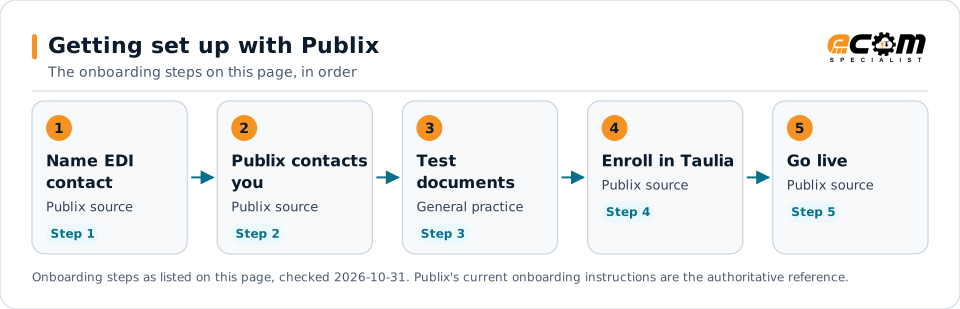
Getting set up with PublixFlow diagram of 5 onboarding steps with Publix: Provide your EDI contact, Publix's EDI department contacts you, Test the documents for your program, Enroll in the accounting portal and Go live and watch the scorecard.Getting set up with PublixThe onboarding steps on this page, in order1Name EDIcontactPublix sourceStep 12Publix contactsyouPublix sourceStep 23TestdocumentsGeneral practiceStep 34Enroll in TauliaPublix sourceStep 45Go livePublix sourceStep 5Onboarding steps as listed on this page, checked 2026-10-31. Publix's current onboarding instructions are the authoritative reference.
Getting set up with PublixFlow diagram of 5 onboarding steps with Publix: Provide your EDI contact, Publix's EDI department contacts you, Test the documents for your program, Enroll in the accounting portal and Go live and watch the scorecard.Getting set up with PublixThe onboarding steps on this page, in order1Name EDI contactPublix sourceStep 12Publix contacts youPublix sourceStep 23Test documentsGeneral practiceStep 34Enroll in TauliaPublix sourceStep 45Go livePublix sourceStep 5Onboarding steps as listed on this page, checked2026-10-31. Publix's current onboarding instructionsare the authoritative reference.

Read left to right, or top to bottom on a phone. 4 of the 5 steps come from Publix's own published material and are marked "Publix source"; the rest are general practice. Week numbers are given only where Publix states them.

Expand diagram Download SVG

Verification

What we checked, and where

Each statement below shows its source and the date we checked it. Statements we could not confirm from an official Publix source are labelled as such.

TopicStatementEvidenceChecked
DocumentsPublix requires all product suppliers to be EDI trading partners; the EDI section does not currently apply to suppliers of Publix manufacturing facilities.Confirmed on a public Publix pageOct 31, 2026
StandardsPublix lists 875/850 purchase orders and 880/810 invoices, so both grocery and X12 documents are in use.Confirmed on a public Publix pageOct 31, 2026
DocumentsThe 855 purchase order acknowledgment and the 832 catalog for alcohol suppliers are listed as not currently used.Confirmed on a public Publix pageOct 31, 2026
OnboardingSuppliers must provide their EDI contact information before they are set up as a vendor; Publix's EDI department then schedules testing.Confirmed on a public Publix pageOct 31, 2026
PaymentsWarehouse invoices must be mailed or sent by standard EDI; faxed invoices are not acceptable. DSD invoices go through NEX or DEX.Confirmed on a public Publix pageOct 31, 2026
PaymentsPayment terms under 30 days are not accepted without a suitable discount for warehouse deliveries; ACH is the preferred payment method.Confirmed on a public Publix pageOct 31, 2026
Supplier portalSuppliers must enroll in the Publix Taulia accounting portal after they are set up in Publix's systems.Confirmed on a public Publix pageOct 31, 2026

Available only after supplier login

Publix keeps these behind its supplier portal. This guide does not reproduce them; use your own Publix access or ask your Publix contact.

  • Publix's EDI specifications for each document, provided during setup and testing
  • Supplier scorecards and other resources on the Publix Business Connection
  • Invoice and payment detail in the Publix Taulia accounting portal

Not confirmed

We could not confirm these from an official public source, so we do not state them as Publix requirements.

  • The X12 and grocery versions Publix uses for each document
  • Which suppliers must send the 856 ship notice
  • Which network or provider options Publix supports for the EDI connection
  • How long Publix's EDI testing takes
  • Any charge for EDI non-compliance; the published document lists none

Checklist

Publix EDI readiness checklist

  1. Name an EDI contact before Publix sets you up as a vendor.
  2. Confirm with Publix whether you will receive 875 or 850 orders and send 880 or 810 invoices.
  3. Submit cost offers that list every cost component exactly as it will be invoiced.
  4. Put the full purchase order number, including any prefix and suffix, on every warehouse invoice.
  5. Invoice free goods, extended-terms items and alcohol on separate lines or invoices as Publix requires.
  6. Enroll in the Publix Taulia accounting portal once your vendor setup is complete.
  7. If you deliver direct to stores, set up NEX or DEX receiving and reconcile every 895.
  8. Review your monthly scorecard, including the order fill rate.

Connectivity and contacts

How Publix connects with suppliers

What Publix's public documents say about networks and setup, and the department contacts it publishes for suppliers. Connection credentials and trading-partner IDs are exchanged with Publix during setup and are never shown on this page.

What Publix states about connecting

Avoid these

Common mistakes with Publix EDI

Invoicing a different cost structure

Publix reconciles every invoice line against your cost offer. An off-invoice allowance where the offer showed a lower list cost leads to inaccurate payment.

Source: Publix, Supplier Policies and Guidelines, Jul 24, 2026, Chapter 7, p. 131

Combining items that need separate invoices

Extended-terms products, alcohol and each DSD sub-department need their own invoices, and Publix does not partially pay invoices.

Source: Publix, Supplier Policies and Guidelines, Jul 24, 2026, Chapter 7, pp. 130-131

Credits on a delivery invoice

Credit for returned product may not be included on a delivery invoice; it needs a separate credit memo.

Source: Publix, Supplier Policies and Guidelines, Jul 24, 2026, Chapter 7, p. 132

Faxing invoices

Faxed invoices are not acceptable for warehouse deliveries. Use EDI or mail.

Source: Publix, Supplier Policies and Guidelines, Jul 24, 2026, Chapter 7, p. 128

Connectivity

Your options for connecting to Publix

  • EDI testing with Publix's EDI department

    After you provide your EDI contact, a member of Publix's EDI department reviews your capabilities and schedules testing. The published document does not name a required network or provider.

    From Publix's published documents

  • Publix Business Connection

    Publix's supplier site publishes the Supplier Policies and Guidelines, forms and contact lists, with scorecards and other resources behind a sign-in.

    From Publix's published documents

  • Publix Taulia accounting portal

    Suppliers enroll after setup to view invoices, credits and payment status and to message Publix.

    From Publix's published documents

Challenges

Common integration challenges

  • Two document families

    Publix supports grocery 875 and 880 documents alongside X12 850 and 810, so confirm which pair applies to you before building maps.

  • Cost offers must match invoices exactly

    Publix reconciles every invoice line against your cost offer and the quantity received, so a different cost structure leads to inaccurate payments.

  • DSD electronic receiving

    DSD suppliers are expected to invoice through NEX or DEX and to reconcile 895 adjustments against what was checked in at the store.

Automation options for Publix suppliers

Four ways to automate. One foundation.

Publix's requirements on this page cover the 856, 824 and 820. ECOM helps you automate them, meet Publix's labeling and ship notice requirements, and see what needs action. Publix sets its program's rules; ECOM confirms which options fit yours.

PRISM Supply Chain Automation Foundation

One platform beneath every option. Use one, or combine them for different partners and documents.

Compliance and actionable visibility

Connect order processing, shipping documentation, trading partner requirements, and performance monitoring through one coordinated workflow. These capabilities help teams improve shipment accuracy, reduce manual work, address compliance risks, and respond to exceptions before they affect customers.

Discuss Your Trading Partner Requirements

Connect Publix documents to your ERP

ECOM integrates Publix purchase orders, invoices, ship notices and payment details with your ERP, in the grocery or X12 format Publix assigns, and supports DSD delivery records.

Industry

Food and Beverage

See how ECOM supports grocery suppliers with warehouse and direct store delivery EDI.

Next step

Get help with your Publix program

Each request goes to an ECOM EDI specialist with Publix's name attached, so the reply starts from your program.

  • Review Publix's requirements

    Send us Publix's guide or your program details; we explain the documents, rules and options for meeting them.

    Request a requirements review
  • Connect Publix to your ERP

    Orders in, ship notices and invoices out, from the ERP and warehouse systems you already run.

    Discuss ERP integration
  • Testing and certification

    Build, test and certify each Publix document, then go live with monitoring from the first file.

    Plan testing and certification
  • Shipping labels and ASNs

    Labels and ship notices that match Publix's rules, to help avoid receiving problems and compliance deductions.

    Review shipping compliance

Publix integration FAQs

Does Publix require EDI?

Yes. Publix's Supplier Policies and Guidelines say Publix requires all product suppliers to be EDI trading partners. The EDI section does not currently apply to suppliers of Publix manufacturing facilities.

Which EDI documents does Publix use?

The published list includes 875/850 purchase orders, 880/810 invoices, the 856 ship notice, 824 application advice, 820 electronic funds transfer, 894 and 895 for direct store delivery, and pharmacy reports such as the 852 and 867.

How do I start EDI setup with Publix?

Provide your EDI contact details when you are set up as a vendor. Publix's EDI department then contacts your EDI contact to understand your capabilities and schedule testing.

Can I fax invoices to Publix?

No. Invoices for product delivered to a Publix distribution center or manufacturing facility must be mailed or sent by standard EDI, and DSD invoices must go through NEX or DEX.

Is ECOM a Publix-approved provider?

This page is an integration guide and does not indicate an approval or partnership with Publix. ECOM builds integrations to the requirements Publix publishes.

Sources and accuracy

This guide summarizes publicly available information as of October 2026. Publix sets its own requirements and can change them at any time; your Publix implementation guide, supplier portal or account contact is the authoritative source for your program.

Publix documents cited on this page

Learn the general practice

Request Publix integration assistance

Tell us about your Publix program, documents and ERP. We will outline the connection, mapping and testing plan.