
X12 transaction guide · Acknowledgments
EDI 824 Application Advice
The X12 document a receiver sends to report business-level errors or rejections in a document it received.
- Sent by
- Receiver of a document (often a retailer or OEM)
- Received by
- Original sender (often a supplier)
- Standard
- ANSI ASC X12
- EDIFACT equivalent
- APERAK
What is an EDI 824?
The EDI 824 Application Advice is the ANSI X12 transaction set a receiver uses to report the results of processing a document in its business application. Unlike the 997, which checks syntax, the 824 reports business problems, such as a ship notice that references an unknown purchase order or an invoice with invalid data, and can indicate whether a document was accepted, accepted with errors or rejected.
Retailers, automotive manufacturers and other large buyers use the 824 to give suppliers specific feedback. Suppliers that monitor 824s and act on them quickly can fix problems before they affect receiving, compliance scores or payment.
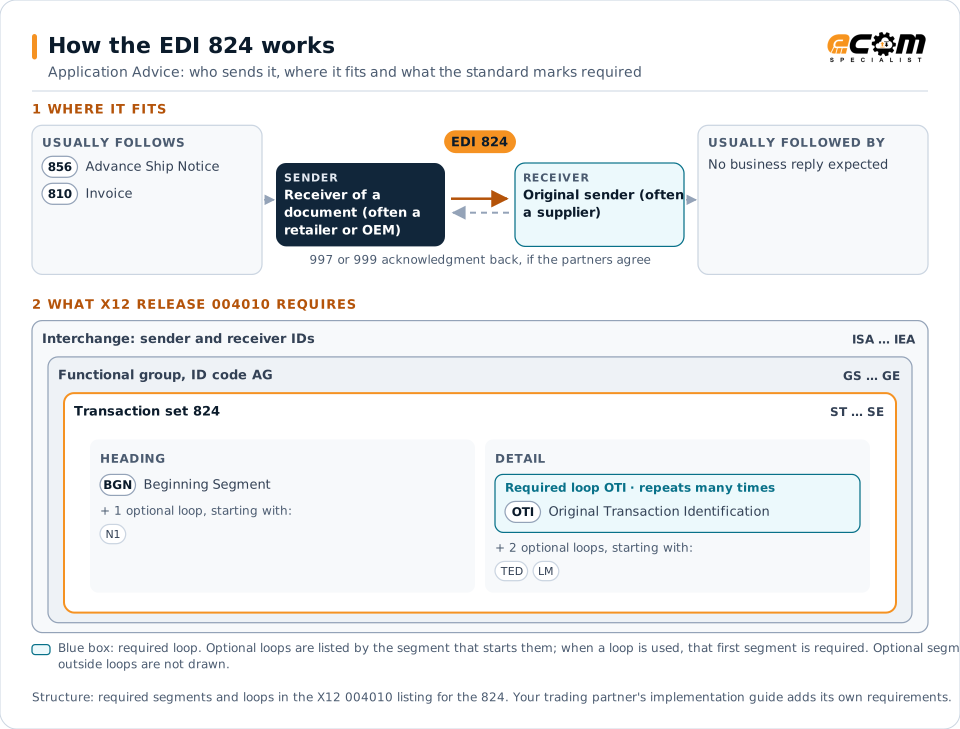
How to read this diagram: the top row shows who sends the 824, to whom, and which documents usually come before and after it. The lower part shows what X12 release 004010 itself requires: the envelopes around the 824 and the segments and loops the standard marks as required, area by area. Optional loops are listed by the segment that starts them rather than drawn in full. This is the standard's minimum, not a trading partner's requirement: each partner's implementation guide usually makes some optional loops mandatory, restricts the codes and may use a different release.
When it is used
- Reporting errors in advance ship notices
- Rejecting invoices that fail business validation
- Notifying suppliers of data problems in other inbound documents
Where it fits in the document flow
Structure
Key segments in the 824
The segments most implementations use, described in plain language. The last column shows what X12 release 004010 itself requires: "Required" marks a segment the standard requires in every 824; "Optional, common" marks a segment the standard leaves optional, or that sits in an optional loop, but that implementations often use. This is the standard's requirement, not your trading partner's: each partner's implementation guide names the release it uses, makes some optional segments mandatory and restricts the values, and requirements can differ between releases. The requirement status comes from one published X12 reference listing and has not been checked against a second source.
| Segment | Name | What it carries | In X12 004010 |
|---|---|---|---|
| BGN | Beginning Segment | Purpose code, reference number and date of the application advice. | Required |
| N1 loop | Party Identification | Parties involved, such as the supplier being notified. | Optional, common |
| OTI | Original Transaction Identification | Identifies the original document, its status (accepted or rejected) and its reference numbers. | Required |
| TED | Technical Error Description | Error code and free-form description of the problem. | Optional, common |
Example
Sample EDI 824
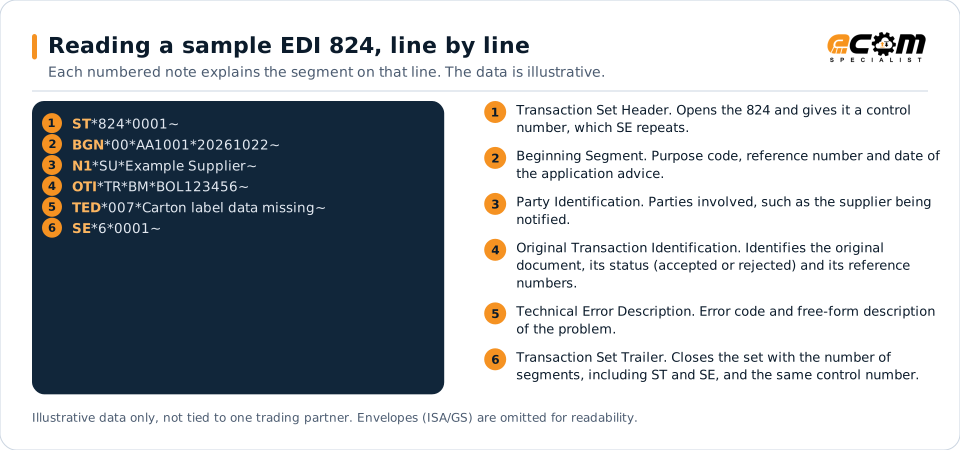
The receiver reports that the transaction referenced by bill of lading BOL123456 was rejected (TR). TED reports the reason as missing data (007) with a free-form description.
Illustrative data only, not tied to one X12 release or trading partner. The interchange (ISA/IEA) and functional group (GS/GE) envelopes are omitted for readability.
ST*824*0001~
BGN*00*AA1001*20261022~
N1*SU*Example Supplier~
OTI*TR*BM*BOL123456~
TED*007*Carton label data missing~
SE*6*0001~The sample is the same one shown above, with a note beside each segment the first time it appears. Segment IDs are highlighted at the start of each line; the fields after them are separated by asterisks, and each segment ends with a tilde.
Avoid problems
Common 824 errors and how to prevent them
No one owns 824s
Application advice often lands in an EDI mailbox with no business owner. Route 824s to the team that can fix the issue.
Correcting without resending
Fixing data internally is not enough. The corrected document usually has to be resent to the partner.
Repeating the same error
Recurring 824s point to a map or master data problem that should be fixed at the source.
Trading partners
Integration guides that include the 824







How ECOM helps
Automate the 824 with ECOM
Solution
Supply Chain Visibility
Track orders, shipments and invoices across partners and catch exceptions early.
Solution
EDI Integration
Exchange X12 and EDIFACT documents with partners and integrate them directly with your ERP.
Industry
Automotive
Schedules, ship notices, labels, self-billing and multi-plant routing for automotive suppliers.
EDI 824 FAQs
How is an 824 different from a 997?
A 997 reports whether a document was syntactically valid. An 824 reports whether it passed the receiver's business validation.
Who typically sends 824s?
Large retailers, automotive manufacturers and other buyers that validate supplier documents in detail.
What should a supplier do when it receives an 824?
Identify the original document, correct the underlying data or map, and resend the document if the partner requires it.
More general questions about EDI are answered in the EDI FAQ.
Related transactions
Related acknowledgments documents
Need help with the EDI 824?
ECOM maps, tests and monitors X12 documents for your trading partners and integrates them with your ERP.