
The short answer
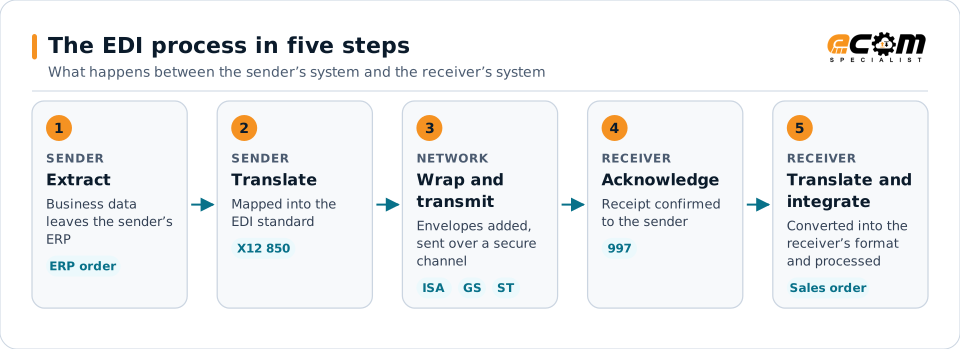
EDI works in five steps: business data is extracted from the sender's system, translated into a standard format such as X12, wrapped in envelopes and transmitted over a secure channel, acknowledged by the receiver, and translated into the receiver's system format so it can be processed automatically.
Each numbered step matches a heading in this article. The tags show what the data looks like at that point, using a purchase order as the example.
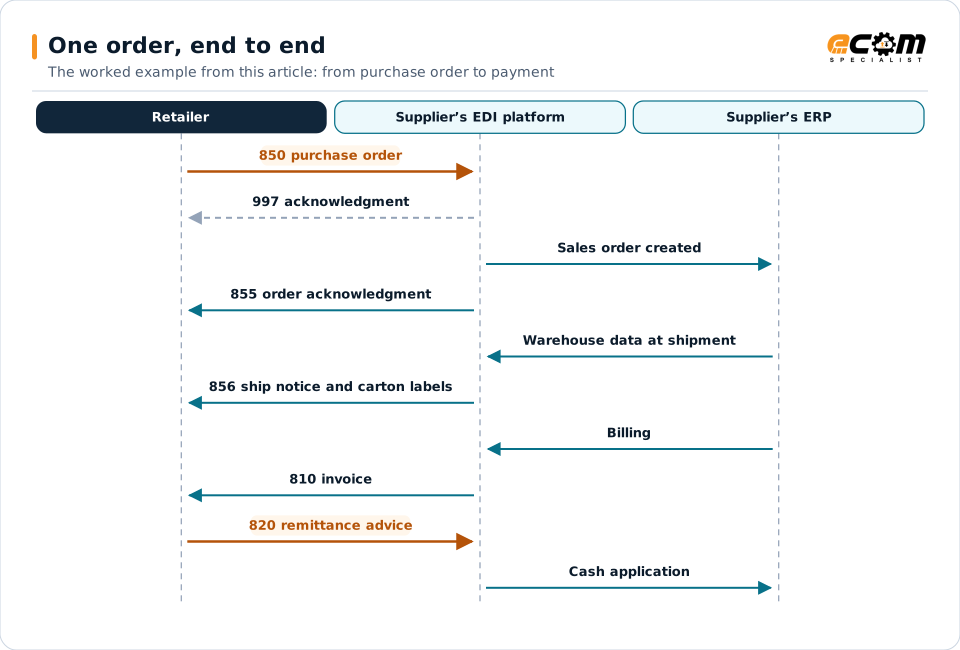
Arrows run in time order from top to bottom. Orange arrows are the documents the retailer sends; the dashed arrow is the technical acknowledgment. People step in only when something does not match.
The EDI process in five steps
Every EDI exchange follows the same basic path, whether it is a purchase order from a retailer or a status update from a carrier.
1. Extract the business data
The process starts in the sender’s business system. A buyer’s ERP creates a purchase order; a supplier’s warehouse system confirms a shipment. The integration layer extracts that data through an API, a file export, a database interface or an ERP-specific format such as an SAP IDoc.
2. Translate to the EDI standard
Translation software applies a map that converts the internal data into the agreed standard, such as an ANSI X12 850 purchase order. The map handles field positions, code conversions (for example, internal units of measure to standard codes) and the trading partner’s specific rules from its implementation guide.
3. Wrap and transmit
EDI documents travel inside envelopes. In X12:
- The ISA/IEA interchange envelope identifies the sender and receiver and carries control numbers.
- The GS/GE functional group bundles documents of the same type.
- The ST/SE segments mark the start and end of each transaction set.
The interchange is then sent over a secure channel, commonly AS2, SFTP, an API or a value-added network (VAN).
4. Acknowledge
The receiver checks the interchange and returns a 997 functional acknowledgment confirming whether each document arrived and was syntactically valid. Business responses, such as an 855 order acknowledgment, follow later if the partner requires them.
5. Translate and integrate
On the receiving side, the process runs in reverse. Translation software converts the X12 document into the receiver’s format, validates it against business rules and master data, and delivers it to the ERP, where it becomes a sales order, receipt or invoice.
A worked example: one order, end to end
- A retailer’s system creates a purchase order and sends an 850.
- The supplier’s EDI platform receives it, returns a 997 and translates the order into a sales order in the ERP.
- The supplier confirms the order with an 855.
- When the order ships, warehouse data generates an 856 ship notice and matching carton labels.
- Billing in the ERP generates an 810 invoice.
- The retailer pays and sends an 820 remittance advice, which the supplier uses for cash application.
Each step is automatic when integration is designed well. People step in only when something does not match.
Where EDI breaks down
Most EDI problems come from a few sources:
- Master data gaps, such as item numbers or ship-to locations that are not cross-referenced.
- Map errors that do not follow the partner’s current guide.
- Timing, when documents are sent too late for the partner’s process.
- Silent failures, when nobody notices a missing acknowledgment.
Monitoring every document across its lifecycle, rather than only checking whether files were sent, is the most effective way to catch these issues before they affect customers.
What you need to run EDI
At minimum: translation and mapping, secure communication with each partner, integration with your business systems, and monitoring. These can be run in-house, on a managed platform, or as a service operated by specialists.
How long it takes to connect a new partner, and what causes most EDI problems, are answered in the EDI FAQ.