
X12 transaction guide · Finance
EDI 141 Product Service Claim Response
The X12 document used to report the status of a product service claim and the items accepted and rejected for payment.
- Sent by
- Manufacturer or warranty provider
- Received by
- Servicing organization or dealer
- Standard
- ANSI ASC X12
What is an EDI 141?
The EDI 141 Product Service Claim Response is the ANSI X12 transaction set used to transmit the status of a product service claim and the items accepted and rejected for payment from the claim.
Warranty claims often contain several items, such as parts, labor and travel. The response tells the servicing organization exactly which items will be paid and why others were rejected, so it can correct and resubmit or close the claim. Claims can be partly paid. Each line carries its own status.
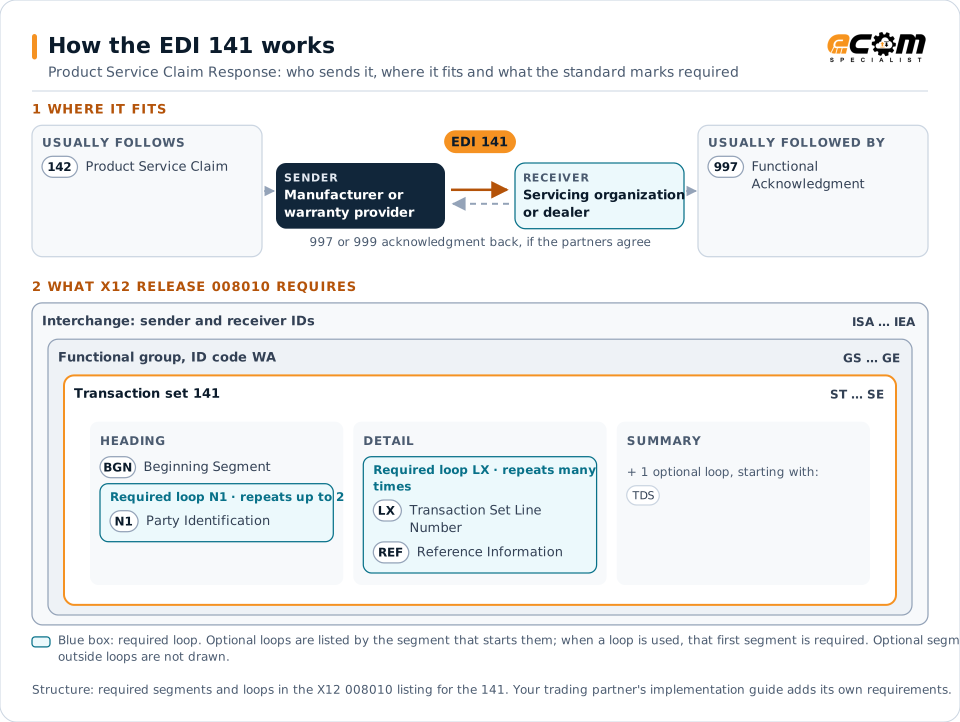
How to read this diagram: the top row shows who sends the 141, to whom, and which documents usually come before and after it. The lower part shows what X12 release 008010 itself requires: the envelopes around the 141 and the segments and loops the standard marks as required, area by area. Optional loops are listed by the segment that starts them rather than drawn in full. This is the standard's minimum, not a trading partner's requirement: each partner's implementation guide usually makes some optional loops mandatory, restricts the codes and may use a different release.
When it is used
- Reporting approval of warranty claims
- Rejecting claim items with reasons
- Reporting claim status during review
Where it fits in the document flow
Structure
Mandatory segments in the 141 (X12 release 008010)
The segments X12 release 008010 marks as mandatory at their level, in order. Segments inside optional loops are needed only when the loop is used. This is the standard's requirement, not your trading partner's: each partner's implementation guide names the release it uses, adds the optional segments it requires and restricts the values. The requirement status comes from one published X12 reference listing and has not been checked against a second source.
- ST
- BGN
- N1
- LX
- REF
- TDS
- SE
Practical example
The 141 in practice
A dealer submits a warranty claim for an engine repair with parts, eight hours of labor and travel. The manufacturer approves the parts and six hours of labor, rejects two hours as above the standard time and rejects travel. It sends a 141 with the decisions and reasons, and the dealer accepts the adjustment.
Implementation
Implementation considerations for the 141
- Give a reason for every rejected claim item.
- Reference claim and item numbers exactly.
- Reconcile approved amounts with payments.
- Track resubmissions of corrected claim items.
How ECOM helps
Automate the 141 with ECOM
Industry
Manufacturing
Customer schedules, supplier connectivity and shipping integrated with the ERP for manufacturers.
Solution
Financial Document Automation
Automate invoices, remittances, payment files and bank statements from capture to posting.
Industry
Automotive
Schedules, ship notices, labels, self-billing and multi-plant routing for automotive suppliers.
More general questions about EDI are answered in the EDI FAQ.
Related transactions
Related finance documents
- 142Product Service Claim
- 847Material Claim
- 819Joint Interest Billing and Operating Expense Statement
- 245Real Estate Tax Service Response
- 248Account Assignment/Inquiry and Service/Status
- 811Consolidated Service Invoice/Statement
- 844Product Transfer Account Adjustment
- 849Response to Product Transfer Account Adjustment
Need help with the EDI 141?
ECOM maps, tests and monitors X12 documents for your trading partners and integrates them with your ERP.