
X12 transaction guide · Ordering
EDI 869 Order Status Inquiry
The X12 document a buyer sends to ask a supplier for the status of a purchase order, selected lines or products, or all open orders.
- Sent by
- Buyer or customer
- Received by
- Supplier or vendor
- Standard
- ANSI ASC X12
What is an EDI 869?
The EDI 869 Order Status Inquiry is the ANSI X12 transaction set a buyer uses to request status information from a supplier. The inquiry can cover an entire purchase order, selected lines or products on an order, or a defined portion of the customer's orders, such as all unshipped items or all shipped items.
The supplier answers with an 870 order status report. Together, the 869 and 870 replace phone calls and emails about where an order stands, and give the buyer status data it can load into its own systems.
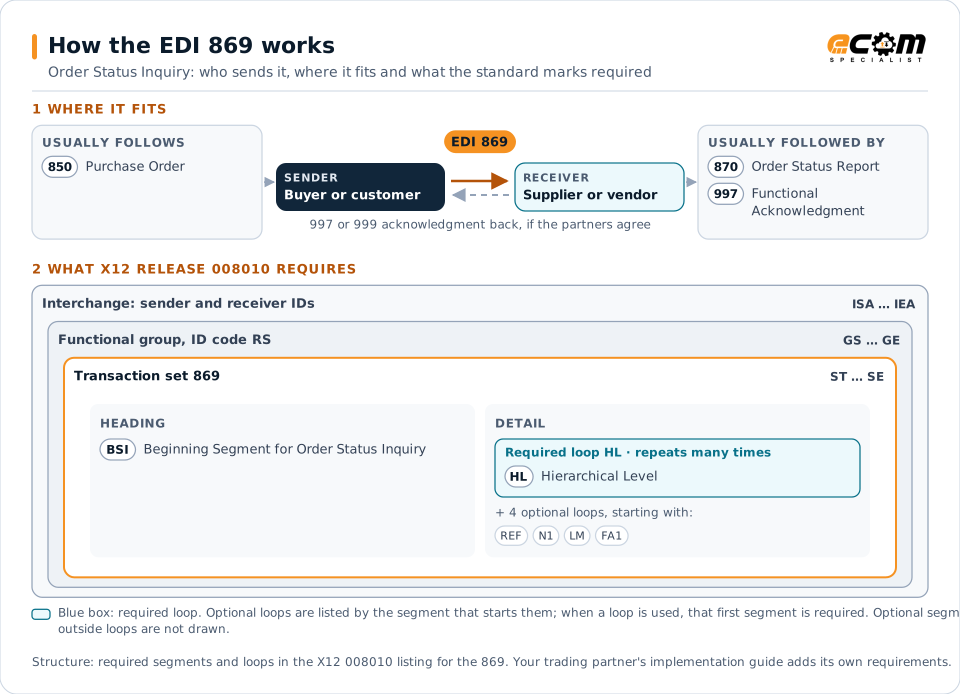
How to read this diagram: the top row shows who sends the 869, to whom, and which documents usually come before and after it. The lower part shows what X12 release 008010 itself requires: the envelopes around the 869 and the segments and loops the standard marks as required, area by area. Optional loops are listed by the segment that starts them rather than drawn in full. This is the standard's minimum, not a trading partner's requirement: each partner's implementation guide usually makes some optional loops mandatory, restricts the codes and may use a different release.
When it is used
- Checking the status of an urgent or late order
- Asking for the status of all unshipped items
- Confirming status before a promotion or production run
Where it fits in the document flow
Structure
Mandatory segments in the 869 (X12 release 008010)
The segments X12 release 008010 marks as mandatory at their level, in order. Segments inside optional loops are needed only when the loop is used. This is the standard's requirement, not your trading partner's: each partner's implementation guide names the release it uses, adds the optional segments it requires and restricts the values. The requirement status comes from one published X12 reference listing and has not been checked against a second source.
- ST
- BSI
- HL
- REF
- N1
- LM
- LQ
- FA1
- FA2
- SE
Practical example
The 869 in practice
A distributor is preparing for a seasonal promotion and needs to know whether three key purchase orders will arrive in time. Its buying system sends an 869 asking for the status of the unshipped lines on those orders. The supplier's system answers with an 870 showing one line back-ordered and the others scheduled to ship, so the buyer can adjust the promotion plan.
Implementation
Implementation considerations for the 869
- Define which inquiry types the supplier will answer, such as a single order or all open orders.
- Answer from the same order and shipping data that drives ship notices, so status does not conflict with the 856.
- Agree a response time, because a status answer that arrives late has little value.
How ECOM helps
Automate the 869 with ECOM
Solution
Order-to-Cash Automation
Automate the flow from purchase order to payment across every customer channel.
Industry
Wholesale Distribution
Customer orders, supplier purchasing, catalogs and drop-ship for distributors.
Solution
EDI Integration
Exchange X12 and EDIFACT documents with partners and integrate them directly with your ERP.
More general questions about EDI are answered in the EDI FAQ.
Need help with the EDI 869?
ECOM maps, tests and monitors X12 documents for your trading partners and integrates them with your ERP.