
EDIFACT message guide · Control and acknowledgments
AUTACK Secure authentication and acknowledgement
The UN/EDIFACT service message that authenticates interchanges or messages sent, or securely acknowledges those received.
- Sent by
- Sender or receiver of the secured data
- Received by
- The other party
- Standard
- UN/EDIFACT · Service message
- X12 equivalent
- No direct equivalent
What is the EDIFACT AUTACK message?
AUTACK is the UN/EDIFACT secure authentication and acknowledgement message. It authenticates interchanges, groups, messages or packages sent, or provides secure acknowledgement of those received. It can give secure authentication, integrity and non-repudiation of origin for the referenced data, or secure acknowledgement and non-repudiation of receipt.
AUTACK carries security results, such as hash values and digital signatures, separately from the business messages they protect. Today many partners secure transmissions at the transport level, for example with AS2, so AUTACK is used mainly where EDIFACT-level security is required.
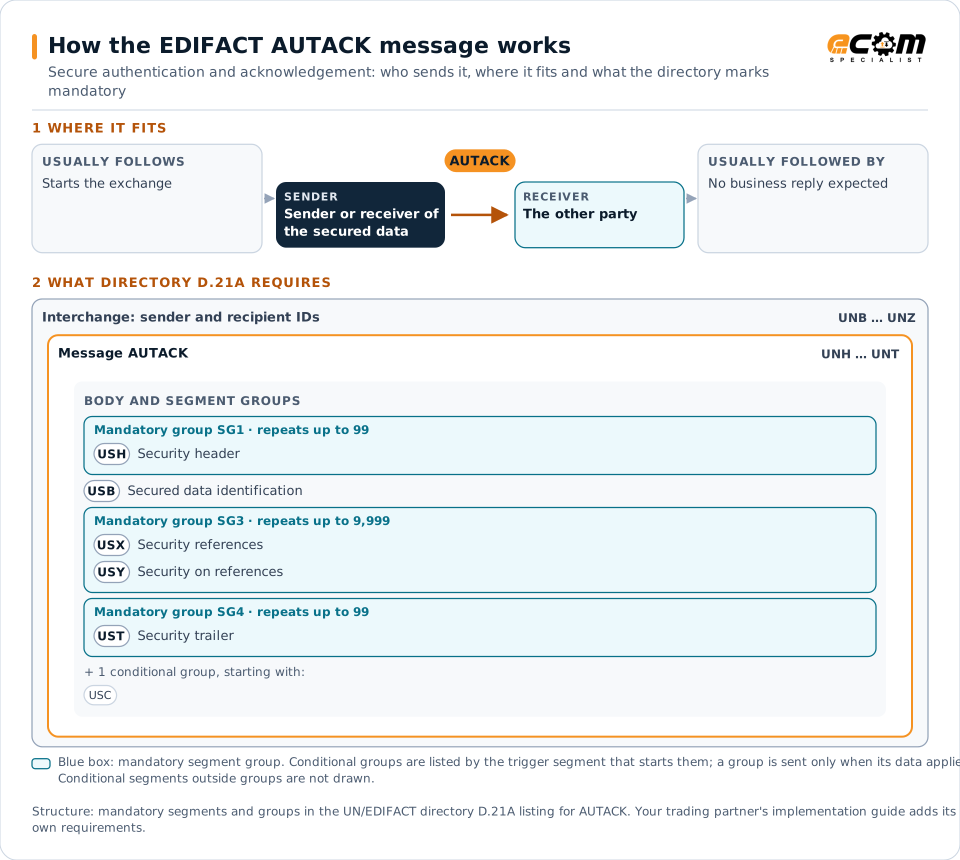
How to read this diagram: the top row shows who sends AUTACK, to whom, and which messages usually come before and after it. The lower part shows what the directory D.21A itself requires: the envelopes around AUTACK and the segments and segment groups it marks mandatory. Conditional groups are listed by their trigger segment rather than drawn in full. This is the directory's minimum, not a trading partner's requirement: a message implementation guide usually makes some conditional groups mandatory, restricts the codes and may use an older directory.
When it is used
- Signing EDIFACT messages for non-repudiation
- Securely acknowledging receipt of signed data
- Meeting sector rules for message-level security
Where it fits in the message flow
No other message routinely comes directly before or after AUTACK; it is exchanged when the business event occurs.
Structure
Mandatory segments in AUTACK (directory D.21A)
In UN/EDIFACT directory D.21A, the AUTACK message has 12 segment positions arranged in 4 segment groups. These are the segments and segment groups marked mandatory at message level, in order; a mandatory group is shown with the segment that starts it. Segments inside conditional groups are needed only when the group is used. This is the directory’s requirement; earlier syntax versions define the message differently, and partners agree which version they use. This structure comes from one published copy of the directory and has not been independently verified: confirm it before you build a map.
- UNH
- SG1 (USH)
- USB
- SG3 (USX)
- SG4 (UST)
- UNT
Practical example
AUTACK in practice
A bank requires message-level signatures on payment files from corporate clients. The client's EDI system sends each PAYMUL followed by an AUTACK containing the hash of the message and the client's digital signature. The bank verifies the signature before processing and returns a secure acknowledgement.
Implementation
Implementation considerations for AUTACK
- Agree algorithms, certificates and key management with the partner.
- Decide whether transport-level security already meets the requirement.
- Manage key and certificate expiry, for example with KEYMAN.
- Keep secured data and acknowledgements for non-repudiation evidence.
How ECOM helps
Automate AUTACK with ECOM
Solution
B2B Integration
Connect every customer, supplier, carrier and bank across EDI, API, file and portal channels.
Solution
Managed File Transfer
Design, migrate and operate secure, auditable file exchange across partners and systems.
Industry
Financial Services
Secure file transfer and B2B integration for banks and financial institutions.
Compare X12 and EDIFACT, or see answers to general questions in the EDI FAQ.
Related messages
Related control and acknowledgments messages
Need help with AUTACK?
ECOM maps, tests and monitors EDIFACT messages for your trading partners and integrates them with your ERP.