
EDIFACT message guide · Control and acknowledgments
CONTRL Syntax and service report message for batch EDI
The UN/EDIFACT service message that acknowledges or rejects a received interchange, group or message and reports syntax errors.
- Sent by
- Receiver of an interchange
- Received by
- Sender of the interchange
- Standard
- UN/EDIFACT · Service message
- X12 equivalent
- 997 Functional Acknowledgment
What is the EDIFACT CONTRL message?
CONTRL is the UN/EDIFACT syntax and service report message for batch EDI. It syntactically acknowledges or rejects, with error indications, a received interchange, functional group, message or package. It can also be used simply to confirm that an interchange was received.
CONTRL answers whether a transmission arrived and could be read, not whether its business content was acceptable; that is the job of APERAK. Partners agree in advance whether CONTRL is required, and the sender requests it in the interchange header. Missing or negative CONTRLs are a prompt to investigate before a business process stalls.
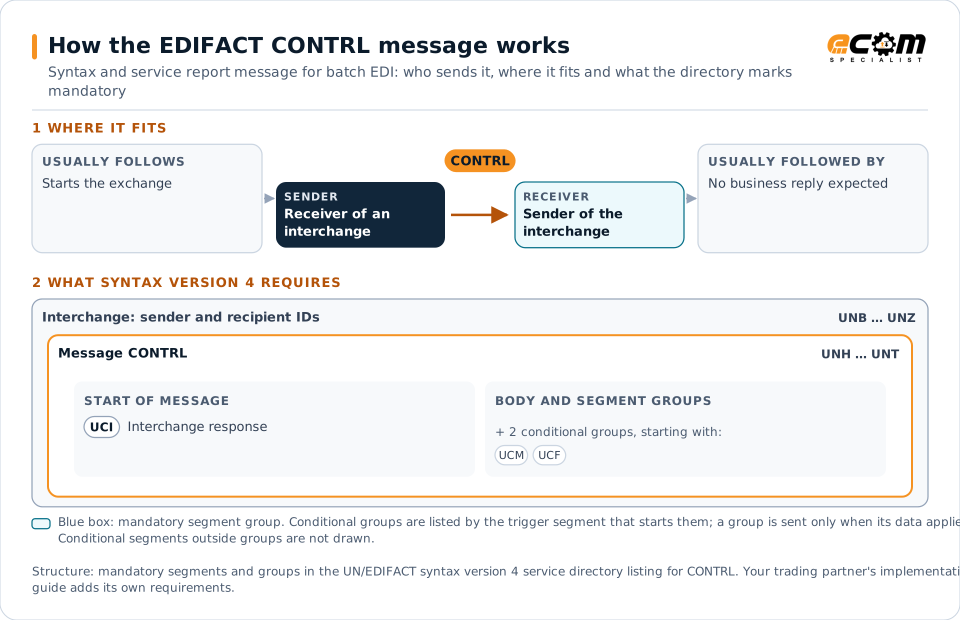
How to read this diagram: the top row shows who sends CONTRL, to whom, and which messages usually come before and after it. The lower part shows what the syntax version 4 service directory itself requires: the envelopes around CONTRL and the segments and segment groups it marks mandatory. Conditional groups are listed by their trigger segment rather than drawn in full. This is the directory's minimum, not a trading partner's requirement: a message implementation guide usually makes some conditional groups mandatory, restricts the codes and may use an older directory.
When it is used
- Confirming receipt of an interchange
- Rejecting interchanges or messages with syntax errors
- Reporting unsupported functionality in a received message
Where it fits in the message flow
No other message routinely comes directly before or after CONTRL; it is exchanged when the business event occurs.
Structure
Mandatory segments in CONTRL (syntax version 4)
In syntax version 4 of the service directory (ISO 9735), the CONTRL message has 10 segment positions arranged in 5 segment groups. These are the segments and segment groups marked mandatory at message level, in order; a mandatory group is shown with the segment that starts it. Segments inside conditional groups are needed only when the group is used. This is the directory’s requirement; earlier syntax versions define the message differently, and partners agree which version they use. This structure comes from one published copy of the directory and has not been independently verified: confirm it before you build a map.
- UNH
- UCI
- UNT
Practical example
CONTRL in practice
A supplier sends an interchange with 40 invoices to a customer and requests acknowledgement in the UNB header. The customer's translator finds that one message has a missing mandatory segment. It returns a CONTRL accepting the interchange but rejecting that one message, with the segment position and error code, and the supplier corrects and resends it.
Implementation
Implementation considerations for CONTRL
- Agree whether CONTRL is required and at which level (interchange or message).
- Monitor for missing acknowledgements within an agreed time.
- Check which syntax version the partner uses, since CONTRL differs between versions.
- Do not treat a positive CONTRL as business acceptance.
How ECOM helps
Automate CONTRL with ECOM
Solution
EDI Integration
Exchange X12 and EDIFACT documents with partners and integrate them directly with your ERP.
Solution
B2B Integration
Connect every customer, supplier, carrier and bank across EDI, API, file and portal channels.
Service
Mapping and Translation
Map development and maintenance for X12, EDIFACT, XML, JSON, flat files and ERP formats.
Compare X12 and EDIFACT, or see answers to general questions in the EDI FAQ.
Need help with CONTRL?
ECOM maps, tests and monitors EDIFACT messages for your trading partners and integrates them with your ERP.