
EDIFACT message guide · Planning and inventory
DELFOR Delivery schedule
The UN/EDIFACT message a customer sends to give suppliers short-term delivery requirements and medium- to long-term schedules.
- Sent by
- Customer planning the use of products
- Received by
- Supplier planning the supply
- Standard
- UN/EDIFACT · Batch message
- X12 equivalent
- 830 Planning Schedule with Release Capability
What is the EDIFACT DELFOR message?
DELFOR is the UN/EDIFACT delivery schedule message. The directory describes it as a message sent from a party planning the use or consumption of products to a party that has to plan their supply, giving requirements for short-term delivery and medium- to long-term scheduling. The schedule can be used to authorize manufacturing or the provision of materials, based on the terms and conditions agreed between the parties.
DELFOR is central to automotive and industrial supply chains, where customers send updated schedules weekly or daily. The directory warns that the DELFOR structure changed from D02A, so versions before and after are not compatible.
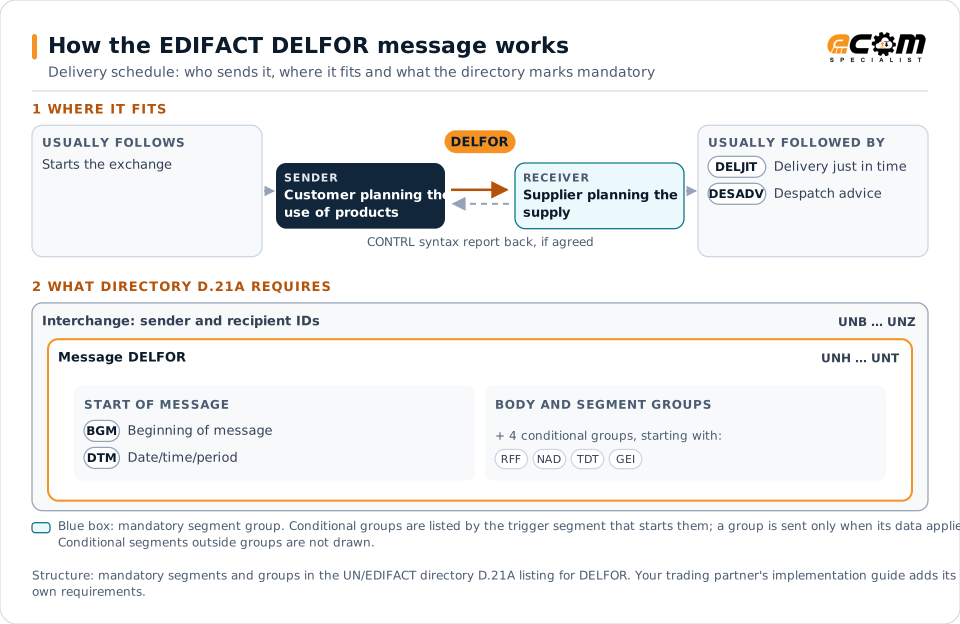
How to read this diagram: the top row shows who sends DELFOR, to whom, and which messages usually come before and after it. The lower part shows what the directory D.21A itself requires: the envelopes around DELFOR and the segments and segment groups it marks mandatory. Conditional groups are listed by their trigger segment rather than drawn in full. This is the directory's minimum, not a trading partner's requirement: a message implementation guide, such as an industry subset or a partner’s own guide, usually makes some conditional groups mandatory, restricts the codes and may use an older directory.
When it is used
- Sending rolling forecasts to suppliers
- Releasing firm delivery requirements
- Authorizing fabrication and raw material purchases
Where it fits in the message flow
Structure
Mandatory segments in DELFOR (directory D.21A)
In UN/EDIFACT directory D.21A, the DELFOR message has 79 segment positions arranged in 32 segment groups. These are the segments and segment groups marked mandatory at message level, in order; a mandatory group is shown with the segment that starts it. Segments inside conditional groups are needed only when the group is used. This is the directory’s requirement, not your trading partner’s: each partner’s message implementation guide names the directory it uses, often an older one such as D.96A or D.01B where the structure can differ, makes some conditional segments mandatory and restricts the codes.
- UNH
- BGM
- DTM
- UNT
Practical example
DELFOR in practice
A vehicle assembly plant sends each component supplier a DELFOR every week with firm requirements for the next two weeks, forecasts for the following months, the cumulative quantity received to date and fabrication authorizations. A seat supplier loads the schedule into its planning system to set production and to order foam and fabric.
Implementation
Implementation considerations for DELFOR
- Confirm the version; DELFOR before and after D02A are structurally different.
- Reconcile cumulative quantities between customer and supplier regularly.
- Distinguish firm, planning and authorization quantities.
- Follow industry guidelines such as Odette or VDA where the customer requires them.
How ECOM helps
Automate DELFOR with ECOM
Industry
Automotive
Schedules, ship notices, labels, self-billing and multi-plant routing for automotive suppliers.
Industry
Manufacturing
Customer schedules, supplier connectivity and shipping integrated with the ERP for manufacturers.
Solution
Supply Chain Visibility
Track orders, shipments and invoices across partners and catch exceptions early.
Compare X12 and EDIFACT, or see answers to general questions in the EDI FAQ.
Related messages
Related planning and inventory messages
Need help with DELFOR?
ECOM maps, tests and monitors EDIFACT messages for your trading partners and integrates them with your ERP.