
EDIFACT message guide · Finance
LEDGER Ledger
The UN/EDIFACT message used to communicate accounting ledgers for accounting, audit, cost accounting, consolidation and analysis.
- Sent by
- Enterprise or its accountant
- Received by
- Auditor, parent company or other user
- Standard
- UN/EDIFACT · Batch message
- X12 equivalent
- No direct equivalent
What is the EDIFACT LEDGER message?
LEDGER is the UN/EDIFACT ledger message. The directory defines it as dealing with the communication of accounting ledgers between an organization and whoever may use them for accounting, auditing, cost accounting, consolidation, financial analysis and similar purposes.
A ledger carries the accounts with their movements and balances for a period. With its companion messages, CHACCO for the chart of accounts, ENTREC for individual entries and BALANC for balances, it lets accounting data move between systems and parties in a standard form.
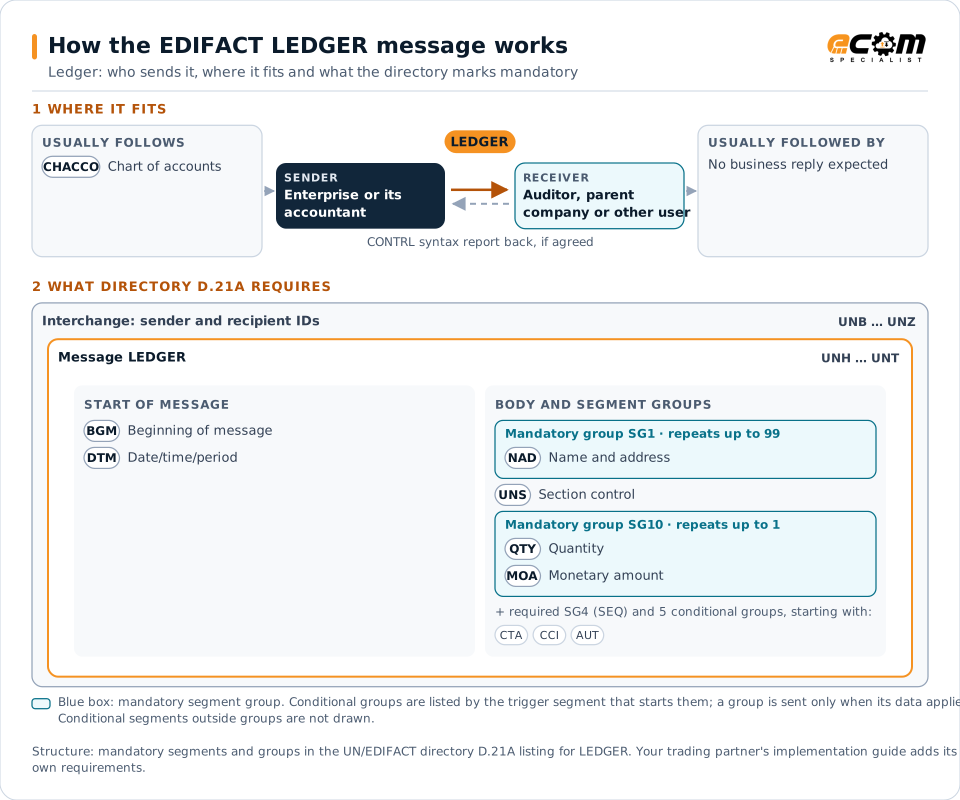
How to read this diagram: the top row shows who sends LEDGER, to whom, and which messages usually come before and after it. The lower part shows what the directory D.21A itself requires: the envelopes around LEDGER and the segments and segment groups it marks mandatory. Conditional groups are listed by their trigger segment rather than drawn in full. This is the directory's minimum, not a trading partner's requirement: a message implementation guide, such as an industry subset or a partner’s own guide, usually makes some conditional groups mandatory, restricts the codes and may use an older directory.
When it is used
- Sending ledgers to auditors
- Transferring ledgers between accounting systems
- Supporting group consolidation
Where it fits in the message flow
Structure
Mandatory segments in LEDGER (directory D.21A)
In UN/EDIFACT directory D.21A, the LEDGER message has 46 segment positions arranged in 11 segment groups. These are the segments and segment groups marked mandatory at message level, in order; a mandatory group is shown with the segment that starts it. Segments inside conditional groups are needed only when the group is used. This is the directory’s requirement, not your trading partner’s: each partner’s message implementation guide names the directory it uses, often an older one such as D.96A or D.01B where the structure can differ, makes some conditional segments mandatory and restricts the codes.
- UNH
- BGM
- DTM
- SG1 (NAD)
- SG4 (SEQ)
- UNS
- SG10 (QTY)
- UNT
Practical example
LEDGER in practice
An external auditor requests the general ledger of a client for the financial year. The client's accounting system exports a LEDGER message with every account's opening balance, movements and closing balance. The auditor loads it into its analysis software and samples transactions for testing.
Implementation
Implementation considerations for LEDGER
- Send the chart of accounts with or before the ledger.
- Reconcile totals with the trial balance.
- Agree the accounting periods and currencies covered.
- Protect financial data in transit and at rest.
How ECOM helps
Automate LEDGER with ECOM
Solution
Financial Document Automation
Automate invoices, remittances, payment files and bank statements from capture to posting.
Solution
Enterprise Integration
Any-to-any integration across partners, systems, protocols, security requirements, formats and ERPs, in batch or real time.
Industry
Financial Services
Secure file transfer and B2B integration for banks and financial institutions.
Compare X12 and EDIFACT, or see answers to general questions in the EDI FAQ.
Related messages
Related finance messages
- CHACCOChart of accounts
- ENTRECAccounting entries
- INFENTEnterprise accounting information
- AUTHORAuthorization
- BALANCBalance
- BANSTABanking status
- BUSCRDBusiness credit report
- COLREQRequest for a documentary collection
- CREADVCredit advice
- CREEXTExtended credit advice
- CREMULMultiple credit advice
- DEBADVDebit advice
Need help with LEDGER?
ECOM maps, tests and monitors EDIFACT messages for your trading partners and integrates them with your ERP.