
EDIFACT message guide · Ordering
OSTRPT Order status report
The UN/EDIFACT message a seller or its agent uses to report the current status of orders, in reply to an enquiry or as agreed.
- Sent by
- Seller or seller's agent
- Received by
- Buyer or buyer's agent
- Standard
- UN/EDIFACT · Batch message
- X12 equivalent
- 870 Order Status Report
What is the EDIFACT OSTRPT message?
OSTRPT is the UN/EDIFACT order status report message. The directory defines it as a message between a buyer or buyer's agent and a seller or seller's agent reporting the current status of previously sent orders. It may answer an order status enquiry (OSTENQ) or be sent as agreed between the partners, for example weekly.
Status can cover whether an order is in production, awaiting material, ready to ship, partly shipped or delayed, with expected dates. Buyers use it to manage expediting and to update customer promises.
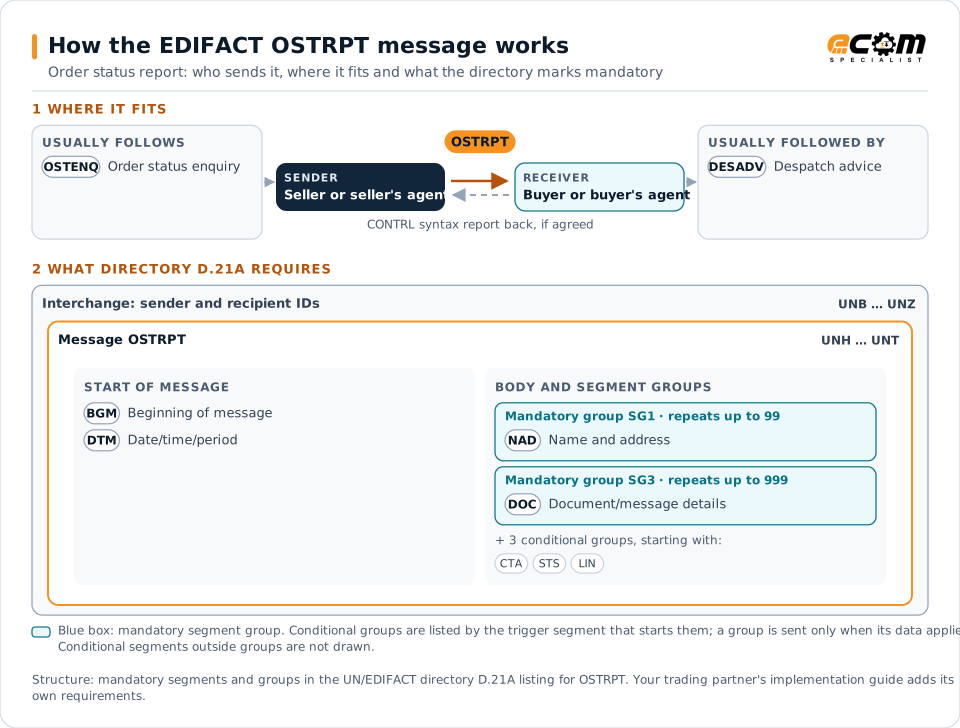
How to read this diagram: the top row shows who sends OSTRPT, to whom, and which messages usually come before and after it. The lower part shows what the directory D.21A itself requires: the envelopes around OSTRPT and the segments and segment groups it marks mandatory. Conditional groups are listed by their trigger segment rather than drawn in full. This is the directory's minimum, not a trading partner's requirement: a message implementation guide, such as an industry subset or a partner’s own guide, usually makes some conditional groups mandatory, restricts the codes and may use an older directory.
When it is used
- Answering an order status enquiry
- Sending scheduled status reports for open orders
- Reporting delays and new expected dates
Where it fits in the message flow
Structure
Mandatory segments in OSTRPT (directory D.21A)
In UN/EDIFACT directory D.21A, the OSTRPT message has 60 segment positions arranged in 18 segment groups. These are the segments and segment groups marked mandatory at message level, in order; a mandatory group is shown with the segment that starts it. Segments inside conditional groups are needed only when the group is used. This is the directory’s requirement, not your trading partner’s: each partner’s message implementation guide names the directory it uses, often an older one such as D.96A or D.01B where the structure can differ, makes some conditional segments mandatory and restricts the codes.
- UNH
- BGM
- DTM
- SG1 (NAD)
- SG3 (DOC)
- UNT
Practical example
OSTRPT in practice
A furniture manufacturer sends a retailer an OSTRPT every Monday covering all open orders. This week it reports that two orders are in production on schedule, one is waiting for fabric with a new ship date ten days later, and one has shipped. The retailer's buyers update store delivery plans for the delayed order.
Implementation
Implementation considerations for OSTRPT
- Use status codes both parties map the same way.
- Report new expected dates whenever status changes.
- Reference order and line numbers exactly.
- Keep reported status consistent with despatch advices.
How ECOM helps
Automate OSTRPT with ECOM
Solution
Supply Chain Visibility
Track orders, shipments and invoices across partners and catch exceptions early.
Solution
Order-to-Cash Automation
Automate the flow from purchase order to payment across every customer channel.
Industry
Retail
Retail and eCommerce EDI for suppliers and retailers, from purchase order to payment, with compliance built in.
Compare X12 and EDIFACT, or see answers to general questions in the EDI FAQ.
Related messages
Related ordering messages
Need help with OSTRPT?
ECOM maps, tests and monitors EDIFACT messages for your trading partners and integrates them with your ERP.