
EDIFACT message guide · Master data
PRODAT Product data
The UN/EDIFACT message a supplier uses to send product master data, the technical and functional description of products, without commercial terms.
- Sent by
- Supplier or manufacturer
- Received by
- Customer, buyer or data pool
- Standard
- UN/EDIFACT · Batch message
- X12 equivalent
- No direct equivalent
What is the EDIFACT PRODAT message?
PRODAT is the UN/EDIFACT product data message. The directory defines it as a message to submit master data, a set of data that rarely changes, identifying and describing the products a supplier offers to customers or buyers. It covers the technical and functional description of products but not commercial terms and conditions.
Product data includes identifiers, descriptions, dimensions and weights, materials, technical characteristics and classifications. Prices and terms travel separately, typically in PRICAT. Separating the two lets slowly changing master data be maintained once, while prices change more often.
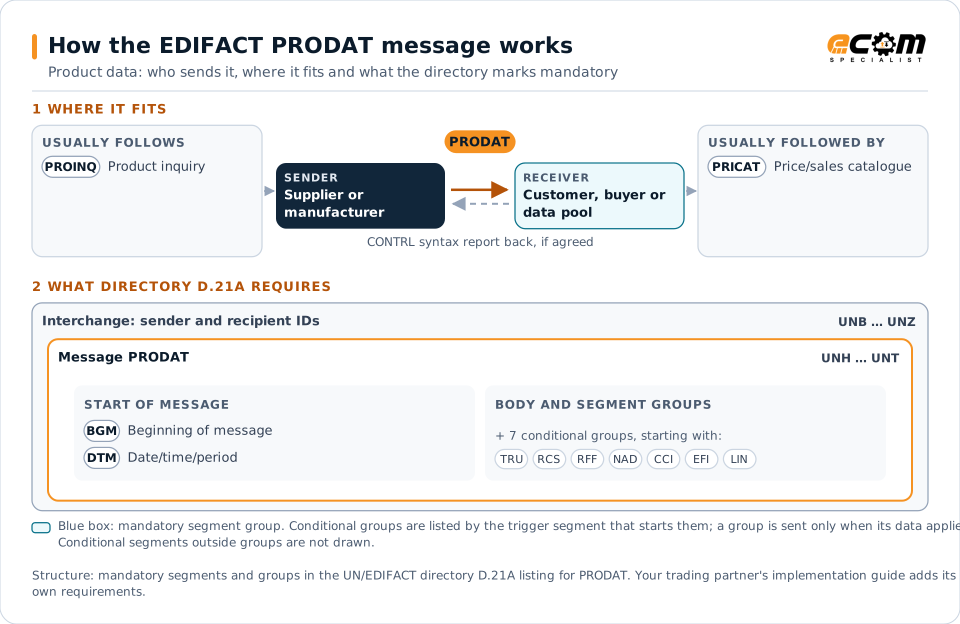
How to read this diagram: the top row shows who sends PRODAT, to whom, and which messages usually come before and after it. The lower part shows what the directory D.21A itself requires: the envelopes around PRODAT and the segments and segment groups it marks mandatory. Conditional groups are listed by their trigger segment rather than drawn in full. This is the directory's minimum, not a trading partner's requirement: a message implementation guide, such as an industry subset or a partner’s own guide, usually makes some conditional groups mandatory, restricts the codes and may use an older directory.
When it is used
- Sending technical product descriptions to customers
- Answering a product inquiry
- Updating master data after a product change
Where it fits in the message flow
Structure
Mandatory segments in PRODAT (directory D.21A)
In UN/EDIFACT directory D.21A, the PRODAT message has 94 segment positions arranged in 28 segment groups. These are the segments and segment groups marked mandatory at message level, in order; a mandatory group is shown with the segment that starts it. Segments inside conditional groups are needed only when the group is used. This is the directory’s requirement, not your trading partner’s: each partner’s message implementation guide names the directory it uses, often an older one such as D.96A or D.01B where the structure can differ, makes some conditional segments mandatory and restricts the codes.
- UNH
- BGM
- DTM
- UNT
Practical example
PRODAT in practice
An electrical components maker introduces a new line of circuit breakers. It sends its distributors a PRODAT for each product with the item number, description, dimensions, weight, rated current, standards met and classification code. A week later it sends a PRICAT with prices, so the distributors can list the products with complete technical data.
Implementation
Implementation considerations for PRODAT
- Keep master data separate from prices and terms.
- Use classification schemes the customer recognizes, such as ETIM or eCl@ss where relevant.
- Send changes with the date from which they take effect.
- Validate dimensions and weights, which drive logistics planning.
How ECOM helps
Automate PRODAT with ECOM
Industry
Wholesale Distribution
Customer orders, supplier purchasing, catalogs and drop-ship for distributors.
Industry
Industrial Manufacturing
Distributor, OEM customer and supplier integration for industrial manufacturers.
Solution
B2B Integration
Connect every customer, supplier, carrier and bank across EDI, API, file and portal channels.
Compare X12 and EDIFACT, or see answers to general questions in the EDI FAQ.
Need help with PRODAT?
ECOM maps, tests and monitors EDIFACT messages for your trading partners and integrates them with your ERP.