
The short answer
Epicor Kinetic processes inbound EDI through Demand Management, which receives orders, forecasts and schedules translated by an EDI layer, compares them with existing sales orders and releases, and lets teams review changes before they post. REST APIs and Business Activity Queries support real-time integration and outbound extracts, while customer shipments and A/R invoices drive ship notices and invoices.
Read the diagram from top to bottom. Epicor Kinetic does not exchange X12 itself in this design: the integration layer handles the partner connection and translation, and Epicor Kinetic creates and posts the business records. Outbound documents are built from what Epicor Kinetic actually recorded.
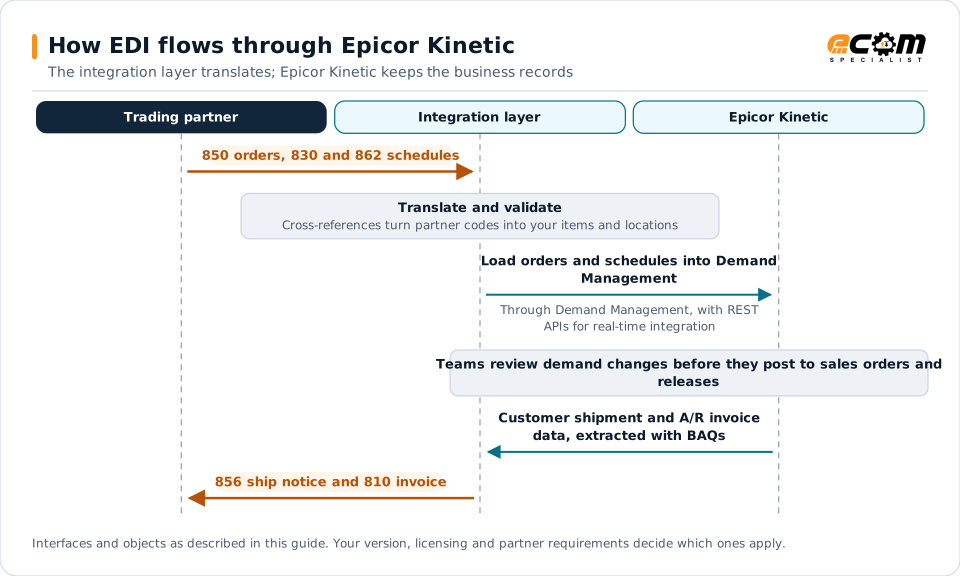
How EDI connects to Epicor Kinetic
Epicor Kinetic, formerly Epicor ERP, is widely used by make-to-order and discrete manufacturers. Their customers, including automotive and industrial OEMs, often send orders, forecasts and schedules electronically and expect accurate ship notices in return. An EDI integration layer translates partner documents, and Kinetic’s Demand Management turns that data into sales orders, releases and forecasts.
Document mapping
| EDI document | Direction | Kinetic object |
|---|---|---|
| 850 purchase order | Inbound | Demand entry, sales order |
| 860 order change | Inbound | Demand entry changes |
| 830 planning schedule | Inbound | Forecasts and releases |
| 862 shipping schedule | Inbound | Firm releases |
| 856 ship notice | Outbound | Customer shipment |
| 810 invoice | Outbound | A/R invoice |
Demand Management
Demand Management sits between inbound EDI and your sales orders:
- Translated demand arrives as demand entries for the customer’s trading partner setup.
- Kinetic compares new demand with existing orders, releases and forecasts.
- Changes within your rules post automatically; others go to review.
- Approved demand updates sales orders, releases and forecasts used by planning.
Set up review rules carefully. Too strict, and planners drown in reviews; too loose, and unexpected changes reach production schedules.
Integration options
- REST APIs: business-object-based APIs for real-time integration, such as creating orders from marketplaces or reading order status.
- Business Activity Queries (BAQs): configurable queries for extracting shipment and invoice data for outbound documents.
- Epicor Functions: server-side logic that can be exposed through the REST API for custom processing.
- Integration tools such as Service Connect: workflow-based integration, where already in use.
Options differ between Epicor-hosted cloud and on-premises deployments, so confirm what your environment supports.
Partner data
- Customer part cross-references map customer part numbers to internal parts.
- Ship-to records hold customer plant, dock and location codes.
- Trading partner settings store partner identifiers and demand processing rules.
Shipping data
Automotive and industrial customers often require container, packaging and label details in ship notices. Build ship notices from customer shipments and packing data, and plan label requirements, such as AIAG-style or GS1-128 labels, with the shipping team.
Best practices
- Maintain customer part cross-references as part of partner onboarding.
- Tune Demand Management review rules with planners before go-live.
- Track cumulative quantities when customers use schedule-based releases.
- Generate ship notices at shipment, not in end-of-day batches.
- Monitor demand processing errors daily and assign owners.