
IBM Sterling Connect:Direct
Run IBM Sterling Connect:Direct transfers your business can depend on
IBM Sterling Connect:Direct moves files point to point between systems, data centers, banks and partners, with assured delivery for high volumes. ECOM configures nodes and netmaps, sets up Secure Plus, onboards partners, plans upgrades and investigates failed transfers.
At a glance
- Node installation and configuration
- Netmaps and partner onboarding
- Secure Plus
- Processes and automation
- Upgrades
- Integration with surrounding products
The challenge
Critical transfers on nodes few people still understand
Connect:Direct often carries payments, payroll, claims, inventory and settlement files between mainframes, servers and banks. Nodes were set up years ago, netmaps and Processes have grown by copy and paste, certificates expire without warning, and upgrades wait because each platform has its own release. When a transfer fails, the business needs to know quickly whether to rerun, restart or call the partner.
- Netmaps and Processes nobody has reviewed in years
- Secure Plus certificates that expire unexpectedly
- Upgrades across several platforms and releases
- Slow diagnosis of failed or stalled transfers
Business uses
Where businesses use Connect:Direct
Connect:Direct is chosen where files must arrive complete and on time, often in large volumes and on fixed schedules.
Bank and payment files
Payment, remittance and statement files move between corporate systems and banks that standardize on Connect:Direct.
Between data centers and platforms
Files move between mainframe, UNIX, Linux, Windows and IBM i systems inside the enterprise, with restart if a link drops.
Industry and partner exchanges
Insurers, retailers, healthcare organizations and their partners exchange large batch files on agreed schedules.
Scope
What ECOM's specialists do for Connect:Direct
-
Node installation and configuration
Install and configure Connect:Direct nodes, including initialization parameters, user authorities and file locations.
-
Netmaps and partner onboarding
Set up netmap entries for each partner and system, exchange connection details and test transfers in both directions.
-
Secure Plus
Configure Secure Plus with TLS, manage certificates and keys, and plan renewals with each partner before they expire.
-
Processes and automation
Write and review Connect:Direct Processes, schedules and file agent rules so transfers start and finish predictably.
-
Upgrades
Plan and run upgrades across platforms, check compatibility with partners and monitoring, and test before cutover.
-
Integration with surrounding products
Work with Sterling Secure Proxy in the DMZ, Control Center monitoring and B2B Integrator or File Gateway where they are part of your design.
-
Transfer troubleshooting
Investigate failed, stalled or slow transfers from statistics and logs on both nodes, and agree the fix with the partner.
Integration architecture
How Connect:Direct fits in your file transfer architecture
Every system that sends or receives runs its own node. Nodes talk to each other directly, with the partner's details held in the netmap.
Each system runs its own Connect:Direct node. Partners connect node to node, usually through Secure Proxy in the DMZ, and Control Center watches the transfers.
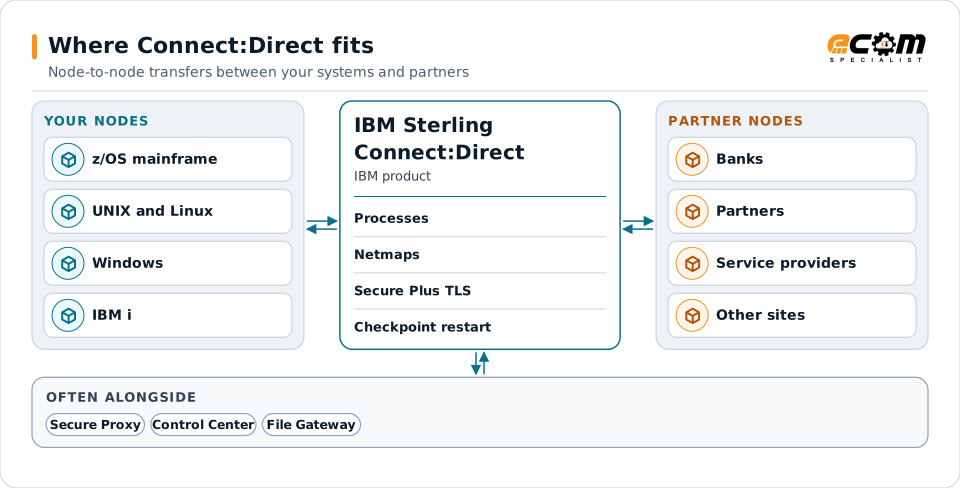
Nodes on each platform
IBM provides Connect:Direct for platforms including z/OS, UNIX and Linux, Windows and IBM i, each run as a node.
Processes describe the work
A Process is a set of statements, such as a copy, a run task or a submit, that the node executes for a transfer.
Secure Plus protects sessions
Secure Plus adds TLS encryption and certificate-based authentication between nodes, configured per partner.
Secure Proxy at the perimeter
For external partners, Sterling Secure Proxy in the DMZ checks the connection and opens a separate session to the internal node.
Control Center for visibility
Sterling Control Center collects transfer events from nodes so operations can see and act on failures.
Approach
How an engagement runs
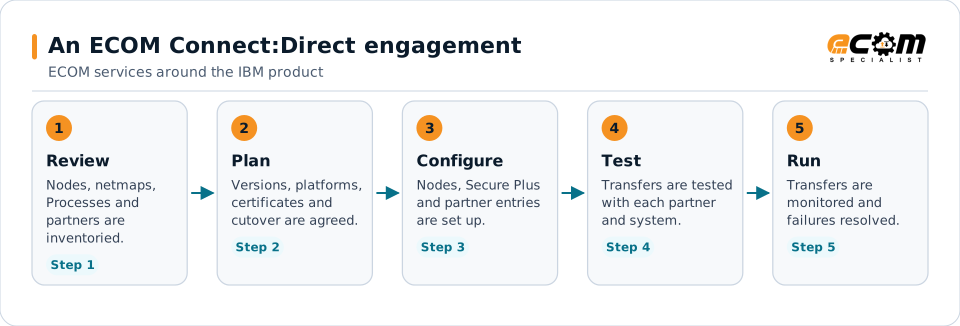
Partner testing in step four is scheduled with each counterparty, because both nodes, their netmaps and their certificates have to agree.
- 01
Review
List nodes, platforms, netmaps, Processes, partners and recent failures, and agree what matters most.
- 02
Plan
Agree configuration standards, the certificate plan, upgrade order and partner test dates with your team.
- 03
Configure and test
Configure nodes and partner entries and test transfers in both directions with each partner.
- 04
Hand over or operate
Hand over with documentation, or continue with ECOM administration, monitoring and troubleshooting.
Technical considerations
Technical considerations for Connect:Direct
-
Each platform is its own product
Connect:Direct for each platform has its own releases, installation and settings, so upgrades are planned per platform.
-
Partners must agree settings
Netmap details, Secure Plus protocols and certificates have to match on both nodes before a transfer works.
-
Restart and checkpoints
Checkpoint settings decide how much is resent after an interruption, which matters for very large files.
-
Perimeter design
External partners usually connect through Secure Proxy, which affects firewall rules and certificate placement.
Migration and upgrades
Upgrades and moves for Connect:Direct
Connect:Direct upgrades are usually run platform by platform, with partners kept connected throughout.
Version and platform planning
Check each node's release against IBM's support dates, operating system levels and the partners it talks to.
Certificates and Secure Plus settings
Review certificates, protocols and cipher settings so upgraded nodes still connect to partners with older settings.
Moving nodes to new servers or cloud
Netmaps, Processes, user authorities and file paths move with the node and are tested with each partner before cutover.
Consolidating transfers
Where partner transfers can be routed through File Gateway or another MFT layer, ECOM plans the move with your team.
Support and troubleshooting
Common Connect:Direct issues and where specialists look
Statistics and logs on both nodes usually show where a transfer failed and why.
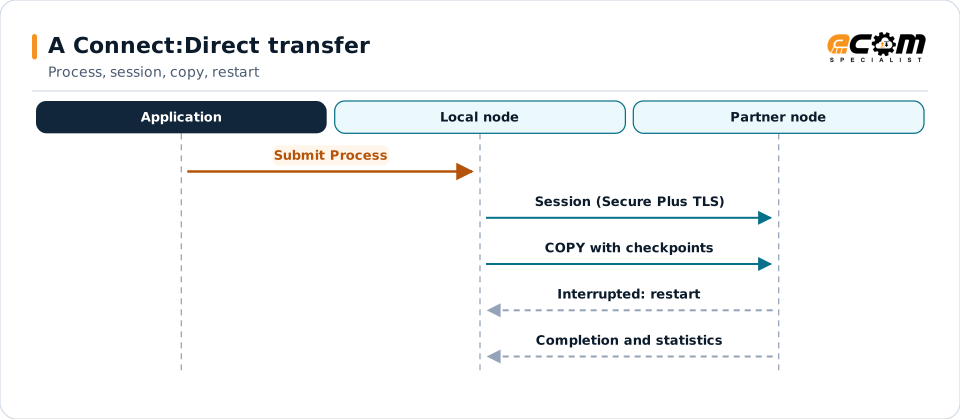
Checkpoints let an interrupted transfer resume instead of starting again. Statistics on both nodes are where troubleshooting starts.
| What you see | What specialists check |
|---|---|
| A transfer fails to connect | Check the netmap entry, the partner's address and port, firewall rules and whether the partner node is up. |
| The session fails during the TLS handshake | Compare Secure Plus settings and certificates on both nodes, including expiry dates, trusted roots and protocol versions. |
| A transfer starts but does not finish | Read the statistics for the step that failed, check disk space and file permissions, and decide whether to restart from the checkpoint. |
| Transfers are slower than usual | Look at network throughput, compression and checkpoint settings, and how many sessions run at the same time. |
| A Process ran but the file is wrong | Check the Process statements, file names and data set attributes, and any conversion between platforms. |
Why it matters
What you gain
Transfers that finish
Reviewed configuration and tested partner settings reduce failed and stalled transfers.
No surprise expiries
A certificate plan agreed with partners avoids outages when certificates expire.
Faster recovery
Clear statistics and a known procedure shorten the time from a failed transfer to a fixed one.
Fit
When teams call us
Nodes on old releases
Several nodes run releases near or past end of support and need an upgrade plan that keeps partners connected.
A new bank or partner
A bank or partner requires Connect:Direct and you need the node, netmap and Secure Plus set up and tested.
Recurring transfer failures
Transfers fail or stall often enough that the business notices, and the cause is not clear.
Product background
About IBM Sterling Connect:Direct
Highlights from IBM's documentation for Connect:Direct. Features and platforms differ by release; confirm them for your version.
IBM sources, checked November 7, 2026:
- IBM Sterling Connect:Direct product page (opens in a new tab)
- IBM Sterling Connect:Direct Overview, version 6.1 (IBM Documentation) (opens in a new tab)
IBM publishes lifecycle and compatibility information that changes over time. Always confirm current details with IBM for your versions and entitlements. IBM and related product names are trademarks of IBM.
- IBM documents Connect:Direct as point-to-point file transfer software for assured, high-volume and secure data exchange
- IBM lists platforms including z/OS, UNIX, Linux, Windows and IBM i
- IBM documents Secure Plus for TLS protection of data in transit and certificate-based authentication
- IBM documents Processes as series of statements that move and manipulate data between Connect:Direct servers
- IBM documents Sterling Secure Proxy as a reverse proxy that checks the node and provides a session break before connecting to the internal node
Why ECOM
Sterling expertise, plus everything around it
Most Sterling problems are not only platform problems. They involve maps, partners, infrastructure and people. ECOM brings these together:
-
IBM Sterling technical expertise
Specialists who install, upgrade, administer and develop on B2B Integrator, File Gateway and Connect:Direct.
-
EDI mapping and partner integration
Maps, business processes and trading partner onboarding, not only platform administration.
-
Managed infrastructure and operations
Hosting, monitoring and day-to-day operations when you want ECOM to run the environment.
-
PRISM integration and visibility
Add ECOM PRISM for visibility, partner connectivity or a future platform path alongside Sterling.
-
EDI Team as a Service
Sterling and EDI specialists who extend your team on an ongoing basis.
-
Automotive integration
Deep automotive integration experience: schedules, ship notices and plant routing on Sterling or PRISM.
Ways to work with ECOM
A defined project
An upgrade, migration, implementation or fix with an agreed scope, plan and hand-over to your team.
Ongoing administration
ECOM specialists share administration and development work with your team through EDI Team as a Service.
Managed service
ECOM operates the environment within an agreed scope and service levels defined in the service agreement.
Each engagement is scoped individually. Not every engagement includes every service listed on this site.
Frequently asked questions
Is ECOM an IBM partner for IBM Sterling Connect:Direct?
Yes. ECOM is an IBM Gold Business Partner with certified delivery for IBM Sterling Connect:Direct.
Can ECOM onboard a new Connect:Direct partner for us?
Yes. ECOM sets up the netmap entry and Secure Plus settings, exchanges certificates and connection details with the partner, and tests transfers both ways.
Which Connect:Direct platforms does ECOM work with?
ECOM's specialists are subject-matter experts in Connect:Direct on z/OS, UNIX and Linux, Windows and IBM i. Tell us which nodes you have, and we will plan the work for each one.
How do you avoid outages when certificates expire?
ECOM lists every certificate with its expiry date, agrees renewal dates with each partner and tests the new certificate before the old one expires.
Can Connect:Direct work with Sterling File Gateway?
Yes. IBM documents File Gateway and B2B Integrator working with Connect:Direct, so partner transfers can be routed and tracked through File Gateway where that fits.
Does ECOM supply Connect:Direct licenses?
Licenses come from IBM. ECOM works with the product you license and helps you confirm what your entitlement covers for each platform.
Talk to an EDI/API Expert about Connect:Direct
Tell us about your nodes, platforms and partners. An ECOM specialist will review them with you and suggest a practical next step.