
IBM Sterling Control Center
See and act on every critical transfer across your Sterling estate
IBM Sterling Control Center Monitor tracks events across B2B and managed file transfer servers and alerts the right people when a server, process or transfer has a problem. ECOM installs it, designs the rules and service levels, tunes alerts and keeps it current.
At a glance
- Installation and configuration
- Rules and notifications
- Service level criteria
- Alert tuning
- Control Center Director
- Upgrades
The challenge
Monitoring that either misses problems or raises too many alerts
Sterling estates grow to dozens of servers across Connect:Direct, B2B Integrator, File Gateway and Secure Proxy. Without central monitoring, failures are found by the business when a file is missing. With poorly tuned monitoring, operators receive so many alerts that the important one is lost. Rules written years ago no longer match today's partners, processing windows and servers.
- Failures found by the business, not by operations
- Too many alerts, so important ones are missed
- No alert when an expected file never arrives
- Rules and server lists out of date
Business uses
Where businesses use Control Center
Control Center is used by operations teams that run Sterling products for critical business flows.
Operations monitoring
One console shows the status of servers, processes and transfers across Connect:Direct, B2B Integrator, File Gateway and Secure Proxy.
Service level tracking
Service level criteria watch processing windows, so a late or missing file raises an alert before the business is affected.
Connect:Direct administration
Control Center Director supports Connect:Direct deployment tasks such as resource discovery, license governance and upgrades.
Scope
What ECOM's specialists do for Control Center
-
Installation and configuration
Install Control Center Monitor and its database, connect the servers to monitor and set up users and roles.
-
Rules and notifications
Design rules that decide which events matter, who is told and how, by email, SNMP or the console.
-
Service level criteria
Define processing windows for critical flows so missing, late or failed work raises an alert in time to act.
-
Alert tuning
Review alert volumes with operations and remove noise, so each alert is one that someone should act on.
-
Control Center Director
Set up Director for Connect:Direct resource discovery, license governance and upgrade tasks where it fits your estate.
-
Upgrades
Plan and run Control Center upgrades, including the database and the monitored server connections.
-
Monitoring operations
Watch the console and work alerts as part of a managed service, within the scope agreed in the service agreement.
Integration architecture
How Control Center fits in your Sterling estate
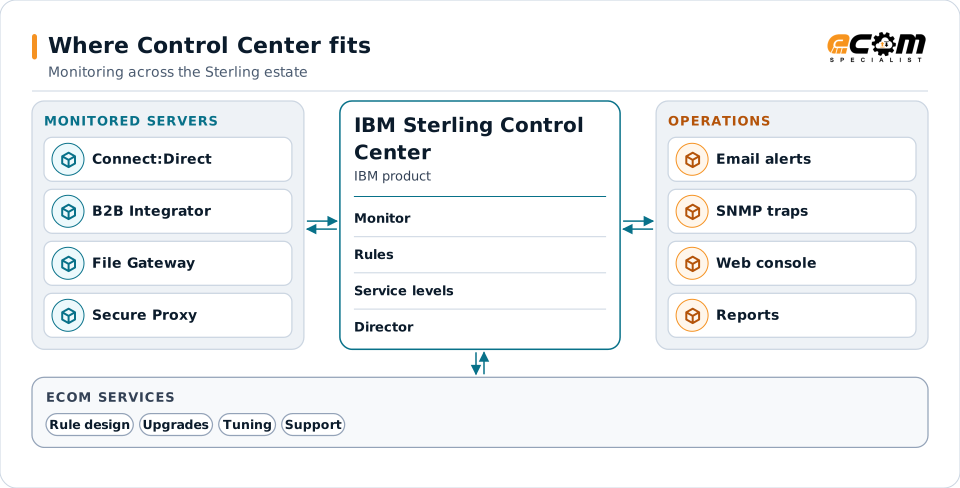
Control Center sits beside the products it watches. It collects their events and turns them into alerts, reports and status views.
Servers report events to Control Center Monitor. Rules and service level criteria decide who is told what, and when. Control Center Director handles Connect:Direct configuration, licenses and upgrades.
Monitored servers
IBM documents monitoring for Sterling products including Connect:Direct, B2B Integrator, File Gateway and Secure Proxy, and many FTP servers.
Engine and database
The Control Center engine collects events from the servers and stores them in its database for status views and reports.
Rules and service levels
Rules act on single events; service level criteria watch expected processing over time and alert when it is at risk.
Director for Connect:Direct
Control Center Director manages Connect:Direct configuration, licenses and upgrades, alongside Monitor's visibility.
Approach
How an engagement runs
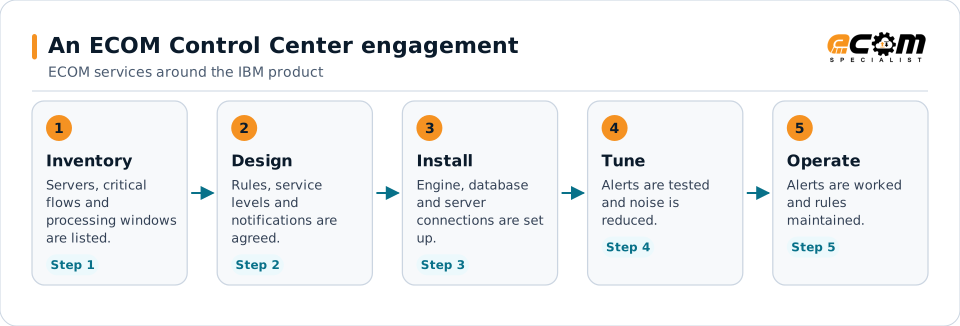
The value is in step two: an alert that nobody acts on is noise, and a missed processing window that raises no alert is the problem Control Center is meant to catch.
- 01
Inventory
List the servers, critical flows, processing windows and current alerts, and who needs to know about which problems.
- 02
Design
Agree rules, service level criteria and notification routes with operations and the business owners of each flow.
- 03
Implement and tune
Install or update Control Center, connect the servers, test the alerts and remove noise with the operations team.
- 04
Hand over or operate
Hand over with documentation and training, or continue with ECOM monitoring and maintenance of the rules.
Technical considerations
Technical considerations for Control Center
-
Product versions
Supported monitored-server releases and features differ by Control Center release; IBM documents them per release.
-
Database sizing
Event volumes and retention decide the database size and the purge schedule.
-
Network access
Control Center needs network access and credentials for each server it monitors, which affects firewall rules.
-
Who acts on alerts
Every alert route needs an owner and a procedure, or the alert becomes noise.
Migration and upgrades
Upgrading Control Center and growing coverage
Upgrades and coverage changes are planned so monitoring is never switched off for critical flows.
Release planning
Check the target release against IBM's support dates, the database version and the releases of the servers it monitors.
Database and history
Plan how event history moves to the new release and how long it is kept, so reports stay available.
Adding servers and flows
New servers and partner flows are added with their rules and service levels, so coverage keeps pace with the estate.
Support and troubleshooting
Common Control Center issues and where specialists look
Most issues are about missing events, wrong alerts or the connection between Control Center and a server.
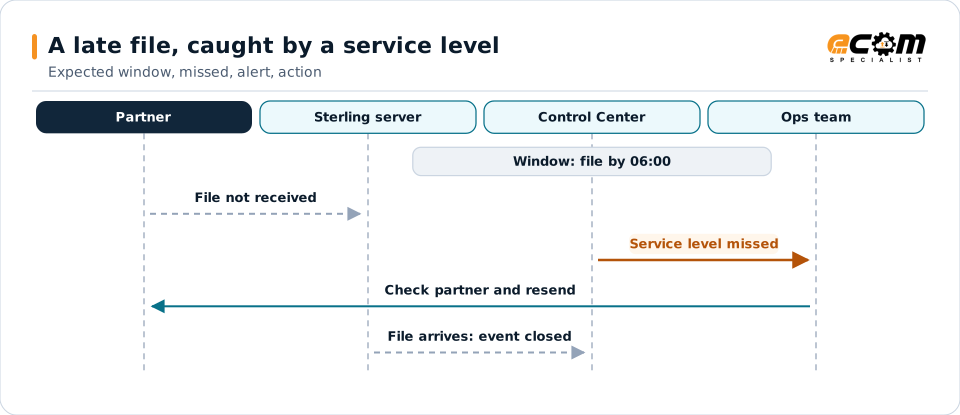
Service level criteria alert on what did not happen, such as a file that never arrived, not only on errors.
| What you see | What specialists check |
|---|---|
| A server shows as offline | Check the connection details, credentials and certificates for that server, and whether its own service is running. |
| An expected alert did not arrive | Review the rule or service level for that flow, the notification settings and whether the event reached Control Center. |
| Operators receive too many alerts | Group alerts by rule and source, retire rules that nobody acts on and raise thresholds where the business agrees. |
| The console or reports are slow | Review the database size, event retention and purge settings, and the number of servers and events collected. |
Why it matters
What you gain
Problems found first by operations
Alerts reach operations before the business notices a missing or failed transfer.
Fewer, better alerts
Tuned rules mean each alert is worth reading and acting on.
Proof of processing windows
Service level tracking shows whether critical flows ran on time.
Fit
When teams call us
No central monitoring
Each product is checked separately, and failures are found when someone complains.
Alert fatigue
Operators receive so many alerts that real problems are missed.
An upgrade is due
Control Center or the servers it monitors are moving to new releases.
Product background
About IBM Sterling Control Center
Highlights from IBM's product page and documentation for Control Center Monitor and Control Center Director. Confirm details for your release.
IBM sources, checked November 7, 2026:
- IBM Sterling Control Center Monitor product page (opens in a new tab)
- IBM Sterling Control Center Monitor 6.4.2 documentation (opens in a new tab)
- IBM Sterling Control Center Monitor 6.4.x (IBM Support) (opens in a new tab)
IBM publishes lifecycle and compatibility information that changes over time. Always confirm current details with IBM for your versions and entitlements. IBM and related product names are trademarks of IBM.
- IBM documents Control Center Monitor as tracking critical events across B2B and managed file transfer infrastructure, with rules that alert when a server, process or transfer has a problem
- IBM documents monitoring for IBM Sterling products and many FTP servers
- IBM documents service level criteria for watching critical processing windows, with notifications by email, SNMP traps and alerts
- IBM documents Control Center Director as an activity management and monitoring product with resource discovery and license governance for Connect:Direct
- IBM's support pages list Control Center Monitor 6.4.x as generally available since December 12, 2024
Why ECOM
Sterling expertise, plus everything around it
Most Sterling problems are not only platform problems. They involve maps, partners, infrastructure and people. ECOM brings these together:
-
IBM Sterling technical expertise
Specialists who install, upgrade, administer and develop on B2B Integrator, File Gateway and Connect:Direct.
-
EDI mapping and partner integration
Maps, business processes and trading partner onboarding, not only platform administration.
-
Managed infrastructure and operations
Hosting, monitoring and day-to-day operations when you want ECOM to run the environment.
-
PRISM integration and visibility
Add ECOM PRISM for visibility, partner connectivity or a future platform path alongside Sterling.
-
EDI Team as a Service
Sterling and EDI specialists who extend your team on an ongoing basis.
-
Automotive integration
Deep automotive integration experience: schedules, ship notices and plant routing on Sterling or PRISM.
Ways to work with ECOM
A defined project
An upgrade, migration, implementation or fix with an agreed scope, plan and hand-over to your team.
Ongoing administration
ECOM specialists share administration and development work with your team through EDI Team as a Service.
Managed service
ECOM operates the environment within an agreed scope and service levels defined in the service agreement.
Each engagement is scoped individually. Not every engagement includes every service listed on this site.
Frequently asked questions
Is ECOM an IBM partner for IBM Sterling Control Center?
Yes. ECOM is an IBM Gold Business Partner with certified delivery for IBM Sterling Control Center.
Which products can Control Center monitor?
IBM documents monitoring for Sterling products including Connect:Direct, B2B Integrator, File Gateway and Secure Proxy, and many FTP servers. Check IBM's documentation for your release.
What is the difference between Control Center Monitor and Director?
Monitor tracks events and raises alerts across the Sterling estate. Director focuses on managing Connect:Direct deployments, such as resource discovery, license governance and upgrades.
Can Control Center alert us when a file does not arrive?
Yes. Service level criteria watch expected processing windows, so a late or missing file can raise an alert even though no error occurred.
Can ECOM monitor our Sterling estate for us?
ECOM can watch alerts and work them as part of a managed service, within the scope and service levels agreed in the service agreement.
Talk to an EDI/API Expert about Control Center
Tell us which servers and flows you need to watch. An ECOM specialist will review them with you and suggest a practical next step.