
IBM Sterling Order Management
Get more from IBM Sterling Order Management across every channel
IBM Sterling Order Management brings orders from every channel together, checks inventory availability and decides where each order is fulfilled. ECOM configures it, connects it to your ERP, warehouses and EDI partners, plans upgrades and supports it in production.
At a glance
- Configuration
- Integration
- EDI connections
- Development and extensions
- Upgrades
- Production support
The challenge
An order hub that touches every system
Sterling Order Management sits between sales channels, inventory, warehouses, stores, suppliers and finance, so every change touches several systems at once. Sourcing rules grow complicated, integrations break when a channel or warehouse changes its interface, drop-ship suppliers need EDI connections, and upgrades are postponed because the regression testing is large. When an order is stuck, the team needs to know which system it is waiting for.
- Orders stuck between systems with no clear owner
- Sourcing and inventory rules that are hard to change
- Drop-ship and supplier connections over EDI
- Large regression testing for every upgrade
Business uses
Where businesses use Sterling Order Management
IBM positions Sterling Order Management for omnichannel order fulfillment, in retail, distribution and manufacturing.
Omnichannel retail
Orders from online stores, physical stores and call centers are fulfilled from distribution centers, stores or suppliers.
B2B distribution
Business customers' orders, including EDI orders, are checked against inventory and fulfilled from the best location.
Drop-ship fulfillment
Order lines are sent to suppliers who ship directly to the customer, with their confirmations tracked against the order.
Scope
What ECOM's IBM specialists do for Sterling Order Management
-
Configuration
Configure order pipelines, statuses, sourcing and inventory rules, and the participants and nodes in your network.
-
Integration
Connect Sterling Order Management to ERP, warehouse, store and channel systems through the queues and APIs IBM documents.
-
EDI connections
Connect EDI orders, acknowledgments, ship notices and invoices with customers and drop-ship suppliers to the order flow.
-
Development and extensions
Build and maintain extensions, user exits and services within the patterns IBM supports for your release.
-
Upgrades
Plan and run upgrades with regression testing of order scenarios, integrations and extensions.
-
Production support
Investigate stuck orders, integration failures and performance issues, as a project or an ongoing service.
Integration architecture
How Sterling Order Management fits in your order flow
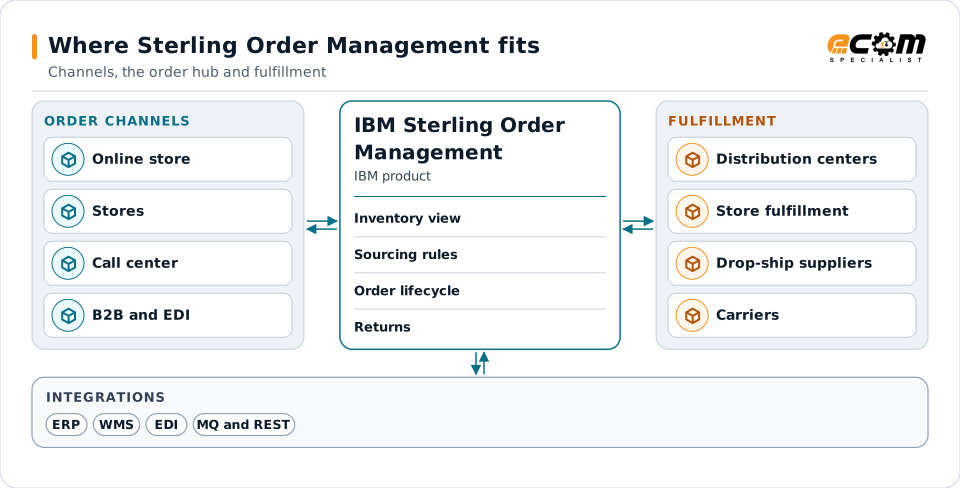
Sterling Order Management is the hub between channels and fulfillment. It does not replace your ERP or warehouse systems; it connects them.
Orders from every channel land in one place. Sterling Order Management checks availability, picks the fulfillment location by rule and tracks the order through to delivery and returns.
Order capture from every channel
Online, store, call center and B2B orders arrive in one place, each with its status tracked through the lifecycle.
Inventory view
IBM documents consolidating inventory from several systems into one view of supply and demand, used for availability checks.
Sourcing and allocation
IBM documents rule-based sourcing that picks fulfillment locations, splits orders when needed and can drop-ship from partners.
Integration with ERP, WMS and EDI
IBM documents integration with external systems through IBM MQ and REST APIs; EDI documents connect through a B2B gateway.
Approach
How an engagement runs
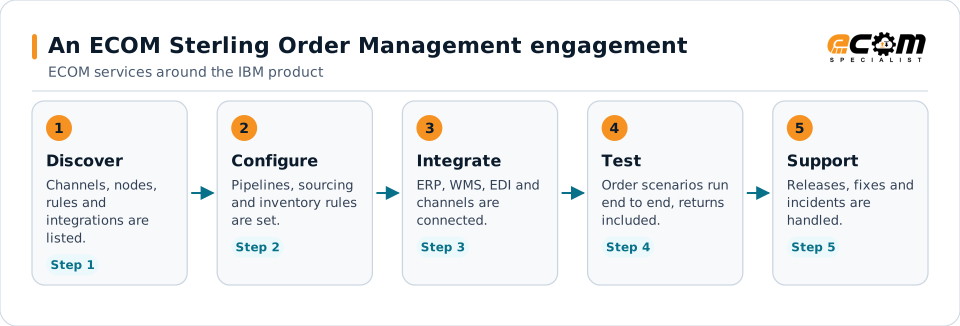
Integration in step three is usually the largest piece: every channel, ERP, warehouse and EDI partner has to send and receive order events in the same shape.
- 01
Discover
List channels, fulfillment nodes, sourcing rules, integrations and extensions, and the order scenarios that matter most.
- 02
Configure and integrate
Configure the order flow and connect ERP, warehouse, store, channel and EDI systems, with agreed message formats.
- 03
Test end to end
Run order scenarios end to end, including splits, cancellations and returns, with each connected system.
- 04
Hand over or support
Hand over with documentation, or continue with ECOM development, upgrades and production support.
Technical considerations
Technical considerations for Sterling Order Management
-
Deployment model
IBM offers cloud, hybrid and on-premises deployments, and the extension options differ between them.
-
Integration volume
Every channel and fulfillment system adds an integration to design, test and monitor.
-
Inventory accuracy
Availability is only as good as the inventory data coming from warehouses, stores and suppliers.
-
Not the same as PRISM
IBM Sterling Order Management is an IBM product. It is not related to PRISM MultiChannel Order Management, ECOM's own product.
Migration and upgrades
Upgrades and changes for Sterling Order Management
Upgrades and large changes are planned around order scenarios, not only around software versions.
Release and deployment planning
Check the target release and deployment model (on premises, hybrid or IBM cloud) against your extensions and integrations.
Extensions and customizations
Review each extension against the target release and rework what uses features that changed or were removed.
Regression testing by scenario
Test order creation, sourcing, split shipments, cancellations, returns and EDI exchanges end to end before cutover.
Support and troubleshooting
Common Sterling Order Management issues and where specialists look
Most issues show up as orders that stop moving or integrations that stop sending or receiving.
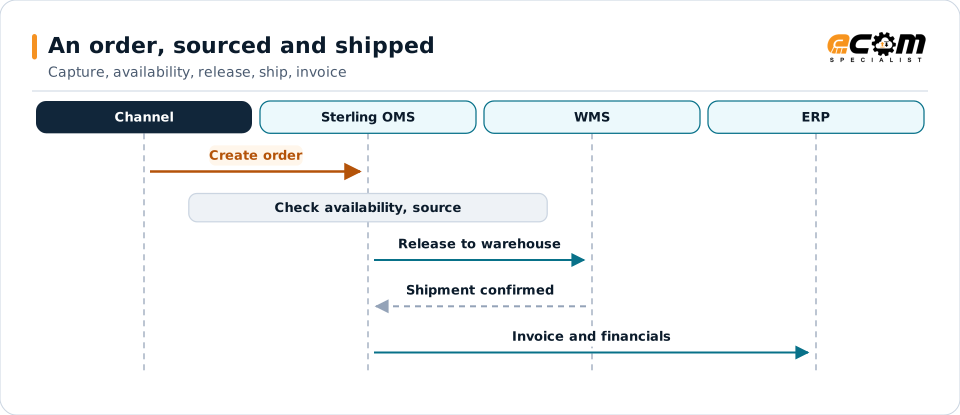
One order can split: some lines ship from a distribution center, others go to a drop-ship supplier as an EDI purchase order. Each line is tracked to shipment.
| What you see | What specialists check |
|---|---|
| Orders are stuck in a status | Check the pipeline step and the agent or condition that should move the order, and whether it is waiting for another system. |
| Inventory availability looks wrong | Compare supply and demand records with the source systems and review the latest inventory synchronization. |
| An integration stopped sending or receiving | Check the queue or API endpoint, credentials and message errors, and whether the other system changed its interface. |
| A drop-ship supplier did not receive the order | Check the release to the supplier, the EDI purchase order in the B2B gateway and the supplier's acknowledgment. |
| Performance degrades at peak | Review agent and server settings, database health and the volume of messages at peak, then test changes at peak volumes. |
Why it matters
What you gain
Orders that keep moving
Clear integrations and monitoring shorten the time an order waits between systems.
Rules you can change
Documented sourcing and inventory rules can be changed and tested with confidence.
Upgrades with less risk
Scenario-based regression testing finds problems before production.
Fit
When teams call us
Integrations need help
Channels, warehouses or suppliers change and the order flow needs new or fixed integrations.
An upgrade is due
Your release is approaching end of support and the extensions and integrations need review.
Drop-ship suppliers over EDI
Suppliers need purchase orders, acknowledgments, ship notices and invoices connected to the order flow.
Product background
About IBM Sterling Order Management
Highlights from IBM's documentation and product pages for Sterling Order Management. Features differ by edition, release and deployment model; confirm them for your environment.
IBM sources, checked November 7, 2026:
- Sterling Distributed Order Management (IBM Documentation) (opens in a new tab)
- IBM Sterling Order Management System Essentials Edition (IBM Documentation) (opens in a new tab)
- IBM Sterling Order and Fulfillment Suite (opens in a new tab)
IBM publishes lifecycle and compatibility information that changes over time. Always confirm current details with IBM for your versions and entitlements. IBM and related product names are trademarks of IBM.
- IBM positions Sterling Order Management for omnichannel order fulfillment
- IBM documents consolidating inventory information from multiple systems into a single view of supply and demand
- IBM documents rule-based sourcing that checks inventory availability, splits orders when needed and can drop-ship from channel partners
- IBM documents integration with external systems using IBM MQ and REST APIs
- IBM offers the product as cloud, hybrid or on-premises software
Why ECOM
Sterling expertise, plus everything around it
Most Sterling problems are not only platform problems. They involve maps, partners, infrastructure and people. ECOM brings these together:
-
IBM Sterling technical expertise
Specialists who install, upgrade, administer and develop on B2B Integrator, File Gateway and Connect:Direct.
-
EDI mapping and partner integration
Maps, business processes and trading partner onboarding, not only platform administration.
-
Managed infrastructure and operations
Hosting, monitoring and day-to-day operations when you want ECOM to run the environment.
-
PRISM integration and visibility
Add ECOM PRISM for visibility, partner connectivity or a future platform path alongside Sterling.
-
EDI Team as a Service
Sterling and EDI specialists who extend your team on an ongoing basis.
-
Automotive integration
Deep automotive integration experience: schedules, ship notices and plant routing on Sterling or PRISM.
Ways to work with ECOM
A defined project
An upgrade, migration, implementation or fix with an agreed scope, plan and hand-over to your team.
Ongoing administration
ECOM specialists share administration and development work with your team through EDI Team as a Service.
Managed service
ECOM operates the environment within an agreed scope and service levels defined in the service agreement.
Each engagement is scoped individually. Not every engagement includes every service listed on this site.
Frequently asked questions
Is ECOM an IBM partner for IBM Sterling Order Management?
Yes. ECOM is an IBM Gold Business Partner with certified delivery for IBM Sterling Order Management.
Is IBM Sterling Order Management the same as PRISM MultiChannel Order Management?
No. IBM Sterling Order Management is an IBM product. PRISM MultiChannel Order Management is ECOM's own product and is not related to IBM's.
Can ECOM connect our drop-ship suppliers to Sterling Order Management?
Yes. ECOM connects supplier purchase orders, acknowledgments, ship notices and invoices over EDI to the order flow through a B2B gateway.
Can ECOM help with an upgrade?
Yes. ECOM reviews extensions and integrations against the target release and runs scenario-based regression testing before cutover.
Does ECOM supply Sterling Order Management licenses?
Licenses and subscriptions come from IBM. ECOM works with the product you license and helps you confirm what your entitlement covers.
Talk to an EDI/API Expert about Sterling Order Management
Tell us about your channels, fulfillment network and integrations. An ECOM specialist will review them with you and suggest a practical next step.