
IBM Sterling Transformation Extender
Keep IBM Sterling Transformation Extender maps accurate, current and supported
IBM Sterling Transformation Extender (ITX) transforms data between formats, from EDI and industry standards to XML, JSON, flat files and databases. ECOM designs and maintains ITX maps, plans upgrades, sets up ITXA and industry packs, and supports the runtime where your maps run.
At a glance
- Map and type tree design
- Map maintenance
- Upgrades
- ITXA and industry packs
- Integration with surrounding products
- Documentation and knowledge transfer
The challenge
Maps that run the business, and few people who know them
ITX maps often sit at the center of order, invoice, claims or payment flows, and many were written years ago by people who have since moved on. Type trees drift from what partners actually send, documentation is thin, and upgrades are postponed because nobody is sure what a new release will change. When a map fails at night, finding the record and the rule behind the failure takes too long.
- Maps and type trees with little documentation
- Upgrades postponed because the impact is unknown
- Industry standard changes that need new map versions
- Slow diagnosis when a map fails in production
Business uses
Where businesses use Transformation Extender
ITX is used wherever data must change shape between systems that do not share a format.
EDI to and from business applications
Purchase orders, ship notices and invoices are mapped between X12 or EDIFACT and the formats your ERP and warehouse systems read.
Healthcare and financial standards
With ITXA and IBM's industry packs, ITX handles standards such as HIPAA X12 transactions and payment messages, with validation.
Application and data integration
Maps convert between XML, JSON, flat files, CSV and database tables inside integration flows and batch jobs.
Scope
What ECOM's specialists do for Transformation Extender
-
Map and type tree design
Define type trees for each partner and application format, and build maps with the rules, lookups and validation the business needs.
-
Map maintenance
Change maps when partners, standards or applications change, with regression tests against real samples before release.
-
Upgrades
Plan and run ITX upgrades, including runtime, design tools and the integrations that call maps, with side-by-side output comparison.
-
ITXA and industry packs
Set up ITX Advanced and IBM's industry packs where they fit, and adapt pack maps to your partners' implementation guides.
-
Integration with surrounding products
Run maps from B2B Integrator, App Connect, schedulers or applications, and connect them to files, queues, databases and APIs.
-
Documentation and knowledge transfer
Document maps, rules and dependencies so your team can support them, and train developers on ITX design practices.
-
Production support
Investigate failed map runs, fix data or map defects and keep the runtime healthy, as a project or an ongoing service.
Integration architecture
How Transformation Extender fits in your integration landscape
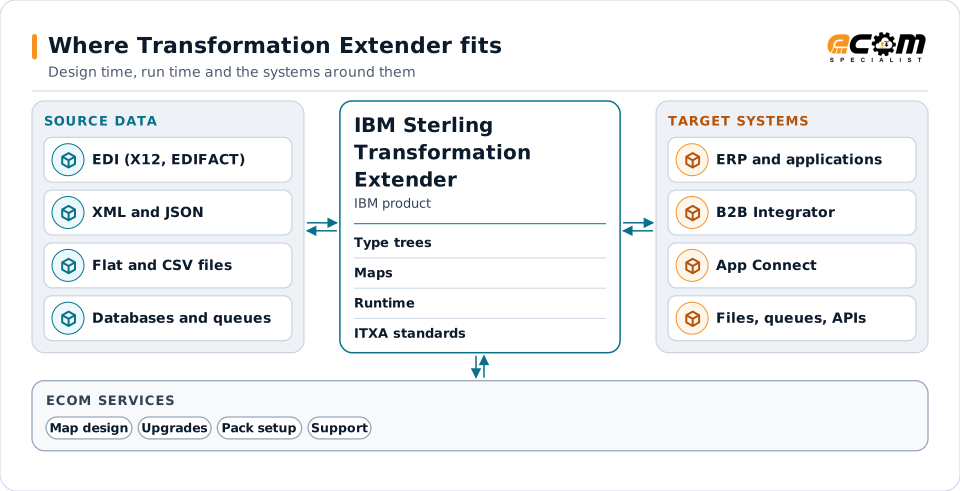
ITX separates design from execution. Formats and maps are defined in the design tools; the runtime executes them wherever data arrives.
Maps are designed once, then run wherever the data arrives: on their own, inside B2B Integrator or App Connect, or called from an application. ITXA adds standards processing for EDI and industry formats.
Type trees describe formats
A type tree describes the structure of one format, such as an X12 850, a JSON order or a fixed-width file, including its rules.
Maps describe the transformation
A map reads one or more inputs described by type trees, applies rules and lookups, and writes one or more outputs.
Runtime executes maps
Maps run on their own, are triggered by events or schedules, or are called by other products and applications.
ITXA adds standards processing
ITX Advanced adds processing for EDI and industry standards, used with IBM's industry packs, as IBM documents for each release.
Approach
How an engagement runs
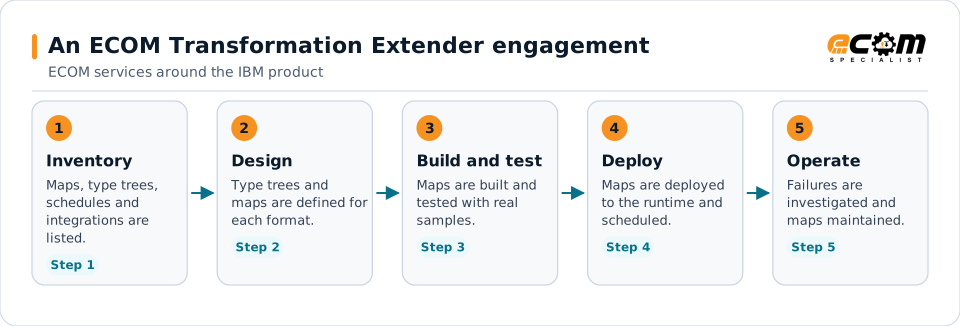
Most of the effort sits in steps two and three: the type trees describe each format, and testing with real partner and application samples catches what a specification misses.
- 01
Review
List maps, type trees, schedules, callers and failures, and agree which flows matter most to the business.
- 02
Design or plan
Design new maps or plan the upgrade, with test samples and acceptance criteria agreed in advance with your team.
- 03
Build and test
Build or change maps and type trees and test them with real partner and application samples, including error cases.
- 04
Hand over or operate
Deploy with documentation and knowledge transfer, or continue with ECOM maintenance and production support.
Technical considerations
Technical considerations for Transformation Extender
-
Version and edition
Features, supported platforms and integrations differ between ITX releases and editions; IBM documents them per release.
-
ITXA and pack versions
ITXA and industry pack versions must match the ITX release; IBM's release notes state which combinations are supported.
-
Products that call maps
B2B Integrator, App Connect and applications that call maps have their own versions and adapters that affect upgrades.
-
Test data
Good regression testing needs representative samples from each partner and application, including the unusual ones.
Migration and upgrades
Upgrading Transformation Extender and moving older maps
Upgrades are planned around the maps that matter most, with evidence that outputs stay the same.
Release planning
Check the target release against your operating systems, the products that call maps and IBM's support dates before work starts.
Side-by-side comparison
Run the same inputs through the old and new runtime and compare outputs, so differences are found before production.
Older WebSphere TX and DataStage TX maps
Maps from earlier product names are rebuilt or converted and retested, with the type trees checked against current partner data.
Moving maps between platforms
When maps move to new servers, containers or cloud, file paths, adapters, schedules and credentials are reviewed and tested.
Support and troubleshooting
Common Transformation Extender issues and where specialists look
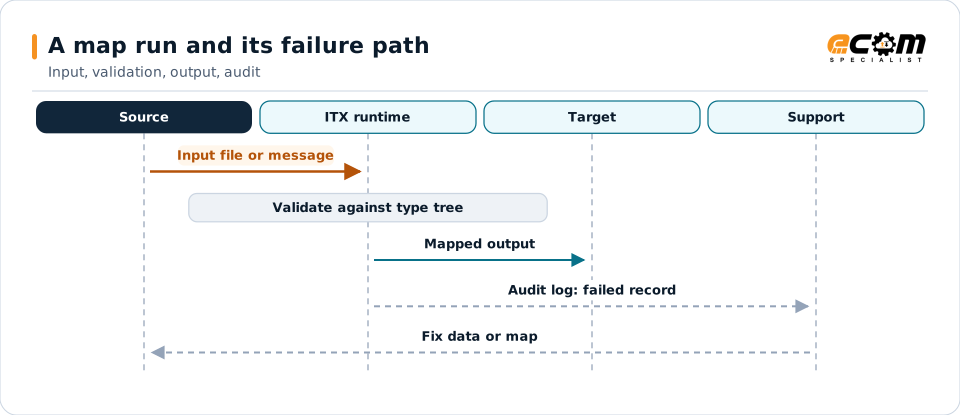
Most production issues come from data that no longer matches the type tree, or from the environment around the map.
Most production issues show up as input that no longer matches the type tree. The audit log and the map trace show which field or record failed, which is where troubleshooting starts.
| What you see | What specialists check |
|---|---|
| A map fails on a file that used to work | Compare the input with the type tree; partners often add a segment, element or value that the type tree does not allow. |
| Output is produced but values are wrong | Trace the map rule for the field, the lookup or code table it uses, and any qualifier that decides which value is picked. |
| A map runs slowly or uses too much memory | Review the input size, how the map processes repeating data and the runtime settings, then test the change with full volumes. |
| Maps behave differently after an upgrade | Rerun old inputs through both releases, compare outputs and check IBM's release notes for changed defaults and fixed defects. |
| A scheduled map did not run | Check the trigger or schedule, the input location and permissions, and the logs of the product that should have called the map. |
Why it matters
What you gain
Fewer map failures
Type trees that match real partner data and tested changes reduce failures in production.
Upgrades with evidence
Side-by-side comparison shows what changes before an upgrade reaches production.
Knowledge your team can use
Documented maps and rules reduce dependence on one or two people who know the code.
Fit
When teams call us
An upgrade is due
Your ITX release is approaching end of support and you need a plan, a test approach and hands to do the work.
A backlog of map changes
Partners and standards are changing faster than your team can update and test the maps.
Maps nobody understands
Critical maps need documentation, clean-up and someone who can support them.
Product background
About IBM Sterling Transformation Extender
Highlights from IBM's documentation and release notes for Transformation Extender. Product details differ by release and edition; confirm them for your version.
IBM sources, checked November 7, 2026:
- IBM Sterling Transformation Extender product release notes (opens in a new tab)
- Release notes for IBM Sterling Transformation Extender, V11.0.2.0 (opens in a new tab)
- IBM Sterling Transformation Extender 11.0.2 documentation (opens in a new tab)
IBM publishes lifecycle and compatibility information that changes over time. Always confirm current details with IBM for your versions and entitlements. IBM and related product names are trademarks of IBM.
- IBM documents Transformation Extender as a data transformation product that maps between many data formats
- IBM's release notes list Transformation Extender 11.0 releases, with industry packs for healthcare, financial payments, supply chain EDI and SAP applications
- IBM's release notes state that industry packs are installed against specific Transformation Extender releases
- IBM's release notes describe Design Studio integration with IBM App Connect Enterprise
- IBM's release notes state which IBM Sterling Transformation Extender Advanced (ITXA) versions and fixes work with each Transformation Extender release
Why ECOM
Sterling expertise, plus everything around it
Most Sterling problems are not only platform problems. They involve maps, partners, infrastructure and people. ECOM brings these together:
-
IBM Sterling technical expertise
Specialists who install, upgrade, administer and develop on B2B Integrator, File Gateway and Connect:Direct.
-
EDI mapping and partner integration
Maps, business processes and trading partner onboarding, not only platform administration.
-
Managed infrastructure and operations
Hosting, monitoring and day-to-day operations when you want ECOM to run the environment.
-
PRISM integration and visibility
Add ECOM PRISM for visibility, partner connectivity or a future platform path alongside Sterling.
-
EDI Team as a Service
Sterling and EDI specialists who extend your team on an ongoing basis.
-
Automotive integration
Deep automotive integration experience: schedules, ship notices and plant routing on Sterling or PRISM.
Ways to work with ECOM
A defined project
An upgrade, migration, implementation or fix with an agreed scope, plan and hand-over to your team.
Ongoing administration
ECOM specialists share administration and development work with your team through EDI Team as a Service.
Managed service
ECOM operates the environment within an agreed scope and service levels defined in the service agreement.
Each engagement is scoped individually. Not every engagement includes every service listed on this site.
Frequently asked questions
Is ECOM an IBM partner for IBM Sterling Transformation Extender (ITX) and ITXA?
Yes. ECOM is an IBM Gold Business Partner with certified delivery for IBM Sterling Transformation Extender (ITX) and ITXA.
What is the difference between ITX and ITXA?
ITX is the transformation product that runs maps. ITX Advanced (ITXA) adds processing for EDI and industry standards and is used with IBM's industry packs. IBM documents which versions work together.
Can ECOM maintain maps written by someone else?
Yes. ECOM reviews the existing maps and type trees, documents what they do, and then maintains them with regression tests before each change goes live.
How does ECOM test an ITX upgrade?
The same inputs run through the current and the new release and the outputs are compared. Differences are explained and fixed before production moves.
Do we have to move off Transformation Extender to work with ECOM?
No. ECOM supports Transformation Extender where it runs today. When a move makes sense, ECOM plans it with you, but that is your decision.
Does ECOM supply Transformation Extender licenses?
Licenses and entitlements come from IBM. ECOM works with the product you license and helps you confirm what your entitlement covers.
Talk to an EDI/API Expert about Transformation Extender
Tell us which maps, standards and releases you work with. An ECOM specialist will review them with you and suggest a practical next step.