
B2B communication protocols
SMTP: email for documents and notifications
SMTP is the protocol that delivers email. Some partners send orders or invoices as email attachments, and many processes need notifications by email. ECOM sends and receives documents by email, adds encryption where needed, and turns attachments into structured data.
- Full name
- Simple Mail Transfer Protocol
- Ports
- 25 between servers; 587 for submission
- Transport security
- STARTTLS between servers, when offered
- Used for
- Attachments, notifications, AS1
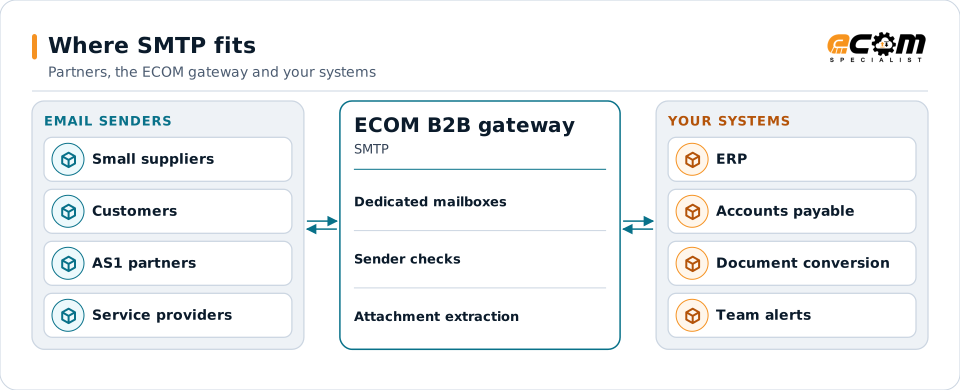
Email reaches dedicated mailboxes, is checked, and its attachments become data for your systems.
Overview
What SMTP is
SMTP moves email from sender to mail server and between mail servers until it reaches the recipient's mailbox. Business documents travel as attachments: EDI files, PDFs, spreadsheets or XML.
Email is universal, but it is not a guaranteed delivery channel. Messages can be delayed, filtered as spam or rejected for size. STARTTLS encrypts each hop between servers when both support it, but it is not end to end. For sensitive documents, the attachment itself is encrypted, as AS1 does with S/MIME.
Where businesses use it
Small partners
Partners that send orders or invoices as email attachments.
Notifications
Alerts, reports and confirmations sent to people.
Document capture
Invoices and orders received by email and converted into data.
How it works
How SMTP delivery works
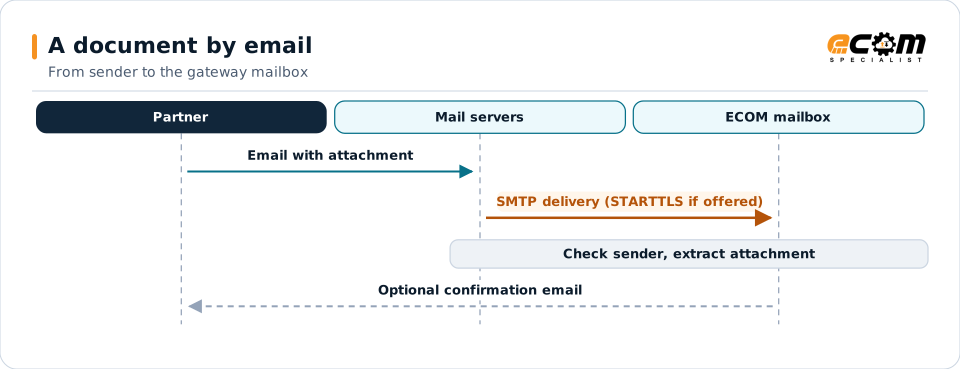
A sending system submits the message to its mail server, which looks up the recipient domain's mail servers and delivers the message, using STARTTLS if both servers support it. The recipient's server stores it in the mailbox.
For inbound documents, the gateway collects messages from a dedicated mailbox, checks the sender, extracts attachments and passes them to translation or document conversion.
Each hop may be encrypted with STARTTLS. The gateway checks the sender before processing the attachment.
In depth
Email as a business channel
Delivery is not guaranteed
Delays, filtering and size limits happen. Important exchanges have checks for missing documents.
Encryption limits
STARTTLS protects each server-to-server hop when offered, not end to end. S/MIME or PGP protects the attachment itself.
Sender checks
SPF, DKIM and DMARC results and allowed sender lists help reject forged messages.
Dedicated mailboxes
Separate mailboxes for documents keep them out of personal inboxes and filters.
Attachments to data
EDI and XML attachments are translated; PDFs and spreadsheets can be converted to data.
Notifications
Alerts and reports go to the right people when something needs attention.
In practice
Example: invoices received by email
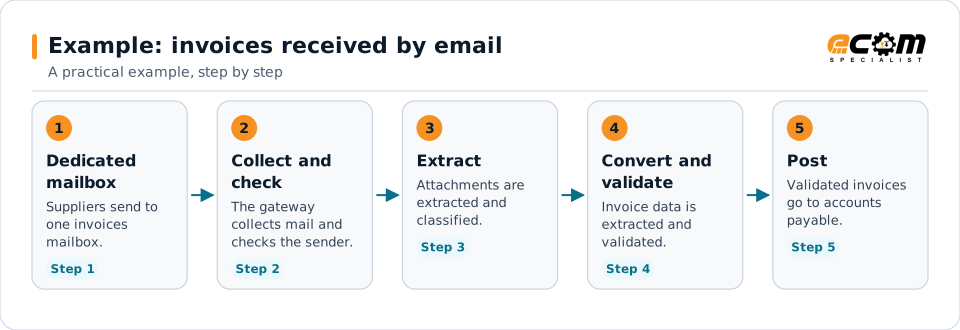
Small suppliers email PDF and spreadsheet invoices. They are turned into data for accounts payable.
Email becomes structured data without anyone retyping invoices.
Connections
How SMTP connects your business
Partners
Partners without EDI can still exchange documents.
Document conversion
PDF and spreadsheet attachments become structured data.
ERP
Validated data posts to your systems.
People
Notifications reach the right teams.
ECOM
How ECOM supports SMTP
ECOM supports SMTP with dedicated implementation, mapping, communication and support teams, and with specialists who know the industries your partners work in.
Implementation team
Plans the SMTP setup with you, configures it on the gateway and runs the tests with your partners and systems.
Mapping team
Builds and maintains the maps, code conversions and validation rules between partner data and your applications.
Communication team
Sets up and monitors partner connections, certificates, keys and credentials, and coordinates changes with each partner.
Support team
Watches the flows, investigates failed or missing documents, and works the issue through with you and your partner.
For SMTP in particular
- Dedicated mailboxes for inbound documents, with sender checks and attachment extraction.
- Outbound email of documents and notifications, with encryption where required.
- Partner onboarding for SMTP: exchanging connection details, testing in both directions and confirming the go-live date with each partner.
- Monitoring of every connection, with alerts for failed, missing or unacknowledged transfers.
Frequently asked questions
Is email secure enough for EDI?
On its own, not fully: STARTTLS protects each hop only when offered and is not end to end. Encrypting the attachment with S/MIME (as AS1 does) or PGP protects the document itself.
Can PDF invoices received by email become data?
Yes. Attachments can be converted into structured invoice data and validated before they reach accounts payable.
What if an email never arrives?
For scheduled documents, missing-file checks raise an alert so the partner can be contacted.
Can the gateway send documents by email?
Yes, as attachments, with encryption where the partner requires it.
Talk to an EDI/API Expert
Tell us which partners, systems and SMTP requirements you are working with. An ECOM specialist will review them with you and outline the setup, the maps and the tests.