
ERP integration · Sage
Sage X3 EDI and B2B integration
Order, shipment and invoice integration for Sage X3, with mapping, validation and reconciliation.
- Integration supported
- Implementation services available
- Cloud, on-premises or hybrid
Overview
Connecting Sage X3 with your trading partners
Connect Sage X3 with customers, suppliers and the applications that support your business. ECOM defines integration at the transaction and data level: the record to create or update, the fields to exchange, the business rules to apply, and the evidence that processing completed.
The scope below describes integration functions and controls that can be included in an ECOM project. Coverage is confirmed for your product version, licensed modules and business requirements. We explain ECOM’s specific connection path and deployment architecture during a live meeting.
This page sets out the scope for Sage X3: the systems involved, the records and transaction flows, field mapping and validation, error recovery, reconciliation and rollout, with diagrams of who owns what and how a document moves through processing.
Methods
Integration approaches for Sage X3
EDI
X12 or EDIFACT documents exchanged with customers, suppliers, carriers and banks under each partner's implementation guide, mapped to and from the Sage X3 records in scope.
PRISM-WebEDI
Web-based EDI collaboration and document processing, subject to the same Sage X3 validation and business controls as other channels.
PRISM-SmartConvert
Converts business documents into structured integration data that is validated and applied to Sage X3 under the agreed rules.
PRISM-WebConnect
Automation of trading partner portals and workflows, brought under the same Sage X3 validation and business controls.
Document mapping
How EDI documents map to Sage X3
Typical mappings between common X12 documents and Sage X3 business objects. Actual designs depend on your configuration and partners.
| EDI document | Sage X3 object | Direction |
|---|---|---|
| 850 Purchase Order | Sales order | Into Sage X3 |
| 860 Purchase Order Change | Sales order | Into Sage X3 |
| 855 Order Acknowledgment | Sales order | From Sage X3 |
| 856 Advance Ship Notice | Delivery | From Sage X3 |
| 810 Invoice | Sales invoice | From Sage X3 |
Planning
Implementation considerations
Separate selling, shipping and financial sites
Distinguish the selling site, shipping site and financial site. The ship-from location cannot be inferred solely from the customer address.
Map units, lots and expiry
Map sales units, stock units, packaging coefficients, lots and expiry attributes where used. A correct item code with an incorrect unit conversion can produce a wrong delivery.
Choose the release point
Define whether delivery validation or invoice validation is the release point for each outbound document. Preserve validated history when subsequent corrections are required.
Integration design
Sage X3: scope, flows, controls and tests
The scope below describes integration functions and controls that can be included in an ECOM project. Coverage is confirmed for your product version, licensed modules and business requirements. We explain ECOM’s specific connection path and deployment architecture during a live meeting.
The ERP environment we integrate around
Sage X3 provides financial, supply chain and production management capabilities. Process and discrete manufacturing requirements differ, including how businesses use lots, units of measure and production information.
The design identifies company, sales site, shipping or stock site, financial site and warehouse. These values determine transaction routing, record validity, ownership and the financial or operational context in which a document is processed.
Systems and ownership
| System or participant | Integration responsibility |
|---|---|
| Sage X3 | Maintain the approved ERP records, business rules, stock and financial results within the agreed module scope. |
| Customer or supplier systems | Supply orders, revisions, forecasts, invoice details and partner reference numbers; receive agreed business responses. |
| Warehouse or fulfillment application | Own physical pick, pack, dispatch and receipt facts where separately deployed. Return actual quantities and shipment references. |
| ECOM integration services | Coordinate agreed document exchanges, business data mapping, validation and processing visibility across the defined systems. |
Sage X3 keeps the approved records, business rules and results; partners supply and receive agreed business documents; a separate warehouse application owns physical facts where one is deployed; and ECOM coordinates document exchange, mapping, validation and visibility. A system of record is decided for each data group.
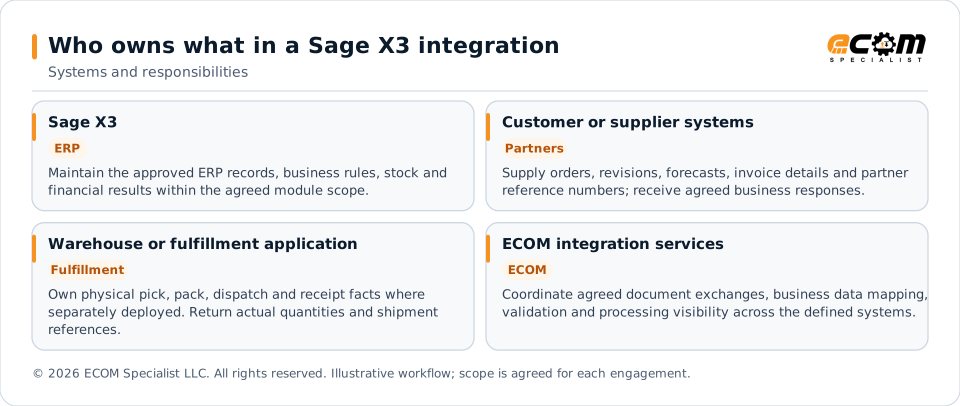
A system-of-record decision is made for each data group. For example, partner purchase order numbers can originate externally while ERP order numbers are assigned by the ERP. External instructions do not automatically authorize changes to item masters, tax settings, accounting periods or payment details.
Input channels can include EDI, PRISM-WebEDI, PRISM-SmartConvert documents and PRISM-WebConnect portal activity, each subject to the same agreed ERP validation and business controls.
ERP records in the proposed scope
- Customer and supplier
- Product and product site
- Sales order
- Delivery
- Sales invoice
- Purchase order
- Receipt
- Purchase invoice
Record availability and permitted actions are checked against the installed environment; the list is a functional scope inventory rather than a claim that every record is enabled in every edition.
Transaction flows and processing rules
Direction is relative to Sage X3. Each flow is defined by its source, target business record, release condition and successful result. Creation, update, cancellation and enquiry are scoped separately.
Each flow has a source, a target business record, a release condition and a successful result. Creation, update, cancellation and enquiry are scoped separately for Sage X3.
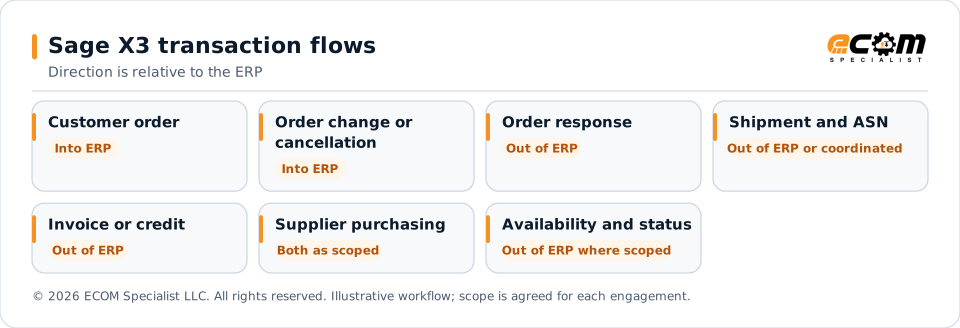
| Business flow | Direction | Processing and completion rule |
|---|---|---|
| Customer order | Into ERP | Create the appropriate sales order with source PO, line references, customer, ship-to, item, quantity, unit and requested date. |
| Order change or cancellation | Into ERP | Match the existing order and revision. Apply only permitted changes to open quantities; hold conflicts with shipped or invoiced activity. |
| Order response | Out of ERP | Return accepted or rejected lines, confirmed quantity and date, and ERP order reference. Transport receipt alone is not order acceptance. |
| Shipment and ASN | Out of ERP or coordinated | Use actual released shipment facts, order-line references, quantities and packaging details. A planned pick does not establish shipment. |
| Invoice or credit | Out of ERP | Use the agreed released or posted billing record. Retain original order and shipment references, charges, allowances and tax treatment. |
| Supplier purchasing | Both as scoped | Publish approved purchase orders and accept supplier confirmations, receipt information and invoices under the purchasing rules. |
| Availability and status | Out of ERP where scoped | Share the agreed stock or available-to-promise measure and timestamp; distinguish on-hand stock from committed or unavailable stock. |
Partner documents and business meaning
X12 examples include 850 orders, 860 order changes, 855 order acknowledgments, 856 shipment notices, 810 invoices and 820 payment or remittance advice. Relevant EDIFACT messages can be scoped for international partners. A 997 or 999 technical acknowledgment is tracked separately from business acceptance. Document selection follows the partner’s implementation guide, not the ERP product name.
A food distributor running Sage X3 needs customer orders and shipments to retain product and lot references. ECOM can help define the information required across the order, warehouse and billing process.
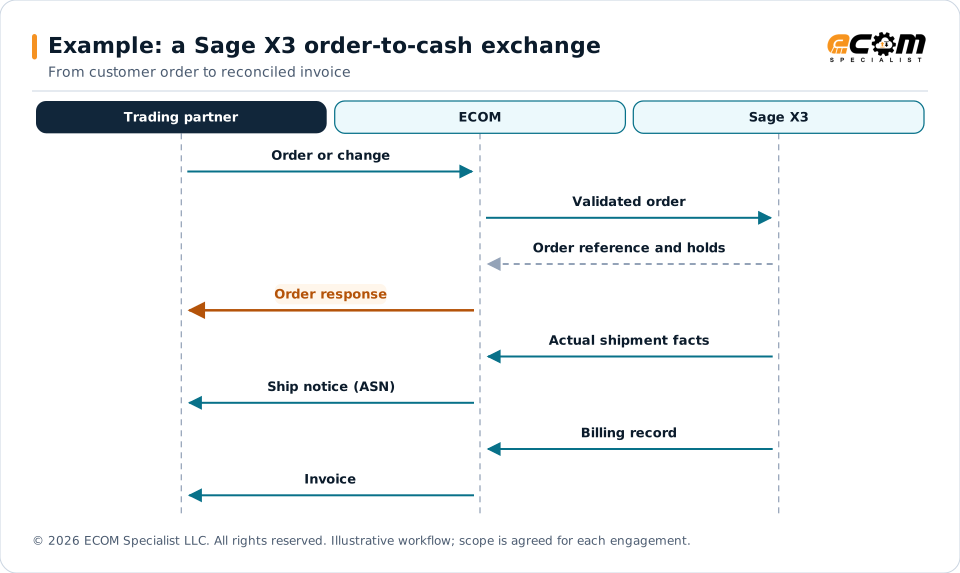
Data mapping and validation
We define a mapping specification at header, line and related-document level. It records source meaning, target business field, transformation, required condition, default ownership and rejection behavior. Partner identifiers remain traceable after ERP identifiers are assigned.
| Data group | ERP fields or business attributes | Validation rule |
|---|---|---|
| Organization | Company, Sales Site, Stock Site, Financial Site | Validate company, sales site, shipping or stock site, financial site and warehouse. Reject unknown or unauthorized combinations. |
| Trading party | Sold-to Customer, Ship-to Address, Supplier | Resolve partner identifiers to approved ERP accounts and locations. Do not match solely on a free-text name. |
| Product identity | Product, Product Site, Lot or Sublot where used | Map buyer and supplier item aliases to the correct ERP product. Check variants, revisions and active status where relevant. |
| Quantity and unit | Sales Unit, Stock Unit, Conversion Coefficient | Keep each quantity distinct. Apply approved pack or unit conversion, precision and rounding rules; reject an unknown conversion. |
| Dates | Order Date, Requested Date, Shipment Date | Preserve meaning, time zone and date-only values. Reject invalid formats and identify stale revisions. |
| Price and money | Gross or Net Price, Currency, Tax Rules | Define the authoritative price and tax calculation. Reconcile line extensions and document totals within approved tolerances. |
| References | Order Number, Line, Delivery, Invoice Reference | Use stable line references across splits and updates. Retain original order, shipment, invoice and correction links. |
| Extensions | Project or analytical attributes where scoped | Agree field ownership, allowed values and length. Do not silently truncate values or discard unmapped required data. |
Field labels above identify business attributes; exact technical names, availability and allowed write actions are verified for your release. They do not disclose ECOM’s connection method.
Identity and duplicate control
The business identity starts with company + customer PO + order line + site + delivery reference. The final rule also distinguishes a new document, a retransmission and a legitimate revision. ERP-assigned IDs are recorded after successful creation. A retry reuses the same business identity instead of creating a second order or invoice.
Processing control and error recovery
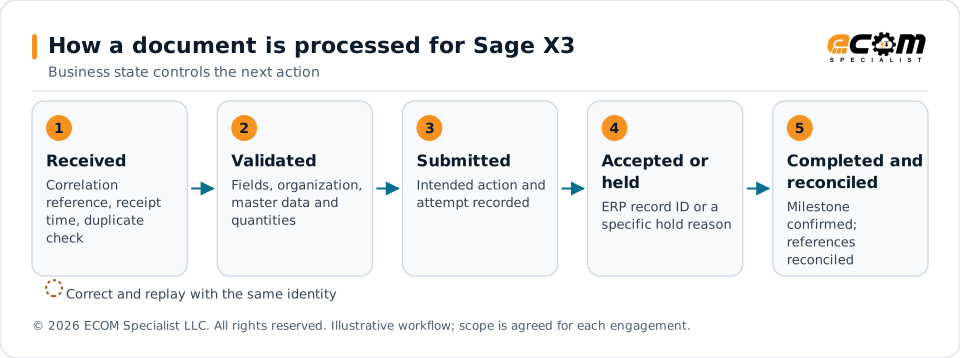
Business state controls the next action
For Sage X3, the design evaluates order acceptance, allocation, delivery validation, invoice validation and credit processing. A document is not considered complete simply because it arrived or passed a format check. Completion requires the intended ERP business result and its returned reference.
| Processing stage | Required evidence and next action |
|---|---|
| Received | Assign a correlation reference, retain the source identity and record receipt time. Check whether this is a duplicate or new revision. |
| Validated | Confirm required fields, authorized organization, master data, quantities and business rules. Reject or hold a failed document before unintended posting. |
| Submitted | Record the intended target action and processing attempt. Submission is an intermediate state, not evidence of ERP acceptance. |
| Accepted or held | Capture the ERP business record ID or a specific rejection or hold reason. Distinguish a business hold from an unavailable system. |
| Completed and reconciled | Confirm the agreed milestone, expected line results and outbound response. Reconcile source identity to ERP and partner references. |
For Sage X3, the design evaluates order acceptance, allocation, delivery validation, invoice validation and credit processing. A document is not considered complete simply because it arrived or passed a format check. Completion requires the intended ERP business result and its returned reference. Held or rejected documents are corrected and replayed with the same business identity, so a retry never creates a second order or invoice.
Changes and sequencing
Process a dependent change against the correct original record and current revision. If a change arrives before the order exists, retain it for controlled review or dependency handling. Define a cut-off state after which quantity, price or ship-to changes require an exception or formal correction. Posted financial history is corrected through the authorized business process.
Safe retry and uncertain results
Temporary availability failures can be retried under an agreed retry limit and escalation policy. Invalid items, closed periods and missing approvals need correction rather than blind retries. When a submission times out, first determine whether the ERP already created the record. An unknown result must not be converted immediately into a new create request.
For multi-step flows, retain completed steps and resume only the incomplete authorized action. An order created successfully must not be recreated because its acknowledgment failed. Recovery should retain original references, corrected values, attempt history and the responsible user or process.
Reconciliation and operational ownership
Reconcile document counts, line counts, quantities, monetary totals and business references at the agreed interval. Identify documents received without ERP results, shipments without required notices, invoices without partner delivery results and aging exceptions. Assign an owner and response target for each exception category. Set the interval and service targets from business deadlines and measured ERP capacity.
Sage X3-specific integration requirements
Design requirement 1: Distinguish the selling site, shipping site and financial site. The ship-from location cannot be inferred solely from the customer address.
Design requirement 2: Map sales units, stock units, packaging coefficients, lots and expiry attributes where used. A correct item code with an incorrect unit conversion can produce a wrong delivery.
Design requirement 3: Define whether delivery validation or invoice validation is the release point for each outbound document. Preserve validated history when subsequent corrections are required.
Example integration sequence
A food distributor running Sage X3 needs customer orders and shipments to retain product and lot references. ECOM can help define the information required across the order, warehouse and billing process.
- Receive the partner order or demand instruction and identify customer, item, organization and delivery requirements.
- Validate and create or update the agreed ERP record; retain the assigned order and line references.
- Produce a business response from accepted quantities, dates and any holds rather than from message receipt alone.
- Use actual fulfillment information to build the required shipment notice and preserve split-delivery references.
- Publish the agreed billing document and reconcile order, delivered quantity, invoiced quantity and open balance.
Security, testing and production rollout
Security and access requirements
Define access by business action and organizational scope. Separate permissions for reading masters, creating documents, changing open records, releasing transactions and viewing financial data. Use dedicated integration identities and approved credential management; avoid shared administrator access. Keep customer environments and partner configuration boundaries explicit.
Agree protection of data in transit and at rest, secret rotation, audit retention and masking of sensitive logs. Restrict test datasets and exception screens to authorized users. Changes to payment details or sensitive master data require separate business authorization; ordinary transaction processing must not silently update them.
Acceptance tests
| Test condition | Expected evidence |
|---|---|
| Valid transaction | One intended ERP result with correct organization, party, lines, quantities, amounts and external references. |
| Replay and duplicate | A replay does not create a second business record or duplicate a stock or financial movement. |
| Invalid master data | An unknown item, location or account produces a clear exception and no unintended posting. |
| Partial transaction | The completed quantity and remaining quantity reconcile across the original and related records. |
| Revision conflict | A stale or late revision does not overwrite newer or completed business activity. |
| Uncertain submission | A timeout after submission is resolved by checking the business outcome before another create action. |
| Volume and cut-off | Representative peak volume meets agreed deadlines with measured backlog, processing duration and recovery behavior. |
| Authorization | An identity cannot access another company or perform an unapproved release, master-data change or finance action. |
Controlled rollout
Approve the transaction list, mapping rules and success criteria first. Test representative partner documents in the agreed nonproduction environment, then complete partner certification where required. Reconcile opening references and queued documents before production cutover. Start with a defined partner or transaction set and monitor actual results before expanding coverage.
The rollout plan identifies who can pause processing, how queued work is retained, how already posted documents are corrected, and when operations resume. ERP upgrades, cloud releases, new partner requirements and mapping changes require impact review and regression tests for affected flows.
Initial synchronization and cutover data
Define the initial data population separately from ongoing transaction processing. Identify which active customers, suppliers, products, locations and reference values are required before the first live document. Include only the open orders, balances or historical references that the agreed business scope needs. Record source ownership, extraction time and the reconciliation totals for the opening population.
During cutover, distinguish transactions already processed in the previous environment from transactions waiting to be processed. Preserve original partner references and ERP identifiers for open documents. Establish how changes made during the cutover window are captured and reconciled. A historical document used for reference must not accidentally be replayed as a new stock or accounting transaction.
Processing frequency and capacity
Assign a frequency to each flow rather than one timing promise for the entire integration. Urgent order changes, periodic inventory availability, shipment notices and financial reconciliation have different deadlines. Agree the peak document rate, typical and largest line counts, permitted backlog, ERP maintenance windows and the oldest acceptable unprocessed transaction.
Measure acceptance time, business completion time and partner response time separately. Test the effect of an ERP outage and the rate at which accumulated work can safely resume. Publish operating targets only after representative testing; a successful small sample does not establish peak-volume capacity or a guaranteed near-real-time service level.
Sage X3 integration FAQs
How quickly are transactions processed?
Timing is defined by business need, ERP capacity and partner deadlines. The design distinguishes event-driven business triggers, scheduled processing windows and bulk reconciliation requirements without promising an unmeasured latency.
What happens when the ERP rejects a transaction?
The operating design identifies the failed document, relevant fields, business reason and responsible owner. Correction and replay must preserve the original identity and prevent duplicate posting.
What will ECOM explain during the live meeting?
We review the actual connection path, hosting and deployment requirements, environment prerequisites and detailed technical responsibilities after understanding your ERP and scope.
Keep exploring
Related
Solution
ERP Integration
Connect your ERP to trading partners through EDI, APIs, IDocs, files and connectors.
Service
ERP Implementation
ERP implementation for SAP, Oracle, Microsoft, NetSuite, Infor, Epicor, QAD and Sage, with B2B integration built in.
Solution
EDI Integration
Exchange X12 and EDIFACT documents with partners and integrate them directly with your ERP.
ERP
Sage 200
Order, shipment and invoice integration for Sage 200, with mapping, validation and reconciliation.
ERP
Sage 300
EDI integration for Sage 300 through the Sage 300 Web API, views and import tools.
ERP
Sage 500
EDI integration for Sage 500 ERP through staging tables, stored procedures and import tools.
Integrating or implementing Sage X3?
Bring your Sage X3 version, installed modules, priority transactions, sample documents and known exceptions. ECOM will review the required systems integration, explain the specific integration path during a live meeting and define a practical implementation scope with your team.