Executive summary
The situation and ECOM’s role
An electronic components manufacturer sells to equipment makers and distributors worldwide through a large product catalog. Customers send forecasts, orders and change requests in different formats and expect timely confirmations, while smaller customers and distributors may be able to use only a browser.
ECOM operates the EDI exchange, provides the API Gateway for internal and external integrations, provides WebEDI for partners without EDI, and provides Reconcile360 to match the many payments the business receives.
In component supply, the order that changes three times matters more than the order that arrives once.
Customer environment
- Industry
- Electronic components manufacturing with a large catalog.
- Customers
- Equipment makers and distributors worldwide.
- ECOM scope
- EDI operations, API Gateway, WebEDI and Reconcile360.
About this profile: the customer is not named and details are generalized. What is stated about the customer comes from ECOM; text marked “industry context” describes how this kind of business typically works. No volumes, timelines, figures, quotes or measured results are published.
The challenge
Forecasts and changes move faster than orders
Industry context: equipment makers plan around components, so they send forecasts and planning schedules (X12 830, 862 or EDIFACT DELFOR and DELJIT) well before orders, and then revise them. Order changes (860, ORDCHG) and cancellations follow demand shifts. A manufacturer has to turn each revision into an updated commitment, confirm it on time (855, ORDRSP), and ship against it with an accurate advance ship notice (856, DESADV) and invoice (810, INVOIC).
A large catalog makes the volume of changes harder to manage. Part numbers, customer part cross-references, units of measure and lead times all have to be correct or documents are rejected. Distributors add price and availability exchanges, while customers in different regions bring different standards and expectations.
The money side is just as fragmented. A business that sells to many customers and distributors receives many payments, often small, frequently with remittance that does not carry the invoice references in a clean form. Matching them by hand is slow, and unapplied cash makes credit and collections decisions harder.
Why ECOM
A managed exchange for customers of different sizes
ECOM operates the EDI exchange with customers and distributors, so format differences are handled by a team that works with them daily. Partner changes and onboarding follow the agreed scope, and one integration pattern connects the manufacturer’s applications with outside parties.
A browser route lets smaller customers and distributors that cannot run EDI transact electronically in the same controlled process, and matched records give cash application a starting point.
Industry context
Electronic components manufacturer
An electronic components manufacturer sells a large catalog worldwide to equipment makers and distributors. Orders and forecasts change often, lead times matter, and customers expect timely confirmations. The business is high-volume with many small payments.
Forecasts and orders both move
Customers send forecasts, orders and change requests that need timely confirmation.
A wide customer base
OEMs and distributors range from large EDI users to small buyers who may only use a browser.
Many small payments
Cash arrives in many small payments that must be matched with invoices.
Where it goes wrong
Typical problems in this kind of exchange
-
Changes pile up
Forecasts and orders change often and in different formats.
Late confirmations can affect a customer’s planning.
-
Smaller customers cannot use EDI
Not all buyers run EDI.
Their orders arrive by email, adding re-keying work.
-
Many small payments
Cash arrives as many payments with little detail.
Matching is slow, and items stay unapplied.
What ECOM provides
The confirmed scope of services
-
EDI operations
ECOM runs the EDI exchange with the customer’s trading partners.
About EDI operations -
API Gateway
PRISM-API Gateway carries the integrations between the customer’s own applications and with outside parties, so internal and external connections follow one pattern.
About API Gateway -
WebEDI
PRISM-WebEDI lets trading partners without an EDI system exchange transactions through a browser.
About WebEDI -
Reconcile360
PRISM Reconcile360 matches remittance advice, bank deposits and open invoices, and flags differences for review.
About Reconcile360
What ECOM is responsible for
- ECOM operates the EDI exchange with equipment makers and distributors.
- The API Gateway carries integrations between the manufacturer’s applications and with outside parties.
- WebEDI serves partners without an EDI system.
- Reconcile360 matches remittance, deposits and invoices and flags differences for review.
Technical and operational detail
Validation and change control in a large-catalog business (industry practice)
In practice, a large catalog turns data validation into the main source of exceptions. A customer’s part number has to map to the manufacturer’s part number. A quantity in the customer’s unit has to convert correctly. A requested date has to be compared against a lead time. When any of these fails, the order is rejected or, worse, accepted incorrectly.
Forecast and order changes add a second discipline. A manufacturer needs to know which version of a schedule is current, to confirm changes in a defined window and to avoid shipping against a superseded release. Reporting those changes clearly to production and planning, instead of burying them in a document queue, is part of what makes electronic data interchange valuable.
Architecture
Where the integration sits
Manufacturer environment
- Planning and order systems
- Product catalog
- Finance
ECOM responsibilities
- EDI operations
- API Gateway
- WebEDI
- Reconcile360
Customers
- Equipment makers
- Distributors
- Browser-only partners
Educational diagram of this kind of environment, not the customer’s own architecture.
Running a similar exchange? Tell us your partners, systems and where the delays are, and a specialist will suggest where to start.
Talk to an EDI/API ExpertThe workflow
How the work flows
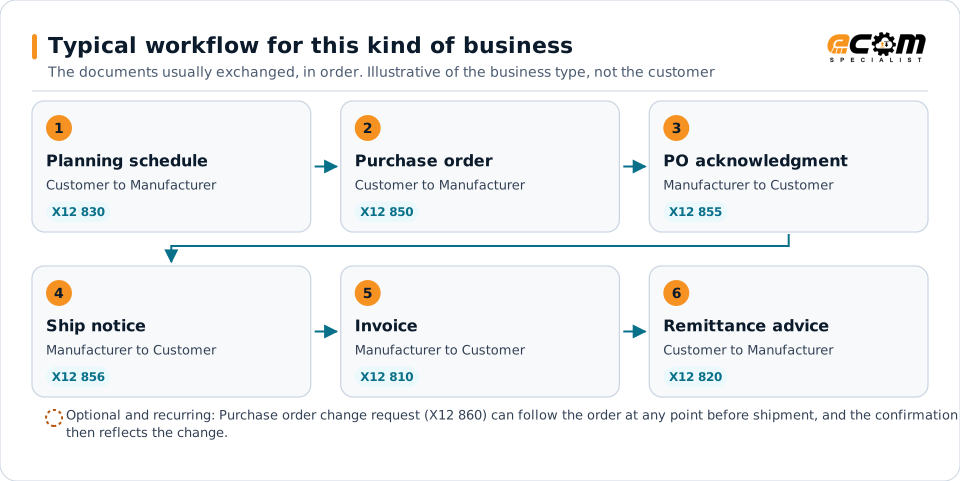
The documents typically exchanged in this kind of business, in the order they usually move. Partners vary, and some connect by API instead of EDI. The shaded line under a step shows where ECOM’s services act.
Steps are listed in the order the documents usually move, with who sends each one. Running alongside every step: Browser exchange.
-
1. Forecast
Planning scheduleX12 830
Customer Manufacturer
A forecast signals expected demand.
ECOM operates the EDI exchange with the customer’s trading partners.
-
2. Order
Purchase orderX12 850
Customer Manufacturer
Orders arrive in the customer’s format.
Where a partner or internal system sends or receives this document by API instead of EDI, PRISM-API Gateway carries the same data.
-
3. Confirm
Order acknowledgmentX12 855
Manufacturer Customer
Confirms the order.
-
Change (optional branch, can recur)
Purchase order change requestX12 860
Customer Manufacturer
Changes to an open order arrive the same way.
-
4. Ship
Advance ship noticeX12 856
Manufacturer Customer
Announces the shipment.
-
5. Invoice
InvoiceX12 810
Manufacturer Customer
The manufacturer bills the customer for shipped orders.
-
6. Get paid
Remittance adviceX12 820
Customer Manufacturer
Many small payments are matched with invoices.
PRISM Reconcile360 matches this remittance advice with the bank deposit and the open invoices, and flags differences for review.
Running alongside every step
These support the exchange throughout. They are alternative routes and controls, not steps that happen after payment.
-
Smaller customers
Browser exchange
Customers without EDI Manufacturer
Smaller buyers and distributors still exchange transactions electronically.
PRISM-WebEDI lets trading partners without an EDI system exchange transactions through a browser.
ECOM’s role
Operational needs and ECOM’s role
What this kind of exchange needs, and what ECOM does about it within the agreed scope.
Exception handling
When something goes wrong
-
An order change arrives late
A customer sends a change after confirmation.
The exchange handles it as a change request in the customer’s format.
-
A payment is unmatched
A payment cannot be tied to an invoice.
It goes to review.
Business value
Confirmed scope and intended benefits
Confirmed
- ECOM operates EDI and provides the API Gateway, WebEDI and Reconcile360.
- The customer sells components to equipment makers and distributors worldwide.
Intended benefits
- Customer requirements handled by a team that works with them daily.
- Partners without EDI able to transact electronically.
- Cash application starting from matched records.
Systems typically involved
- Customer and distributor systemsSend forecasts and orders and receive confirmations.
- Order management and ERPSource of orders, confirmations and invoices.
- Accounting and bankHold invoices and deposits to be matched.
Lessons for similar enterprises
What other organizations can take from this
Manage change, not just orders
Forecast revisions and order changes decide whether commitments stay accurate.
Keep catalog data clean
Part and unit cross-references prevent rejected documents.
Automate cash matching
Many small payments need matching rules, not manual spreadsheets.