
X12 transaction guide · Finance
EDI 155 Business Credit Report
The X12 document used to transmit business credit information, such as identification, financial and payment experience data, to a trading partner.
- Sent by
- Credit reporting agency
- Received by
- Supplier, lender or other credit grantor
- Standard
- ANSI ASC X12
- EDIFACT equivalent
- BUSCRD
What is an EDI 155?
The EDI 155 Business Credit Report is the ANSI X12 transaction set used to transmit business credit information to a trading partner. It can convey identification, location, financial, payment experience and other information about a business.
Suppliers and lenders check a business's credit before extending terms. Receiving reports as data lets credit systems update limits and risk ratings automatically, and monitor changes such as worsening payment behavior across many customers. It is the X12 counterpart of the EDIFACT BUSCRD message, and some agencies also send update notices when a monitored company's information changes.
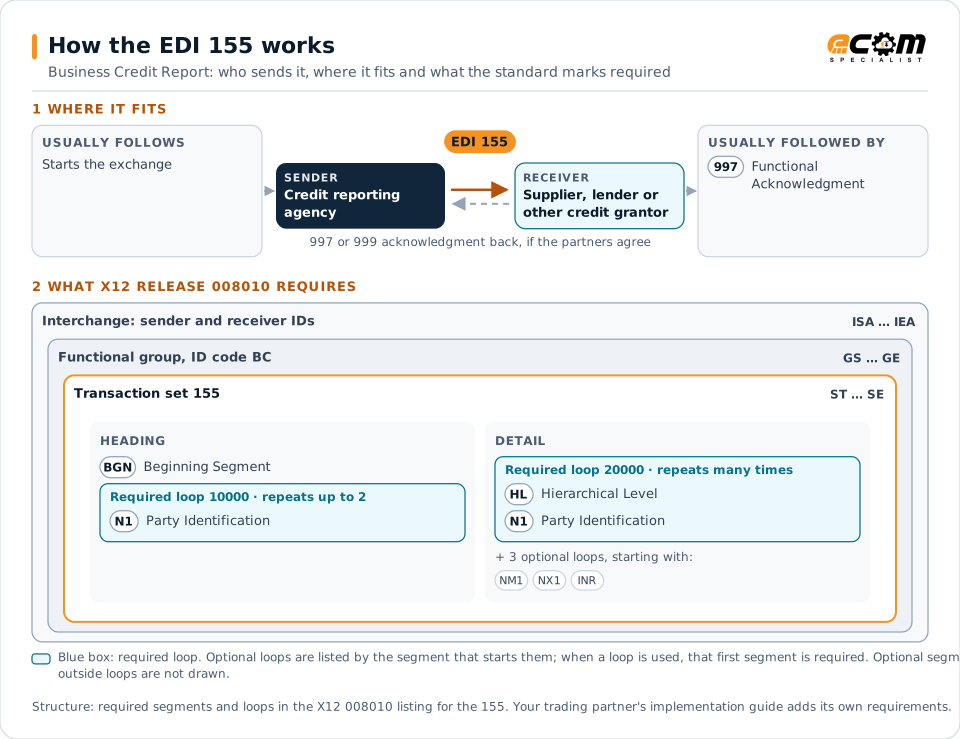
How to read this diagram: the top row shows who sends the 155, to whom, and which documents usually come before and after it. The lower part shows what X12 release 008010 itself requires: the envelopes around the 155 and the segments and loops the standard marks as required, area by area. Optional loops are listed by the segment that starts them rather than drawn in full. This is the standard's minimum, not a trading partner's requirement: each partner's implementation guide usually makes some optional loops mandatory, restricts the codes and may use a different release.
When it is used
- Checking a new customer's credit
- Monitoring existing customers' credit
- Setting credit limits and terms
Where it fits in the document flow
Structure
Mandatory segments in the 155 (X12 release 008010)
The segments X12 release 008010 marks as mandatory at their level, in order. Segments inside optional loops are needed only when the loop is used. This is the standard's requirement, not your trading partner's: each partner's implementation guide names the release it uses, adds the optional segments it requires and restricts the values. The requirement status comes from one published X12 reference listing and has not been checked against a second source.
- ST
- BGN
- N1
- HL
- NM1
- NX1
- REQ
- INR
- INQ
- LX
- LM
- III
- API
- CRC
- IN1
- CED
- LQ
- SE
Practical example
The 155 in practice
A distributor receives an order from a new business customer requesting 60-day terms. Its credit system requests a report, and the agency returns a 155 with the company's registration details, payment history with other suppliers and financial summary. The system sets a credit limit and approves the terms.
Implementation
Implementation considerations for the 155
- Comply with laws governing credit information.
- Map agency ratings to internal credit policies.
- Refresh reports for active customers periodically.
- Record the report used for each credit decision.
How ECOM helps
Automate the 155 with ECOM
Solution
Order-to-Cash Automation
Automate the flow from purchase order to payment across every customer channel.
Industry
Financial Services
Secure file transfer and B2B integration for banks and financial institutions.
Solution
Financial Document Automation
Automate invoices, remittances, payment files and bank statements from capture to posting.
More general questions about EDI are answered in the EDI FAQ.
Related transactions
Related finance documents
- 200Mortgage Credit Report
- 833Mortgage Credit Report Order
- 820Payment Order/Remittance Advice
- 135Student Aid Origination Record
- 139Student Loan Guarantee Result
- 144Student Loan Transfer and Status Verification
- 191Student Loan Pre-Claims and Claims
- 197Real Estate Title Evidence
- 198Loan Verification Information
- 199Real Estate Settlement Information
- 201Residential Loan Application
- 202Secondary Mortgage Market Loan Delivery
Need help with the EDI 155?
ECOM maps, tests and monitors X12 documents for your trading partners and integrates them with your ERP.