
X12 transaction guide · Finance
EDI 198 Loan Verification Information
The X12 document used to request, validate or exchange loan verification information among parties in the loan life cycle.
- Sent by
- Lender or verification service
- Received by
- Employer, depository institution or other verifier
- Standard
- ANSI ASC X12
What is an EDI 198?
The EDI 198 Loan Verification Information is the ANSI X12 transaction set used to request, validate or exchange standard loan verification information among entities involved in the loan life cycle, which may include lenders, employers, depository institutions and others.
Lenders verify what applicants state on their applications: employment and income with employers, account balances with banks, and existing debts with other creditors. Exchanging verifications electronically shortens underwriting and reduces the risk of fraudulent paper documents. Verifications may be requested again before closing.
How to read this diagram: the top row shows who sends the 198, to whom, and which documents usually come before and after it. The lower part shows what X12 release 008010 itself requires: the envelopes around the 198 and the segments and loops the standard marks as required, area by area. Optional loops are listed by the segment that starts them rather than drawn in full. This is the standard's minimum, not a trading partner's requirement: each partner's implementation guide usually makes some optional loops mandatory, restricts the codes and may use a different release.
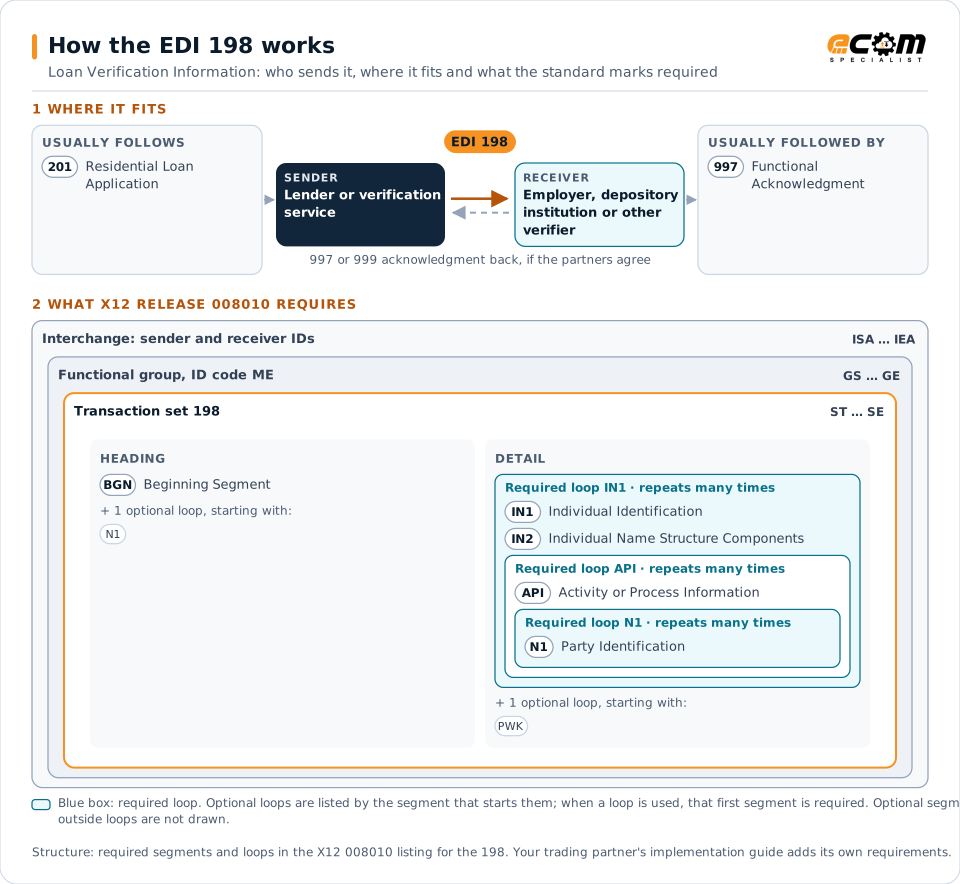
When it is used
- Verifying employment and income
- Verifying deposit account balances
- Verifying existing loans
Where it fits in the document flow
Structure
Mandatory segments in the 198 (X12 release 008010)
The segments X12 release 008010 marks as mandatory at their level, in order. Segments inside optional loops are needed only when the loop is used. This is the standard's requirement, not your trading partner's: each partner's implementation guide names the release it uses, adds the optional segments it requires and restricts the values. The requirement status comes from one published X12 reference listing and has not been checked against a second source.
- ST
- BGN
- N1
- IN1
- IN2
- API
- PWK
- AIN
- NX1
- FAA
- DTP
- CDA
- SE
Practical example
The 198 in practice
An applicant states her salary and bank balance on a mortgage application. The lender sends verification requests as 198 transactions to her employer's payroll service and her bank. Both respond with the verified salary, employment dates and account balance, and the underwriter completes the file.
Implementation
Implementation considerations for the 198
- Obtain the borrower's authorization for verifications.
- Protect applicants' personal and financial data.
- Match responses to applications reliably.
- Check whether verifiers use other electronic services.
How ECOM helps
Automate the 198 with ECOM
Industry
Financial Services
Secure file transfer and B2B integration for banks and financial institutions.
Solution
Financial Document Automation
Automate invoices, remittances, payment files and bank statements from capture to posting.
Solution
EDI Integration
Exchange X12 and EDIFACT documents with partners and integrate them directly with your ERP.
More general questions about EDI are answered in the EDI FAQ.
Related transactions
Related finance documents
- 201Residential Loan Application
- 144Student Loan Transfer and Status Verification
- 139Student Loan Guarantee Result
- 191Student Loan Pre-Claims and Claims
- 202Secondary Mortgage Market Loan Delivery
- 264Mortgage Loan Default Status
- 820Payment Order/Remittance Advice
- 135Student Aid Origination Record
- 155Business Credit Report
- 197Real Estate Title Evidence
- 199Real Estate Settlement Information
- 200Mortgage Credit Report
Need help with the EDI 198?
ECOM maps, tests and monitors X12 documents for your trading partners and integrates them with your ERP.