
X12 transaction guide · Finance
EDI 206 Real Estate Inspection
The X12 document used to initiate, modify or cancel a property site inspection by a field service or inspection company.
- Sent by
- Mortgage lender, servicer or insurance company
- Received by
- Field service organization or inspection company
- Standard
- ANSI ASC X12
What is an EDI 206?
The EDI 206 Real Estate Inspection is the ANSI X12 transaction set mortgage lenders, insurance companies and others use to initiate, modify or cancel a site inspection by a field service organization, home inspection company, insurance vendor or similar provider.
Servicers inspect properties when loans become delinquent to confirm occupancy and condition, and insurers inspect properties they insure. Ordering inspections electronically lets large servicers manage thousands of orders and receive results consistently. Results usually include photographs and occupancy status. Orders can be repeated monthly.
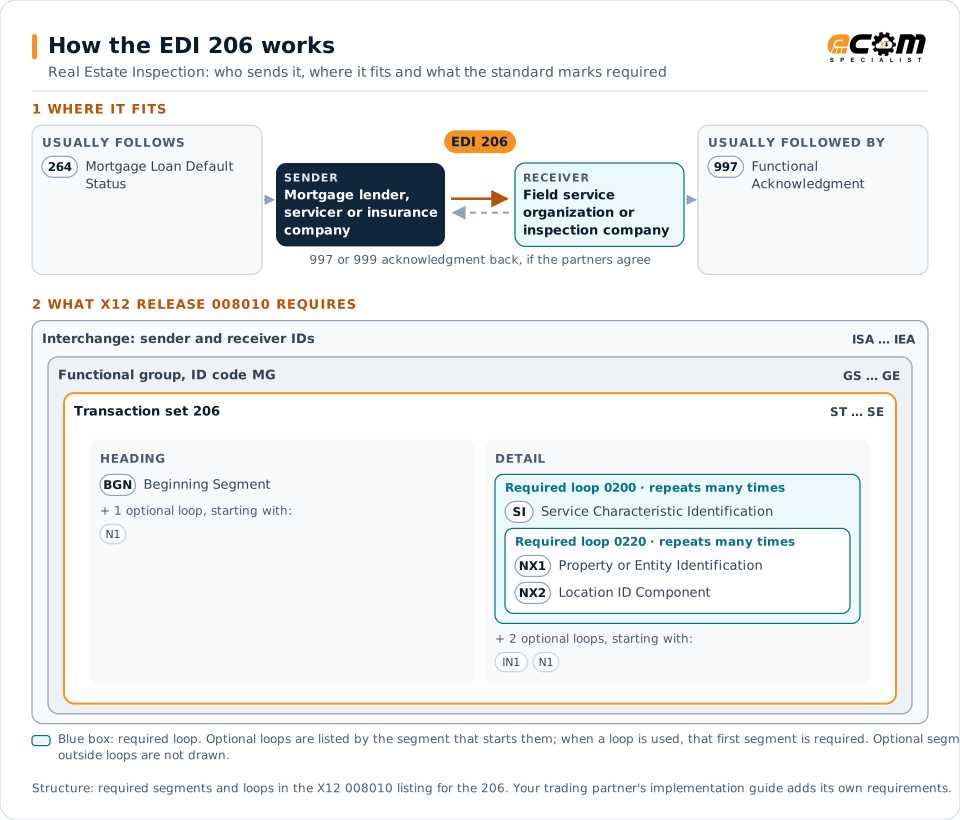
How to read this diagram: the top row shows who sends the 206, to whom, and which documents usually come before and after it. The lower part shows what X12 release 008010 itself requires: the envelopes around the 206 and the segments and loops the standard marks as required, area by area. Optional loops are listed by the segment that starts them rather than drawn in full. This is the standard's minimum, not a trading partner's requirement: each partner's implementation guide usually makes some optional loops mandatory, restricts the codes and may use a different release.
When it is used
- Ordering occupancy inspections on delinquent loans
- Ordering insurance property inspections
- Changing or cancelling inspection orders
Where it fits in the document flow
Structure
Mandatory segments in the 206 (X12 release 008010)
The segments X12 release 008010 marks as mandatory at their level, in order. Segments inside optional loops are needed only when the loop is used. This is the standard's requirement, not your trading partner's: each partner's implementation guide names the release it uses, adds the optional segments it requires and restricts the values. The requirement status comes from one published X12 reference listing and has not been checked against a second source.
- ST
- BGN
- N1
- SI
- IN1
- NX1
- NX2
- SE
Practical example
The 206 in practice
A servicer's default management system finds 300 loans more than 45 days delinquent. It sends its field service vendor 206 orders for occupancy inspections on those properties. The vendor dispatches inspectors and reports whether each property is occupied and its condition.
Implementation
Implementation considerations for the 206
- Follow investor and regulatory rules for inspection frequency.
- Cancel orders when loans are brought current.
- Identify each property precisely by address and parcel.
- Track inspection results and the charges billed.
How ECOM helps
Automate the 206 with ECOM
Industry
Financial Services
Secure file transfer and B2B integration for banks and financial institutions.
Solution
B2B Integration
Connect every customer, supplier, carrier and bank across EDI, API, file and portal channels.
Solution
EDI Integration
Exchange X12 and EDIFACT documents with partners and integrate them directly with your ERP.
More general questions about EDI are answered in the EDI FAQ.
Related transactions
Related finance documents
- 264Mortgage Loan Default Status
- 197Real Estate Title Evidence
- 199Real Estate Settlement Information
- 245Real Estate Tax Service Response
- 261Real Estate Information Request
- 262Real Estate Information Report
- 265Real Estate Title Insurance Services Order
- 820Payment Order/Remittance Advice
- 135Student Aid Origination Record
- 139Student Loan Guarantee Result
- 144Student Loan Transfer and Status Verification
- 155Business Credit Report
Need help with the EDI 206?
ECOM maps, tests and monitors X12 documents for your trading partners and integrates them with your ERP.