
X12 transaction guide · Catalogs and pricing
EDI 218 Motor Carrier Tariff Information
The X12 document used to send processable rate information extracted from a motor carrier's tariff or pricing database.
- Sent by
- Motor carrier or tariff publisher
- Received by
- Shipper or other interested party
- Standard
- ANSI ASC X12
What is an EDI 218?
The EDI 218 Motor Carrier Tariff Information is the ANSI X12 transaction set for interchanging processable data extracted from a motor carrier's tariff or pricing database. Any producer of motor carrier tariffs or rates can use it to send rate information to shippers and others.
The 218 is not intended to transmit a complete, legal tariff. It carries the rate information shippers need to rate shipments and audit invoices in their own systems, such as rates by class, weight break and origin-destination pair. In the X12 inventory it appears in release 004010 only.
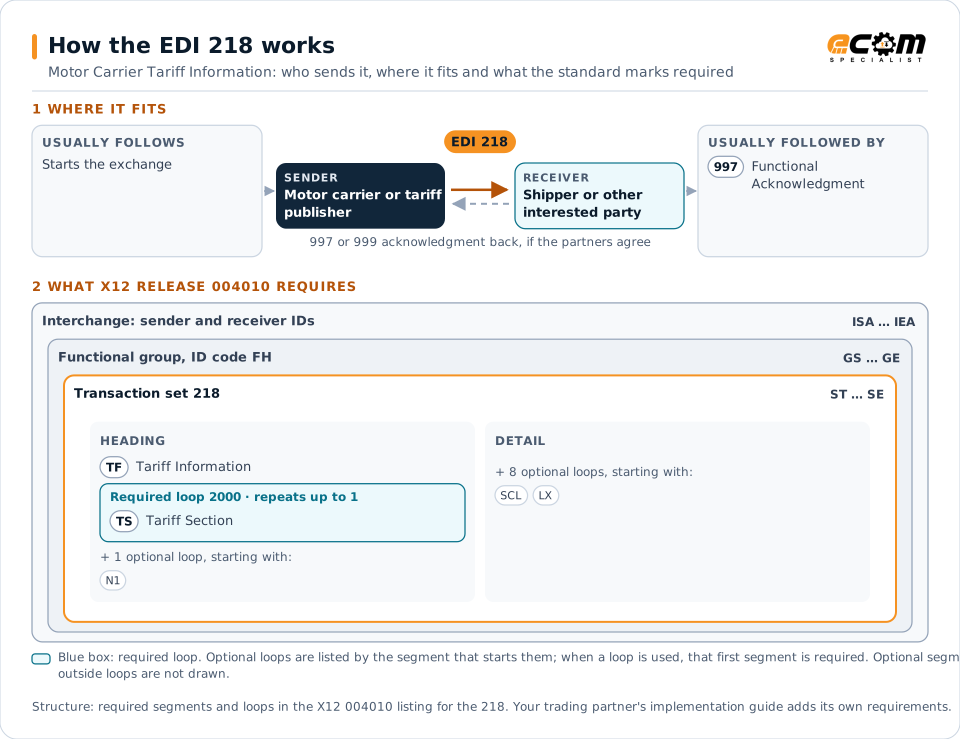
How to read this diagram: the top row shows who sends the 218, to whom, and which documents usually come before and after it. The lower part shows what X12 release 004010 itself requires: the envelopes around the 218 and the segments and loops the standard marks as required, area by area. Optional loops are listed by the segment that starts them rather than drawn in full. This is the standard's minimum, not a trading partner's requirement: each partner's implementation guide usually makes some optional loops mandatory, restricts the codes and may use a different release.
When it is used
- Sending a shipper the rates from a carrier's tariff
- Distributing rate updates and general rate increases
- Supplying data for freight rating and audit
Where it fits in the document flow
Structure
Mandatory segments in the 218 (X12 release 004010)
The segments X12 release 004010 marks as mandatory at their level, in order. Segments inside optional loops are needed only when the loop is used. This is the standard's requirement, not your trading partner's: each partner's implementation guide names the release it uses, adds the optional segments it requires and restricts the values. The requirement status comes from one published X12 reference listing and has not been checked against a second source.
- ST
- TF
- N1
- TS
- SCL
- CL
- LX
- SE
Practical example
The 218 in practice
A carrier announces a general rate increase effective in January. It sends its contract shippers a 218 with the new class rates by weight break for each origin and destination zone. A shipper's freight audit system loads the rates so January invoices (210) are audited against the new values.
Implementation
Implementation considerations for the 218
- Remember that the 218 provides rate data, not the legal tariff.
- Load rates with effective dates to audit invoices correctly over the changeover.
- Agree on the rate structure, such as class rates, weight breaks and discounts.
- Confirm the release; the 218 is not present in later X12 releases.
How ECOM helps
Automate the 218 with ECOM
Industry
Trucking and Transportation
Load tenders, responses, status and freight invoices for carriers, brokers and shippers, integrated with the TMS.
Solution
Logistics Automation
Automate tenders, status updates, freight invoices and warehouse orders with logistics partners.
Solution
Financial Document Automation
Automate invoices, remittances, payment files and bank statements from capture to posting.
More general questions about EDI are answered in the EDI FAQ.
Related transactions
Related catalogs and pricing documents
- 129Vehicle Carrier Rate Update
- 432Rail Car Hire Rate Negotiation
- 460Railroad Price Distribution Request or Response
- 463Rail Rate Reply
- 466Rate Request
- 468Rate Docket Journal Log
- 485Ratemaking Action
- 486Rate Docket Expiration
- 490Rate Group Definition
- 492Miscellaneous Rates
- 494Rail Scale Rates
- 602Transportation Services Tender
From the guide to go-live
Put this into practice with ECOM
Reading about EDI is the first step. When you are ready to meet a trading partner's requirements, an ECOM specialist can help.
-
EDI compliance help
Check documents against the partner's rules before they are sent, and find out why labels, ship notices or invoices are rejected or short-paid for EDI 218.
-
EDI implementation
Map, test and certify the documents for EDI 218, and connect them to your ERP, warehouse or order system.
-
Managed EDI
Have ECOM run the day-to-day EDI: monitoring, error handling and new trading partner setup.
Need help with the EDI 218?
ECOM maps, tests and monitors X12 documents for your trading partners and integrates them with your ERP.