
X12 transaction guide · Ordering
EDI 840 Request for Quotation
The X12 document a buyer sends to potential suppliers to request prices, delivery schedules and terms for goods or services.
- Sent by
- Buyer or procurement team
- Received by
- Potential supplier
- Standard
- ANSI ASC X12
- EDIFACT equivalent
- REQOTE
What is an EDI 840?
The EDI 840 Request for Quotation is the ANSI X12 transaction set a buyer uses to ask potential sellers for prices, delivery schedules and other terms before placing an order. It identifies the items or services wanted, the quantities, required dates, the date by which quotes must be returned and any conditions the quote must meet.
The 840 starts the sourcing cycle. Suppliers answer with an 843 response to request for quotation, and the buyer compares the replies before issuing a purchase order (850). Government agencies and large manufacturers use the 840 to run competitive sourcing for repeat and engineered items.
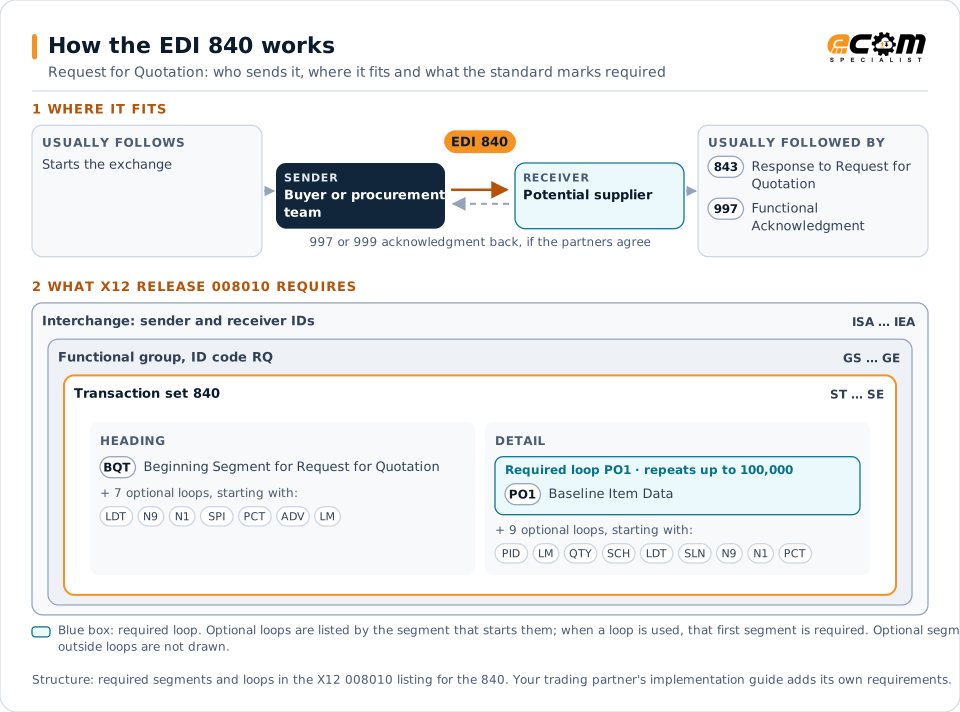
How to read this diagram: the top row shows who sends the 840, to whom, and which documents usually come before and after it. The lower part shows what X12 release 008010 itself requires: the envelopes around the 840 and the segments and loops the standard marks as required, area by area. Optional loops are listed by the segment that starts them rather than drawn in full. This is the standard's minimum, not a trading partner's requirement: each partner's implementation guide usually makes some optional loops mandatory, restricts the codes and may use a different release.
When it is used
- Soliciting prices from several suppliers for the same items
- Requesting quotes for engineered or made-to-order parts
- Running periodic re-sourcing of recurring purchases
- Asking for delivery lead times before committing to an order
Where it fits in the document flow
Structure
Mandatory segments in the 840 (X12 release 008010)
The segments X12 release 008010 marks as mandatory at their level, in order. Segments inside optional loops are needed only when the loop is used. This is the standard's requirement, not your trading partner's: each partner's implementation guide names the release it uses, adds the optional segments it requires and restricts the values. The requirement status comes from one published X12 reference listing and has not been checked against a second source.
- ST
- BQT
- LDT
- N9
- N1
- SPI
- CB1
- PCT
- ADV
- LM
- LQ
- PO1
- PID
- QTY
- SCH
- SLN
- SE
Practical example
The 840 in practice
A machinery manufacturer needs 5,000 machined brackets over the next year. Its procurement system sends an 840 to three approved suppliers listing the part number, drawing revision, quantities by quarter and a response deadline. Each supplier replies with an 843 giving unit prices by quantity break and lead times, and the buyer awards the business with an 850 to the best offer.
Implementation
Implementation considerations for the 840
- Give each request a unique reference so quotes can be matched to it, and state a clear response deadline.
- Send the same item identifiers and units of measure that the eventual purchase order will use.
- Agree with suppliers how drawings or specifications are referenced, since the 840 usually points to them rather than carrying them.
- Decide whether suppliers may quote alternatives or partial quantities, and how that is coded.
How ECOM helps
Automate the 840 with ECOM
Solution
Procure-to-Pay Automation
Automate purchasing, receiving and supplier invoicing across EDI, portals and documents.
Industry
Industrial Manufacturing
Distributor, OEM customer and supplier integration for industrial manufacturers.
Solution
EDI Integration
Exchange X12 and EDIFACT documents with partners and integrate them directly with your ERP.
More general questions about EDI are answered in the EDI FAQ.
Related transactions
Related ordering documents
Need help with the EDI 840?
ECOM maps, tests and monitors X12 documents for your trading partners and integrates them with your ERP.