
X12 transaction guide · Master data
EDI 878 Product Authorization/De-authorization
The X12 document used to tell a trading partner which products are authorized, or no longer authorized, at store or warehouse level.
- Sent by
- Retailer, wholesaler or distributor
- Received by
- Manufacturer, broker or direct store delivery vendor
- Standard
- ANSI ASC X12
What is an EDI 878?
The EDI 878 Product Authorization/De-authorization is the ANSI X12 transaction set used to advise a trading partner of the products authorized at store or warehouse level. It tells a supplier which items each store or warehouse may receive, and which items are being removed from the assortment.
In grocery and convenience retail, direct store delivery vendors and brokers rely on authorization data to know what they can deliver to each store. Out-of-date authorizations lead to rejected deliveries at the back door or missing products on the shelf.
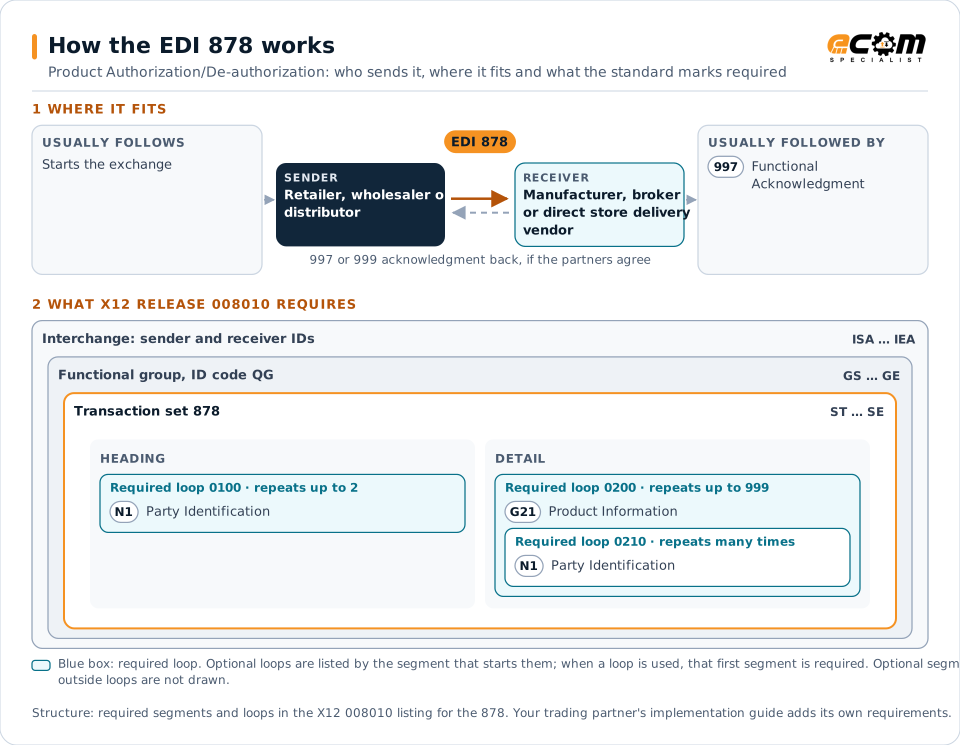
How to read this diagram: the top row shows who sends the 878, to whom, and which documents usually come before and after it. The lower part shows what X12 release 008010 itself requires: the envelopes around the 878 and the segments and loops the standard marks as required, area by area. Optional loops are listed by the segment that starts them rather than drawn in full. This is the standard's minimum, not a trading partner's requirement: each partner's implementation guide usually makes some optional loops mandatory, restricts the codes and may use a different release.
When it is used
- Authorizing new items at selected stores
- De-authorizing discontinued items
- Synchronizing store-level assortments with vendors
Where it fits in the document flow
Structure
Mandatory segments in the 878 (X12 release 008010)
The segments X12 release 008010 marks as mandatory at their level, in order. Segments inside optional loops are needed only when the loop is used. This is the standard's requirement, not your trading partner's: each partner's implementation guide names the release it uses, adds the optional segments it requires and restricts the values. The requirement status comes from one published X12 reference listing and has not been checked against a second source.
- ST
- N1
- G21
- SE
Practical example
The 878 in practice
A regional grocery chain adds a new line of sparkling water to 60 of its 140 stores. It sends the beverage vendor an 878 listing the item codes and the stores where each is authorized from the reset date. The vendor's route accounting system adds the items to those stores' delivery lists, and its drivers can deliver them from the first visit.
Implementation
Implementation considerations for the 878
- Use effective dates so authorizations line up with store resets.
- Keep store and item identifiers synchronized with the vendor's master data.
- Send de-authorizations promptly to stop deliveries of discontinued items.
- Reconcile authorization data with direct store delivery records (894 and 895).
How ECOM helps
Automate the 878 with ECOM
Industry
Retail
Retail and eCommerce EDI for suppliers and retailers, from purchase order to payment, with compliance built in.
Industry
Food and Beverage
Grocery and foodservice EDI for food and beverage manufacturers, with lot, date and inventory data.
Industry
Consumer Goods
Retail, distributor, marketplace and direct-channel integration for consumer brands.
More general questions about EDI are answered in the EDI FAQ.
Need help with the EDI 878?
ECOM maps, tests and monitors X12 documents for your trading partners and integrates them with your ERP.