
X12 transaction guide · Master data
EDI 140 Product Registration
The X12 document used to register a product sale, with the manufacturer, seller and purchaser, and the sale, delivery and in-service dates.
- Sent by
- Seller or dealer
- Received by
- Manufacturer or warranty provider
- Standard
- ANSI ASC X12
What is an EDI 140?
The EDI 140 Product Registration is the ANSI X12 transaction set used to specify the manufacturer, seller, secondary warranter and purchaser or lessee of a product. It can specify the dates the product was sold, delivered and placed in service.
Registration starts the warranty period and lets the manufacturer contact owners, for example about recalls. Dealers of equipment, appliances or vehicles register sales electronically so warranties begin on the right date without customers filling in cards. It is the starting point for later service claims.
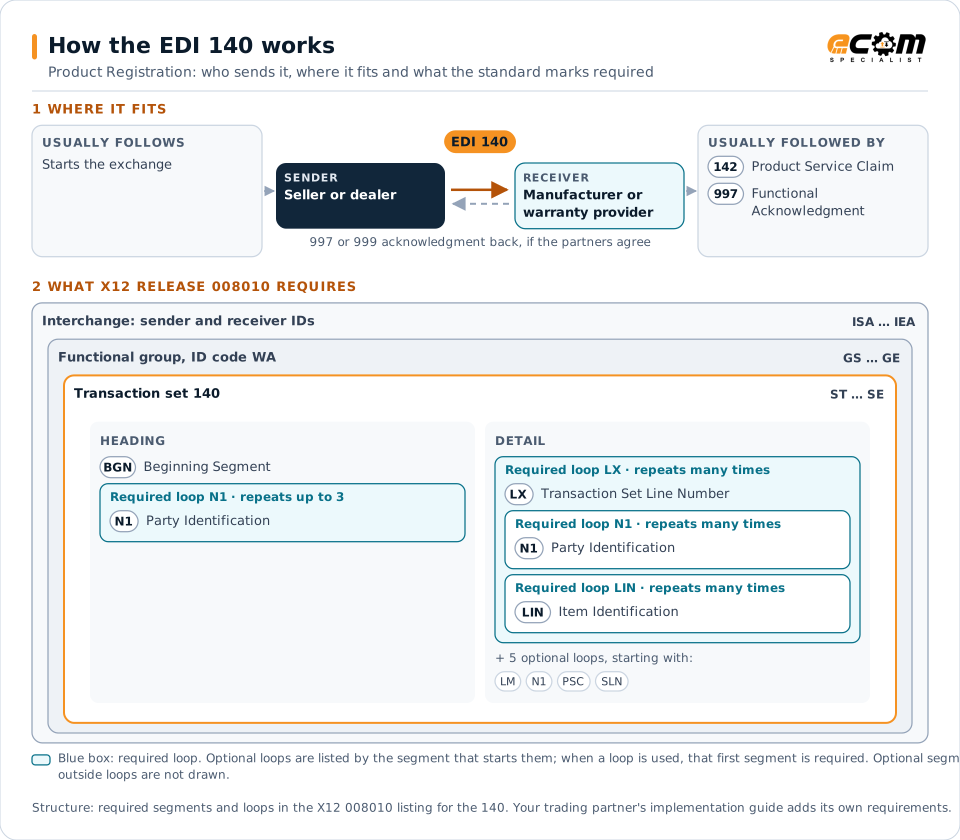
How to read this diagram: the top row shows who sends the 140, to whom, and which documents usually come before and after it. The lower part shows what X12 release 008010 itself requires: the envelopes around the 140 and the segments and loops the standard marks as required, area by area. Optional loops are listed by the segment that starts them rather than drawn in full. This is the standard's minimum, not a trading partner's requirement: each partner's implementation guide usually makes some optional loops mandatory, restricts the codes and may use a different release.
When it is used
- Registering product sales for warranty
- Recording in-service dates for equipment
- Identifying owners for recall notices
Where it fits in the document flow
Structure
Mandatory segments in the 140 (X12 release 008010)
The segments X12 release 008010 marks as mandatory at their level, in order. Segments inside optional loops are needed only when the loop is used. This is the standard's requirement, not your trading partner's: each partner's implementation guide names the release it uses, adds the optional segments it requires and restricts the values. The requirement status comes from one published X12 reference listing and has not been checked against a second source.
- ST
- BGN
- N1
- LX
- LM
- LQ
- LIN
- PSC
- SLN
- SE
Practical example
The 140 in practice
An agricultural equipment dealer sells a tractor. Its dealer system sends the manufacturer a 140 with the serial number, the buyer, the sale and delivery dates and the date it was placed in service. The manufacturer starts the warranty from the in-service date and records the owner for future recalls.
Implementation
Implementation considerations for the 140
- Register sales promptly so warranties start correctly.
- Protect purchasers' personal data under applicable law.
- Identify each product by its serial number.
- Keep registrations aligned with service claims.
How ECOM helps
Automate the 140 with ECOM
Industry
Manufacturing
Customer schedules, supplier connectivity and shipping integrated with the ERP for manufacturers.
Industry
Industrial Manufacturing
Distributor, OEM customer and supplier integration for industrial manufacturers.
Solution
B2B Integration
Connect every customer, supplier, carrier and bank across EDI, API, file and portal channels.
More general questions about EDI are answered in the EDI FAQ.
Related transactions
Related master data documents
Need help with the EDI 140?
ECOM maps, tests and monitors X12 documents for your trading partners and integrates them with your ERP.