
X12 transaction guide · Master data
EDI 871 Component Parts Content
The X12 document used to report the non-domestic content of a product or component, as required by government regulations.
- Sent by
- Supplier or manufacturer
- Received by
- Customer, typically a vehicle or equipment manufacturer
- Standard
- ANSI ASC X12
What is an EDI 871?
The EDI 871 Component Parts Content is the ANSI X12 transaction set for reporting the non-domestic content of a product, or of a component part contained in a product, in accordance with government regulations. Manufacturers need this data from their suppliers to calculate and declare the domestic and foreign content of what they sell.
In the automotive industry content reporting supports requirements such as US parts content labeling and trade agreement rules of origin. Suppliers report the share of value or the origin of components in each part, and customers roll the figures up through the bill of materials.
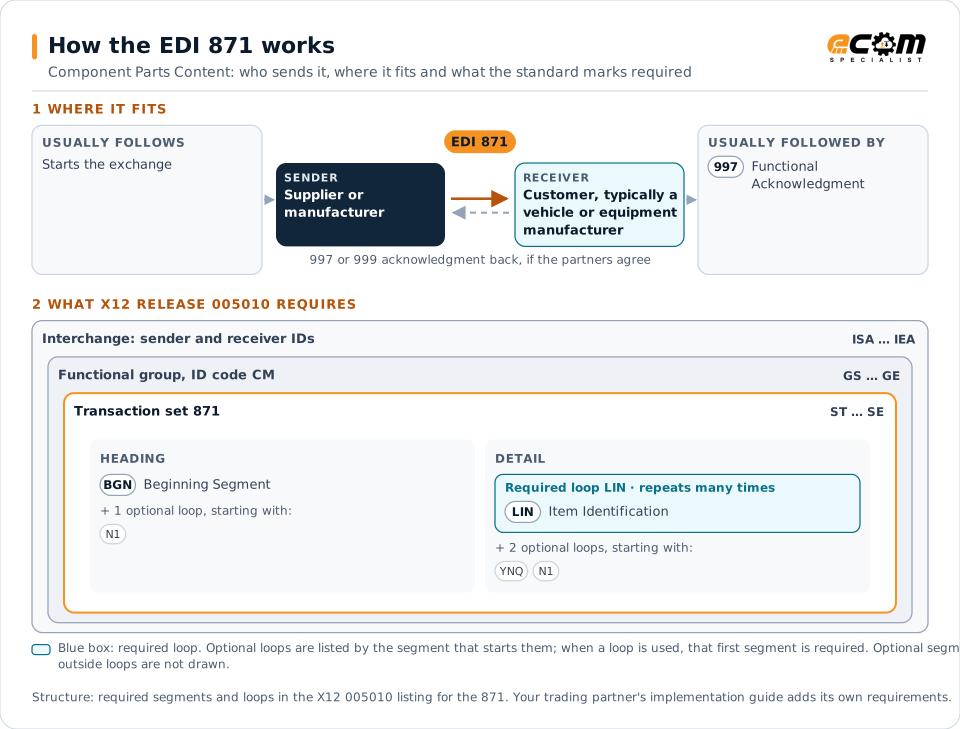
How to read this diagram: the top row shows who sends the 871, to whom, and which documents usually come before and after it. The lower part shows what X12 release 005010 itself requires: the envelopes around the 871 and the segments and loops the standard marks as required, area by area. Optional loops are listed by the segment that starts them rather than drawn in full. This is the standard's minimum, not a trading partner's requirement: each partner's implementation guide usually makes some optional loops mandatory, restricts the codes and may use a different release.
When it is used
- Reporting the domestic and foreign content of supplied parts
- Supporting parts content labeling and rules of origin
- Updating content after a change of sourcing
Where it fits in the document flow
Structure
Mandatory segments in the 871 (X12 release 005010)
The segments X12 release 005010 marks as mandatory at their level, in order. Segments inside optional loops are needed only when the loop is used. This is the standard's requirement, not your trading partner's: each partner's implementation guide names the release it uses, adds the optional segments it requires and restricts the values. The requirement status comes from one published X12 reference listing and has not been checked against a second source.
- ST
- BGN
- N1
- LIN
- YNQ
- SE
Practical example
The 871 in practice
A vehicle manufacturer asks its suppliers each year for the content of every part they supply. A seating supplier sends an 871 listing each seat assembly with yes/no answers and values describing the share of North American content and the countries of origin of major components. The manufacturer rolls the data up to calculate the content declared for each vehicle line.
Implementation
Implementation considerations for the 871
- Follow the customer's definitions for content calculation, which vary by regulation.
- Keep supporting records, since content declarations can be audited.
- Update the data when sourcing changes, not only at the annual request.
- Confirm the release in use; this set appears in the 004010 and 005010 releases.
How ECOM helps
Automate the 871 with ECOM
Industry
Automotive
Schedules, ship notices, labels, self-billing and multi-plant routing for automotive suppliers.
Industry
Manufacturing
Customer schedules, supplier connectivity and shipping integrated with the ERP for manufacturers.
Solution
B2B Integration
Connect every customer, supplier, carrier and bank across EDI, API, file and portal channels.
More general questions about EDI are answered in the EDI FAQ.
From the guide to go-live
Put this into practice with ECOM
Reading about EDI is the first step. When you are ready to meet a trading partner's requirements, an ECOM specialist can help.
-
EDI compliance help
Check documents against the partner's rules before they are sent, and find out why labels, ship notices or invoices are rejected or short-paid for EDI 871.
-
EDI implementation
Map, test and certify the documents for EDI 871, and connect them to your ERP, warehouse or order system.
-
Managed EDI
Have ECOM run the day-to-day EDI: monitoring, error handling and new trading partner setup.
Need help with the EDI 871?
ECOM maps, tests and monitors X12 documents for your trading partners and integrates them with your ERP.