
X12 transaction guide · Master data
EDI 128 Dealer Information
The X12 document a shipper uses to notify carriers of a new ship-to location, such as a dealer, or of changes to an existing one.
- Sent by
- Vehicle manufacturer (shipper)
- Received by
- Rail and truck carriers
- Standard
- ANSI ASC X12
What is an EDI 128?
The EDI 128 Dealer Information is the ANSI X12 transaction set the shipper uses to notify carriers of the establishment of a new ship-to location, such as a retail dealer, drop-ship point or body vendor, or of a profile change to an existing one.
Carriers need each dealer's address, delivery hours, access restrictions and contacts to deliver vehicles. Keeping dealer data synchronized avoids failed deliveries, especially as dealers open, relocate or change hours. Carriers depend on it to deliver vehicles successfully.
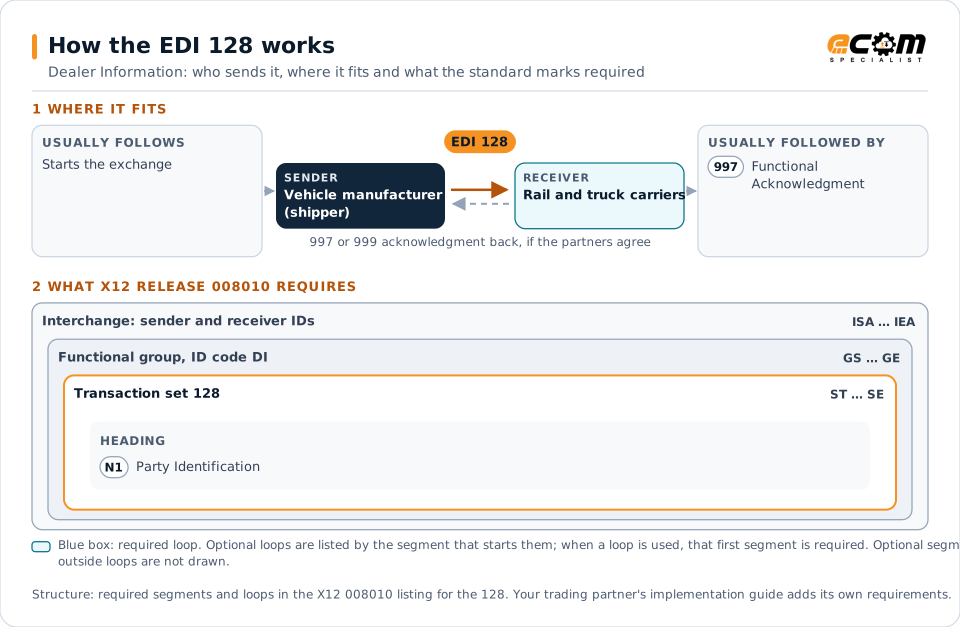
How to read this diagram: the top row shows who sends the 128, to whom, and which documents usually come before and after it. The lower part shows what X12 release 008010 itself requires: the envelopes around the 128 and the segments and loops the standard marks as required, area by area. Optional loops are listed by the segment that starts them rather than drawn in full. This is the standard's minimum, not a trading partner's requirement: each partner's implementation guide usually makes some optional loops mandatory, restricts the codes and may use a different release.
When it is used
- Announcing a new dealer location
- Updating delivery hours or access details
- Closing or relocating dealers
Where it fits in the document flow
Structure
Mandatory segments in the 128 (X12 release 008010)
The segments X12 release 008010 marks as mandatory at their level, in order. Segments inside optional loops are needed only when the loop is used. This is the standard's requirement, not your trading partner's: each partner's implementation guide names the release it uses, adds the optional segments it requires and restricts the values. The requirement status comes from one published X12 reference listing and has not been checked against a second source.
- ST
- N1
- SE
Practical example
The 128 in practice
A dealership moves to a new site with a different delivery entrance and hours. The manufacturer sends its carriers a 128 with the dealer code, the new address, delivery hours and restrictions, effective from the move date. Carriers update their systems so deliveries go to the new site.
Implementation
Implementation considerations for the 128
- Send dealer changes before they take effect.
- Include delivery restrictions that affect truck access.
- Keep dealer codes consistent with shipping orders.
- Notify every carrier that serves the dealer.
How ECOM helps
Automate the 128 with ECOM
Industry
Automotive
Schedules, ship notices, labels, self-billing and multi-plant routing for automotive suppliers.
Solution
Trading Partner Onboarding
EDI certification and automation onboarding for customers, suppliers and carriers, by whichever method each partner can support.
Industry
Trucking and Transportation
Load tenders, responses, status and freight invoices for carriers, brokers and shippers, integrated with the TMS.
More general questions about EDI are answered in the EDI FAQ.
Related transactions
Related master data documents
- 217Motor Carrier Loading and Route Guide
- 431Railroad Station Master File
- 433Railroad Reciprocal Switch File
- 434Railroad Mark Register Update Activity
- 435Standard Transportation Commodity Code Master
- 437Railroad Junctions and Interchanges Activity
- 475Rail Route File Maintenance
- 603Transportation Equipment Registration
- 841Specifications/Technical Information
Need help with the EDI 128?
ECOM maps, tests and monitors X12 documents for your trading partners and integrates them with your ERP.