
X12 transaction guide · Finance
EDI 882 Direct Store Delivery Summary Information
The X12 document a direct store delivery vendor uses to summarize reconciled deliveries, returns and adjustments and request payment.
- Sent by
- Direct store delivery vendor
- Received by
- Retailer's accounts payable
- Standard
- ANSI ASC X12
What is an EDI 882?
The EDI 882 Direct Store Delivery Summary Information is the ANSI X12 transaction set used to summarize detailed delivery, return and adjustment information that was already reconciled at the time of delivery in a retail direct store delivery (DSD) environment, and to request payment for the products delivered.
The 882 carries only summary totals by delivery, without product detail; the detail was exchanged and agreed at the store, typically through 894 delivery/return base records and 895 acknowledgments. It lets the retailer's head office pay for many store deliveries from one summary.
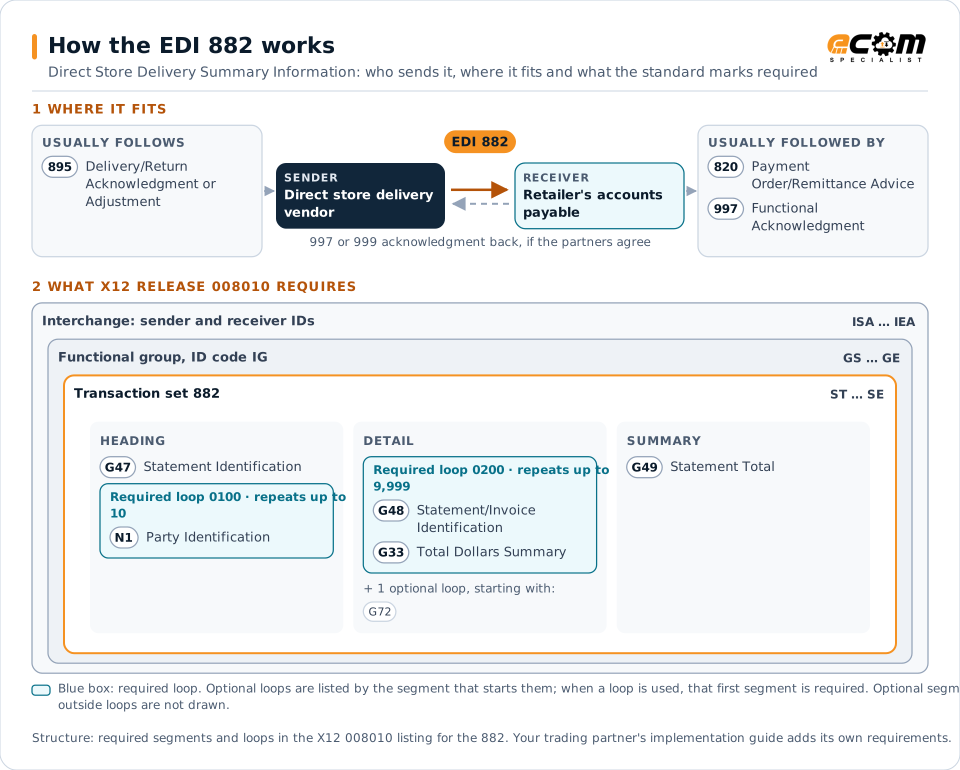
How to read this diagram: the top row shows who sends the 882, to whom, and which documents usually come before and after it. The lower part shows what X12 release 008010 itself requires: the envelopes around the 882 and the segments and loops the standard marks as required, area by area. Optional loops are listed by the segment that starts them rather than drawn in full. This is the standard's minimum, not a trading partner's requirement: each partner's implementation guide usually makes some optional loops mandatory, restricts the codes and may use a different release.
When it is used
- Requesting payment for reconciled store deliveries
- Summarizing deliveries, returns and adjustments for a period
- Supporting head-office settlement of DSD invoices
Where it fits in the document flow
Structure
Mandatory segments in the 882 (X12 release 008010)
The segments X12 release 008010 marks as mandatory at their level, in order. Segments inside optional loops are needed only when the loop is used. This is the standard's requirement, not your trading partner's: each partner's implementation guide names the release it uses, adds the optional segments it requires and restricts the values. The requirement status comes from one published X12 reference listing and has not been checked against a second source.
- ST
- G47
- N1
- G48
- G72
- G33
- G49
- SE
Practical example
The 882 in practice
A bakery delivers bread to 40 supermarkets daily, and each delivery is checked in and agreed at the store's back door. At the end of the week the bakery sends the chain's head office an 882 summarizing the delivery tickets, returns of stale product and adjustments, with totals per store. Accounts payable matches the summary to the store receiving records and pays the bakery.
Implementation
Implementation considerations for the 882
- Make sure each summarized delivery was reconciled at the store, since the 882 has no item detail.
- Reference the delivery ticket numbers the stores recorded.
- Agree on the summary period and payment terms with the retailer.
- Keep returns and adjustments separate from deliveries in the totals.
How ECOM helps
Automate the 882 with ECOM
Industry
Retail
Retail and eCommerce EDI for suppliers and retailers, from purchase order to payment, with compliance built in.
Industry
Food and Beverage
Grocery and foodservice EDI for food and beverage manufacturers, with lot, date and inventory data.
Solution
Financial Document Automation
Automate invoices, remittances, payment files and bank statements from capture to posting.
More general questions about EDI are answered in the EDI FAQ.
Related transactions
Related finance documents
- 820Payment Order/Remittance Advice
- 880Grocery Products Invoice
- 223Consolidators Freight Bill and Invoice
- 290Cooperative Advertising Agreements
- 812Credit/Debit Adjustment
- 818Commission Sales Report
- 822Account Analysis
- 881Manufacturer Coupon Redemption Detail
- 884Market Development Fund Settlement
- 890Contract & Rebate Management Transaction
- 891Deduction Research Report
- 202Secondary Mortgage Market Loan Delivery
Need help with the EDI 882?
ECOM maps, tests and monitors X12 documents for your trading partners and integrates them with your ERP.