
EDIFACT message guide · Finance
COMDIS Commercial dispute
The UN/EDIFACT message a buyer uses to notify a seller of a dispute against one or more invoices.
- Sent by
- Buyer
- Received by
- Seller
- Standard
- UN/EDIFACT · Batch message
- X12 equivalent
- No direct equivalent
What is the EDIFACT COMDIS message?
COMDIS is the UN/EDIFACT commercial dispute message. The directory describes a notice of commercial dispute against one or more invoices, usually raised by the buyer to tell the seller that something was wrong with the goods delivered or services rendered, such as damaged goods, an incomplete delivery or a late delivery. The dispute must be resolved before the related invoices can be paid.
Raising disputes as structured messages tells the seller exactly which invoices and lines are held and why, so credit notes or corrections can be issued quickly.
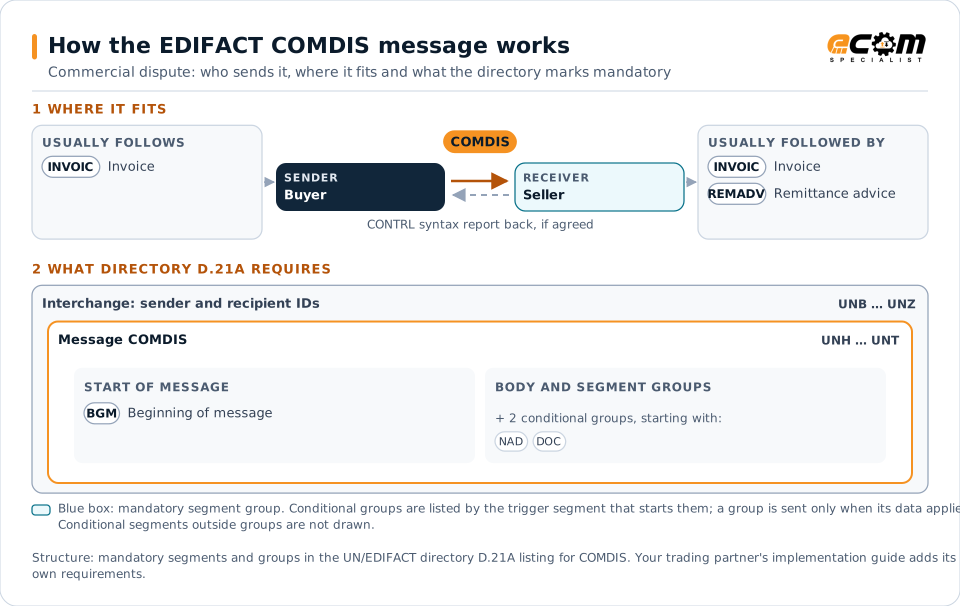
How to read this diagram: the top row shows who sends COMDIS, to whom, and which messages usually come before and after it. The lower part shows what the directory D.21A itself requires: the envelopes around COMDIS and the segments and segment groups it marks mandatory. Conditional groups are listed by their trigger segment rather than drawn in full. This is the directory's minimum, not a trading partner's requirement: a message implementation guide, such as an industry subset or a partner’s own guide, usually makes some conditional groups mandatory, restricts the codes and may use an older directory.
When it is used
- Disputing invoices for damaged or missing goods
- Holding invoices for late delivery or pricing errors
- Notifying the reasons payment is withheld
Where it fits in the message flow
Structure
Mandatory segments in COMDIS (directory D.21A)
In UN/EDIFACT directory D.21A, the COMDIS message has 20 segment positions arranged in 6 segment groups. These are the segments and segment groups marked mandatory at message level, in order; a mandatory group is shown with the segment that starts it. Segments inside conditional groups are needed only when the group is used. This is the directory’s requirement, not your trading partner’s: each partner’s message implementation guide names the directory it uses, often an older one such as D.96A or D.01B where the structure can differ, makes some conditional segments mandatory and restricts the codes.
- UNH
- BGM
- UNT
Practical example
COMDIS in practice
A builders' merchant receives an invoice for a delivery in which ten pallets of tiles were damaged. Its accounts payable system sends the supplier a COMDIS against the invoice line, with the damage reason and the quantity affected. The supplier issues a credit note through INVOIC, and the merchant pays the corrected amount with a remittance advice.
Implementation
Implementation considerations for COMDIS
- Use dispute reason codes agreed with the seller.
- Identify the disputed invoices and lines precisely.
- Track each dispute until it is resolved and paid.
- Link disputes to receiving advices that show the problem.
How ECOM helps
Automate COMDIS with ECOM
Solution
Financial Document Automation
Automate invoices, remittances, payment files and bank statements from capture to posting.
Solution
Procure-to-Pay Automation
Automate purchasing, receiving and supplier invoicing across EDI, portals and documents.
Industry
Wholesale Distribution
Customer orders, supplier purchasing, catalogs and drop-ship for distributors.
Compare X12 and EDIFACT, or see answers to general questions in the EDI FAQ.
Related messages
Related finance messages
Need help with COMDIS?
ECOM maps, tests and monitors EDIFACT messages for your trading partners and integrates them with your ERP.