
EDIFACT message guide · Projects and construction
CONAPW Advice on pending works
The UN/EDIFACT message a contractor uses to advise authorities and utility networks of planned works and to request plans of their services.
- Sent by
- Contractor
- Received by
- Public authorities and utility network operators
- Standard
- UN/EDIFACT · Batch message
- X12 equivalent
- 620 Excavation Communication
What is the EDIFACT CONAPW message?
CONAPW is the UN/EDIFACT advice on pending works message. The directory describes it as enabling a contractor that intends to start works to advise public authorities and water, gas, telephone and electricity distributors of its intention, and to ask them to send back plans or information about their networks in the area.
Knowing where cables and pipes run before digging prevents damage to networks and injuries to workers. Network operators reply with CONRPW, giving details of their services in the work area.
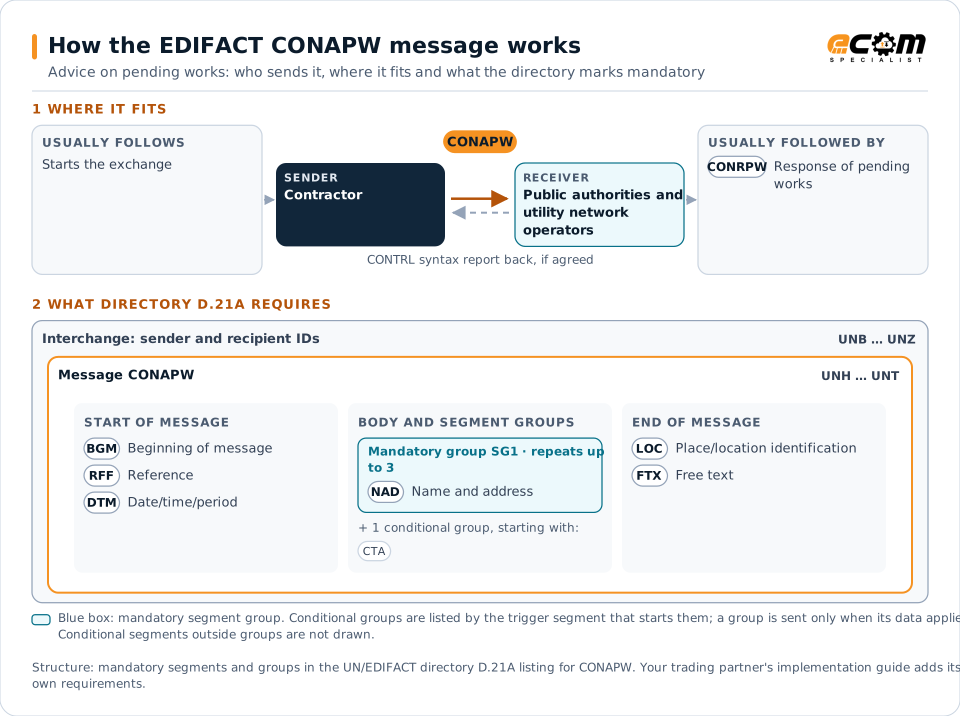
How to read this diagram: the top row shows who sends CONAPW, to whom, and which messages usually come before and after it. The lower part shows what the directory D.21A itself requires: the envelopes around CONAPW and the segments and segment groups it marks mandatory. Conditional groups are listed by their trigger segment rather than drawn in full. This is the directory's minimum, not a trading partner's requirement: a message implementation guide, such as an industry subset or a partner’s own guide, usually makes some conditional groups mandatory, restricts the codes and may use an older directory.
When it is used
- Notifying utilities before excavation
- Requesting plans of underground networks
- Informing authorities of planned roadworks
Where it fits in the message flow
Structure
Mandatory segments in CONAPW (directory D.21A)
In UN/EDIFACT directory D.21A, the CONAPW message has 13 segment positions arranged in 2 segment groups. These are the segments and segment groups marked mandatory at message level, in order; a mandatory group is shown with the segment that starts it. Segments inside conditional groups are needed only when the group is used. This is the directory’s requirement, not your trading partner’s: each partner’s message implementation guide names the directory it uses, often an older one such as D.96A or D.01B where the structure can differ, makes some conditional segments mandatory and restricts the codes.
- UNH
- BGM
- RFF
- DTM
- SG1 (NAD)
- LOC
- FTX
- UNT
Practical example
CONAPW in practice
A contractor plans to excavate a trench along a city street for fiber cables. Two weeks before starting, it sends a CONAPW to the city and the gas, water, electricity and telecom operators with the location, dates and type of works. Each operator replies with a CONRPW showing its networks in the area.
Implementation
Implementation considerations for CONAPW
- Notify all network operators in the area within legal deadlines.
- Describe the work location precisely, ideally with coordinates.
- Wait for responses before starting excavation.
- Follow any national one-call or notification system.
How ECOM helps
Automate CONAPW with ECOM
Industry
Telecom and Media
Equipment supply chains, service billing and partner data exchange for telecom and media companies.
Solution
B2B Integration
Connect every customer, supplier, carrier and bank across EDI, API, file and portal channels.
Solution
EDI Integration
Exchange X12 and EDIFACT documents with partners and integrate them directly with your ERP.
Compare X12 and EDIFACT, or see answers to general questions in the EDI FAQ.
Related messages
Related projects and construction messages
Need help with CONAPW?
ECOM maps, tests and monitors EDIFACT messages for your trading partners and integrates them with your ERP.