
EDIFACT message guide · Projects and construction
CONDRA Drawing administration
The UN/EDIFACT message that administers each exchange of a set of engineering or CAD files, describing their nature, contents and technical details.
- Sent by
- Designer, engineer or project party
- Received by
- Other project parties
- Standard
- UN/EDIFACT · Batch message
- X12 equivalent
- No direct equivalent
What is the EDIFACT CONDRA message?
CONDRA is the UN/EDIFACT drawing administration message. The directory defines it as a message for administering each exchange of a set of engineering or CAD files, giving additional information about the files, such as their nature, a list of their contents and the technical information needed to use them.
On construction and engineering projects, drawings pass between architects, engineers and contractors many times. The administration message records which drawings, revisions and formats were sent, so recipients know they hold the current set.
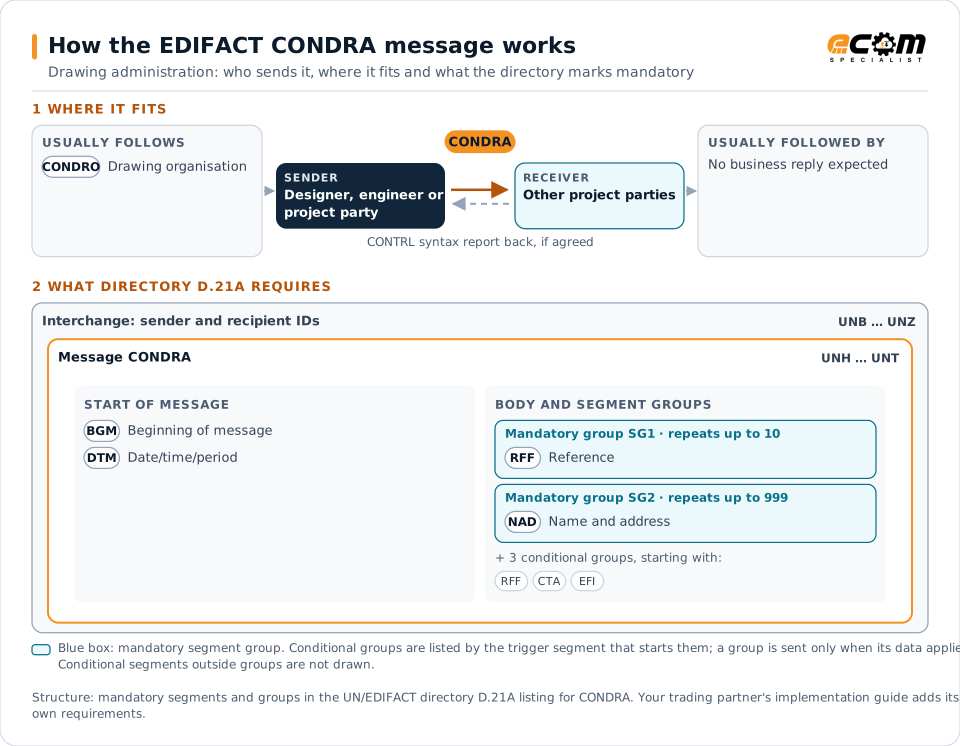
How to read this diagram: the top row shows who sends CONDRA, to whom, and which messages usually come before and after it. The lower part shows what the directory D.21A itself requires: the envelopes around CONDRA and the segments and segment groups it marks mandatory. Conditional groups are listed by their trigger segment rather than drawn in full. This is the directory's minimum, not a trading partner's requirement: a message implementation guide, such as an industry subset or a partner’s own guide, usually makes some conditional groups mandatory, restricts the codes and may use an older directory.
When it is used
- Sending a set of drawings to project partners
- Documenting drawing revisions issued
- Describing file formats and contents
Where it fits in the message flow
Structure
Mandatory segments in CONDRA (directory D.21A)
In UN/EDIFACT directory D.21A, the CONDRA message has 49 segment positions arranged in 9 segment groups. These are the segments and segment groups marked mandatory at message level, in order; a mandatory group is shown with the segment that starts it. Segments inside conditional groups are needed only when the group is used. This is the directory’s requirement, not your trading partner’s: each partner’s message implementation guide names the directory it uses, often an older one such as D.96A or D.01B where the structure can differ, makes some conditional segments mandatory and restricts the codes.
- UNH
- BGM
- DTM
- SG1 (RFF)
- SG2 (NAD)
- UNT
Practical example
CONDRA in practice
A structural engineer issues revised foundation drawings to the contractor. With the CAD files it sends a CONDRA listing each drawing number, title, revision, status and file format. The contractor's document control system registers the new revisions and withdraws the superseded ones from site use.
Implementation
Implementation considerations for CONDRA
- List every file in the set with its revision.
- Use the project's drawing numbering rules.
- Keep the administration data with the files.
- Withdraw superseded drawings when revisions arrive.
How ECOM helps
Automate CONDRA with ECOM
Industry
Industrial Manufacturing
Distributor, OEM customer and supplier integration for industrial manufacturers.
Solution
B2B Integration
Connect every customer, supplier, carrier and bank across EDI, API, file and portal channels.
Solution
Managed File Transfer
Design, migrate and operate secure, auditable file exchange across partners and systems.
Compare X12 and EDIFACT, or see answers to general questions in the EDI FAQ.
Related messages
Related projects and construction messages
Need help with CONDRA?
ECOM maps, tests and monitors EDIFACT messages for your trading partners and integrates them with your ERP.