
EDIFACT message guide · Finance
FINCAN Financial cancellation
The UN/EDIFACT message a customer, or a party with authority over its payments, sends a bank to cancel a financial message or transaction.
- Sent by
- Ordering customer, its agent or an authorized third party
- Received by
- Ordered bank
- Standard
- UN/EDIFACT · Batch message
- X12 equivalent
- No direct equivalent
What is the EDIFACT FINCAN message?
FINCAN is the UN/EDIFACT financial cancellation message. The directory defines it as a message sent by the ordering customer, or a payer or agent on its behalf, or a third party with authority over the customer's payments, to the ordered bank to request cancellation of a given financial message or transaction.
Cancellation is only possible before the bank executes the payment, so timing is critical. The bank reports whether the cancellation succeeded, typically with a BANSTA. Companies use FINCAN when a payment file was sent in error, duplicated or contains wrong beneficiary details.
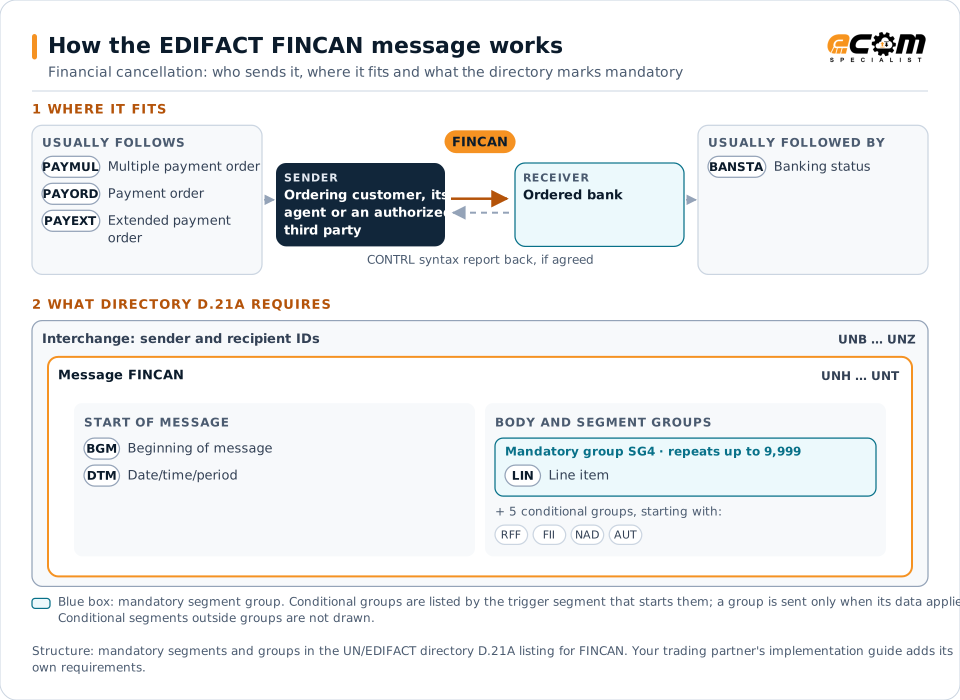
How to read this diagram: the top row shows who sends FINCAN, to whom, and which messages usually come before and after it. The lower part shows what the directory D.21A itself requires: the envelopes around FINCAN and the segments and segment groups it marks mandatory. Conditional groups are listed by their trigger segment rather than drawn in full. This is the directory's minimum, not a trading partner's requirement: a message implementation guide, such as an industry subset or a partner’s own guide, usually makes some conditional groups mandatory, restricts the codes and may use an older directory.
When it is used
- Cancelling a duplicated payment file
- Stopping a payment with wrong beneficiary details
- Withdrawing payments before execution
Where it fits in the message flow
Structure
Mandatory segments in FINCAN (directory D.21A)
In UN/EDIFACT directory D.21A, the FINCAN message has 19 segment positions arranged in 6 segment groups. These are the segments and segment groups marked mandatory at message level, in order; a mandatory group is shown with the segment that starts it. Segments inside conditional groups are needed only when the group is used. This is the directory’s requirement, not your trading partner’s: each partner’s message implementation guide names the directory it uses, often an older one such as D.96A or D.01B where the structure can differ, makes some conditional segments mandatory and restricts the codes.
- UNH
- BGM
- DTM
- SG4 (LIN)
- UNT
Practical example
FINCAN in practice
A treasury analyst notices that the morning's supplier payment file was sent twice. Before the bank's processing cut-off, the treasury system sends a FINCAN referencing the duplicate PAYMUL. The bank cancels the duplicate and confirms with a BANSTA, and the analyst records the incident.
Implementation
Implementation considerations for FINCAN
- Act before the bank's execution cut-off.
- Reference the original message or transaction exactly.
- Confirm the outcome from the bank's status report.
- Apply the same authority controls as for payment approval.
How ECOM helps
Automate FINCAN with ECOM
Solution
Financial Document Automation
Automate invoices, remittances, payment files and bank statements from capture to posting.
Industry
Financial Services
Secure file transfer and B2B integration for banks and financial institutions.
Solution
EDI Integration
Exchange X12 and EDIFACT documents with partners and integrate them directly with your ERP.
Compare X12 and EDIFACT, or see answers to general questions in the EDI FAQ.
Related messages
Related finance messages
- PAYEXTExtended payment order
- PAYMULMultiple payment order
- PAYORDPayment order
- BANSTABanking status
- AUTHORAuthorization
- FINSTAFinancial statement of an account
- BALANCBalance
- BUSCRDBusiness credit report
- CHACCOChart of accounts
- COLREQRequest for a documentary collection
- CREADVCredit advice
- CREEXTExtended credit advice
Need help with FINCAN?
ECOM maps, tests and monitors EDIFACT messages for your trading partners and integrates them with your ERP.