
EDIFACT message guide · Finance
PAYEXT Extended payment order
The UN/EDIFACT message a customer sends its bank to pay a beneficiary, with extended commercial details of what is being paid.
- Sent by
- Ordering customer (payer) or its agent
- Received by
- Ordered bank
- Standard
- UN/EDIFACT · Batch message
- X12 equivalent
- 820 Payment Order/Remittance Advice
What is the EDIFACT PAYEXT message?
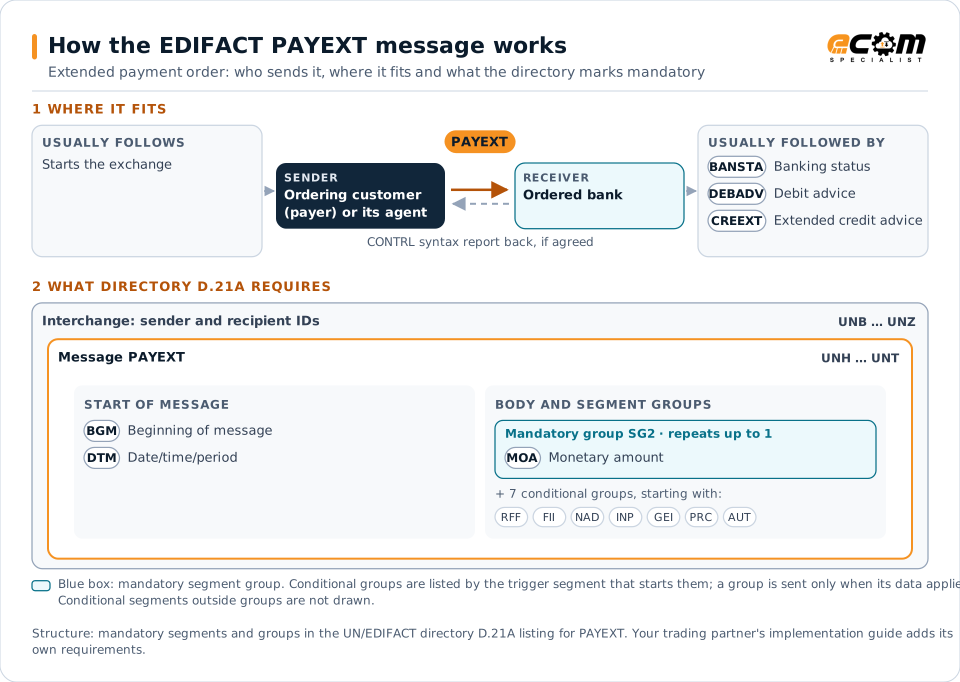
PAYEXT is the UN/EDIFACT extended payment order. The directory defines it as a message sent by the ordering customer, or a payer or agent on its behalf, to the ordered bank, instructing the bank to debit an account it services and to arrange payment of a specified amount to a beneficiary in settlement of the referenced business transactions. The extended version carries detailed commercial information, such as the invoices being paid.
The bank passes that remittance detail to the beneficiary's bank, which can forward it as an extended credit advice (CREEXT), so the beneficiary can apply the payment automatically.
How to read this diagram: the top row shows who sends PAYEXT, to whom, and which messages usually come before and after it. The lower part shows what the directory D.21A itself requires: the envelopes around PAYEXT and the segments and segment groups it marks mandatory. Conditional groups are listed by their trigger segment rather than drawn in full. This is the directory's minimum, not a trading partner's requirement: a message implementation guide, such as an industry subset or a partner’s own guide, usually makes some conditional groups mandatory, restricts the codes and may use an older directory.
When it is used
- Paying a supplier with a full invoice list
- Sending remittance detail through the banking chain
- Paying invoices net of credit notes and deductions
Where it fits in the message flow
Structure
Mandatory segments in PAYEXT (directory D.21A)
In UN/EDIFACT directory D.21A, the PAYEXT message has 55 segment positions arranged in 15 segment groups. These are the segments and segment groups marked mandatory at message level, in order; a mandatory group is shown with the segment that starts it. Segments inside conditional groups are needed only when the group is used. This is the directory’s requirement, not your trading partner’s: each partner’s message implementation guide names the directory it uses, often an older one such as D.96A or D.01B where the structure can differ, makes some conditional segments mandatory and restricts the codes.
- UNH
- BGM
- DTM
- SG2 (MOA)
- UNT
Practical example
PAYEXT in practice
A car parts distributor pays a supplier for 45 invoices and three credit notes. Its ERP sends the bank a PAYEXT with the net amount, the supplier's account and the list of invoices and credits with their amounts. The supplier's bank advises the credit with the same detail, and the supplier clears the items automatically.
Implementation
Implementation considerations for PAYEXT
- Confirm that both banks support the extended remittance information.
- Reference invoices exactly as the supplier issued them.
- Make the remittance total match the payment amount.
- Consider sending a REMADV directly where banks truncate details.
How ECOM helps
Automate PAYEXT with ECOM
Solution
Financial Document Automation
Automate invoices, remittances, payment files and bank statements from capture to posting.
Industry
Financial Services
Secure file transfer and B2B integration for banks and financial institutions.
Solution
Procure-to-Pay Automation
Automate purchasing, receiving and supplier invoicing across EDI, portals and documents.
Compare X12 and EDIFACT, or see answers to general questions in the EDI FAQ.
Related messages
Related finance messages
Need help with PAYEXT?
ECOM maps, tests and monitors EDIFACT messages for your trading partners and integrates them with your ERP.