
EDIFACT message guide · Healthcare and social
JAPRES Job application result
The UN/EDIFACT message an employer uses to report decisions on job applications, interviews, hires and rejections.
- Sent by
- Employer
- Received by
- Employment agency
- Standard
- UN/EDIFACT · Batch message
- X12 equivalent
- No direct equivalent
What is the EDIFACT JAPRES message?
JAPRES is the UN/EDIFACT job application result. The directory defines it as a message specifying an employer's decisions on job applications and interviews and on employment or rejection, with reasons where necessary. It is transmitted from an employer to an employment agency.
Agencies need outcomes to close vacancies, update job seekers' records and measure their matching. Public employment services may also need the results to administer benefits for job seekers. Reasons for rejection must be expressed carefully, within anti-discrimination and data protection rules. Timely results also let agencies stop proposing candidates for vacancies already filled.
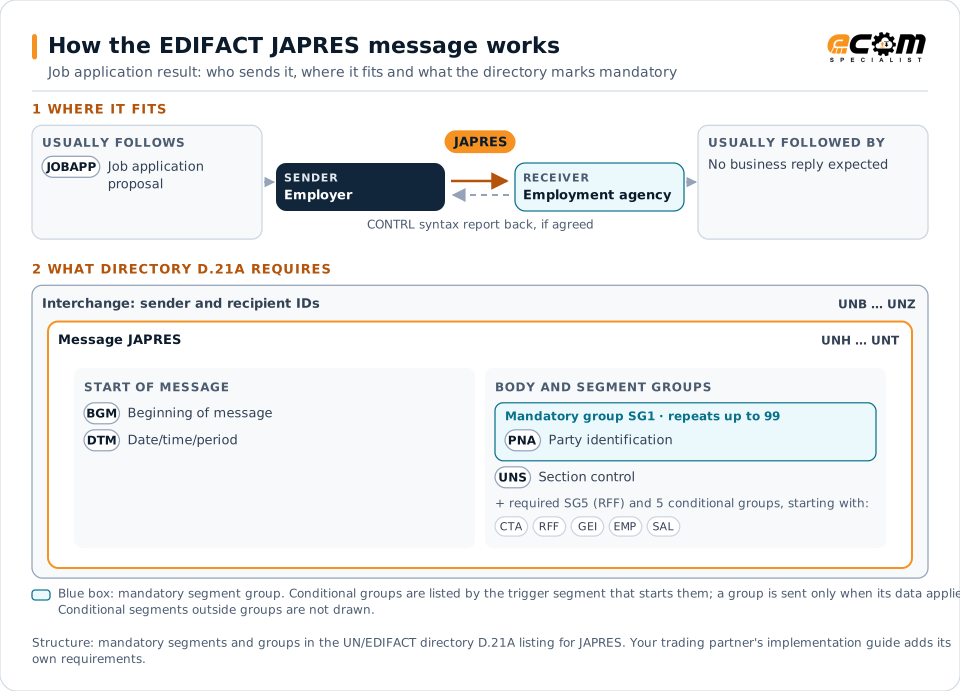
How to read this diagram: the top row shows who sends JAPRES, to whom, and which messages usually come before and after it. The lower part shows what the directory D.21A itself requires: the envelopes around JAPRES and the segments and segment groups it marks mandatory. Conditional groups are listed by their trigger segment rather than drawn in full. This is the directory's minimum, not a trading partner's requirement: a message implementation guide, such as an industry subset or a partner’s own guide, usually makes some conditional groups mandatory, restricts the codes and may use an older directory.
When it is used
- Reporting interview invitations
- Reporting hires
- Reporting rejections with reasons
Where it fits in the message flow
Structure
Mandatory segments in JAPRES (directory D.21A)
In UN/EDIFACT directory D.21A, the JAPRES message has 48 segment positions arranged in 16 segment groups. These are the segments and segment groups marked mandatory at message level, in order; a mandatory group is shown with the segment that starts it. Segments inside conditional groups are needed only when the group is used. This is the directory’s requirement, not your trading partner’s: each partner’s message implementation guide names the directory it uses, often an older one such as D.96A or D.01B where the structure can differ, makes some conditional segments mandatory and restricts the codes.
- UNH
- BGM
- DTM
- SG1 (PNA)
- UNS
- SG5 (RFF)
- UNT
Practical example
JAPRES in practice
After interviewing five candidates, the logistics company hires three and rejects two. It sends the employment service a JAPRES with each outcome and, for the rejections, the reason codes. The service updates the vacancy, informs the candidates and continues matching for the remaining openings.
Implementation
Implementation considerations for JAPRES
- Use result and reason codes agreed with the agency.
- Respect data protection rules on rejection reasons.
- Report outcomes promptly so candidates can be informed.
- Reference the proposals and vacancy concerned.
How ECOM helps
Automate JAPRES with ECOM
Solution
Enterprise Integration
Any-to-any integration across partners, systems, protocols, security requirements, formats and ERPs, in batch or real time.
Solution
B2B Integration
Connect every customer, supplier, carrier and bank across EDI, API, file and portal channels.
Industry
Trucking and Transportation
Load tenders, responses, status and freight invoices for carriers, brokers and shippers, integrated with the TMS.
Compare X12 and EDIFACT, or see answers to general questions in the EDI FAQ.
Related messages
Related healthcare and social messages
Need help with JAPRES?
ECOM maps, tests and monitors EDIFACT messages for your trading partners and integrates them with your ERP.