
EDIFACT message guide · Communications
REQDOC Request for document
The UN/EDIFACT message a party uses to request that data be sent or resent, as a document, a message or another agreed form.
- Sent by
- Any trading partner
- Received by
- Trading partner that holds the data
- Standard
- UN/EDIFACT · Batch message
- X12 equivalent
- No direct equivalent
What is the EDIFACT REQDOC message?
REQDOC is the UN/EDIFACT request for document message. The directory defines it as a message that lets a party request the sending, or re-sending, of data, either as a document or message or in another agreed form.
It is a general tool for recovering missing information: a buyer can ask for a copy of an invoice, a carrier for a missing instruction, or a customs authority for supporting documents. The request identifies the document and the form in which it should be delivered.
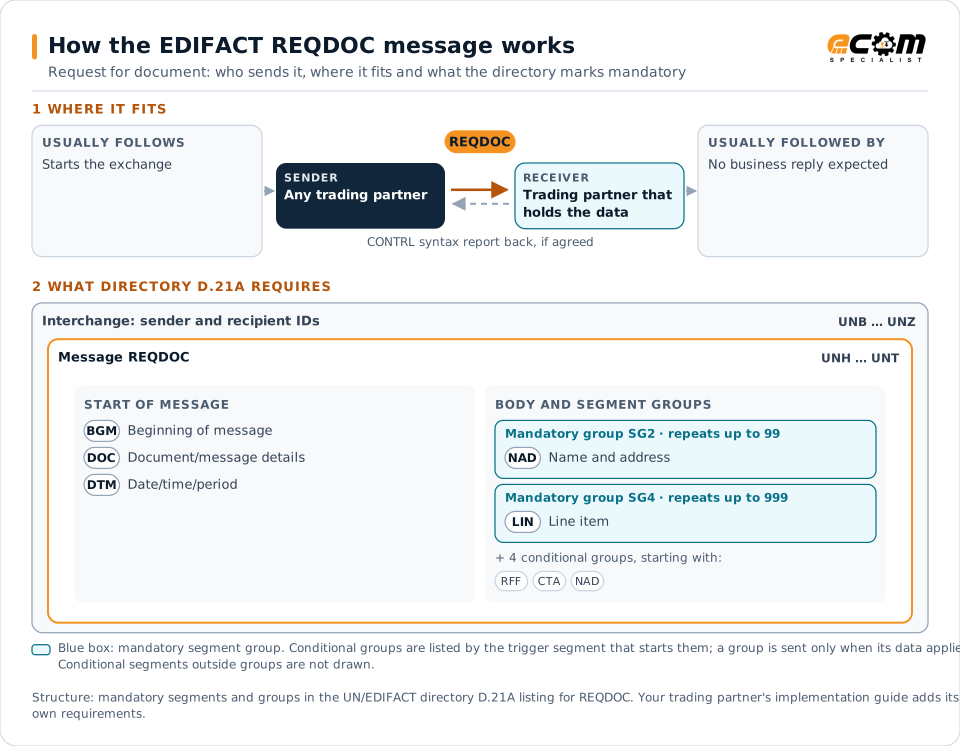
How to read this diagram: the top row shows who sends REQDOC, to whom, and which messages usually come before and after it. The lower part shows what the directory D.21A itself requires: the envelopes around REQDOC and the segments and segment groups it marks mandatory. Conditional groups are listed by their trigger segment rather than drawn in full. This is the directory's minimum, not a trading partner's requirement: a message implementation guide, such as an industry subset or a partner’s own guide, usually makes some conditional groups mandatory, restricts the codes and may use an older directory.
When it is used
- Asking for a copy of an invoice or credit note
- Requesting a message that was not received
- Requesting supporting documents in another form
Where it fits in the message flow
No other message routinely comes directly before or after REQDOC; it is exchanged when the business event occurs. If the partners agree, the receiver confirms each interchange with a CONTRL syntax and service report.
Structure
Mandatory segments in REQDOC (directory D.21A)
In UN/EDIFACT directory D.21A, the REQDOC message has 24 segment positions arranged in 7 segment groups. These are the segments and segment groups marked mandatory at message level, in order; a mandatory group is shown with the segment that starts it. Segments inside conditional groups are needed only when the group is used. This is the directory’s requirement, not your trading partner’s: each partner’s message implementation guide names the directory it uses, often an older one such as D.96A or D.01B where the structure can differ, makes some conditional segments mandatory and restricts the codes.
- UNH
- BGM
- DOC
- DTM
- SG2 (NAD)
- SG4 (LIN)
- UNT
Practical example
REQDOC in practice
A retailer's accounts payable team cannot find an invoice the supplier says it sent. Its system sends the supplier a REQDOC identifying the invoice number and asking for the INVOIC message to be resent. The supplier's EDI system resends it automatically, and the invoice is processed the same day.
Implementation
Implementation considerations for REQDOC
- Identify the requested document precisely.
- Agree the forms in which documents can be resent.
- Mark resent messages as copies or duplicates where the partner needs it.
- Track requests until the document arrives.
How ECOM helps
Automate REQDOC with ECOM
Solution
EDI Integration
Exchange X12 and EDIFACT documents with partners and integrate them directly with your ERP.
Solution
Financial Document Automation
Automate invoices, remittances, payment files and bank statements from capture to posting.
Solution
B2B Integration
Connect every customer, supplier, carrier and bank across EDI, API, file and portal channels.
Compare X12 and EDIFACT, or see answers to general questions in the EDI FAQ.
Need help with REQDOC?
ECOM maps, tests and monitors EDIFACT messages for your trading partners and integrates them with your ERP.